Instagram reports 1 billion monthly active users and more than 500 million daily users.[1] Most teens use social media for more than 6 hours per day.[2] Many social media users have shifted in intention, placing the highest importance on becoming insta-famous rather than sharing information with close friends. Insta-famousrefers to a person who is well-known on Instagram, reflected by thousands of followers and likes. Teens can become consumed in this virtual competition for internet popularity, sometimes leading to a destructive pattern described in my book, Screen Time in the Mean Time: A Parenting Guide to Get Kids and Teens Internet Safe, as compare and despair.
Insta-worthy? Self-Presentation Theory and Impression Management
Many Instagram users lurk profiles, consumed by other people’s lives and perfecting their virtual selves. According toself-presentation theory, people are motivated to present themselves to show off an ideal self and please their audience.[3]
Our frontis our best-stylized image. Our backstage is our true selves. Maintaining too many fronts can be overwhelming. Being great at impression management can be the difference between social media success or failure.
Shout Out for Shout Out
A SFS (Shout out For Shout out) is a branding strategy for optimal self-presentation on Instagram. It refers to teens posting someone else’s account to theirs and vice versa. The goal is to cooperatively promote their pages so both people gain more followers.
As self-presentation trends change in pop culture, so do trends online. In 2008, graphic t-shirts were the cool thing to wear to school. In 2015, hipsters ruled the school. And in 2019, the VSCO look was in. VSCOis the name of the popular app used to create fun colorful edits.
A “VSCO girl” has beach-wavy hair, carries around a hydro flask, has a scrunchie around their wrist, and shops at thrift stores and Urban Outfitters. My 13-year-old cousin shares, “Everyone wears skirts, Doc Martens, and scrunchies now. It’s so VSCO.”
Evolution and Optimal Distinctiveness
With popular editing apps such as VSCO or FaceTune, many social media users have unrealistic expectations for how attractive they should look in posts. Humans are social beings. We work best collaboratively. Social rewards like compliments, words of appreciation, affection, or being with a friend, are major behavioral motivators for young people.[3]
Seeking social reward and trying to achieve optimal distinctiveness (being unique but still super stylish) can be traced back to our ancestors. Belonging to a community meant being socially accepted and supported by a group of others. Many times, this meant life or death.
For teens today, that means walking a razor’s edge trying to look unique while still fitting in with peers. In this impossible quest, teens may be juggling several virtual and nonvirtual selves. Being too unique or too the same invites criticism and cyberbullying.
Getting social media likes rewards the brain with dopamine, the neurotransmitter released in the pleasure center.[2] Instagram programmers know it and bake it in so they can make more money.
Social media influencers are experts at achieving optimal distinctiveness. Viewers spend a lot of time and money trying to do the same. Views and likes result in millions of dollars in profit. This biological hack of social acceptance and connection makes the brand more profitable.
Risks of Social Media
Insta-Anxiety
The constant pressure to stay up to date with trends can cause compulsive online browsing and anxiety. Most teenagers do not have jobs to maintain the lifestyle that many YouTubers do. Social anxiety and the fear of being judged by peers can be overwhelming alongside daily social obstacles that teens face like bullying, hormonal changes, and self-judgment. Instead of fun, spontaneous sharing, teens can get caught up in compulsively second-guessing their posts or avoid sharing altogether.
According to recent studies, social media use has contributed to an increasing number of cases of social anxiety disorders in adolescents.[2] Untreated, anxiety can contribute to other mental health issues including depression, eating disorders, substance abuse, and even thoughts of suicide.
Social Anxiety Disorder Symptoms include:
Lack of desire to socialize
Being withdrawn
Feeling embarrassed or a deep fear of being judged by others
Low Self-Esteem
Forty-six percent of teen girls admit that social media makes them feel bad about themselves due to unrealistic standards.[2] Self-esteem is elevated when individuals are deemed popular by others. For example, having Facebook friends who are more responsive can satisfy psychological needs above and beyond the number of Facebook friends one has.[4]
Seeking Positive Feedback
We all like to know that people find us attractive. Social media, however, can impact us in ways we aren’t even aware of. For example, a 2018 study found that when young women received likes for sexy selfies, they were more likely to post similar photos again.[3]
Lack of Privacy
Teens don’t have the prefrontal brain development to anticipate consequences and engage in high order thinking. Subsequently, teens may not think ahead, instead focusing on the instant gratification of someone liking or commenting on their post. This can cause a habit of oversharing online. Eighty percent of people who commit crimes have taken information from social media sites.[5]
Ways to Improve Your Teen’s Emotional Reliance & Achieve Better Online Safety
To avoid triggering insta-anxiety, make sure your kids are neurologically, socially, and emotionally mature enough to manage risk. Although she says it depends on the child, Dr. Bennett recommends avoiding social media until the second semester of middle school.
Experts agree that Social Media Readiness Training is critical to help kids recognize risk, know how to ask for help, and self-manage use.
Use our free Connected Family Screen Agreement to set parameters and create a screen-friendly, cooperative dialogue. Just enter your email and name on our website, and it will be delivered directly to your email.
Create a customized filtering, tracking, and monitoring toolkit with the GKIS Screen Safety Toolkit. This course also offers smart parenting strategies, like making sure you have social media login information for back-end access.
Thank you to GKIS intern, Isabel Campos for alerting us about the risks of insta-anxiety. If you learned something, please share GKIS articles and tools with friends and family!
I’m the mom psychologist who will help you GetKidsInternetSafe.
[1] “Our Story.” Instagram, 26 Mar. 2019, instagram-press.com/our-story/.
[2] Granet, R. (2016, September 19). Living In Live Time: Social Media’s Impact On Girls. Retrieved from https://newyork.cbslocal.com/2016/09/19/social-media-use-teens/
[3] Bell, Beth T., Cassarly, Jennifer A., & Dunbar, Lucy. “Selfie-objectification: Self objectification and positive feedback (‘likes’) are associated with frequency of posting sexually objectifying self-images on social media.” Body Image, 26, 83–89. September 2018. https://doiorg.summit.csuci.edu/10.1016/j.bodyim.2018.06.005
[4] Burrow, A. L., & Rainone, N. (2016). How many likes did I get?: Purpose moderates links between positive social media feedback and self-esteem Journal of Experimental Social Psychology, 69, 232-236 https://doi.org/10.1016/j.jesp.2016.09.005
[5] Law Enforcement, Social Media and Your Privacy: How Your Data is Used to Solve Crimes. (2018, May 16). Retrieved from https://www.nextadvisor.com/law-enforcement-social-media-and-your- privacy-how-your-data-is-used-to-solve-crimes/
Do you worry that you allow too much, or too little, screen time for your kids?
Have you read about digital injuries, like interaction with Internet predators, screen addiction, and neck and spine deformities, and worry you don’t know enough to spot risk in time to intervene?
Do you yell, punish, and lecture too often trying to keep them from doing what they beg to do online?
I did too! That’s why I started GetKidsInternetSafe 7 years ago. Yes, even psychologists find parenting challenging – especially nowadays with teens. When I started this legacy project, I was heartbroken and overwhelmed when my dad died and my mom succumbed to dementia. To get everything done and keep my kids happy, I was relying too much on Minecraft. The parents in my practice were doing the same…at the expense of the kids. I started to get freaked out.
But when I looked for digital safety tools and parenting strategies online for support, the best I could find was Dr. Phil saying to supervise all child screen use – as in, sit with them every time they were on screen. Because we all know that can’t happen, I did a deep-dive in the research, created my own screen safety parenting programs based on my 25+ years of momming and working with families, pooled resources of friends and colleagues, and founded GetKidsInternetSafe. Every day, I hear from families just like ours telling me how much they needed it and how much they appreciate it! A feel-good project, indeed.
If you who have been with me from the beginning, THANK YOU! I’ve appreciated your support more than you know. And for those who are new to GKIS or considering subscribing, you’ll want to know what’s happening with GKIS these days!
As a subscriber,
1. You receive your free Connected Family Screen Agreement, designed to inform and inspire you to cooperatively connect as a family and set reasonable and sensible online safety guidelines for kids and teens. It’s delivered in 4 weekly chunks so you don’t get overloaded. Slow, steady, and fun is the goal.
And of course, I never share your information with anyone. Please let me know if there’s anything you want to learn more about (or just to say hi!) by emailing me at DrTracy@DrTracyBennett.com.
Thanks again for being part of the GKIS community!
I’m the mom psychologist who will help you GetKidsInternetSafe.
Onward to More Awesome Parenting,
Tracy S. Bennett, Ph.D.
Mom, Clinical Psychologist, CSUCI Adjunct Faculty
Raising kids in the digital age is tough. Not only are kids going through baffling developmental stages and life crises, so are their parents. Plus, each family member has a unique personality, belief system, and behavioral history that lead to varying “fits” between members at varying times. Throw that in a blender and you have a family. To make it more complicated, divorce peaks during trying times, upending everything even more. Divorce conflict, shared custody, and blended family issues can lead to exploitative and manipulative opportunities, especially with powerful mobile devices in-hand. My clients have benefitted from both using our free CONNECTED FAMILY SCREEN AGREEMENT. This digital contract gives both households sensible rules and strategies so kids have consistency and cooperative guidance. To align on parenting strategies and get more confident with setting rules and adopting parental controls, our weekly parent and family coaching videos delivered on the GETKIDSINTERNETSAFE APP is for you. Quick 5-minute videos a week allow you to tweak screen safety and positive parenting in your home in doable chunks. Demonstrating that you are consistently addressing screen safety looks great in court! Another option to help your tweens and teens directly build knowledge and psychological wellness with our SOCIAL MEDIA READINESS COURSE FOR TWEENS & TEENS. It’s like driver’s training but for the Internet.
In my twenty-six+ years as a clinical psychologist with a specialty in family transitions, I have run across practically every family situation you can imagine. Not only can divorce strain parent-child alliances, but fear can muddy parent judgment as they jockey to win child favor and aim to achieve parenting perfection in less-than-perfect times. With everybody distracted by their own emotional processes, consistency, and communication too often slip leaving kids vulnerable for risk.
Here are three fictional family stories that resemble actual situations to illustrate the complex factors that divorced families face.
Safety, Parental Alienation, & Home Privacy
Sally and Joe were married for fourteen years. They have two daughters, 13-year-old Maggie and 10-year-old Jacqueline. The marriage dissolved when Joe was discovered having an affair with Pamela. Sally shared too much information with the girls during her heartbreak, blaming Pamela for the breakup and begging Joe to make the marriage work even after discovery. Pamela and Joe married six months after the divorce was final and were granted shared custody of Maggie and Jacqueline as well as Pamela’s son and daughter.
Sally didn’t trust Joe and Pamela to take good enough care of the girls. She constantly worried about Joe not checking the girls’ homework, believed Joe and Pam drank too much, thought Pamela favored her own children and became particularly angry if Joe socialized with old friends. The girls felt protective of their mom and felt guilty leaving her during dad’s custodial time. They also wondered if mom’s fears were true and they were being unfairly treated and not adequately attended to.
Sally bought both girls mobile phones outfitted with the social media they wanted and encouraged them to call, text, and send images frequently with the hopes of gathering evidence she could use in family law court. She also posted accusatory memes about Joe and Pamela on her Facebook. If Joe set limits with the mobile phones, Sally argued the restriction prevented the girls from seeking appropriate help in an emergency situation, which further demonstrated to the girls that Joe was not protecting them.
In her cloud of grief, fear, and anger, Sally was committing parental alienation. Parental alienation is a pattern of psychological abuse toward a child by creating fear, disrespect, or hostility toward the other parent with the ultimate goal of parent-child estrangement. Parental alienation has been demonstrated to be detrimental to child mental and physical health and parent-child attachment. When caught in the destructive dynamic, family members are nearly incapable of post-traumatic growth, spinning helplessly for sometimes years in the eye of the storm.
Illegal Surveillance
John is a twelve-year-old who’s divorced parents have conflicting views on-screen use. John’s father allows him to use his phone and
other screen devices as much as he likes with no filtering or monitoring. His mother, on the other hand, does not allow him to use ANY screen devices. What John does not know is that his father secretly installed spyware on his mother’s devices during their divorce in order to gain information against her and has a history of domestic violence and pornography addiction. John’s mother has a restraining order against her ex-husband. She does not feel safe having mobile devices in her house that her ex-husband has purchased in case of spyware. She also worries about the online content her son has access to for fear of him becoming addicted like his father. John prefers to be at his father’s house because of the more permissive screen access and accuses his mom of being too uptight and paranoid. His dad laughs with him and agrees.
Consequating Dangerous Child Behavior
Dave and Laura have been divorced for two months and have two sons, 16-year-old Chad and 14-year-old Ian. After the divorce, both boys were living with their mother with weekends and certain holidays spent with their father. Chad has AD/HD and an anxiety disorder; Ian is in independent study due to oppositionality and defiance.
After suspecting Chad was using drugs, Dave demanded to see Chad’s phone. When Chad refused, Dave grabbed the phone and found photos of Chad smoking marijuana at a house party. A screaming conflict resulted. Chad stormed out the house and walked several miles back to his mother’s house where she then called Child Protective Services. Dave insisted that Laura take Chad’s screen devices away as a form of punishment. Laura disagreed thinking it would isolate Chad from his friends at a time he needed them most and bought Chad a new phone with no filtering or monitoring. Chad has chosen to live full time with Laura and refuses to talk to Dave. Ian feels caught in the middle.
Co-Parenting Strategies
Co-parenting can be difficult in all family types, but shared custody poses particularly ripe opportunities for exploitation and manipulation during a time when parents need to be particularly astute about the prevention of digital injury due to unchecked screen use. To launch a healthy and safe relationship with screen media, kids need warm, encouraging guidance from their parents.
Parents who set standards and praise without being overly critical have well-adjusted kids. Theorists call this authoritative parenting. Evidence demonstrates it is better than uninvolved, permissive, (overly accepting), or authoritarian (overly controlling) parenting styles.
Authoritative parents are proactive rather than reactive. They set the stage for success and respond calmly rather than ignoring or being overly punishing in response to destructive child behaviors. Children from authoritative home environments not only achieve more in school, but they also demonstrate a stronger willingness to seek out and master challenges for personal satisfaction.
In the stories above, the parents let their divorce conflicts interfere with their parenting judgment and slipped into authoritarian or permissive styles. While authoritarian parenting promotes a form of structure for the child, the harshness and rigidity can lead to parent and child aggression and can cause the child to have low self-esteem and minimized self-worth (Paul, 2011).
On the other hand, permissive parents are kind and accepting but don’t implement safety measures or uphold rules. Thus, children can become entitled, depressed, or anxious (Paul, 2011). Even parents who were once authoritative will sometimes escalate their tendencies in order to counterbalance the strategies used in the other custodial home. This leaves kids ping-ponging between sometimes hostile perspectives and varying rules for conduct. They will often choose the more permissive parent due to their inability to recognize the long-term implications of their behaviors.
In response to these challenges, family law courts often refer or order parents to use educational resources like co-parenting classes, schedule sessions with supportive professionals like child psychologists, therapeutic and legal mediators; or even order minor’s counsel to represent the children’s best interests. Parents may also be ordered into individual or reunification therapy which can lead to positive change.
When working with co-parents, I strive to empathize with the very real challenges of single parents and working through issues that make kids hard to handle. I remind them the situation is usually temporary. In most circumstances, grudges heal and parents recognize that parenting must take priority over vindictiveness. Kids will eventually see manipulation, often resulting in delayed insight. Nobody wins. Patience, empathy, grace, and kindness help kids heal. Sometimes we all need lots of nudges and gentle reminders, whether it comes from family, friends, lawyers, judges, or mental health professionals. Kids come first.
Thank you to Ventura family law lawyer extraordinaire Joel Bryant for the valuable information he contributed to this GKIS article and to CSUCI intern Allie Mattina for her research. To best understand the complex developmental factors of family life and learn effective screen safety strategies, check out Screen Time in the Mean Time: A Parenting Guide to Get Kids and Teens Internet Safe. Full of developmental brain facts and helpful tips and information, setting structure and sensible teaching conversations is a great start to family safety and stability.
I’m the mom psychologist who will help you GetKidsInternetSafe.
Screen technology provides amazing entertainment, convenience, and communication as well as a wide range of problems, particularly for kids and teens. Parents and professionals complain they can’t find the perfect tech toolbox to help. There are a lot of costly third-party solutions out there, but where do parents start? None seem to cover all the bases! Apple may have helped us by launching the Screen Time setting in the new iOS 12 update. Promising more speed, the ability to FaceTime up to 32 people at once, new personal animojis, stickers, and filters, augmented realities, easily sharable photos, searching, and shortcuts, Apple is committing to more “power” overall. Features that promise to help us control our use include auto turn-off Do Not Disturb, Instant Tuning to selectively turn off notifications, advanced shortcut and privacy features, and Screen Time tracking. Find out what you need to know in today’s GKIS article.
Tracking Your Usage
This update offers Screen Time, which will allow you to see which apps you use most often and how much time you spend on each activity with an easy-to-read bar graph and data count. Screen Time also allows parents to see which of your kids is the Twitter addict and which is up past their bedtime watching YouTube videos. You can monitor multiple devices linked to your iCloud account.
The Screen Time feature also tracks how many notifications you receive and from which apps they are coming from. Screen Time even tells you how many times you picked up your phone, a number that may surprise you.
Setting Limits
There are several limits that you will find with this update. If you see that social media is taking up a majority of your child’s day, you can set a timer on that category and for the entire day they will only have a set time to use their phones for that specific purpose. If your concern is about a certain app, like Snapchat, then you can just set a limit on that app alone.
Another useful tool is the Content and Privacy Restrictions, which allows you to monitor your child’s internet usage and their app store purchases. This is a simple way to ensure that your child is not viewing graphic or inappropriate internet content.
The last major setting that can be utilized by this new update is called Downtime. Downtime allows for you to schedule time for yourself or your family to disconnect from the distractions of your apps. This may sound a lot like Airplane mode, however the difference with Downtime is the ability to allow certain apps to continue to be used. Calls and texts come in automatically with Downtime, but if you can’t be without your emails you can allow that to remain active during this scheduled break.
Opportunity to Start Important Screen Time Conversations with Your Family
With the new Screen Time feature, your kids may feel like their privacy is being infringed upon, and you aren’t giving them enough space. However, we at GKIS feel that filtering inappropriate content and monitoring screen use is an important aspect of parenting, especially for younger kids and teens.
Rather than avoid the discussion and lock their screen use down, negotiate what seems reasonable for your family. Have spirited conversations. Share important facts about risk and benefits that you learned from GKIS articles. Team work builds stronger relationships.
There is no more influential tool for screen safety than a healthy parent-child relationship. Trust is earned on both sides. As stated in Dr. Bennett’s book, Screen Time in the Mean Time, your attachment to your child is a relationship built upon communication, negotiation, and fun. It’s important to ensure that your children’s privacy is something that is as important to you as it is to them, and that seeing where their time on their phones is spent is a way to look after their digital health and social well-being.
Recap
You can see which apps are the most used and for how long
You can set limits to specific apps and categories of apps
You can set content restrictions for internet and iTunes usage
You can set a bedtime for yourself and your children
Thanks to GKIS intern Adam Ramos for keeping us up on the latest! We at GKIS are big fans of Apple’s new Screen Time innovation. It is worth carving the time out of your chaotic parenting schedule to check this one out. It’s easy to use, free, and a giant step toward personal screen time accountability. Need support how to start these important family conversations, set your home up for safe screen use with handy tech tools, and get your family behind sensible rules? Check out the GKIS Home Starter Kit. In 10 easy steps and in as little as two hours, you can make several giant steps toward a closer relationship and better screen safety in your home.
I’m the mom psychologist who will help you GetKidsInternetSafe.
Have you heard the rumor that Facebook is spying by recording your everyday conversation? Or maybe you’ve had an experience of Facebook offering a friend request after you had lunch with a shared friend? Facebook denies any form of spying. Are they being truthful or are they going behind our backs and hiding in the shadows of the Internet?
Ad Retargeting
Ad retargeting refers to a marketer using data about your browsing or buying history to advertise products you’re likely to buy.
It’s well known that Facebook and other websites participate in ad retargeting. However, stories have arisen that question how that data is being collected. One story that has been widely shared is about a couple talking about getting a cat and then, suddenly, ads for cat food appear on their Facebook profile.[1] Or the one about. a pregnant teen who was targeted for diaper and stroller ads before she even knew she was pregnant.
We’ve all been the victim of ad retargeting on Google or Facebook. For example, the other day I searched for a specific lotion from Bath & Body Works and added it to my cart. Before checking out, I closed the website to go on Facebook. JUST THEN, an ad was presented to me for the exact lotion I was waiting to purchase. Creepy!
Facebook
One of the largest social media outlets under fire regarding the invasion of privacy is Facebook. With over 2.3 billion Facebook users, this social media giant has a responsibility to protect its customers. Or do they?
In response to allegations, Facebook denied spying and claims they do not use microphone technology to listen in on our conversations.[2] Without our consent, that would be illegal.
Maybe there are different reasons why these coincidences are occurring. In psychology, we call the feeling of learning something and then noticing that the same thing appears constantly the Baader-Meinhof phenomenon.[2] In other words, it could be just your imagination and it’s truly a coincidence.
Smart Devices
Perhaps that explanation isn’t persuasive enough. There are smart devices (like televisions, refrigerators, and speakers) and even children’s toys that bend the rules of privacy and know more about us than we’d be comfortable with. Smart devices can use location, data, and even a microphone to gain personal information that is valuable to marketers.[3]
For example, smart connected toys like Talking Barbie are on the market, and parents are becoming concerned.[3] These toys not only record the sounds and conversations you home. They also store that data on a server. The doll can then respond with one of the thousands of canned responses based on an algorithm. If your daughter asks Barbie what outfit she should choose, Barbie may suggest she consider a career in fashion merchandising.
Smartwatches also raise privacy concerns.[3] For example, the Apple Health app on iPhones and Google Fit can track and collect data on your location wherever you take your phone.[4]
Smart speakers like Siri, Alexa, Echo, and Google Home are other examples of smart-connected appliances. Recent estimates are that Alexa has over 10,000 skills available.
Pixel and Digital Exhaust
The ‘liking’ and ‘sharing’ features on Facebook and other social media sites also provide important marketing data that allow those sites to more specifically target you.[5] The more they know about you, the better they can conveniently dish up items you will be compelled to buy.
Even with Facebook’s denial of privacy violations, many are still skeptical. During an episode of the podcast ‘Reply All,’ the hosts informed listeners that Facebook uses a program called Pixel. This program collects data about your online behavior and is installed on millions of websites.[6]
In fact, whenever you surf the Internet, you are followed by trackers, called digital exhaust, that collect data on your activity. This data that is very valuable to those trying to sell you something or learn about your interests and habits.
Is Facebook spying on you?
On the episode of Reply All titled, “Is Facebook Spying on you?” hosts investigated an incident where a listener was convinced Facebook listened in on her private conversation through her smartphone microphone. She reported that the same day she brought up the name of an old friend, Facebook suggested that individual as a contact.[6]
After much discussion, the listener learned that the site uses a shadow profile to access the contacts on your phone if that option is selected. The listener reasoned that since Facebook could determine her location was the same as her lunchmate, also a Facebook user, maybe the site decided they were friends and offered each of them friends from the other’s friends lists. She said it is kind of like a bird-of-a-feather-flocks-together offer.
The bottom line is that it’s almost impossible for us to anticipate how congregated (combined) data can be used to predict future behavior, and how that data might be useful to marketers.
Although most of us willingly sign over our private information in exchange for fun content, here are some ways to minimize risk.
Turn off the feature that tracks your location and embeds that data in your photos. For iPhone go to Settings > Privacy > Microphone and then unselect Facebook. On Android, go to Settings > Personal > Privacy > Safety > App permissions > Microphone and unselect Facebook.[2]
Turn off location services.
Avoid giving away private information.
Do not open or click on anything that looks suspicious.
Use a password generator, which is a software program or web page that will generate a one-time password for you to strengthen your cybersecurity.[8]
You’re having dinner with friends and realize you forgot your wallet. No longer do your friends have to cover wondering if you’re good for the money. With the free money-sharing app, Venmo (send money make purchases), you can send a digital transaction more simple than sending an email. Viola! Your friend has your money in their bank with a digital receipt of payment. Crisis averted. You feel safe, because Venmo promises your personal and financial information is kept private with encryption. But is Venmo safe enough for teens to use? Today’s GKIS Sensible Guide answers parent questions.
What is Venmo?
Venmo is a free money-sharing application. Users can immediately transfer money from either their Venmo account, bank account, or debit card. Users can connect with other Venmo users by using the search function. With Venmo, you can pay for items automatically or transfer money between friends without an additional charge. Instead of cash, teenagers can be found saying, “I’ll Venmo you.”
Venmo was created by two college students in 2009, in the hopes to create a better way of paying each other back. It started as a text message transferring system; which, has revolutionized to a new type of social network. According to Fast Company, it is estimated that there are about 7 million active users every month. The also reported that last year the app transferred almost a total of $18 Million dollars between users.
What are Venmo’s popular features?
Venmo is super popular as a convenient, quick and easy way to wire somebody money. You can request for somebody else to send you money or you can easily pay somebody back. Your account will use the money you have received in Venmo or link to your bank account or debit card quickly. Venmo does have the option to connect to Facebook but it will only take your contact list.
How to use Venmo?
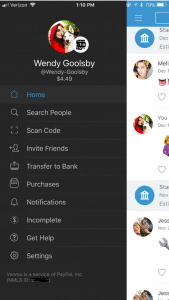
You’re on the Venmo app and you press the three lines on the left hand side. You’re brought to your account options but what do all of these tabs mean?
Home: This is where you can see your friend’s interactions with the app. When on the home tab there is three buttons at the top.
One is an emoji of a world, which will bring you to a list of anyone in the world’s latest interaction with Venmo.
The second option shows two heads, this is where you can see the money you’re friends have been transferring between each other. On this section, it used to show how much people were sending but for security reasons it now just shows that you transferred but with no money total.
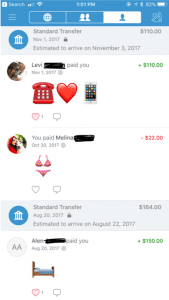
The last button is a picture of single–headed emoji. This shows all of your past transactions and also when you took out money from your bank and when you deposited money back into your bank.
Search People: This is where you can search through your friends for the appropriate person you want to send or receive money from. You have the option to connect to your Facebook so it can inherit your contact list.
Scan Code: Your coworker brings you coffee and asks you to pay them back. You don’t have cash and you’re not friends on Venmo. Instead of searching their name, this tool gives you the option to scan the user’s unique barcode. Both of you have to have the application open at the same time for this to work.
Invite Friends: Your friend isn’t on Venmo? You can input their name, phone number, or email to invite them to join the app.
Transfer Balance: This is where you go when someone has sent you the money but now you need to get it into your bank. It has the option to transfer the money to your previously entered account or to enter a new bank account.
This is also where you will see Venmo’s new interaction to instantly transfer money to your Bank in seconds. This new feature does cost $.25. The standard option (free) is still available but this option takes one to three business days to transfer to your bank account.
Purchases: You can now use Venmo to pay in other apps and on the mobile web with select PayPal merchants.
Venmo does put in their FAQ webpage that if a person purchases a good or service on the internet using Venmo, they will not offer protection. The transactions are potentially high risk and you may lose funds.
Notifications: This is where it will show if you have any pending requests for money or if anyone is requesting money from you.
Incomplete: This will show outstanding requests or payments. There will not disappear until the other user pays your or you pay them.
Get Hep: This brings you to three options and those being “Browse Ours FAQs”, “Contact Us”, or “My Support Tickets” (for any IT help).
How to make a payment or request a payment?
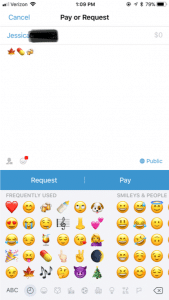
Click on the button in the top right hand corner to pull up your contact page.
Select the friend you want to send money to or request money from. You can also type in the name.
Type the amount for payment.
Add a comment about what the payment is for using words, emojis, or a combination of both (Venmo will not let you skip this step).
Select pay or request money. If you pay, the money is transferred to their account. If you request, your friend receives an email or text and an app notification saying that you requested money.
What are the privacy options?
When you make a payment or receive money from someone it automatically gets added to a live feed. This feed is where you can see your friends and families latest transactions. It will not show the amount transferred but it will show the reason (you can leave the reason blank). It’s common for people to not use words in their description but instead emoji’s.
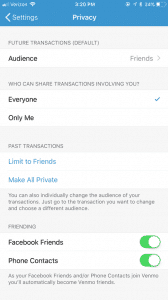
In the Settings menu you can change your audience options to include public (everyone on the Internet), friends (sender, recipient, and their friends), and participants only (sender and recipient only). There is the option to change past transactions viewers as well and make everything completely private.
It also asks where you want your contacts to come from. You can get contacts imported from your Facebook contacts or your phone contacts or both. You have the option to turn both options off and only have friends you add by hand.
What are the risks for use?
A new trend is for sites like Craigslist, Instagram, or Facebook to ask people to buy goods and services and to pay with their Venmo accounts. The company highly discourages this type of transaction but it happens daily. Buying a pair of leggings off an Instagram promoter seems innocent enough, but the real problem is now it’s even easier to buy illegal substances.
Rachael Ferguson did a research project in which she used an application called Whisper, a messaging app that allows users to send and receive messages anonymously, and she had two drug dealers agree to talk to her about their social media influence on the drug market. They explained how easy it is to find drugs on apps like Instagram or Twitter, just buy searching up relevant hashtags. An example of those would be #Kush4Sale or #OGKUSH. If you comment on these posts it’s more likely you’ll caught, so there in underground etiquette of messaging the hastagger privately (Ferguson.)
Besides using social media to buy drugs, there are plenty of other goods and services that can be bought through these apps and that are requesting a payment using Venmo. One man was selling a car on Craigslist, the purchaser claimed he could only pay if he used Venmo. The car dealer watched the other person transfer money and he saw the money come into his bank account. Happily, he signed the car over to the purchaser. 12 hours later, the dealer of the car received an email from Venmo saying the payment had been stopped (Chatman.)
What to watch out for on Venmo.
Users can remain secretive about the actual reason for money transfer. Unless you set your page to private, the public can see your transactions and reason for sending. In the privacy section of a Venmo account, there is the option to set all past transactions to private.
When I asked my friends why they or their other friends are using Venmo, they majority reported that they used it for paying rent, bills, dinner, coffee, drugs and when they were underage they can transfer money to someone 21+ to buy alcohol. This is where the emoji’s come in handy when putting in a description for your money transfer.
Emoji’s and what they mean on Venmo:
Wine/Beer/Cocktail: Alcohol/ booze
Dancing/Celebrate: Party/bar
House: Rent or bills
Car: Uber
Leaf: Marijuana
Needle: Drugs
And there numerous food emoji’s used to indicate that they are paying the person back for food. Fun fact: the pizza emoji is the most popular emoji in Venmo transaction messages (Wener-Fligner.)
What are the protection features?
Venmo’s security page outlines how it will protect you financial information, your account, storage and how it will keep you safe in the long run.
Venmo is an easy app to use, but when the user is a child or a teen, parents should consider discussing with them the risks and how to stay safe. Some things to think about:
Decide if it is the right time for your child to have their own personal bank account or if they are responsible enough to have a Venmo account connected to your bank account.
Discuss with the child when it’s appropriate to send money and when it is not. Set limits and don’t let them send or receive money from strangers.
Consider monitoring their transactions. One way to do this is by making a contract demonstrating their Venmo rules and regulations. Establish an agreement that you can have access to their account anytime.
Create a list of the people they are allowed to transfer money to. If they want to add a new person, they must let you know first. You have the right to remove any person at anytime.
When using a money sharing app, the child should be prepared to be honest and responsible. As parents, instead of banning certain apps all together, make sure your children know what your rules are! Keep a copy of their username and password so you can easily monitor their account. Also, remember this application is not only for your kids! Venmo is super helpful in limiting your cash interactions and providing a safe way to share money with your friends and family.
Thanks GKIS Intern, Wendy Goolsby for keeping us up to date on the latest virtual wallet. Make sure to keep an eye out if your child is attaching credit cards to any sorts of applications. In other teen news, check out the article, Is Your Teen Hooking Up? for ideas about how to support your kids in today’s casual sex environment.