In 2014, the Founder of GetKidsInternetSafe Dr. Tracy Bennett wrote an article on artificial intelligence (AI) facial recognition and the potential dangers associated with such technology. Fast-forward 6 years to 2020 and many of her predictions have proven true plus more than could have been anticipated. AI facial recognition has boomed to an extent that many companies are using our social media data to increase profits. Big tech is willing to do to capitalize on us, even if it is not in our best interest. For a glimpse into the scary future possibilities of privacy invasion and trampling on our civil rights, check out what’s happening in China in today’s GKIS article.
Artificial intelligence (AI) facial recognition has come a long way in the past few years especially since engineers have been using artificial neural networks. These neural networks are similar to an actual human brain. They consist of a connection of nodes called artificial neurons and can transmit a signal to other nodes. Once a node receives a signal, it can process the signal and relay the information to the other nodes connected to it. When it comes to neural networks, a person can input any type of information. In face recognition technology, an image of the face is entered. AI marks each feature as a nodal point, collecting more data with each image.
Facebook uses neural networks and processes over 350 million new pictures daily. Amazon also has a service called recognition where customers can pay to acquire Clearview AI is a controversial service that many in Silicon Valley have opposed due to implications on privacy. Clearview AI searches social media platforms and has acquired over 3 billion pictures in their inventory. When someone searching Clearview gets a match, they get data AND a link to the social media accounts where the facial data was acquired. Many have concerns that this takes the privacy breach a step further.
Beneficial Ways Facial Intelligence is Being Used
AI has led to the recovery of many missing children that have been sex trafficked or sexually exploited.
Taylor Swift’s security team used facial recognition at her concerts to see if any of her stalkers were in the audience.
Law enforcement uses AI to identify people that cannot identify themselves, like people with severe mental illnesses, people high on drugs, or people that are refusing to identify themselves. With a three-minute turnaround time, law enforcement is saving a ton of money and time so they can focus on other crimes.
Controversial Ways Facial Intelligence is Being Used
A man seen stealing beer at a CVS in New York City looked a lot like Woody Harrelson. The police entered a picture of Woody Harrelson into facial recognition technology and found a match. Although police were able to locate and apprehend the suspect, this technology could implicate the wrong person with similar facial geometry.
People of color are more likely to be misidentified due to AI facial recognition not being as good at differentiating people with darker skin.
The government could enable continued surveillance of certain individuals like they are doing in China. China uses facial recognition to follow Uighurs, a largely Muslim minority, as well as monitor all Chinese citizens using a social credit score.
Dystopian Surveillance
AI advancements worry people due to fear of one day living in a dystopian surveillance taped society. Having this type of society would mean that all citizens would be tracked, and privacy would cease to exist. One might think that with the civil rights protections in the United States we are not at risk. I wonder if Chinese citizens have concerns…
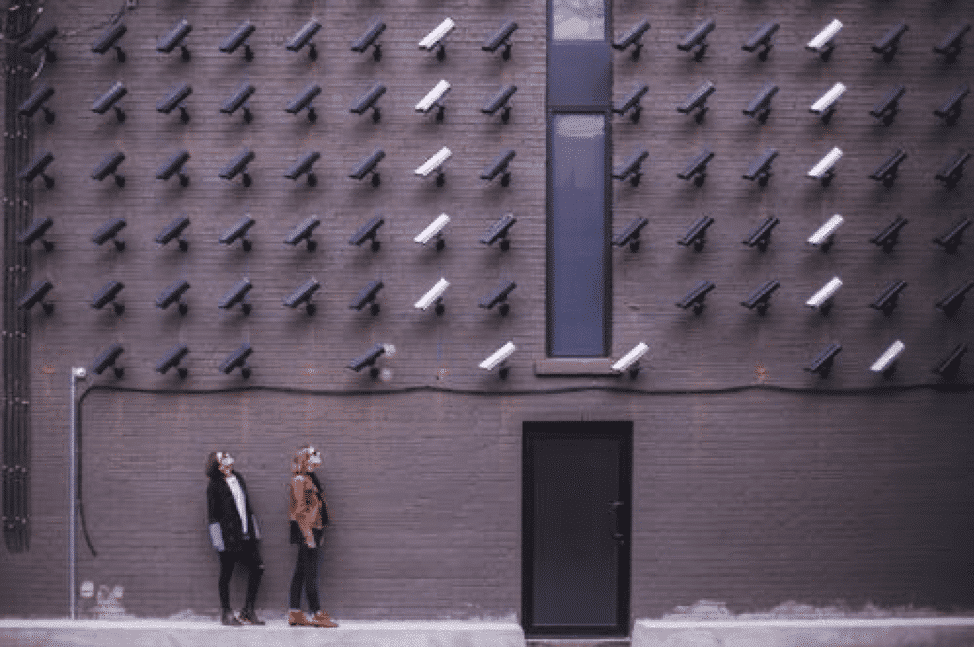
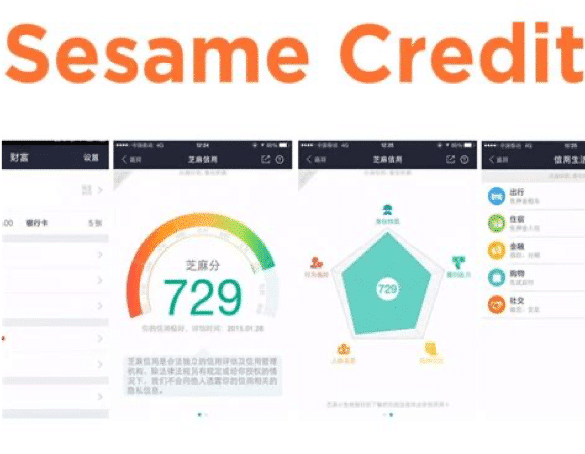
China has more AI facial recognition CCTV cameras than any other country in the world and is a prime example of dystopian surveillance. The Chinese government claims to use AI to lower crime and increase prosocial behavior using a social credit system by a company called Sesame Credit. They contend that this system encourages citizens to behave in a socially appropriate manner and if someone is a good citizen, then they have nothing to hide and the cameras should not be a concern.
Specifically, using Sesame Credit in China, if a Chinese citizen is caught on camera doing anything that is not considered “socially appropriate” like jaywalking, littering, smoking, or buying too much alcohol or too many video games, their social credit score will decrease. A low social credit score may result in the inability to purchase airline or train tickets or book at certain hotels, or they may be barred from certain schools and jobs. Citizens can also have their dog taken away if it isn’t walked on a leash or is a public disturbance. It is also mandatory for blacklisted citizens to register to a public blacklist which typically results in social stigmatization. Parent scores can affect other family members, like preventing kids from being accepted to private schools. Public shaming is a big part of the social credit system. Pictures of blacklisted and low scoring citizens are shown on TikTok, pictures and videos with names play on public LED screens, and addresses are shown on a map on WeChat.
People with good social credit scores appreciate the system since they get rewarded. Perks consist of discounts on hotels, entertainment, and energy bills and one can rent bikes without a deposit. High scorers also get into better schools and get access to better jobs. Users on dating apps are required to put in their social credit score; good scores get more dates.
Ways Citizens Can Raise Their Scores
Donating to college funds for poor students
Caring for elderly or disabled people
Repaying a loan even if the bank canceled it
How the United States is Implementing Social Credit
The U.S. has not implemented AI as comprehensively as China. However, it is used in some industries. For example, life insurance companies in New York are allowed to look at a person’s public social media account to see if they are engaging in risky behavior. They base a person’s premium on what they find. In fact, a 2020 survey found that 98% of professionals do a background check on new hires and 79% disqualified a job candidate due to unfavorable social media content.
There is also a company called PatronScan which was designed to help restaurants and bars manage customers. It can help spot fake IDs and troublemakers by scanning an ID upon entry. A public list is shown for all PatronScan customers. The problem is that judgment about what constitutes a “troublemaker” is subjected and may result in an unfair listing without the owner’s consent.
Rideshares like Uber and Lyft have reviews for both drivers and riders that may result in a customer being refused a ride. Airbnb also works by reviewing both hosts and renters. Many hosts refuse to rent to certain people based on their past reviews, and many hosts may not be booked based on renter reviews.
China is a prime example of the dangers of AI facial recognition and how it can affect our privacy and freedoms. There is not yet much legislation preventing AI from being used in the United States and there’s a need to push for it. Like the frog in the pot, people adapt so willingly to advancing technology that it’s difficult to recognize possible consequences.
For information and safety tips about how to keep you and your family safe, we highly recommend Dr. B’s Cybersecurity and Red Flags supplement. In an age where technology is advancing at such a fast rate, it is important to keep you and your family informed on current technological risks and how to prevent them.
Thank you to CSUCI intern Andres Thunstrom for co-authoring this article.
I’m the mom psychologist who will help you GetKidsInternetSafe.
In last week’s GKIS article, “How Teens Overshare,” we covered the ways kids intentionally and unintentionally share location information on social media and how to prevent this safety risk. In today’s article, we detail how cybercriminals victimize teens and offer more helpful information on how to get your kids internet safe.
Cyberstalkers
Cyberstalkers are predators who track online information to extort or harass, create cybercrimes like hacking or identity theft, or intercept a victim offline. Cyberstalkers can be complete strangers or people your teen may already be acquainted with.
Hackers
Hackers are predators who steal usernames, passwords, and personal information to gain access to a victim’s screen device. Once they can access, they can still further data, change or destroy information, install malware, and even take over the device’s camera.[1] Data can then be sold to other criminals on the dark web or be used for identity theft to take out loans and credit cards in your name.
Phishing
Phishing is a cybercrime in which a victim is contacted by email, telephone, or text message by someone posing as a legitimate institution to lure individuals into providing sensitive data. Phishing can also occur through websites and social media.[2] Dr. Bennett notes in her book, Screen Time in the Mean Time that the sensitive information obtained by phishing is often used for online login information such as usernames and passwords, bank account and credit card information, and even identity theft.
The most common example of phishing is email phishing. To email phish, the cybercriminal creates a fake domain that looks trustworthy and legitimate, then sends emails to potential victims asking them to click a link, download an attachment, or “update” their passwords.
To prevent your child from falling victim to online phishing, encourage them to only open emails, online messages, and text messages from trusted individuals and advise them to never click on any links or download attachments from an unusual or suspicious-looking email or message.
Identity Theft
According to The United States Department of Justice, “Identity theft and identity fraud are terms used to refer to all types of crime in which someone wrongfully obtains and uses another person’s personal data in some way that involves fraud or deception, typically for economic gain.”[5]
Cybercriminals often target younger individuals because children do not have bad credit (which is great for cybercriminals) and it is easy to keep it from being noticed until the child is older. In Dr. Bennett’s book, Screen Time in the Mean Time, she writes about a couple of children who were victims of identity theft.
Here are a few ways to protect your child from identity theft:
Install cybersecurity safeguards on phones, laptops, iPads, and any other device that need protection
Have family conversations about being wary of posting or sharing personal information online
Set up a virtual private network (VPN) to ensure the safety of your device(s)
Update passwords at least once a year and be sure that the new password does not include any information that may already be public such as, your teen’s name, age, pet’s name, or anything that could be easily guessed
Social Media Quizzes
Cybercriminals can also phish for information through social media by reviewing posts, asking questions, or offering an online quiz with targeted questions. Quiz questions to avoid include any that ask for your (or your mother’s) maiden name, your favorite color, the street you grew up on, your pets’ names, the first car you owned, or your best friend’s name.
The answers to these questions are often security answers on websites. With security information, personal accounts can be accessed for malicious intent. To prevent cybercrimes, ask your teen to refrain from taking online quizzes or you can encourage them to only take online quizzes from a legitimate source. Teaching your teen to withhold sharing personal information that could pose a security risk is vital to ensure their online safety.
Cyber Blackmail
Once a cybercriminal obtains sensitive information, they may use it to coerce a victim further. According to the BBC, “Cyber-blackmail is the act of threatening to share information about a person to the public, their friends or family unless a demand is met or money is paid.”[3] Cyber blackmail can take many forms and the cybercriminals who commit this crime use different tactics to take advantage of their victims.
Cybercriminals may even say that they have explicit photographs, access to their victim’s phone and computer’s webcam, or even recordings of them from their personal devices. Some of those claims may be true or false, but either way, the cybercriminal uses fear and shame to get what they want.[4]
To help prevent your teen from becoming a victim of cyber-blackmail;
advise them to never share sexual images of themselves (the images can end up anywhere)
advise them to not accept friend requests from strangers
advise them to be wary of things they post, share, or message others online (what they say can very well be used against them in the future)
require your teen to have private social media accounts
For more information and safety tips, we highly recommend parents to purchase our Cybersecurity & Red Flags Supplement. Dr. B created this tool because parents in her clinical and coaching practices frequently asked her to teach their kids the red flags that may alert them to the tricks of online predators, hate groups, and cyberbullies. In this Supplement, she offers her clinical teaching list so you can educate your kids. Knowledge and assertiveness coaching are key elements of child resilience and good judgment online.
Also included in the supplement is Dr. B’s Online Safety Red Flags for Parents. This tool teaches parents what child behaviors to look for that may signal they are at risk – a tool she created from 25+ years of clinical practice. Being able to recognize behavioral red flags in your child may be the difference between stopping risk after one exposure versus not recognizing dangerous relationships and exposures until it’s too late.
Thanks to CSUCI intern, Remi Ali Khan for researching cybercrimes and cybersecurity for this article.
I’m the mom psychologist who will help you GetKidsInternetSafe.
Onward to More Awesome Parenting,
Tracy S. Bennett, Ph.D.
Mom, Clinical Psychologist, CSUCI Adjunct Faculty
Photo Credits
Photo by Gerd Altmann from Pixabay
Photo by B_A from Pixabay
Photo by Pixabay from Pexles
Photo by Tracy Leblanc
Works Cited
Bennett, T. (2017). Screen Time in the Mean Time: How to Get Kids and Teens Internet Safe.
Brant, E., & Butterly, A. (2013, September 20). Cyber-blackmail: How to keep safe and deal with it. BBC Newsbeat. http://www.bbc.co.uk/newsbeat/article/23724703/cyber-blackmail-how-to-keep-safe-and-deal-with-it.
Cyber Extortion: Ransomware vs Extortionware. Alpine Security. (2020, August 2). https://alpinesecurity.com/blog/cyber-extortion-ransomware-vs-extortionware/.
The Dangers of Hacking and What a Hacker. https://www.webroot.com/us/en/resources/tips-articles/computer-security-threats-hackers.
Identity Theft. The United States Department of Justice. (2017, February 7). https://www.justice.gov/criminal-fraud/identity-theft/identity-theft-and-identity-fraud.
KnowBe4. What Is Phishing? Phishing. https://www.phishing.org/what-is-phishing.
The pandemic of 2020 has many of us working from home. For most of us, our internet must work quickly and efficiently to stay productive. The increasing demand for having reliable, quick internet coupled with new technology compatible with the internet has led to the creation of 5G, a new wireless internet connection. But many feel anxious about this new mobile network, wondering what impacts it may have on our health, privacy, and security. Learn all about 5G in today’s GKIS article.
What is 5G?
Introduced in 2019, 5G is the latest form of wireless internet connection. 5G will enhance internet connections and download speeds using “millimeter waves.” These waves are smaller and move faster than previously used 4G waves, allowing the space needed for the Internet of Things (IoT).
What is “IoT”?
IoT stands for the Internet of Things, which refers to wired and WiFi-connected home products that collect data about our daily behaviors. This data is then used to better target us for marketing, to improve services, and to make more efficient, informed decisions based on probability and statistics. Currently, we have 6.5 billion devices connected to the internet. It is estimated that by 2026, more than 75 billion devices will be connected to the internet generating $1.1 trillion a year.1
How will IoT be applied?
Consumer
Door locks, security cameras and monitors, home appliances, light fixtures, thermostats, smart televisions, smart refrigerators, media platforms, and voice-assisted digital assistants like Amazon’s Alexa, Apple’s Siri, Google’s Google Assistant, and Microsoft’s Cortana will have the capacity to sense, analyze, and act as well as deliver data to the corporation for analysis, storage, and sharing.
Commercial
IoT is being applied to many industries, including the healthcare and automobile industries through the use of video training, building automation, security robots, pacemakers, wireless infusion pumps, and vehicle to vehicle communication (V2V). In 2019, at the Mobile World Congress in Barcelona, Dr. Antonio de Lacy guided a team of doctors operating on a patient through a live video from the other side of town.2 The video is clear, in real-time, and with no delays.
Military
Drones, robots, surveillance, and wearable biometrics are being implemented for warfare.
Industrial
Industrial applications of IoT include statistical evaluations of big data from manufacturing robots and smart farming. One study estimates IoT will replace up to 800 million farmworkers by 2030.3 Vertical farms and warehouses can produce the exact amount according to demand, rather than a surplus, and without the expense of employing workers.4
Infrastructure
Barcelona has embraced the development of becoming a “smart city” through the use of IoT. The results appear to have a positive impact on their economy, resulting in a $50 million per year revenue on smart parking alone. They have decreased their costs in energy consumption by $37 million a year using self-regulating lights, as well as saving $58 million a year with “smart gardens” that water plants at the right place and the right time.5
Security, Privacy, and the Internet of Things
We are headed for a paradigm shift, where our physical belongings are increasingly becoming computer systems. What was first “internet security” will be “everything security.” Unfortunately, most IoT software being manufactured and marketed is poorly written, insecure, and in the hands of corporations. Although you may trust the corporation with your data, do you trust the hackers who can breach that corporation’s controls to get access to it?
Security just isn’t a pressing concern for corporations and consumers. As consumers, we want inexpensive devices that work. Having insecure appliances connected to the internet like a thermometer, which is normally intended to last a long time, is dangerously allowing hackers the opportunity of exploitation.6 You might be able to get away with leaving the front door of your home unlocked, but in the cyberworld, every door can be attacked. Security professionals and hackers alike use what is known as wardriving to locate and record WiFi networks using a GPS.7
Wardriving is a GPS used to locate vulnerable and unprotected WiFi from a car. Problems arise when hackers recover the WiFi password through other connected smart devices.8 Thermometers, baby monitors, smart toys, surveillance cameras, and vehicles have been hacked in the past.9 More recently, throughout this pandemic, video conferencing Zoom applications have been hacked and banned all around the world because of poor security.10 Steps towards securing the IoT will need to be regulated, rather than patching the software for security after-the-fact, like Zoom.
Thank you to GKIS intern Andrew Weissmann for researching and authoring this article. To learn how to increase the cybersecurity in your home and identify the red flags that suggest your child may be in danger from bad actors online, check out our GKIS Cybersecurity and Red Flags Supplement. For less than a cup of coffee, you can be more informed and assured your family has adopted the best cyber-safety practices.
I’m the mom psychologist who will help you GetKidsInternetSafe.
Minecraft is a virtual 3D game that allows users to create unlimited worlds using online building blocks while unlocking resources along the way. From cities to rollercoasters, the possibilities are nearly endless. We at GKIS are big fans of Minecraft because it fosters creativity, problem-solving, new skill development, and socialization opportunities. But like any online tool, there are also associated risks. This GKIS Sensible Guide provides information that parents need to optimize Minecraft’s benefits while keeping your children safe.
How long has Minecraft been around and how popular is it?
Minecraft was created in 2011 by Swedish game developer Markus Persson and purchased by Microsoft in 2014. Nearly 176 million copies were sold by late 2019. In 2019, Minecraft has over 112 million players every month and can be played on various platforms including smartphones, tablets, Xbox, and other gaming stations. It has evolved to include more elements and has a series of spin-off g
ames with different themes. Users also post Let’s Play videos YouTube to show how they build their worlds and different ways to create items.
Getting Started on Minecraft
According to Minecraft’s Terms of Service, “If you are young and you are having trouble understanding these terms and conditions, please ask a responsible adult such as your parent or guardian.” Minecraft also insists that children under age 13 have their parents download and register for an account. However, children can easily change their age before signing up to go around that rule.
Minecraft varies in price depending on the type of platform. Signing up for an account is simple. Just create an account with a unique username and email address. Users are given one profile by default but have the option to make multiple profiles.
Features of Minecraft
Minecraft allows users to collect resources and build their own worlds. Users can dig, build, and enchant items to transform their world into whatever they want. Users can also select different game modes, each with unique challenges and features.
Survival Mode
One of the main game modes
Players must collect resources, build structures, battle mobs, find food.
The goal is to survive and thrive.
Creative Mode
Players are able to build with an unlimited number of blocks.
Players are given all the items needed to build.
Mobs still exist, but there is no threat to survival.
Players are able to fly around the world.
Adventure Mode
Players use maps to navigate the world.
Depending on the device played on, blocks can either be destroyed or placed.
Hunger and dying is possible.
Spectator Mode
Users have the ability to fly around and observe the worlds without interacting with it
Players are invisible and can move through blocks and buildings.
Hardcore Mode
Available only on the online version.
The world is locked to hard difficulty and the player cannot respawn after they die.
Only specific worlds enable hardcore mode and not individual players.
Minecraft has two different play modes, single-player and multiplayer. In single-player mode, a user only interacts with their own character and their own world. In multiplayer, users can join any game with any player, friends or strangers. Parents have the ability to sign their child up for a family-friendly multiplayer mode that is supervised and has restrictions on the chats and interactions.
The Benefits of Minecraft
Minecraft allows players to use their imagination and create what they desire. Users develop problem-solving skills while they are creating their world. Minecraft also helps users develop computer literacy skills, teamwork, and collaboration. For example, while in multiplayer mode, players are able to communicate and work together to build their worlds. Mathematics and spacial skills are also developed while playing the game. For example, it takes six planks to build one door. If players have 60 planks, they can calculate how many doors they are able to build.
Parents have the ability to limit their child to only single-player mode or a family-friendly version of multiplayer. There are several Minecraft servers that have been designed for children in mind. They are designed with a code of conduct and have full moderation. Parents are able to sign their children on to a family-friendly server where they will be safe from interacting with strangers in a negative way.
The Risks of Minecraft
There are relatively few risks for children playing Minecraft. With the exception of playing too often, for too long, or getting frustrated with gameplay, single-player mode is relatively safe because kids can be restricted from interacting with players they don’t know. However, violence can be easily found in the game. For example, there are multiple ways to kill users, mobs, or animals, such as:
setting another player on fire using lava or a torch
hanging an animal or another player
using canons and bombs
using sand to trap and suffocate mobs
using a zombie as a weapon to kill a villager
shooting with a gun or stabbing with a sword
There is also a chance for cyberbullying in multiplayer mode. It is not uncommon to come across a user who is intentionally irritating and harassing other users. They often use parts of the game in unintended ways. For example, they may curse, cheat, and kill without reason. Cyberbullying also includes players who deliberately kick players off the server and anger others for their own enjoyment.
Multiplayer mode carries the risk of children chatting with strangers. For example, in 2017 a Minecraft user was jailed for meeting two children on Minecraft and persuading them to carry out sexual acts. [i]
There is a potential for users to track down your IP address from playing Minecraft. An IP address is n unique number for an internet network. The IP address provides the location of where your network is coming from. If users are able to hack into the server, they can find another player’s IP address. This can lead the user to the location of the player within a couple of miles.
If your child wants to play Minecraft, GKIS recommends that you:
Add it to your free GKIS Connected Family Agreement (If you haven’t downloaded it yet, enter your name and email on our GetKidsInternetSafe home page and it will be emailed immediately)
Discuss the risks of chatting with strangers with your child. For ideas about how to do this, check out our GKIS Connected Family Course.
GetKidsInternetSafe rates Minecraft as a green-light app due to the safety of the game and the benefits it can have on children’s development. Dr. Bennett has found that her kids and the kids in her practice love Minecraft when they are young and even return to it as teens! They tell her they appreciate the simplicity of it and especially love the relatively stress-free atmosphere with no in-game purchase requirements.
Thank you to CSUCI intern Makenzie Stancliff for writing this article. If you love to encourage creativity with your kids, you won’t want to miss the Makerspace ideas in our Connected Family Course.
I’m the mom psychologist who will help you GetKidsInternetSafe.
Instagram is the second most popular social media app among teens, with 78% using the social media platform in 2018. Instagram has become a necessary tool to manage relationships and participate in public culture.[1] Teens love to develop their virtual identities, follow friends and popular celebrities, and keep track of popular culture. Relative to other platforms, Instagram is easy to use, encourages creative content with photo filters, and has privacy and protective report features that are easy to access. But there are danger potentials and parenting strategies you should be aware of before you give permission for this social media staple.
What is Instagram?
Instagram is a free mobile social media app that offers photo or video sharing to followers or a select group of friends. Videos range from 3 to 15 seconds. All you need to sign up is an email address and a username (a phone number is optional).
How long has it been around and how popular is it?
Instagram was created by Stanford graduates Kevin Systrom and Mike Krieger and launched in October 2010. Within two months, Instagram gained over a million users. In 2011, Apple named Instagram iPhone app of the year. In April 2012, Instagram was acquired by Facebook for a billion dollars. As of April 2019, Instagram has 500 million daily active users.[2] It is the gateway app for most young social media users.
How old is old enough for adoption?
Instagram Terms of Use state, “You must be at least 13 years old to use the Service.” I recommend sixth grade as the youngest adoption age for Instagram and only under the following conditions:
Require your child to create a persuasive PowerPointthat covers risks, benefits, and privacy and protection features so you both know the ins and outs of Instagram’s features. For more information about how to create and judge a persuasive PowerPoint about a social media app along with other useful screen safety strategies, check out our Connected Family Online Course.
Add it to your free GKIS Connected Family Agreement as an “OK” or a “not yet,” so parameters, rules and regulations, and etiquette issues are understood. (If you haven’t downloaded it yet, enter your name and email on our GetKidsInternetSafe home page and it will be emailed immediately.)
Require the account to be set to private and you agree on the number and nature of followers and frequency of posting.
Ensure you are friended and you have their username and password for backside control.
Instagram Basics
Instagram’s big appeal is its image-based simplicity. Here are its regularly used features:
Stories (like Snapchat) that allow the user to post a collection of photos or videos to their profile. The story lasts 24 hours then disappears.
Your personal photo & video collection profile with captions that others can love, comment, and share.
Photo filters that offer limited editings, like color and hue.
Option to tag and @mention others or your post.
Links to other social media platforms including Facebook, Twitter, and Tumblr.
The ability to search and explore public profiles and follow favorites, like celebrity profiles.
Instagram offers suggestions of videos and posts you might like as well as potential FB contacts to follow.
What are Instagram’s popular features?
Direct Messenger allows users to start a conversation with friends.
Send messages, photos, videos, and posts. You can even video chat with up to 6 friends.
Watch long-form videos where users can create and watch videos that are not limited to one minute.
Similar to Stories or photos and videos you see in your Feed, you can like, comment, or share IGTV videos with friends.
Shop as You Scroll allows users to find products in your Feed and Stories that you’re curious about.
Tap the Product Tag to see the price, item name, and even have the ability to buy it directly from Instagram. There is also a save ion that will automatically add the item to your private Shopping Collection.
Search & Explore offers fresh content based on people you follow and posts you like.
Refresh the Explore page to see a new set of photos and videos, all created based on your interests.
Close Friendsallows for private messaging and posting to occur on Instagram, similar to private stories on Snapchat.
Start at the main page of Instagram, press the top-right icon of three bars, choose which followers you’d like to add to your list, and press Done.
What is included in the personal profile?
Number of posts, followers, and following
Username (can be a nickname)
Bio (like a website and other social media contact info here like Kik messenger, Skype, Facebook)
Your collection of photos and videos with the date posted, likes, and comments
Tagged photos and videos of you
Photos and videos you save
What are the privacy options?
Profiles are set to public by default. To change this, follow these steps:
Go to the settings icon, select the Privacy icon, and under Account Privacy turn the Private Account toggle on to require the approval of follow requests. If your profile is private, posts will not appear on the EXPLORE tab and only followers can see your posts.
Teens typically create more than one account for improved privacy options. Instagram allows you to simply toggle between the two. I require my teens to keep even their main profile on “private.” But they also generate a second account, offered referred to as a “Finsta” (a spam Instagram account) where they only friend their closest friends. Be aware that the posts on the finsta accounts are where the most questionable content is posted. Don’t forget to spot-check those from your child’s phone directly. You can’t just assume you’ll see everything they are up to on your feed.
Be aware that if your child posts other contact information on their profile (like Skype or Kik usernames), the public can view that and reach out to them even if their post is set to “private.” Another tricky workaround that people aren’t usually aware of is that if you SHARE your Instagram post on another social media platform like Twitter, your Twitter followers can click on the link and see your private post.
What Instagram trends and slang should I know about?
Clickbait: The practice of using a provocative title with the sole purpose of driving clicks.
Finsta: “Fake Instagram account.” Followed by a close circle of friends where teens post their casual, authentic side, where they can let their guard down a bit, act silly and not edit out every blemish.
#influencer: Instagram is becoming a huge platform for brands to publicize their company. 48.8% of brands use Instagram for promotional purposes. They pay people who are “Instagram famous” to show these brands on their profiles.
Rinsta: “Real Instagram account.” Usually accessible by a wider audience for teens polished and idealized selves.
Slide into someone’s DMs: The practice of randomly sending a DM to someone.
Throwing shade: The act of publicly denouncing or disrespecting someone. Often used in reference to sarcastic remarks against someone or something.
VSCO: The term originally referred to an app used for simple photo edits. It is now commonly used to make fun of girls who use the app.[3]
What are the risks for use?
Cyberbully potential:
Bullies posting unflattering or humiliating tagged or @mentioned photos and videos (@drtracybennett is a loser).
Cruel comments or hashtags (#annoying).
Fake accounts and impersonation.
Influencers making certain activities or expensive clothes/makeup seem normal.
Tracking potential:
Users can include contact information on comments or in their bio. Although posts are set to private, anyone can see your profile photo, username, and bio.
Photos and videos may be geotagged so the location can be tracked. For safety, turn off this feature on your device by turning off the “location” option for “camera.” To prevent Instagram from capturing your location on the iPhone, go to the phone’s settings, tap Instagram, select Location, and choose the “Never” option.
Attention-seeking potential:
Users often try to attract large numbers of followers with poor posting or comment choices.
There are numerous other apps that are affiliated with Instagram and they give the option to buy likes for your posts and even buy more followers.
Inappropriate content potential:
Sexualized, cutting, violent, politicized, and eating disorder images and inappropriate memes are commonplace and easily found when viewing photos and videos from the Explore tab.
Ability to send and receive instant messages, photos, or videos directly:
If your child’s profile is public anyone, including Instagram users your child does not follow, can send them messages, photos, or videos directly. If your child’s account is private, then the messages will be sent to their “message requests” instead of directly to their inbox. From there, you or your child can proceed to decline or accept the message. If one ignores the request folder, the sent item will disappear after two weeks.
What are the protection features?
By setting your profile to private, only followers can see your posts and stories. (There is an option to let anyone see your Stories, followers or not, make sure this setting is turned off). However, keep in mind that ANYONE can see your profile information (profile image, username, and bio), even non-followers.
If you come across an inappropriate photo (or you are tagged inappropriately), go to your profile page, select the three-line icon located at the top right corner above “Edit Profile”, select “Settings”, and “Report a Problem” in the Help area. From there Instagram offers many categories for the report with specific instructions.
Spam or Abuse
Something Isn’t Working
General Feedback
Image or Video Quality Issue
After the Block or Report is completed, that person cannot search for you or view your photos. However, mutual followers can still see your likes and comments on other people’s pictures. Blocked users can also still @mention you. You will receive a notification that they mentioned you but it will not show you the comment they made unless you unblock them. You must change your username to avoid mentions.
If an unwanted comment on your page appears, simply swipe on it and select the “!” icon to report Spam or Scam or Abusive Content or simply trash it.
Review your profile often and delete old or questionable photos.
Finesse your posts to favorably reflect positive activities, experiences, and character traits (like a digital resume).
Track your time.
Parents – check for extra accounts and other social media follow requests.
Social media can be really fun, but it has its risks. If you think your child is ready for an Instagram account or if they are on it and you want to optimize safety and resilience, YOU WILL LOVE OUR GKIS Social Media Readiness Training Course. It covers social media risks to digital injury and teaches tweens and teens the psychological wellness tools they need to thrive!
Thanks to Isabel Campos for her research and help with writing this article.
I’m the mom psychologist who will help you GetKidsInternetSafe.
Onward to More Awesome Parenting,
Tracy S. Bennett, Ph.D.
Mom, Clinical Psychologist, CSUCI Adjunct Faculty
GetKidsInternetSafe.com
Tik Tok is a social media app that allows users to create and discover short videos made and posted by users. It’s popular because it combines teen users’ love for social media, music, and creative shorts. They love the authenticity of sharing and creating Tik Tok offers. Dangers are that kids may post and view sexualized or stunt videos and explicit songs, post videos of others without their permission, users are commonly ridiculed and cyberbullied, they may read lewd comments, and there is potential for public direct messaging. Be aware that popular Tik Tok influencers produce highly sexualized content and the “For You” autofeed commonly offers up content that most parents find inappropriate for child viewing. Plus, it’s so fun it’s addictive. Kids can spend hours scrolling endless content. As always, make sure you have familiarity with Tik Tok before you allow your child to use it. And, of course, add it to your free GKIS Connected Family Agreement as an “OK” or a “not yet,” so parameters, rules and regs, and etiquette issues are understood. (If you haven’t downloaded it yet, enter your name and email on our GetKidsInternetSafe home page and it will be emailed immediately). For a comprehensive tween/teen course on how to stay safe on social media, know what to watch out for, and how to apply amazing psychology wellness strategies, check out our GKIS Social Media Readiness Training Course. It gets the conversations started about the truths of Internet risk,. Also, y\ou won’t want to miss the parent setup tips at the end of this article. Our GKIS Sensible Guide provides information that parents need to know to make an informed decision.
What is Tik Tok?
Tik Tok is an app that allows users to create 15-second videos. It’s based on a previously popular app called Musical.ly, which is no longer available. Tik Tok users can post videos they saved on their phones and add sounds, parts of songs, special effects, and filters. Recently, Tik Tok added a new feature that allows users to record their reactions to other Tik Tok videos. The app also includes a feature that notifies users when they’ve spent more than two hours on the app. Users seem to value creativity and authenticity over likes.
How long has it been around and how popular is it?
Tik Tok is developed by ByteDance, a Chinese Internet technology company. It was first released in September 2016 for IOS and Android. Tik Tok’s global offices are located in Los Angeles, London, Dubai, and Tokyo, among other places. As of October 2018, Tik Tok was downloaded 80 million times in the US and 800 million times globally. It is free to use. ByteDance makes its money through advertisements integrated into the app.
How old is old enough for adoption?
Tik Tok’s Term of Service states, “If you are under age 13, you may only use the Services with the consent of your parent or legal guardian. Please be sure your parent or legal guardian has reviewed and discussed these Terms with you.” As you know from other GKIS Sensible Guides, 13 years old allows social media apps to be in compliance with the U.S.’s Children’s Online Privacy Protection Act (COPPA). It has nothing to do with child psychology. Nobody assessed that 13 years old is a healthy age for app adoption. That is up to you.
Before you make your decision, keep in mind that before 13 years old, kids still have limited ability to understand potential consequences and lack impulse control. In Dr. Bennett’s book, Screen Time in the Mean Time, she recommends no social media app adoption until at least the second semester of sixth grade, when kids have more social experience for creative problem solving and are no longer transitioning into middle school. (If the seventh grade is a transition year in your community, she recommends waiting until spring semester for the introduction). Most parents will find that, even at 13 years old, they are uncomfortable with their kids viewing the sexually explicit and sometimes cruel content easily available on Tik Tok. Follow a few popular Tik Tok influencers to sample what I’m talking about. Of course, every family circumstance is unique. We at GKIS believe that parents are the ultimate authority on your children’s unique traits and “fit” with Tik Tok.
Tik Tok In the News
In December 2019, the U.S. Army and U.S. Navy banned soldiers from using the Tik Tok app on government-owned phones due to concerns that content shared with ByteDance could be used to influence and surveil Americans. ByteDance reports that it stores U.S. user data in the U.S. with backups in Singapore, so it is not subject to Chinese law. But as a security expert told me, “It doesn’t matter where they store the data, it’s how they access it that counts. China is well known for having an excellent ability to steal private data from foreign countries.”
In February 2019, ByteDance was fined $5.7m by the U.S. Federal Trade Commission for illegally collecting personal information from children, like names, emails, addresses, and locations. in violation of COPPA. The FTC found that Tik Tok failed to delete content from underage children despite receiving thousands of complaints from parents. As a result of the FTC fine, Tik Tok created an experience for underage users which allows them to only access curated, clean videos and not have the ability to comment, search, or post their own videos. Kids can work around this by simply entering a false birthdate.
What are Tik Tok’s popular features?
After opening the app through your smartphone, you have the option of looking at the videos of those who you follow, what’s featured, and videos under hashtags.
You can follow friends and other Tik Tok users. Those you follow will show up under “following” on the home page of the app. With a simple scroll, you’ll be introduced to the thousands of videos Tik Tok users create. Just because you follow someone doesn’t necessarily mean they follow you back.
To make a Tik Tok video, click the square button with the plus sign. Once there, the app will ask you if you want 15 seconds, 60 seconds, or photo templates. You also have the option to add sounds, upload photos or videos, and add effects. Users can also adjust the speed and add filters. Tik Tok provides sound categories like “Trending,” “Country,” “Furry Friends,” “Sweat It Out,” and even “Munchies.”
There’s a search feature that allows users to browse through various hashtags. They can also search through categories like “top,” “videos,” “sounds,” and “hashtags.”
You can personalize your “For You” feed by ♥︎ing videos you like or choosing “not interested” on those you don’t.
Tik Tok nudges its users to go outside of their groups of friends by immediately introducing them to group challenges, theme hashtags, and videos based on a popular song.
What is included in the personal profile?
Tik Tok makes signing up to the app simple. You can sign up with an email, name, and phone number or through your Facebook, Google, Instagram, or Twitter accounts or through your Apple ID. From there, you can choose to sync your phone or Facebook contacts with Tik Tok to see if your friends also have an account.
Along with a personal profile photo of your choosing, your profile page can also contain your bio, the number of people you follow, who follows you, and how many Tik Tok videos you’ve liked. If you have uploaded Tik Tok videoes, they’re displayed on your profile too.
The top left has a button for searching for friends on the app. The top right is a button for the settings. When you click on “edit your profile,” you have the option of adding your Instagram username or your YouTube channel, which will be public to those who can see your profile.
What are the privacy and safety options?
Many Tik Tok users love interacting with a large, global audience to spark creativity and enjoy fun feedback. As a clinical psychologist who sees how some of these collaborations with strangers can turn dangerous, I recommend a private account so you can approve or deny follower requests, and only users you’ve approved as followers can see your content. Of course, we encourage parents to discuss the pros and cons of use with their kids to reach a cooperative agreement.
To do this,
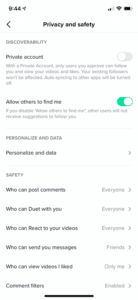
Click on the Settings button at the top right corner on your profile page.
Click on Privacy and Safety.
The first option is “Private Account” or “Allow others to find me.”
If you change an already-existing account to private, current followers will not be affected.
You can also remove or block followers at any time. Removing them disables their ability to direct message your teen. Blocking them stops them from interacting with or viewing your teen’s content at all.
Opting for Restricted Mode limits content that may be considered inappropriate. Users can also restrict comments to friends only or block them altogether. The can also disable messaging and disable duets.
Tik Tok offers a Screen Time Management mode with a passcode as one of their Digital Well Being offerings.
If you see inappropriate content while browsing the app, you have the option of reporting it within the app. We noticed that the report button is somewhat difficult to find in that it is hidden among other buttons.
As with most social media apps, the company collects information, including your name, email address, and phone number. They may also collect any messages you send through the app to friends. This is part of their privacy policy.
Tik Tok is rated a 12+ app store rating. This means you can block underage kids from onboarding the app with Gooogle and Apple parental controls. Tik Tok resources for parents include a Top Ten Tips for Parents primer, “You’re in Control,” safety educational videos, a Safety Center, and an ongoing blog series with helpful tips. The videos can be accessed directly in-app @TikTokTips.
What are the risks for use?
Constant Access
When kids are little, parents decide when playdates happen. Once Tik Tok is on board, keep in mind that your kids will have access to their friends whenever they have their device, and other Tik Tok users will have access to your kids. For many, that means 24/7 access. If you’re not OK with that, you’ll have to dock screens consistently or limit their access.
Inappropriate Content
Although the rules state that users younger than age thirteen shouldn’t be on Tik Tok without parental guidance, anyone can simply lie and accept the terms of conditions without informing their parents. Sometimes the content may not be filtered, and any kind of inappropriate content may pop up. Of particular concern is dangerous stunts, hate speech, and sexualized dancing to explicit music lyrics. Imagine watching your 12-year-old dancing sexy to lyrics that include the n-word, the f-word, p&^sy, and worse.
Cyberbullying
A fun video posted today can feel humiliating when viewed tomorrow. Since moderators can’t oversee all comments on the app, there is cyberbullying. Since being creative requires risk, public ridicule now or later is a real concern. Often the ridicule happens when the Tik Tok video is shared on other social media platforms, like Instagram or Twitter. The best way to prevent this would be to keep the account on private and add only people whom you know or are friends with. However, keep in mind that cyberbullies can always screenshot from a private account and share publicly. Users can turn off comments to prevent or stop cyberbullying on their content. Exclusion from posts about friend groups can also be hurtful. Imagine if your child is the one who was left out.
Trends & Attention-Seeking
Users can produce or view inappropriate Tik Tok’s and often try to attract large numbers of followers with poor posting or comment choices. For example, the trend for “Chop Chop Slide” involves kids filming their parents’ reactions to an unexpected string of very explicit lyrics. Many of these videos of their parents are likely shared without permission. To feed the need for likes, affiliative apps offer the purchase of likes for your posts and to buy more followers.
Stunts & Challenges
Most Tik Tok Challenges are incredibly skillful dance moves. You’ll also see kids singing along with their tongues out and clever facial expressions to vulgar lyrics alone and in groups. Like with the other social media platforms, you’ll also see some winners come up with something like the outlet challenge which involves shoving a penny in a charging cube for sparks. To see what I’m talking about, search YouTube for Best Tik Tok Compilations and prepare to be mesmerized for awhile. The talent Tik Tok inspires is amazing.
Online Predators
If your child’s profile is set to public, anybody signed into the app can view your child’s videos, comment, and message your child. The tech website, Motherboard, reported a large community of adults soliciting young Tik Tok users for nude photos and videos and even sent videos to the children. Lewd and hateful comments have been found on children’s videos. News reports say that, while Tik Tok has attempted to remove those comments after being reported, several inappropriate comments were left on videos. The owners of the accounts that left those comments were not suspended from Tik Tok and were allowed to continue commenting.
It’s Addictive!
Once you test the app, you’ll see how fun it is! It’s hard for users to resist the endless on-demand video content on the Discover page (indexed with hashtags) that is interactive, shocking, funny, creative, musical, and titillating. Be aware that popular Tik Tok influencers produce highly sexualized content and the “For You” autofeed offers up content that is similar to what has been viewed before. Kids spend hours scrolling endless content.
GKIS Parent Checklist for Tik Tok Use:
Disable underage use of this 12+ rated app using IOS & Android parental controls.
Test Tik Tok by creating an account and using the app yourself for awhile. It’s mind-blowing how creative users can be. It’s also helpful to search YouTube for Tik Tok compilations (e.g., “Tik Tok procreate compilations”).
Preset your chid’s account for best content by scrolling the home page liking appropriate videos & selecting “not interested” for inappropriate videos. Although it won’t keep them safe from viewing inappropriate content, it does preset the autoplay to a more positive autoplay pattern.
It’s also helpful to block influencers who commonly produce inappropriate content, while also “hearting” topics and influencers that match your child’s interests (e.g., singing, dancing, drawing, procreate, etc.).
Make sure you already have a digital contract in place (like our free GKIS Connected Family Agreement). Add it to your agreement as an “OK” or a “not yet,” so parameters, rules and regs, and etiquette issues are understood. (If you haven’t downloaded it yet, enter your name and email on our GetKidsInternetSafe home page and it will be emailed immediately.)
Agree that use is probational and visit Tik Tok’s Safety Center and watch their “You’re in Control” videos together (recognizing that once the content is posted, you no longer are in control).
Require your child to create a persuasive PowerPointthat covers risks, benefits, and privacy and protection features so you both know the in’s and out’s of Tik Tok’s features before you agree to it. For more information about how to create and judge a persuasive PowerPoint about a social media app along with other useful screen safety strategies, check out our Connected Family Online Course. The course was created to optimize healthy screen use while protecting kids and teens from digital injury. The best part about the course is it brings parents and kids closer with more cooperative negotiation around family screen rules. Once you agree on a trial, create a digital poster with a bullet list of the rules you agreed upon and tape it up in your home’s homework or computer space.
Limit use with Tik Tok’s Screentime Management feature.
Insist on a PRIVATE account so strangers can’t view your child’s posted videos, Select RESTRICTED MODE. Use FRIENDS ONLY for comments and videos.
Consider DISABLING messaging and duets at first.
Agree to how many personally-known friends are allowed at first to limit exposure while your child is gaining expertise and judgment. Remember, they WILL post, view, and message inappropriately no matter how great you parent. If that’s unacceptable to you, DON’T ALLOW TIK TOK.
Insist that you are friended and you have their username and password for backend control.
Set a #TechCheckThursday meeting to check friends, videos, messaging, and to ensure rules are being followed and everybody is safe. This will also keep the cooperative dialogue going.
Make a Tik Tok video together. Have fun with it!
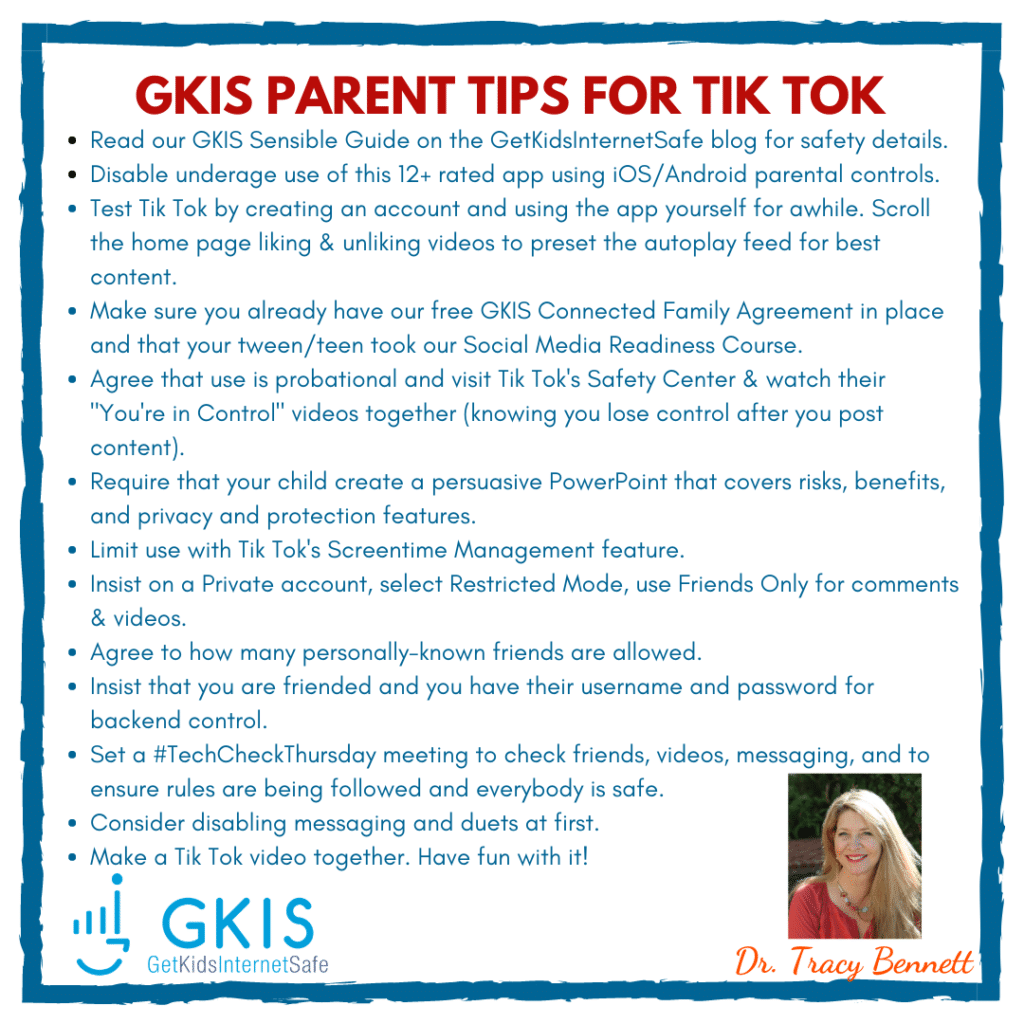
GetKidsInternetSafe rates Tik Tok as a red-light app due to the easy access to strangers, inappropriate content, bad judgment while posting or live streaming, and potentially harmful comments. Because the app has millions of users, it is difficult for Tik Tok moderators to weed out all of the unacceptable content. But there is also a legitimate argument for creative and fun sharing with a private profile. If you do opt to allow Tik Tok, be sure and get your child’s username and password and monitor posts. Share our GKIS Parent Tips on your social media for friends and family. HERE’S THE LINK TO THE IMAGE
Thank you to CSUCI intern Makenzie Stancliff for co-authoring this article. For more help with social media. judgment and overall psychological health, you won’t want to miss our GKIS Social Media Readiness Training Course for tweens and teens.
I’m the mom psychologist who will help you GetKidsInternetSafe.