Were you the kid with a mohawk in the 70s or pegged pants in the 80s? Maybe you were goth, a skater, or straight-edge. Teens of every era love to experiment with creative expression and explore new philosophical ideas. The internet offers boundless opportunities to follow cool influencers andchat with like-minded others in online forums. Visiting random virtual neighborhoods can be mind-expanding and fun, but it can also be dangerous. Today’s GKIS article explores the world of online counterculture. Being in-the-know is a critical element to great parenting in the digital age.
New Age Counterculture
As adolescents begin to form their unique adult identity, they look to their peer community for ideas for current, creative interests, how they want to come across, and what they want to look like. Especially attractive to teens is anything that their parents ARE NOT. Trends that are new, fresh, and totally different from parents or social norms are aptly named counterculture.[1]
The concept of countercultures isn’t new. From the anarchists in ancient Greece to the punks of the 1970s, countercultures have always influenced trends and fashion. Because kids today form multiple identities in their real world and in various virtual worlds, they love to explore constantly-evolving countercultures.
Fun Curated Online Platforms
These days, online influencers define counterculture for kids and teens. Sometimes that results in harmless fun. Other times, influencers post sexualized and edgy content designed to shock and titillate, engaging their audience in active discussions and
sharing.
To help you become familiar with counterculture online content, we’ve selected some content creators for you to check out and explore. Please keep in mind that because we don’t monitor these sites, we can’t vouch for their choices or the choices of their followers. Only you can best decide what makes sense for your family.
Kathryn Loo, Youtube username@hellobatty, posts videos about crafts, outfits, vlogs, and more. Her gothic Lolita style and love for all things Halloween inspires her viewers to embrace their interests and gives viewers ideas on how to get creative in her own spooky aesthetic.
Alex Weaver, Instagram username@thegothicalice, posts artwork, fashion, and for-sale creations in her goth/punk style. She frequently posts about books she’s interested in, artistic projects she’s working on, and creative outfits she puts together.
Aurel Nelson, Instagram username @phonyghost,is a skilled costume creator who makes amazing images of her cosplays (meaning dressing up and portraying a specific character). Some of her costumes include superheroes. She frequently collaborates with other costume makers to make a spin-off of our favorite Disney princesses as punk rock girls.
Tae-Seon Hall, Tik Tok username@tae.seonrise,posts videos on funny reactions to how her style is perceived by the public, videos of her cat, and quick makeup looks.
Mary Rose, Blog @TheEveryday Goth, creates fun posts relating to counterculture events, fun reads, fashion posts, and references to goth classics such as The Addams Family. She also links goth themed stores and songs she loves.
Pros to Trendy Counterculture Sites
Opportunities to meet and interact with like-minded fans
Exposure to creative ideas and unique ideas that may not be reflected in your community
Encourage your child to develop independent thinking
Help to build self-confidence
Their participation reflects that your child knows your home is a safe place for expression and communication
Cons to Trendy Counterculture Sites
Unregulated, unmonitored messaging boards
Exposure to inappropriate content like sexuality, vulgarity, and cyberbullying
Exposure to hate groups, radicalization, fake news, and conspiracy theories
Conversations of that may encourage serious mental health-related behaviors like depression, anxiety, eating disorders, self-harm, and suicide
Pop up ads and marketing
Tips to Navigating Counterculture Sites
Dr. B offers the following tips to protect your child from inappropriate counterculture sites
Tell your child you’ll be monitoring their online activity and explain why you think that is important.
Have an ongoing, fun, cooperative dialogue to stay current with their interests, challenge their ideas, and teach family values.
Monitor sites your child is interested in by creating a bookmark and following the creators. Be alert for subtle messaging and links to other sites and music.
Insist on having your child’s login credentials to their devices
Review browser searches
Do not save your credit card information on sites you share with your child.
GKIS Parenting & Safety Tools
If you feel overwhelmed when it comes to keeping your kids safe online, we got you covered. Our GKISScreen Safety Toolkit offers tried-and-true tech tools to help with filtering, monitoring, and managing your child’s screen activities. We also share links to apps and social media safety guides for platforms popularly used by influencers. This parenting step is what Dr. B calls protectionism in her bookScreen Time in the Mean Time, an important part of parenting in the digital age.
If you’d love a more comprehensive parenting course to help understand not only how to manage your child’s media, but how to optimize creativity and learning potential, check out our GKIS Connected Family Course. Dr. Tracy Bennett, can even personally guide you through this process during a personalizedworkshop orin-person coaching. Our GKIS CEO is passionate about assisting families with these confusing moments and is available to you at a click of a button. Coaching is an efficient, cost-efficient alternative to in-person psychotherapy. Prevention is always better than treatment.
The Overall Verdict?
The GKIS mission is to help families achieve screen sanity, prevent digital injury, and form deeper, more meaningful relationships. That includes joining them where they’re at in experimenting with identity formation. Just like punk in the 1970s and new wave in the 1980s, online counterculture helps today’s kids discover all that this crazy world has to offer.
Special thanks to Aroni Garcia for researching and co-writing this article. If you want to learn more about the mentioned social media platforms of the GKIS approved counterculture influencers, check out the GKIS parents sensible guides to Instagram and Tik Tok.
[1] CrashCourse. (2017). Cultures, Subcultures, and Countercultures: Crash Course Sociology #11. Retrieved from https://www.youtube.com/watch?v=RV50AV7-Iwc&feature=emb_title
[2]Daschuk, M. (2010). Messageboard Confessional: Online Discourse and the Production of the “Emo Kid”. Berkeley Journal of Sociology,54, 84-107. Retrieved February 6, 2020, from www.jstor.org/stable/40999937
[3] Hawkes, N. (2015). Young goths may be more vulnerable to depression and self-harm, study finds. BMJ: British Medical Journal,351. Retrieved January 31, 2020, from www.jstor.org/stable/26521636
It seems everybody is on their screens all of the time. Whether you’re working on your computer or your kids are texting and walking back from school, screen use can take an unexpected toll on your body. Find out about “text neck” and what you can do to avoid damaging and even dangerous distractions and repetitive use injuries.
What is a repetitive strain injury?
According to the CDC, device use has contributed to a 10% increase in unintentional child injuries.[1] Overuse or repetitive strain injuries (RTI) refers to bodily injuries that result from reduced blood flow to the muscles, bones, and ligaments as a result of poor posture or repeated movement.[2]For kids, repetitive strain injuries can occur from repeated movements typical in sports play, video controller use, or from repeatedly swiping or texting on smartphones and from excessive screen use.
Preventable Repetitive Strain and Misuse Injuries
Tendonitis
Repetitive strain injuries from excessive screen use include tendonitis in the shoulder, elbow, forearm, wrist, and hand and back or neck strain.
Ocular Migraines
Migraine headaches, particularly ocular migraines, are also becoming increasingly common due to excessive screen use. Symptoms of ocular migraines include visual disturbances like temporary vision loss, blind spots, auras, flashing lights or seeing stars, and zigzag lines.
Tinnitus
Tinnitus refers to a hissing, buzzing, whistling, roaring, or ringing in the ears that result from exposure to excessive and loud noises. Not only can the tiny hairs in the inner ear be damaged by loud and excessive noises, but they can also occur due to aging, sudden impact noises, middle ear infections, stress, negative side effects from medications, neck or head injuries, and other untreated medical conditions. Currently, tinnitus is incurable, but symptoms can be relieved with techniques like sound therapy (listening to specially selected distracting sounds).
Postural Injuries
A postural injury refers to injuries that result from accumulated pressure due to poor posture while sitting, using your computer, driving, wearing high heels, or standing. If you’re not using good posture your bones don’t properly align and your muscles, joints, and ligaments can’t work as they are designed to.
The most common postural injuries include
lower back pain
neck pain
shoulder impingement
knee pain
carpal tunnel syndrome (numbness, tingling, and weakness in your hand and arm due to nerve impingement in your wrist)
piriformis syndrome(pain that radiates down the back of the legs when the piriformis muscle compresses the sciatic nerve when sitting or crossing your legs)[3]
Text Neck
Another common type of postural injury among kids and teens is text neck. Text neckrefers to premature degeneration and malformation of the neck and spine caused by looking down at the screen for texting.
In the past, these types of injuries were only seen among aging dentists and welders. Now physicians are seeing these injuries in teens.
Hanging your head at a sixty-degree angle while texting places sixty pounds of force on the neck. This is far beyond the ten pounds of force your neck is designed to support when your head is in the neutral position.
Kyphosis
Poor texting posture can be particularly problematic for young users whose spines are still developing and could lead to arthritic changes in the spine, bone spurs, or muscle deformities. Research findings indicated that kyphosis, which refers to an S-curve of the spine or rounded back, can be caused by the loosening of ligaments in the spine aggravated by screen use.
Prevention
Instead of taking away the screen device or video controller altogether, simply implement healthy screen practices in your family.
Here are some great injury prevention ideas
Balance off-screen and on-screen activities.
Download an app, use parental controls like those we offer in our Screen Safety Toolkit, or provide a simple kitchen timer for time limit compliance and body-healthy rest and stretch breaks. Suggested break times are fifteen-minute for every forty-five minutes of play.
Encourage your kids to refocus their eyes for twenty seconds after every twenty minutes of screen time
Set up kids’ yoga, which helps with strength, stabilization, balance, and range of motion. Plus, kids learn more about their physiology and how to optimize healthy posture and avoid painful injuries. We recommend watching Youtuber AloYoga’s video “Yoga for Kids with Alissa Kepas.”
Implement ergonomics, the study of people, and their efficiency when interacting in different environments. The primary goal of ergonomics is to arrange a workplace so that it fits the individual working there.
Ergonomic computer setups include:
Eyes leveled with the top of the screen
Head and neck balanced and in line with the torso
Shoulders relaxed
Elbows supported and close to the body
Wrists and hands in-line with forearms
Feet flat on the floor
Overhead lighting dim to prevent glare
Curious to learn more helpful tips on RTI prevention? More information can be found in Dr. Bennett’s book, Screen Time in the Mean Time.
Distraction Injuries
We’ve all seen this form of injury in headlines about car accidents due to texting while driving. We’ve even had a laugh at trips and falls while texting in programs such as America’s Homes Funniest Videos where a person may trip and fall while texting. A distraction injury is an injury resulting from one’s attention being taken by screen use (texting, viewing, talking, or video conferencing).
While Walking
On CBS News you can find an article where a woman was texting and so distracted, she fell into a mall fountain.4 Or maybe you saw the viral video of a guy who literally ran into a bear while walking and staring into his phone. The Internet is alive with videos of injuries that have resulted from distracted walking or bicycle riding. The possibility of bringing harm to yourself has become such an issue that New Jersey has proposed a ban on walking and texting.5 Remind your child that there is a time and place to be sure you are being extra cautious towards your surroundings, such as walking in the streets.
While Driving
Distracted driving accounts for 60% of all teen accidents.6 Teens are more reliant on their phones and lack experience behind the wheel. According to CNN Health, texting is the most distracting form of device use and has been proven to limit the number of times an individual will look up and look both ways before crossing.7
TheCDC Youth Behavior Surveillance System (YRBSS) reports that 39.2% of teens will use devices while driving.8 While you may assume that your teen knows better, it’s always a smart choice to play it safe. This can be as easy as putting devices out of sight while driving or adopting helpful tech.
Tech Tools That Can Help
Use the “Do Not Disturb” mode on their smartphone to ensure safety practices when you’re not around.
On iPhones:
Go to settings
At the very top, there will be a search bar, type “driving”
Press “Do Not Disturb While Driving”
Activate the Feature at the bottom
If your phone doesn’t already have the Do Not Disturb feature, the following are GKIS-approved apps that can assist in distracting free driving!9
The AT&T Drive Mode App silences incoming alerts and calls. The application automatically activates once you’ve reached a speed of 15 mph or higher. If you’re concerned about not calling your kid and being left on voicemail with no notice, the app has customizable automatic responses that will let the parent know they are driving and will answer them afterward.
The OMW (On My Way) app works similarly to the AT&T app, but rather than activating at 15 mph it starts at 10 and higher. Aside from this you could earn points and win discounts for being a safe driver.
The Safe 2 Save app also allows you to earn points for being a safe driver by giving discounts to local businesses. The app also encourages users to include pictures of loved ones as a reminder of who they’re driving safely for.
Think you’ll need a helping hand in implementing all these tips? Contact ourscreen safety expert and founder of GKIS Dr. Tracy Bennett for a telehealth coaching session to discuss specific outside-the-box screen safety tips! In a quick, fun, and customized family workshop, you’ll feel more at ease knowing you have the tools to continue to have important safety conversations with your kids.
Special thanks to Aroni Garcia for researching and co-writing this article. If you liked the article, you’re interested in learning more tips on how to manage device time to avoid distracted driving and repetitive tech use, look at What Age Should We Allow Smartphones?
Full disclosure, when Facebook’s Messenger Kids (MK) first came out in 2017, I was skeptical. As a GKIS screen safety expert, I published an article accusing Facebook of branding our kids and introducing them to the world of social media too young. Soon after, Facebook’s Head of Global Safety contacted me to let me in on some things I hadn’t thought about. She said that they’d done the research and found that kids were already using their parents’ messaging apps whether we liked it or not. To increase safety and offer parent management and kid-friendly features, they decided to trial Messenger Kids. They also offered me a volunteer spot on their Youth Advisory Committee for ongoing input. Since I joined in 2017, I’ve enjoyed a monthly collaborative call with about 25 other child development experts from over the world. Messenger Kids has benefitted from some of the most respected experts in the business, including Sesame Street, The Fred Rogers Institute, and the Yale Center for Emotional Intelligence, among many others. Do you want a safe way for your child to message and video chat with friends and family? This GKIS Sensible Guide offers you the information you need to make a competent decision about whether Messenger Kids makes sense for your family.
What is Messenger Kids?
Messenger Kids is a video conferencing app for kids that was released by Facebook in 2017. It was created as a safe alternative to Facebook’s Instant Message.
How old is old enough for adoption?
Messenger Kids is designed for kids ages 6 to 12 as a safe, parent-managed way for children to video chat and message with friends and family.
After downloading the app, you will be prompted to complete the following:
Log into your Facebook account
Once logged in, you will be prompted to enter your child’s name and their birth date.
After the account is created, you will be shown a list of other Messenger Kids accounts, as well as Facebook accounts to add to your child’s friend list.
Add a second parent or guardian who would be able to manage the account as well.
Set a code that your child can give out to their friends which would request your permission to be a contact.
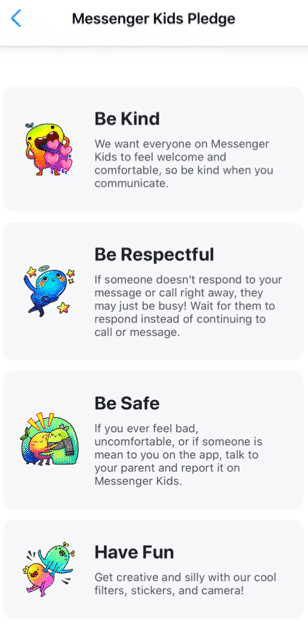
After you have completed all the above steps, your child will be prompted to add a photo of themselves, set a color to decorate the app, and complete “missions” to get to know the functions of the app. Your child will be prompted to read the Messenger Kids Pledge to be kind, be respectful, be safe, and have fun.[i]
What are the main features?
A parent dashboard that displays your child’s activities, contacts, and controls
Provide education to the child about new control features
Blocking a user allows the user to remain in the contact list, but the child will not be able to have individual conversations with that user
The child can use photo filters to send images to their contacts and to video chat
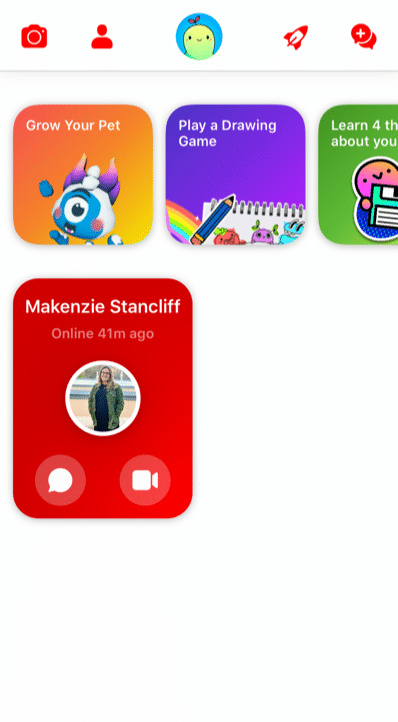
There are several “missions” the child can complete
Grow a pet
Play a drawing game
Learn 4 things about your information
Add a friend
Take a funny photo
Create a group
The Parent Dashboard
Because Facebook gets feedback from kids, parents, and child development experts, Messenger Kids is always changing for the better. For example, the updated parent dashboard is where you can see all of your child’s latest activities, contacts, and controls at a glance in one place. It also shows you
who and what content your child has reported or blocked and why,
a list of recent chats and calls (including how frequently your child is chatting/calling and with whom),
an image gallery of all the images and videos exchanged by your child and their contacts (including whether exchanged in a group).
User Education for Kids
Facebook has also thought through Kids’ digital literacy and privacy needs by notifying child users of the new parental control features in a Data Transparency Flow. Kids are prompted to go through this education with a push notification. It’s also available in the “mission” section of the app for kids. New users engage with this education during the registration process. They’ll get important basic information about how their personal data is used and shared when they use Messenger Kids – a great first step to cyber awareness and privacy issues in general.
Because child friendships need a healthy pause here and there, Facebook has also made blocking easier to use and less permanent. Before, if a child blocked someone, they were automatically removed as a contact. Now when a kid blocks someone, they won’t be able to communicate in a 1:1 chat, but they’ll remain contacts and still be able to be in group chats together. This allows kids to leave or stop individual interactions they no longer want while not having to leave group environments they may share with that contact. The child is always warned when they return to or start a group chat that contains a blocked contact that they have the option to continue to the chat, leave the group, or cancel joining the chat.
What are the privacy and safety options?
There is no minimum age of use outlined in the apps privacy policy. Facebook has a detailed list of what features they collect while using the app on their privacy policy. Here are a few of the features collected while using the app:
Facebook has recently added more controls. In the controls tab, you can see which device your child is logged into on MK, when your child last used MK on those devices and enables you to log your child out of selected devices. Parents also have the ability to remove and report any of these images and videos from the same Dashboard (doing so will remove that content from the child’s thread and notify them that you removed it).
As long as parents stay on top of who’s being friended and the information that is being exchanged, there are few risks associated with using Messenger Kids. The parent has the ability to control what the child can and cannot do as well as who they contact. Parents can also see what has been shared (and deleted).
However, any messaging app has its risks, especially when kids are involved. Here are a few we at GKIS thought you may want to consider
Your child and their friends may post inappropriately or impulsively
Cyberbullying between known contacts, like exclusion.
Too much access to friends and screens (of course, parents can schedule the use and use the sleep feature).
Your child is exposed to the Facebook brand, just as they are other popular American brands like Coca-Cola, Harley Davidson, and Budweiser.
Because parents have so much management opportunity and kids love the socializing, GetKidsInternetSafe rates Messenger Kids as a green-light app. We also love that Messenger Kids offers educational information that helps kids make better decisions with friends onscreen.
Thank you to CSUCI intern Makenzie Stancliff for co-authoring this article. For more information on keeping your child safe on social media, check out the Get Kids Internet Safe Screen Safety Toolkit. Be sure to add Messenger Kids on to the free GKIS Connected Family Agreement as “appropriate.”
I’m the mom psychologist who will help you GetKidsInternetSafe.
[i] Introducing Messenger Kids, a New App For Families to Connect. (2019, November 7). Retrieved from https://about.fb.com/news/2017/12/introducing-messenger-kids-a-new-app-for-families-to-connect/
[ii] (n.d.). Retrieved from https://www.facebook.com/legal/messengerkids/privacypolicy?version=2020
TikTok is a trendy, popular social media app that is controversial amongst parents. On the one hand, explicit language, attention-seeking trends, and cyberbullying on the app give TikTok the potential to be harmful. But kids and teens love it, anxious to join and follow the latest trends, memes, and creators. Like every app, it is important to consider the potential benefits TikTok can offer, not just the dangers. Many TikTok creators take advantage of the app’s popularity to provide inspiration and education to its adolescent audience. If you’ve decided to allow your teens access to TikTok, GKIS has identified some influencers your family may enjoy.
Who’s on TikTok?
Like YouTube and other social media platforms, TikTok users form communities based on popular trends like cooking, makeup, education, and wildlife. While we don’t think of apps like TikTok as a learning resource, many TikTok creators have dedicated their page to making teen-friendly, educational videos that can help your teen learn new things in a fun, accessible way.
Before You Start
As we mentioned in our GKIS Sensible Parents Guide to Tik Tok, it is recommended that kids be over the age of 13 before using TikTok due to its explicit language and content. Also, we strongly advise that you implement our free GKIS Connected Family Agreement before you allow your child a mobile device. With two versions available for kids and teens, our agreement spells out just what you should cover to help keep you family members safer online. All you have to do to get your free agreement delivered directly to your email by entering your name and email address on the GKIS home page. No purchase necessary and, if it’s not for you, you can unsubscribe at any time.
Meet Our Favorite Creators
For this article, we tried to find creators who have a relatively clean act for a teen audience. Please review these creators and decide for yourself whether they are good fits for your family.
Cooking
In the cooking community, creator @salt_to_taste has amassed over 1 million followers with his cooking videos and recipes. With easy recipes made with everyday ingredients and simple directions, this page is a great place for teens to get inspired to start experimenting in the kitchen. Salt to Taste makes a variety of foods, from snacks to smoothies to simple American and East Asian dishes. This creator has been active for almost a year and has been recently nominated for a Shorty Award in the food category. This creator does not seem to use inappropriate language and does not seem to do sponsorships.
Makeup
In the makeup community, creator @mariasgoldenmakeup is known for her bold eye looks and makeup tutorials. Though fairly new to TikTok, Maria has already gained over 61,000 followers with videos showing how she achieves her beautiful makeup looks as well as the products she uses to achieve them. Maria’s page can offer inspiration for teens who want to try their hand at makeup and achieve specific looks. Her looks can be used for everyday makeup and special occasions. She has done some sponsored posts but is transparent about what products are being advertised, using the hashtag #ad to indicate a sponsorship.
Nutrition
In the educational community, there are a few creators who have gained popularity for their educational TikToks in various subjects. In nutritional education, creator @sarahgracemeck, with over 149,000 followers, creates educational TikToks correcting various health myths and promoting tips on healthy eating. In our culture, we are obsessed with being thin and restricting what we eat, and this message unfortunately gets pushed on teens the most. Sarah does a great job using her background as a dietician to spread the message of healthy eating in a nonjudgmental, positive way. Sarah is passionate about spreading accurate information and debunking various unhealthy dieting trends and myths. It does not seem that Sarah offers sponsored content.
Science
In science education, creator @chemteacherphil is a popular user with a background as a high school chemistry teacher. Phillip has amassed over 1.3 million followers on TikTok with his videos exhibiting different chemical reactions and explaining their processes. The reactions he creates in his videos are fascinating to watch, and the information he gives can be useful to any high school student taking a chemistry class. Phillip does not seem to use explicit language or audios in his videos or do sponsorships.
Language
In language education, creator @fresajapomex is a popular multilingual creator who publishes videos in Spanish. With over 2.5 million followers, this creator does a variety of content from vlogs to comedy skits to food reviews. This creator, who goes by Sony on TikTok, has an energetic and kind personality and has a great sense of humor. Her parents are Mexican and Japanese, and therefore she speaks both languages as well as English. As a former Spanish student, one of the ways I improved my Spanish skills was consuming media in my target language. Sony’s content can be a great tool to help your teens improve their skills in a different language in a fun way. Sony does not seem to do sponsored content.
Wildlife
In the wildlife community, The Urban Rescue Ranch, the organization behind the page @ostrichplug, recently joined TikTok in an effort to show the work they do raising animals in an urban area. Their content shows their workers handling a variety of animals like frogs, possums, ostriches, pigs, and most recently, chickens. The creators often include their animals in fun, comedic skits and do frequent updates on the development of a few of their younger animals. This is a fun page for teens to view the different responsibilities of owning animals, and may even be inspired to go volunteer for an organization like the Urban Rescue Ranch themselves. This page does not seem to use any explicit language or audios and also does not seem to do sponsorships.
Fun with Coffee
Lastly, a popular creator among GKIS interns is @morgandrinkscoffee. Morgan is a college student who works as a barista for her local coffee shop, and she has gained over 2.2 million followers since joining in 2019. Her content mainly consists of the work she does as a barista, showing how she makes certain drinks, her day to day responsibilities, and some funny skits on her experience in the food industries. For teens who may be experiencing their first jobs in food services, Morgan’s content can show that it’s possible to enjoy the work that you do, but it also lets teens have a laugh at some of the shared struggles most of us have faced while working in customer services. Morgan is transparent in her sponsorships, labeling her sponsored content with the hashtag #ad.
Making TikTok Safer
As discussed in our previous TikTok article, it can be difficult to control the content suggested by the TikTok algorithm. But with careful decisions on who you allow your teen to follow, TikTok will suggest better, safer content that teens will love and parents can trust. Though it’s important to be cautious of the dangers of TikTok, with a little research, finding teen-friendly creators can help make the app safer and more fun for everyone.
Thanks to Alexandra Rosas-Ruiz for her research and help with writing this article. Want to learn more about how to manage the risks of the internet for your teen? Check out Dr. Bennett’s latest book, “Screen Time in the Meantime.” With a quick read (or listen because it is also offered in audio), you can learn creative, sensible, and family-tested parenting strategies to help protect your teen both online and offline.
I’m the mom psychologist who will help you GetKidsInternetSafe.
Onward to More Awesome Parenting,
Tracy S. Bennett, Ph.D.
Mom, Clinical Psychologist, CSUCI Adjunct Faculty
Twitter is a popular social media app that allows users to communicate with their peers through short “tweets” or posts. Many users post whatever is on their mind, what happened to them during the day or to reach out to their friends. Twitter has the potential for cyberbullying, communicating with strangers, sharing fake news, and viewing inappropriate content. This GKIS Sensible Guide provides the information parents need to know to be familiar with Twitter and make informed decisions on when and how to allow their children to use Twitter.
What is Twitter?
Twitter is a social media platform that allows users to communicate with others using short messages. Twitter messages are called “tweets” and may include text, photos, and videos. Many people use Twitter to follow and reach out to others and to post tweets that aim at becoming “viral.”
Many companies like Target, Starbucks, and fast-food restaurants have Twitter accounts and use them to advertise their products and reach customers. Twitter is also useful for customer service and reporting issues to companies. During highly political times, it is not uncommon to see politicians and their followers using Twitter to garner support and attack opposing opinions.
Twitter has produced many popular influencers. Katy Perry and Justin Bieber are the popular influencers for entertainment/celebrity. Elon Musk, inventor of Tesla, and Jack Dorsey, founder of Twitter, are the top influencers in the technology area. There are several other areas with influencers including The Frugal Traveler as a travel influencer, Jamie Oliver as a health influencer, and Atelier Dore as a fashion influencer.[1]
How long has Twitter been around and how popular is it?
Twitter was founded by Jack Dorsey and officially launched in July of 2006. It is based in San Francisco and has over 25 offices around the world. In a statistic published in February 2020, 56.2% of United States Twitter users were male.[2] There is a wide age range of users with the most common ages 25 to 34 and 55 to 64.[3] In 2019, 330 million monthly active users were reported.[4]
How old is old enough for adoption?
According to Twitter’s Terms of Service, a user “must be at least 13 years old to use the Services.” [5] This age is selected for compliance with the U.S.’s Children’s Online Privacy Protection Act (COPPA). However, in Dr. Bennett’s book Screen Time in the Mean Time, she recommends no social media app adoption until at least the second semester of sixth grade, when kids have more social experience for creative problem solving and are no longer transitioning into middle school. (If the seventh grade is a transition year in your community, she recommends waiting until spring semester for the introduction). Because every child has unique strengths and vulnerabilities, parents are well suited to make the best-informed decision for their family.
What is included in the personal profile?
To create a Twitter account, you will need to enter your name, phone number or email, and create a password. The name you enter does not have to be your real name. It can also be a nickname. You will be directed to set a profile photo that will be used as a thumbnail for all your tweets. A cover photo may also be uploaded and will appear at the top of your profile.
A profile also includes your birthday, including the year, and the month and year that you joined Twitter. It also displays the number of people who follow you and the number of people that you follow. The profile also has four tabs that include Tweets, Tweets & replies, Media, and Likes.
Tweets: Shows all tweets the user has posted or retweeted.
Tweets, retweets, & replies: Shows all tweets the user has posted or retweeted and any replies to tweets.
Media: Shows any photos, videos, or gifs the user has tweeted.
Likes: Shows all tweets the user has liked.
When clicking on a stranger’s profile, it will display if they are following you. It will also list everyone that follows them and that you follow. It also gives you an option to follow the user, turn on their notifications, send them a direct message, and mute, block, or report.
What are the privacy options?
When clicking on “Privacy and Safety” in your settings, Twitter gives you several options which include information on protecting your tweets, direct messages, discoverability and contacts, safety, and personalization and data.
Tweets
The Protect your Tweets option allows users to only show their tweets to those that follow them. This also requires users to approve their followers.
The location information option allows users to add their location to each of their tweets. Users also have the ability to delete all location information.
The photo tagging option allows users to block others from tagging them in photos.
Direct Messages
Users are able to block others from messaging them
Users are able to turn on or off their read receipts which notify the sender with the time they read their message.
Discoverability and Contacts
Users are able to allow people to find their accounts using their phone number or email address.
Safety
Users have the option of blocking media that may contain sensitive content
User can also mark the media they tweet as containing sensitive content
Users have the option of muting works or account
Users can block accounts which means they will no longer see the account and the account will no longer see their account
Users can change their notification settings or turn off notifications
Personalization and Data
Through these settings, users can control how Twitter personalizes content and collects and shares certain data
Users can block Twitter from sharing their data with business partners.
What are the risks for use?
Inappropriate Content
It is easy for users to stumble upon potentially inappropriate content for their age and/or fake news. If one user retweets or shares something potentially inappropriate, all their followers will see that post. The best way to prevent your child from viewing inappropriate content on their Twitter feed is to go through their privacy settings and make sure to block inappropriate accounts. Requiring your child to get approval before the following accounts is another way to prevent inappropriate content. Please note, however, that once on Twitter it is impossible to filter out all inappropriate content.
Cyberbullying
Twitter carries a major risk for cyberbullying due to the anonymous nature of the platform. Twitter users may use a fake name and photo in order to remain anonymous and then send harmful messages or leave harmful comments on others’ tweets. The best way to prevent cyberbullying is to have the Twitter profile set on private and only approve people who are known by the user.
Sub tweeting is another common form of cyberbullying that is found on the platform. Sub tweeting means posting a tweet about someone without specifically naming that person. Most subtweets are harmful and are used as a way to attack a person without having an explicit connection to that person. Once again, even with best efforts, it’s impossible to block all cyberbully behaviors once on the Twitter platform.
Communicating with Strangers
Users who have a public profile are able to be contacted by any Twitter user. This means that strangers of any age can message a user and send them text or photos. Predators have the ability to send messages to young users. A private Twitter account is the best way to prevent contact with strangers.
Distractibility & Constant Access
Twitter produces a wide variety of content which makes it easy to keep scrolling for hours. Users often start looking at one tweet which leads to others of similar content. The cycle can go on for hours. Also, consider how comfortable you are having your child’s friends have constant screen access with your child. Social media fills one’s digital inbox constantly, all-the-time.
GetKidsInternetSafe rates Twitter as a yellow-light app due to the easy access to strangers, inappropriate content, and the potential for cyberbullying. Twitter tries to block inappropriate content from being posted, but there are millions of users who post multiple times a day. If you do opt to allow Twitter, be sure and get your child’s username and password and monitor posts.
Thank you to CSUCI intern Makenzie Stancliff for co-authoring this article. For more information on keeping your child safe on social media, check out the Get Kids Internet Safe Screen Safety Toolkit. Be sure to add Twitter on to the free GKIS Connected Family Agreement as a “not yet.”
I’m the mom psychologist who will help you GetKidsInternetSafe.
[1] Meet The Top Twitter Influencers by Topic. (2018, February 20). Retrieved from https://izea.com/2018/02/20/influencers-on-twitter/
[2] Clement, J. (2020, February 18). U.S. Twitter user distribution by gender 2020. Retrieved from https://www.statista.com/statistics/678794/united-states-twitter-gender-distribution/
[3] Clement, J. (2019, August 9). Twitter: U.S. user age distribution 2018. Retrieved from https://www.statista.com/statistics/192703/age-distribution-of-users-on-twitter-in-the-united-states/
[4] Clement, J. (2019, August 14). Twitter: number of active users 2010-2019. Retrieved from https://www.statista.com/statistics/282087/number-of-monthly-active-twitter-users/
[5] Twitter Terms of Service. (n.d.). Retrieved from https://twitter.com/en/tos
Minecraft is a virtual 3D game that allows users to create unlimited worlds using online building blocks while unlocking resources along the way. From cities to rollercoasters, the possibilities are nearly endless. We at GKIS are big fans of Minecraft because it fosters creativity, problem-solving, new skill development, and socialization opportunities. But like any online tool, there are also associated risks. This GKIS Sensible Guide provides information that parents need to optimize Minecraft’s benefits while keeping your children safe.
How long has Minecraft been around and how popular is it?
Minecraft was created in 2011 by Swedish game developer Markus Persson and purchased by Microsoft in 2014. Nearly 176 million copies were sold by late 2019. In 2019, Minecraft has over 112 million players every month and can be played on various platforms including smartphones, tablets, Xbox, and other gaming stations. It has evolved to include more elements and has a series of spin-off g
ames with different themes. Users also post Let’s Play videos YouTube to show how they build their worlds and different ways to create items.
Getting Started on Minecraft
According to Minecraft’s Terms of Service, “If you are young and you are having trouble understanding these terms and conditions, please ask a responsible adult such as your parent or guardian.” Minecraft also insists that children under age 13 have their parents download and register for an account. However, children can easily change their age before signing up to go around that rule.
Minecraft varies in price depending on the type of platform. Signing up for an account is simple. Just create an account with a unique username and email address. Users are given one profile by default but have the option to make multiple profiles.
Features of Minecraft
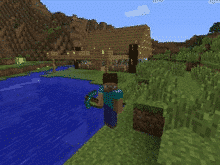
Minecraft allows users to collect resources and build their own worlds. Users can dig, build, and enchant items to transform their world into whatever they want. Users can also select different game modes, each with unique challenges and features.
Survival Mode
One of the main game modes
Players must collect resources, build structures, battle mobs, find food.
The goal is to survive and thrive.
Creative Mode
Players are able to build with an unlimited number of blocks.
Players are given all the items needed to build.
Mobs still exist, but there is no threat to survival.
Players are able to fly around the world.
Adventure Mode
Players use maps to navigate the world.
Depending on the device played on, blocks can either be destroyed or placed.
Hunger and dying is possible.
Spectator Mode
Users have the ability to fly around and observe the worlds without interacting with it
Players are invisible and can move through blocks and buildings.
Hardcore Mode
Available only on the online version.
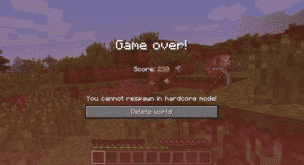
The world is locked to hard difficulty and the player cannot respawn after they die.
Only specific worlds enable hardcore mode and not individual players.
Minecraft has two different play modes, single-player and multiplayer. In single-player mode, a user only interacts with their own character and their own world. In multiplayer, users can join any game with any player, friends or strangers. Parents have the ability to sign their child up for a family-friendly multiplayer mode that is supervised and has restrictions on the chats and interactions.
The Benefits of Minecraft
Minecraft allows players to use their imagination and create what they desire. Users develop problem-solving skills while they are creating their world. Minecraft also helps users develop computer literacy skills, teamwork, and collaboration. For example, while in multiplayer mode, players are able to communicate and work together to build their worlds. Mathematics and spacial skills are also developed while playing the game. For example, it takes six planks to build one door. If players have 60 planks, they can calculate how many doors they are able to build.
Parents have the ability to limit their child to only single-player mode or a family-friendly version of multiplayer. There are several Minecraft servers that have been designed for children in mind. They are designed with a code of conduct and have full moderation. Parents are able to sign their children on to a family-friendly server where they will be safe from interacting with strangers in a negative way.
The Risks of Minecraft
There are relatively few risks for children playing Minecraft. With the exception of playing too often, for too long, or getting frustrated with gameplay, single-player mode is relatively safe because kids can be restricted from interacting with players they don’t know. However, violence can be easily found in the game. For example, there are multiple ways to kill users, mobs, or animals, such as:
setting another player on fire using lava or a torch
hanging an animal or another player
using canons and bombs
using sand to trap and suffocate mobs
using a zombie as a weapon to kill a villager
shooting with a gun or stabbing with a sword
There is also a chance for cyberbullying in multiplayer mode. It is not uncommon to come across a user who is intentionally irritating and harassing other users. They often use parts of the game in unintended ways. For example, they may curse, cheat, and kill without reason. Cyberbullying also includes players who deliberately kick players off the server and anger others for their own enjoyment.
Multiplayer mode carries the risk of children chatting with strangers. For example, in 2017 a Minecraft user was jailed for meeting two children on Minecraft and persuading them to carry out sexual acts. [i]
There is a potential for users to track down your IP address from playing Minecraft. An IP address is n unique number for an internet network. The IP address provides the location of where your network is coming from. If users are able to hack into the server, they can find another player’s IP address. This can lead the user to the location of the player within a couple of miles.
If your child wants to play Minecraft, GKIS recommends that you:
Add it to your free GKIS Connected Family Agreement (If you haven’t downloaded it yet, enter your name and email on our GetKidsInternetSafe home page and it will be emailed immediately)
Discuss the risks of chatting with strangers with your child. For ideas about how to do this, check out our GKIS Connected Family Course.
GetKidsInternetSafe rates Minecraft as a green-light app due to the safety of the game and the benefits it can have on children’s development. Dr. Bennett has found that her kids and the kids in her practice love Minecraft when they are young and even return to it as teens! They tell her they appreciate the simplicity of it and especially love the relatively stress-free atmosphere with no in-game purchase requirements.
Thank you to CSUCI intern Makenzie Stancliff for writing this article. If you love to encourage creativity with your kids, you won’t want to miss the Makerspace ideas in our Connected Family Course.
I’m the mom psychologist who will help you GetKidsInternetSafe.