Need peaceful screen time negotiations?

Get your FREE GKIS Connected Family Screen Agreement

social media

3 Tips to Get Back on Track With Screen Safety After the Slips

blog68girlonbooks

Our kids are solidly into midterms and my practice is flooded with concerned parents, bummed out kids, and grade dips. Families start out dialed in with expert organizational and parenting practices, lunch boxes packed and folders color-coded. We set screen blackout times and enforce rules and regs around social media and buddy lists. Everybody is on-board with lofty academic goals, locked in screen media agreements, and calendars ripe with ambition. But then we get busy, really busy. Homework gets shoved to the bottom of backpacks, we cave to the shortcuts of fast food after soccer practice, and screens slowly move from the family docking station to the bedroom. Grades slip, tempers flare, and Dr. Bennett’s schedule gets really busy.

AS A FALL PICK-ME-UP HERE ARE 3 AWESOME PARENTING SHORTCUTS TO GET US BACK ON TRACK

1.    Set a quick agenda for  GKIS tech talks

 and create space to deepen the parent-child connection.

To get ideas about what to talk about, simply go to GetKidsInternetSafe.com, enter your name and email address, and wait for weekly articles to arrive in your inbox. Each weekly article covers hot topics for skill-building and discussion, like cyberbullying, netiquette, digital footprints, and issues spurred by current media events. With this information you are prepped to speak with authority (and a sense of humor) about online issues. With each conversation you’ll see your connection deepening and your collaboration improving. Soon they’ll consider you their #1 GO-TO PERSON for online and offline issues. Taking the time to reboot your parent-child connection is your most powerful tool for safety and the very thing that makes us go to sleep at night without guilt and worry.

2.   Establish the GKIS family docking station as a habit 


Pick up your iPhone right now, push the button, and tell Siri to set a reminder 15 minutes after your child’s bedtime. “Remind me to check the FAMILY DOCKING STATION.” Then set it to repeat. This will ensure screens get docked with you at night before lights out. Remember, screens in the bedroom will eventually lead to inappropriate disclosures, x-rated browser searches, and sexting. Even the “good kids” are doing it so surrender your denial already. And it starts younger than you think. For a great blueprint for home staging, check out my GKIS Connected Family Online Course.

3.   Install tech tools that save you time and hassle 


I don’t know about you, but the last thing I want to do is stalk my thirteen year-olds every move on Instagram. I mean really, how many selfies with Frappuccino’s can a middle-aged mom take? Besides, my daughter is an awesome kid. I want to grant her some privacy with her friends, and I’m not particularly comfortable spying on her 24/7 online. But as an Internet safety expert and clinical psychologist, I’m acutely aware of the risks. Knowing what I know, I’m simply not willing to let her through this dangerous portal alone.

That’s where tech can help. I offer a GKIS Tech Playbook in my 30-Days to Internet Safety Course. With this step-by-step blueprint, I suggest several apps and software programs that help parents fill screen media risk gaps.

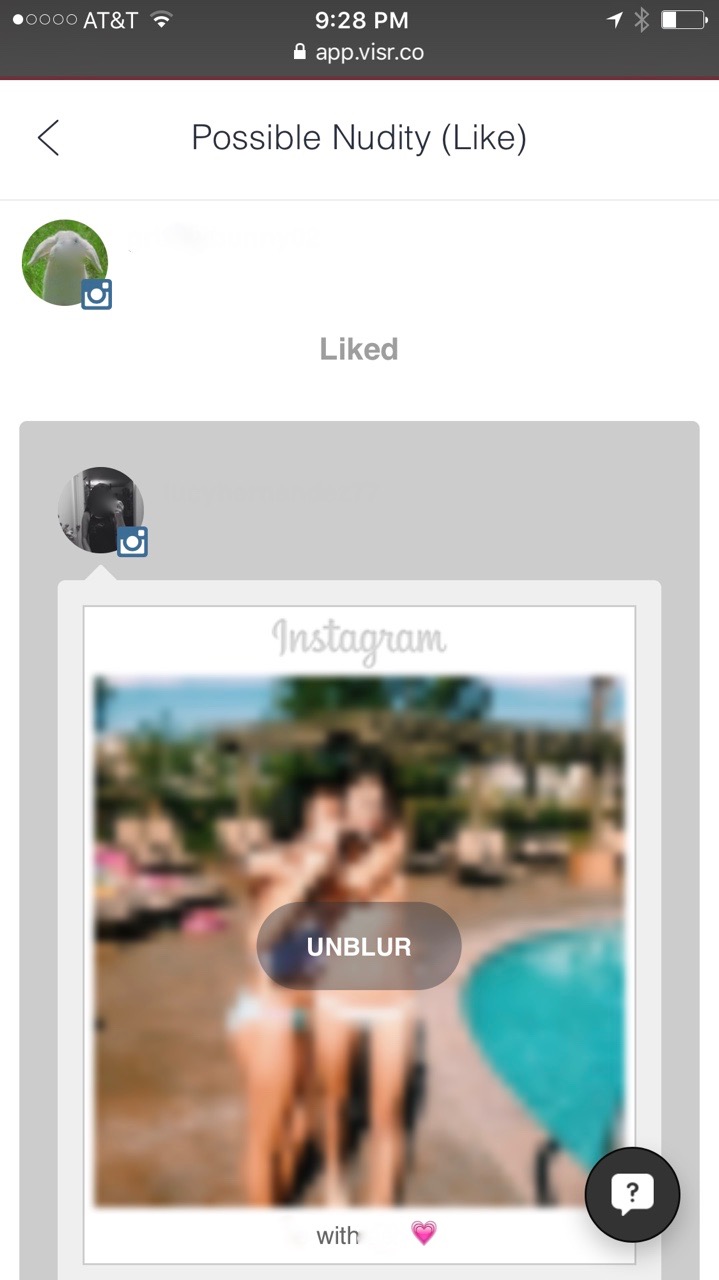
One of my favorites is VISR. Their website says, “VISR is a simple, effective and kid-friendly tool notifying parents when relevant safety issues such as bullying, risky geotagging, and unusual times of use are detected across social networks.” When the creator and CEO Robert Reichmann contacted me through GKIS, we had a long discussion about our concerns and parenting perspectives regarding screen safety. And I’m happy to say that we became fast friends.

Robert and I both believe that kids must be monitored with social media use in order to achieve safety. But we also hold the parent-child connection as the highest priority. In order to protect that connection, we think being open and honest with our kids about our parenting choices is critical to maintaining trust. Because I agreed with Robert’s philosophies, I agreed to try out VISR with my family.

Now keep in mind that VISR isn’t the only tech tool we use. But I’m so happy to say it is among my top favorites. VISR only alerts me if their computer algorithm picks up something of concern from my teen’s Instagram use. I’m alerted to issues within 22 categories that include violence, explicit content, drugs, or late night usage. I honestly love it. 
1

I’m pleased to report that VISR’s notifications haven’t uncovered dangerous content for my child. However, it did catch some after-hours usage and has inspired countless conversations including a recent one about a peer who regularly posts inappropriate content. I didn’t step in and make a decision for my daughter about whether to remain that kid’s friend, but I have challenged her to think about some issues in a way that has made our alliance stronger. She accepts my influence while still maintaining her independence. This is the secret to a strong connection and expert skill building. Ultimately I love the idea that I facilitate her in making the safest choices rather than helicoptering her into sneaking and resentment.

I know this sounds like an ad for VISR, but here’s the truth of the matter. Because Robert and I believe in each other’s programs, he offered a deal for GKISsers when they sign up for VISR! Just enter “GKIS” as the coupon code. Although VISR is currently free, GKIS users are guaranteed three months free if and when VISR charges for the service. And because I love VISR so much, I asked Robert if I could write a blog about it to spread the word to informed parents. Currently they cover YouTube, Instagram, Gmail, Facebook, Twitter, and KidsEmail. 

With services like GetKidsInternetSafe and VISR in your corner, you will be informed, confident, and more successful maintaining screen safety in your home.

I’m the mom psychologist who will help you GetYourKidsInternetSafe.

Onward to More Awesome Parenting,

Tracy S. Bennett, Ph.D.
Mom, Clinical Psychologist, CSUCI Adjunct Faculty
GetKidsInternetSafe
The Secrets to Happiness and the Creation of GetKidsInternetSafe

 

blog80happiness

I was listening to a TED talk on happiness this morning. It got me reflecting on my life and the current state of things in it, including you guys and GetKidsInternetSafe.

I’m solidly in what is considered “midlife.” It is a strange place to be. As my mirror reflects new wrinkles, I feel as young and vibrant as I’ve ever been. My gangly teens chatter around me, constantly unveiling new sparks of independence, while I’ve struggled to cope with the storms of menopause amidst the grief from the deaths of my father and stepmom and the reality of my mother sinking into disabling dementia. It’s surreal really.

And I’m only half way through. Am I happy?

TED guest psychologists and best-selling authors offered five not-surprising by genius secrets to happiness (that I whole-heartedly agree with):

  • PRODUCTIVITY: People who spend time stressing, worrying, and fretting rate themselves as less happy than those who are actively distracted by the process of “doing.”
  • SIMPLICITY: Those who unclutter their burdens of “stuff” are able to cleanse their schedule of the “shoulds” and instead soak in the rejuvenating pleasures of chosen activities.
  • MINDFULNESS: Soaking in the present of the moment rather than being distracted by the past or future slows time and makes one more thoughtful and deliberate with their current activities and interactions.
  • GRATITUDE: Appreciating those you love, the beauty of your surroundings, and the very essence of what it means to be alive fills the heart with the awesome sauce of happiness. In my practice I call this the transformation of “stinking thinking” into “can-do thinking” and consider it the most potent protectant of self-confidence.
  • TIME: Despite what we expect, most of us recover from even the most flattening of crises after three months time. Time heals and tragedy passes. We must move on in the best ways we can muster carrying those we’ve loved with us. I believe that legacy building is always launched from loving inspiration.

Two years ago sucked for me. And weirdly, from that time came GetKidsInternetSafe. In the midst of grieving the death of my parents and the decline of my mom into dementia, I was also buried in an overwhelming tangle of a lawsuit and estate managing nightmares (including the bullying behavior of a misguided and drug-addicted relative) and the transformative launch of my oldest daughter to college away from home. I needed help. Looking back I almost ache thinking of the intensity of emotions and responsibilities I was juggling in the thick of it. Yet I’m so grateful for having the experience. Not that I would wish anything close to the torrent of loss and disappointment and hurt I was drowning in; but in the clarity of emotion the recovery brought me. It was humbling and illuminating, great insight into the similar struggles of many of my clients.

I suppose my biggest take-away from my tragic few years is that I can trust in my resilience as a human being. That happiness prevails, and I’ve earned enough self-understanding to know the things I have to implement in my life to stay afloat. I understand now that if I’m struggling, there is help if I ask.

I want to share how founding GetKidsInternetSafe was a successful intervention in the eye of my storm. Not because I made any money from it (because I haven’t yet earned a penny), but because the giving and learning aspects of the project gave me the focus and inspiration I needed to persevere during the times I felt flattened. Everything I learned, the people I met, and the help I was giving gave me hope and inspiration.

I recall the moment I realized I needed help. I was in the thick of it feeling truly depleted of everything I’d always relied on to keep going. I looked up from my computer and realized that, in keeping all of the balls I was juggling in the air, I had allowed my children too much time and unprotected access to their screen media. I was committing the same mistakes that parents in my practice had just before their kids got into serious Internet-involved troubles. I was lost in my own responsibilities and leaving them to fend for themselves. I realized with vivid clarity that if I didn’t craft a deliberate screen safety plan, I could lose far more than I had already, my connection with my kids.

Maybe that sounds dramatic, but it actually was. I was treating kids who had been wooed by Internet predators and others who were addicted to porn. I saw how parents had slipped and kids were relying on their friends through texting rather than their families at home. My guilt and worry added to my burden.

While I considered how to resolve it, I thought about my parents and their sources of resilience; my strengths, my weaknesses, my opportunities. And weirdly I realized that my parents had turned to alcohol when things got tough. Maybe if I could find a “healthy” drug I could get some respite from this challenging time. Now I enjoy a glass of wine here and there, but by some miraculous stroke of luck I seemed to have not inherited the addiction gene. But what I can lose myself in with true joy and happiness (which is kind of like addiction) is learning.

I live happily in a marriage with a man who can expound on the most interesting of topics, and I thrive in a teaching university environment. The creativity and intensity of clinical work has brought me enormous satisfaction and being out in nature is my soothing tonic. But nothing, and I mean nothing, brings me the kind of electric joy as the happy chaos of being a mom.

Ironically, that true joy was exactly what had taken a backseat during my overwhelm. Not only did I not have the time to spend with them, I didn’t have the energy. I needed help. I needed an infusion of something I could be passionate about. Something so cool that I could dig in and disappear from the grief with it; something that would be fun for me, helpful to bring me back to my family, and provide a service to parents and kids that I could really be proud of. From this emotional place of depletion GKIS was born.

Thank goodness I am happy to say that after two years I am out of the thick of my troubles. I’m back to rejoicing fleeting moments of profound celebration and that electric tingle of knowing I’m alive and those I love are healthy. That I have blessings that deserve grateful reflection and those five happiness secrets I detailed earlier are in delicious abundance. I no longer stress and feel guilty that I haven’t figured out how to filter inappropriate content, nor do I allow too much screen time. We are at a healthy balance. In this aspect I feel confident we are safe and our connection has deepened and broadened because of it.

Just as I am grateful for what GetKidsInternetSafe has brought me and my family and then my clients, I am grateful to you for reading this and for loving your kids in such a profound way you are seeking answers too. And for you I hope that my GKIS parenting programs will provide you the saved time and diminished worry so you can focus on those secret habits of happiness too; productivity, simplicity, mindfulness, gratitude, and time. Oh! And let’s not forget the most important source of happiness of all, your precious connection with your kids.

To start shedding worry today, check out my ultimate safety guide to simplicity with home staging, the GKIS Home Starter Course.

Onward to More Awesome Parenting,

Tracy S. Bennett, Ph.D.
Mom, Clinical Psychologist, CSUCI Adjunct Faculty
GetKidsInternetSafe.com

Enjoy the awesome TED Radio Hour that inspired this week’s article, Is There A Secret To Happiness?

Why Screen Use is the New Heroin

blog67tweenonground

When the term “addiction” is used, most people think of drugs or alcohol. But in the digital age, there is a new addiction that is accessible to almost everyone and can start in elementary school. It is the Internet. Parents use the Internet to occupy their children, and teachers use it in the classrooms as a daily educational tool.

Internet addiction does not sound like a big deal, but like other addictive drugs and behaviors, it has undesirable psychological consequences and some of the same withdrawal symptoms. It is also very accessible. No ID is needed to verify age for use, and the Internet is open twenty four hours a day, seven days a week.

I’m Kathleen, Dr. Bennett’s intern from California State University Channel Islands. My eleven year-old daughter once again did not do her chores, so I took her phone and computer use away. Her reaction shocked me. When she could not access her social media sites she became agitated, emotional, restless, and begged and pleaded for me to let her use it for just a minute. She was acting like a drug addict who needed a hit to ease the pain. Was she in the beginning stages of Internet addiction?

Pre-addiction signs to look out for:

Increasing use to achieve satisfaction

This can happen when an adolescent is using gaming or social media to fulfill emotional needs. They will keep logging on to feel close to others if their emotional needs are not being met in real life. These needs are satisfied through maintaining online relationships with gaming (more common among boys) and social media (more common among girls) to give the feeling of pleasure and or escape from what is going on in nonvirtual life. Emotional needs are met through getting a “like” on a picture, a response to a post, or a new friend request rather than a healthy collaborative friend relationship.

Preoccupying thoughts about use

An adolescent may have intrusive thoughts about Internet use such as, “I need to see if anybody commented on my photo,” or “What if I miss out on something important?” These thoughts can distract them from studying and maintaining real life relationships with their friends and family.

Falling grades from overuse

Grades can decline from screen use for social media, gaming, and chatting instead of doing homework and studying. Also if a child has a computer or smartphone in their room, loss of sleep from staying up late to use the Internet contributes to falling grades (Hung et al., 2005).

Other symptoms that may be an indicator that an adolescent’s Internet use has moved from fun to addiction are lying about how much time is spent online, responsibilities get ignored, mood changes from not being able to log on, and relationships become strained. Despite addiction risk, there are many benefits that the Internet provides. It serves as research and study tool and can help maintain relationships between friends and family.

Suggestions to ensure healthy screen use:

Set limits. Filter. Monitor.

One of the best strategies for preventing Internet addiction is making sure your children have limits to what they do and see online and how much time they spend. Make nonschool computer use a reward for helping out and maintaining good grades instead of using the computer to entertain your child.

Prevent boredom by providing enriching activities

Boredom can be alleviated with Internet use, but there are many other things that can as well. Provide and promote books, puzzles, or arts and crafts instead of Internet use. Instead of the computer being used as a tool for relaxing, encourage going for a walk around the block or sign your child up for after school group or sport activities. This will not only help limit computer use but it also provides exercise.

Connect better as a family

Family activities will help strengthen relationships and bring closeness. Have a picnic in the park, go on a hike, or play a board game together. This will not only help limit computer use for your child but for you as well. This can also be a great way to have a ongoing teaching dialogue with your children and family (Lin et al., 2009).

blog67boyinhat

While there are lots of benefits of Internet use, it is important to keep a look out for trouble signs. And if your child’s symptoms are getting in the way of academics and healthy relationships, seek support from your pediatrician or clinical psychologist. For more information on how to limit computer time, check out “Start Fall Fresh with a Cleansing Digital Detox.”

KathleenCongratulations and thank you to Kathleen Gulden, CSUCI intern, for authoring her first GKIS article!

I’m the mom psychologist who will help you GetKidsInternetSafe.

Onward to More Awesome Parenting,

Tracy S. Bennett, Ph.D.
Mom, Clinical Psychologist, CSUCI Adjunct Faculty
GetKidsInternetSafe.com

Works cited:

Lin, C. , Lin, S. , & Wu, C. (2009). The effects of parental monitoring and leisure boredom on adolescents’ Internet addiction. Adolescence, 44(176), 993-1004.

Ko, C. , Yen, J. , Chen, C. , Chen, S. , & Yen, C. (2005). Proposed diagnostic criteria of Internet addiction for adolescents. The Journal of Nervous and Mental Disease, 193(11), 728.


The GKIS Sensible Parent’s Guide to Tumblr

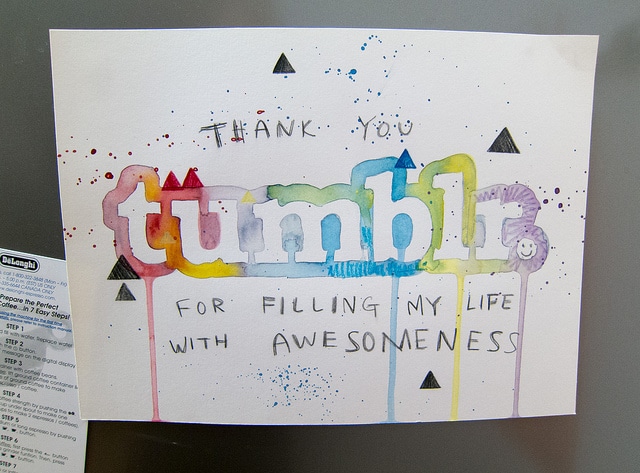
tumblr advertisement

Tumblr is a multimedia microblogging social networking site that many tweens and teens use for streaming a scrapbook of short blogs, images, links, text, and videos and audio clips. Many of my clients love the creative versatility of Tumblr and most choose to have a public profile. Tumblr users commonly form close-knit, highly-involved communities that share common passions. Celebrities like Taylor Swift have benefitted from her 46 million following and reposting fans (#swifties) resulting in consistently viral coverage. Recently a friend of a client detailed her suicide plan on her Tumblr blog, triggering a welfare check from the police. Although this app resulted in a teen getting the help she needed in this instance, often times intimate information is used to get to an unintended victim. Trigger warning with this article due to the graphic and sexual image examples easily found on Tumblr. Sorry folks, but you NEED TO KNOW.

What is Tumblr?

Tumblr is a microblogging, social networking site that you can now use on your phone as an application. It was founded by David Karp and is owned by Yahoo! People use it to post, reblog, or comment on blogs.

What are Tumblr’s popular features?

  • The home screen will contain blogs posted by those you are following.

blog66image1

  • The home screen is where you can see posts made by other people; they can be blogs or reblogs. (Reblogs are when people take a blog and repost it onto their page for more people to see it).
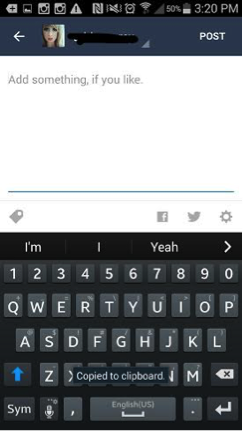
  • To reblog a post you select the two arrows going in a circle; it will take you to a page where you can add something yourself to the post.

blog66image2blog66image3

  • If you want to just like a post you can tap on the heart to the right of the arrows; if you want to leave a comment you can tap the bubble to the left of the arrows. Or you can share a post by tapping the three dots and you can share it via facebook, pintrest, email, etc.
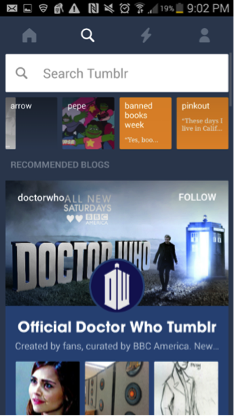
  • The search icon next to the home is where you can look up other users; you can search for friends or you can just search for anyone that may blog about things you enjoy. You can type just about anything into the search bar and find people to follow.

blog66image4.png

  • It will also give you recommendations of what to follow; if you want to follow that page you can just click the follow button.
  • The lightning bolt icon is where you can see your notifications. People can tag you, reblog your post, or even comment on something.

blog66image5

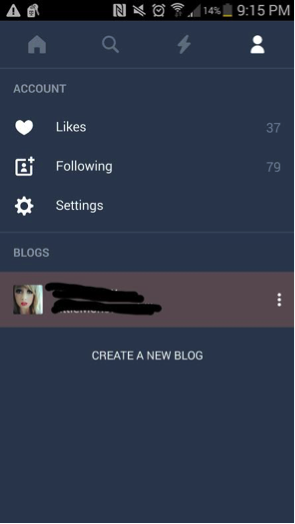
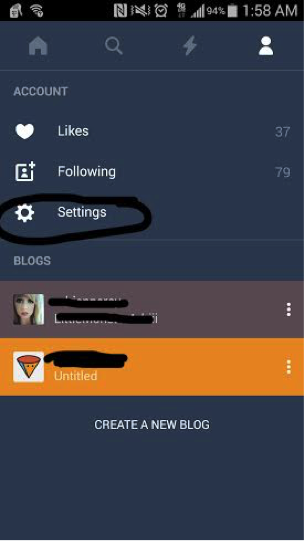
  • The person icon next to the lightning bolt is your account information; here you can see your likes, who you’re following, your settings, and your blog information. There is also a place where you can start a new blog which is like a subaccount.

blog66image7

  • To post a blog you can select the big blue circle with a pencil on the main page.

What is included in the personal profile?

  • To look at your own personal profile you can go to the person icon, click your picture and username. It will bring you to your profile and you can see what everyone else can see.
  • You can edit your user name, background, profile picture, etc. It will also show things that you have posted or shared.

blog66image8

  • The big blue circle with the pencil is where you can post your own personal blog.
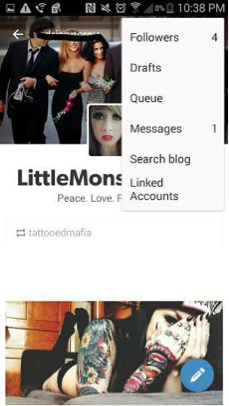
  • Top right hand corner is where you can edit your profile.
  • The person icon to the left of it is where you can see your followers, messages, search for other blogs, view linked accounts if you have any, etc.

blog66image9

What are the privacy options?

  • There are not many privacy options on Tumblr.
  • You are unable to make your main blog private.
  • In order to post a blog that only you can read; you must make a secondary blog account.
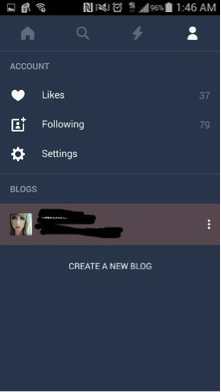
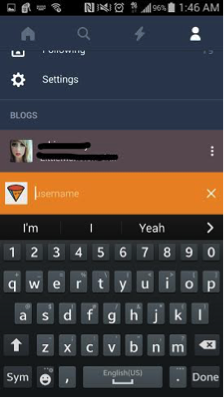
    • To make a secondary blog, you go to the person icon at the top right.
    • Tap the “create new blog link.”

blog66image11blog66image12

  • These secondary blogs are unable to follow other blogs, talk to other users, like or post other blogs.
  • Other privacy information Tumblr offers are under the person icon. Select “Settings,” then select privacy policy.
  • In this section Tumblr just explains why they use your email, username, password, and age (such as using your email to send you updates about the app or site). They note that this information is kept confidential from third parties,

blog66image13

How long has it been around and how popular is it?

  • Tumblr has been around since November, 2007.
  • It is estimated that there are about 30 million users and possibly more.
  • Popular amongst teens and young adults.

What are the risks for use?

Cyberbully potential:

  • Due to the confessional-type nature of many entries, Tumblr users are extremely vulnerable to trollish and cyberbullying comments.

Inappropriate content potential:

  • Social media sometimes provides groups to make teenagers feel like they “belong.” However these groups can be dangerous.
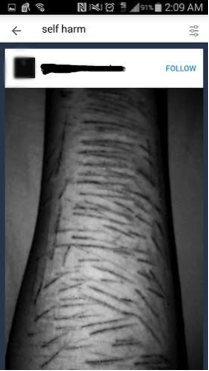
    • Cutting: Those who may have depression and depend on self harm can reach out to others who also cut and share stories/pictures of their experiences, which can lead to more cutting and other “ways” of doing it.blog66image16
      blog66image14
    • Sexualized Content: Due to all ages being on the internet, parents should be aware of the sexualized images that are available through Tumblr.blog66image17 blog66image18
    • Eating Disorders: People tend to use their blogs on social media sites to share their stories and/or pictures of their struggles with eating disorders. This content may give others advice or help on how to become anorexic or bulimic.blog66image20 blog66image19
    • Drug Use: Blogs may be used to “brag” or talk about drug use, making it seem like a cool thing to do.


blog66image22 blog66image21

Making poor decisions:

  • Teens long to form private, creative communities and Tumblr is the perfect place to do that. As with all social media apps, Tumblr can be prosocial or destructive. Therefore if you teen wants Tumblr, I suggest that you continue to nurture a warm, collaborative relationship so they can come to you if they run across anything uncomfortable. And for young teens, definitely monitor content.

Due to the intimate and dangerous content often shared on Tumblr, I recommend this is a GKIS yellow-light app (with monitoring only). Kids are being introduced to topics that they may not be mature enough to handle (is anybody?) and are also vulnerable to cyberbullying. More scary to me is the opportunity that online sex offenders have for learning intimate details about children, such as special interests and personal identifying information. Tumblr is tantamount to confessional YouTube channels and social networking sites like Twitter. Do you have any stories to share about Tumblr? Please share them below!

11755355_1062290680448181_4814698546326661932_nThank you to CSUCI student Adrienne Roy-Gasper for co-authoring this article.


I’m the mom psychologist who will help you GetKidsInternetSafe.

Onward to More Awesome Parenting,

Tracy S. Bennett, Ph.D.
Mom, Clinical Psychologist, CSUCI Adjunct Faculty
GetKidsInternetSafe.com

Photo credit:

Tumblr by Scott Beale, CC BY-NC-ND 2.0

Snapchat’s New Snap Map Feature May Be a Better Privacy Option Than Facebook: What Parents Need to Know

Snap Map feature on Snapchat

Hey GKISsers. I’m in Berlin (!) for a security conference, and my email feed is alive with press inquiries for my opinion about how Snapchat’s new Snap Map feature threatens child safety. Because I try to have a life, I was unable to respond quickly. But I’m on it now, AND I have a unique opinion about why I’ve chosen Snapchat over Facebook on this trip for privacy reasons. Huh? You may ask.

Let’s start with Snapchat’s big news

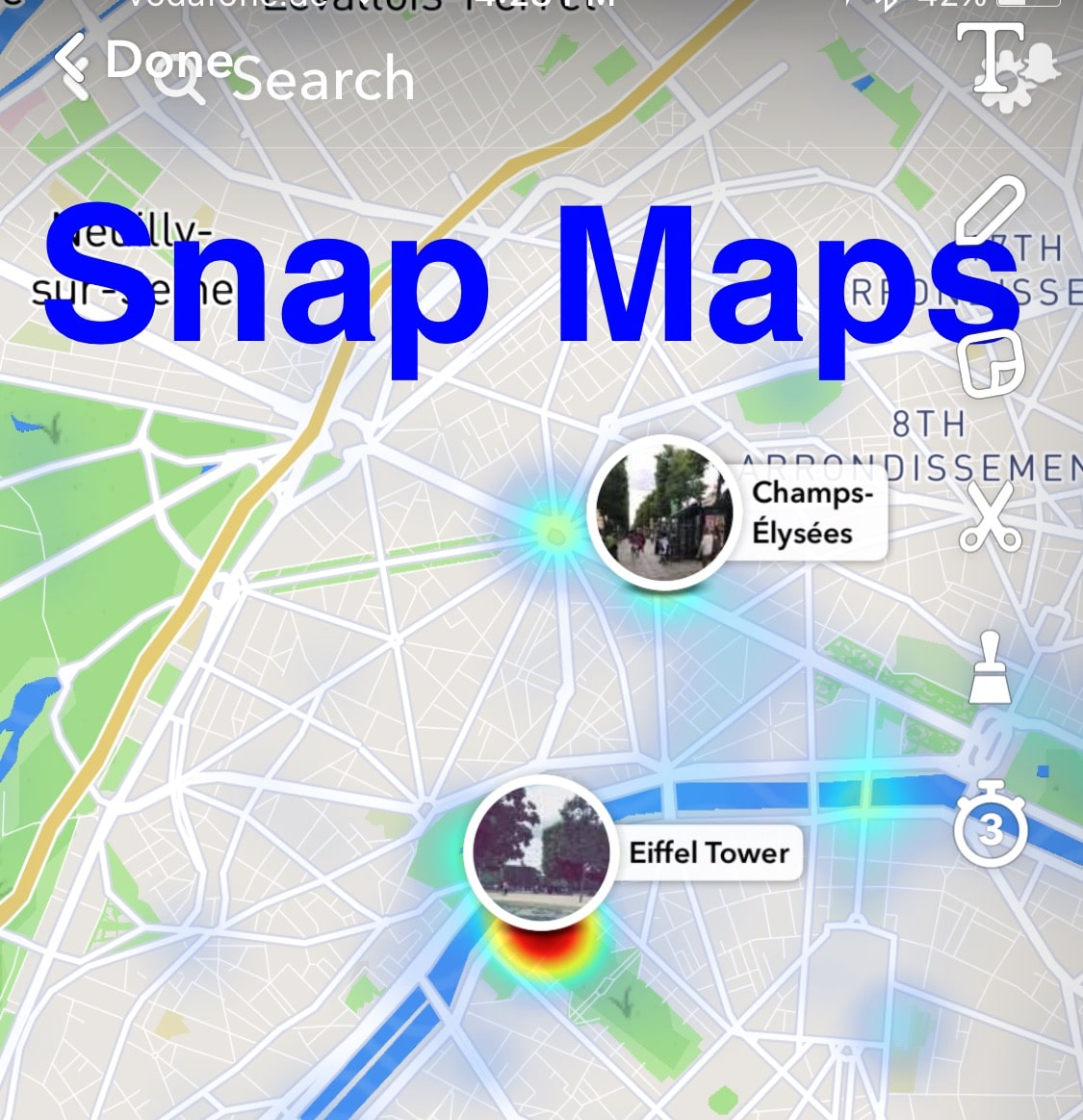
Here’s the skinny: With the new 10.11 Snapchat update, your teen’s worldwide location can be tracked real time using the new feature Snap Maps. That means anybody can pull up a map and see exactly where your child is posting from in the moment with such precision one can see which part of a building your child is in. Location updates only when Snapchat is open and will disappear from the map if the app hasn’t been opened for several hours.

Their location shows up as an “Actionmoji” on a map – an avatar doing Snapchat’s best guess of activity typical of that location (like sitting under an umbrella at the beach or listening to music). Snapchat also notes your speed of travel and whether or not your headphones are plugged into your phone. If your child views the map, she can see where her friends are at anytime, and what she is missing out on. She may also see the locations of Snapchat users she does not know for snaps submitted to “our story,” like a collection of snaps at a concert or sports event. Amazing to get a snapchat view of events occurring real time around the world.

In order to create this new feature, Snap bought social media mapping startup Zenly in May of this year. Snapchat’s press release states, “We’ve built a whole new way to explore the world! See what’s happening, find your friends, and get inspired to go on an adventure!”

What does that mean for our kids?

It means that today, not tomorrow, your kids need to select the ghost feature for Snap location sharing, or their Snapchat buddies may be able to track their exact location real time.

For the FOMO (fear of missing out) of adolescence, this feature is cool. Imagine seeing where friends and other Snap users are at all times, maybe inspiring Friday night plans or providing options about where to go. Also, if there are lots of Snapchat posts in one location, a patch of color appears to identify the hotspot. If friends are all in one group, you can even kick off a group chat. How cool is that? But let me be a huge mom-like buzzkill and paint a picture about what that could mean based on terrifying human trafficking scenarios I’ve seen in my office:

Impulsive Snap from your daughter: “<pouty face> alone again on a Friday night”

Snap maps identifies her bedroom address with a map to every creeper your daughter happened to friend in order to get her numbers up.

Knock at the door

I know that sounds dramatic, but it happens more than we’d like to think. Check out my GKIS article to learn how pimps and predators search out teens on social media to groom them for a face-to-face meeting. Imagine your daughter eventually agreeing to meet a predator who’s been wooing her for weeks for promised romance, tenderness, gifts, and understanding (what all young girls dream about), resulting in her being drugged and locked in a room so her new pimp can arrange a series of rapes by paying customers. I sincerely apologize for the graphic representation of truth, but honestly parents, we need to face the facts to get our GetKidsInternetSafe.

On a less scary note, there’s also a cyberbully risk when kids can see exactly which get-togethers they were excluded from.

What can you do to help keep your child safe?

  • If you’ve agreed to Snapchat for your teen, download the app and check it out so you can set up an informed digital contract with ongoing educational dialogue. Here is my GKIS article to help with Snapchat basics (update with Snap Maps pending).


  • Require that your child select appropriate privacy options on Snapchat. When you are on the Snapchat camera home screen, pinch out to get to Snap Maps. Tap on the settings gear in the top right hand corner. Select who you want to share your location with (a select group of friends, all Snapchat friends, or no friends at all – ghost mode). Obviously, I recommend that the ghost mode option “no friends at all” be selected. If friends-only gets selected, have a discussion about what that might mean in regard to friending strangers, frenemies, or what may happen if there is a falling out with a friend.


  • Keep a dialogue going to stay in the loop and model that you are a go-to consultant for social media and Internet challenges. Mistakes are inevitable, and you want to be a calm and knowledgeable resource for your child. No shame, no blame.


  • Turn the location option off for your smartphone camera to avoid default geotagging on all photos.


  • Finally, join me in pressuring the government to require social media apps to offer SAFE ACCOUNTS for use under 18. These accounts would be locked on highest privacy settings with location turned off.

You might be wondering why I don’t simply red light Snapchat with risks like these? I yellow light Snap, because it is a pretty amazing social media app that even I use with friends on occasion. I even prefer it for my activities right now.

Why did I choose Snapchat over Facebook for security reasons this week?

I mentioned that I’m in Berlin. As an avid Facebook user I wanted to share photos of this amazing experience I’m having with friends and family. The problem? I wasn’t particularly comfortable advertising to my 400+ FB friends that my home sat empty. Yes I keep my buddy list culled to friends and family, but I have added some bloggers and business people I particularly admire as well as high school friends. I can’t be 100% sure my privacy is secure. On Snapchat I have far fewer followers.

My carefully culled buddy list and convenient Snapchat story option (with creative filters) is the perfect format to send fun pics of me braving the metro in Paris on my own, wearing wooden clogs in Amsterdam, and sharing my Berlin taxi driver’s impressive road rage. In other words, on this occasion I think Snapchat was more secure than Facebook. PLUS my images go away. I don’t have to hire the 13 year-old across the street to delete my photos one-by-one, because I share TOO MUCH and that digital exhaust follows me for years. An ongoing saved photo stream is just too intimate. AND once posted, Facebook owns that content. Of course, Snapchat is reputed to also keep images for months on their server even after disappearing.

There you have it. I am not entirely Internet safe by choice, which occasionally has me worried amongst these intense security experts in Berlin who’s digital footprints are nil for good reason. They know the worst-case scenarios and made their best decisions. Are you making yours? And more importantly, are your teens posting safely?

I’m the mom psychologist who will help you GetKidsInternetSafe.

Onward to More Awesome Parenting,
Tracy S. Bennett, Ph.D.
Mom, Clinical Psychologist, CSUCI Adjunct Faculty
GetKidsInternetSafe.com