In today’s day and age, it seems our whole world depends on smartphones, tablets, and the internet. There is no doubt that technology has completely changed our world. It has given us unlimited access to information and communication while removing the need for face-to-face social interaction. Technology is particularly helpful with vulnerable children, like those with autistic spectrum disorder (ASD). Screen technology can play an important role in supporting early language by creating new opportunities for interaction and engagement. Indiana Resource Center for Autism reports that many children with autism are visual learners.[1] Screen media tends to make visual images more available for children with autism and computer graphics grab and keep their attention. Technology also enables kids to find specific interests and build skills, thus increasing play options and independence. To learn more about autism and ways you can help your child, Check out Dr. B’s book Screen Time in the Mean Time. In today’s article, we will discuss the benefits of technology and app recommendations for children with autism.
What is Autistic Spectrum Disorder (ASD)?
Autistic Spectrum Disorder is a developmental disability that affects the way people communicate, behave, or interact with others. Researchers have not identified a single cause, and symptoms can be mild to severe. Autism can be detected at 18 months or younger.
There are also cases where children don’t receive diagnoses until much older. According to the Centers for Disease Control, autism affects an estimated 1 in 54 children in the United States.[2]Autism spectrum disorder affects children of all races and nationalities. It is 4 times more common among boys than girls.[3] It is important that as parents we are aware of certain signs and symptoms of autism. The earlier the treatment, the better and more effective for the child.
Signs of Autism
Social Skills
Impaired social skill is one of the most common signs of autism. Specifically, many children with autism display impairment in the areas of poor eye contact, trouble recognizing expressions of emotions of others, and lack of social awareness. This is different compared to when someone is “shy.” Kids with ASD often have difficulties knowing how to act in social situations, especially with same-age peers. Children with ASD tend to avoid eye -contact, prefer playing alone, and often don’t respond to their name by 12 months old.
Communication
Communication varies when it comes to autistic children. About 40% of children with ASD do not talk at all. About 25%–30% of children with ASD have some words at 12 to 18 months of age and then lose them.[4] ASD issues include delayed speech and using repetitive words and reversed pronouns. Many children with ASD have a hard time understanding and using nonverbal behaviors that facilitate communication like hand movements, body language, and different tones of voice.
Behavior
Children with ASD tend to repeat their actions and behaviors over and over which are called stereotypies. For instance, a child might spend a long period spinning in circles or clapping their hands. This is an example of a self-stimulation activity. Children with autism often thrive with a routine. Changes to their expected rituals can be upsetting to them.
How is technology beneficial?
If your child has ASD, technology can help them become more self-sufficient, work out challenges and improve upon strength. Using helpful apps shouldn’t disrupt your day-to-day routines, but rather enhance them. Apps allow for personalized learning and encourages an inclusive and interactive learning environment.
By observing children and their interaction with apps and listening carefully to the way they respond, you can better understand their thought patterns and plan carefully for their next steps in learning. Wellness apps offer strategies to regulate moods and improve well-being.
Using Technology to Improve Verbal Skills
Many children with autism find it helpful to use resources with a picture communication system, social stories, and visual timetables to improve their verbal skills. Applications for smartphones and tablets now allow parents to create schedules, stories, and activities that can benefit their children. There are many apps designed for those who have trouble communicating by providing a digital voice. Apps can give children the opportunity to enhance vocabulary development while also supporting children’s understanding of early language concepts.
Apps to Improve Verbal Skills
Proloquo2Go
Proloquo2Go is a symbol-based app for children with nonverbal autism. Using a natural-sounding voice, the user creates a sentence using symbols they are familiar with. Then the app will read it aloud. Most individuals report improvement in verbal skills and behavior. The images on the buttons are SymbolStix, although the user can also use real pictures or life-like cartoon drawings. The app is currently available for ios users.[5]
Avaz AAC
Avaz AAC is a speech app that assists children with autism who have a hard time communicating with others. The app can create a picture exchange communication book that can be created into a pdf and printed. That way the child has the option to print it out and store it in a binder. The Avaz app can help your child communicate their thoughts and needs while tracking progress. The app is currently free for a 14-day trial.
Using Technology to Improve Social-Emotional Skills
Often children who are on the autistic spectrum have difficulties with social skills. Children usually cannot understand facial expressions and vocal tones which can affect a child’s ability to communicate. This can lead to failure to understand other emotions and social cues. Technology can help children be understanding and aware of others, which increases their communication skills.
Apps to Improve Social-Emotional Skills
Conversational Builder
Conversion Builder is an app to help children develop social skills and exchange conversations with people. The app supports children to role-play conversation such as turn-taking, topic maintenance, and appropriate questioning in a fun and engaging way. It can be challenging for children with autism to start and maintain a conversation. This app helps children practice, rehearse, and learn from their mistakes which can lead to them having a successful conversation.
Thanks to CSUCI intern, Maira Soto for researching technology and autism for this article. For more information on some beneficial apps, check out this GKIS article, GKIS Recommends Some Favorite Mental Health Apps
I’m the mom psychologist who will help you GetKidsInternetSafe.
Onward to More Awesome Parenting,
Tracy S. Bennett, Ph.D.
Mom, Clinical Psychologist, CSUCI Adjunct Faculty
GetKidsInternetSafe. com
In 2018, the gaming industry reported 30-billion-dollars in revenue with 2022 earnings expected to reach 50 billion![1] Much of this profit comes from the pockets of vulnerable kids and teens. To help your kids learn about the risks of online play before they get into trouble, we created the Social Media Readiness Online Course. Set up like driver’s training (but for the internet), each module is followed by a mastery quiz. That way, when your child earns their graduation certificate, you know they’ve learned what they need to have better judgment when faced with difficult online choices. For today’s GKIS article, we’ve uncovered another tricky trap that introduces vulnerable players to dangerous gambling behaviors, the loot box.
Microtransactions
In the old days, the only expense to gamers was the cost of buying the gaming device and the video game. Now video games require players to make additional purchases within the game to advance. A common and profitable expense comes in the form of microtransactions.
Microtransactions are in-game purchases of opportunity, goods, and game currency. Two types of microtransactions are desirable to players, fun pain and skill games. Fun pain purchases refer to a second chance opportunity. Skills games remove obstacles during stressful game situations. Microtransactions typically occur in the form of game currency.
Game Currency
Game currency refers to the virtual money or points necessary to progress in the game. For example, NBA 2k offers VC (Virtual Currency), Call of Duty provides CP (Call of Duty Points), Fortnite offers V-Bucks, FIFA offers FIFA coins, and Apex Legends offers Apex coins. One advantage to offering game currency is that it can have its own value. By giving a different name and image to currency, it’s easier for players to lose track of spending. Tempting marketing ploys are also common, like free offers, larger package discounts, limited time offers, and loot boxes.
Loot Boxes
Loot boxes have become a massive moneymaker for game publishers. A loot box refers to a box of virtual items (like stickers, skins, camos, weapons, in-game currency, or another loot box) that players buy before they know exactly what it contains.[4] It’s like a surprise bag that promises an advantage over other players.
Sometimes players get a disappointing loot box; while other times they win big. Creating different values to the loot boxes creates what researchers call the near-miss effect. That means the brain fires with an “almost win” in the same way it would for a win. Kids being hit with the near-miss effect are highly motivated to keep spending until they reach their dream loot box jackpot. What happens if they get their dream? They desperately keep spending to win again!
Do loot boxes introduce kids to the addictive features of gambling?
If it seems to you that the desperate quest triggered by the near-miss effect sounds like gambling, you are right. It’s one thing for adults to gamble, but it’s an entirely different thing to sneak gambling features into child activities. Because kids’ brains are still developing, they are particularly vulnerable to forming addictive behaviors.
Here is what loot boxes have in common with other gambling activities:
Exchange of money or a valuable item
Unknown outcome that can change based on future events
So is child gambling now a thing? According to the Gambling Health Alliance, it is.
They report that:
41% of gamers under the age of 18 have purchased a loot box
75% of gamers report that they’ve felt regret for loot game purchases
48% of gamers have hid the amount spent on in-game microtransactions
76% of gamers believe that loot boxes should be made illegal for minors[3]
Publishers That Incorporate Loot Boxes
Apex Legends by Electronic Arts
Call of Duty: Black Ops 4 by Activision
Counter-Strike: Global Offensive by Valve & Hidden Path Entertainment
FIFA ’17-20 by Electronic Arts
Fortnite by Epic Games
Gears of War 4 by Microsoft Studios
Halo 5: Guardians by Microsoft Studios
Injustice 2 by Warner Bros.
League of Legends by Riot Games
NBA 2k21 by 2k Sports
Overwatch by Blizzard Entertainment
PlayersUnknown’s Battlegrounds by PUBG Cooperation
Star Wars Battlefront II by Electronic Games
Furthermore, Activision and Electronic Arts have current patents on motivation to spend.[2]
How can you protect your kids from getting tricked into online gambling?
First, keep up with our free GKIS blog articles by subscribing in the orange box on the top of our GetKidsInternetSafe Home Page.
Start a healthy, informative dialogue as a family about the traps of online activities. We guide you through everything you need to know with our free Connected Family Agreement. It comes directly to your email once you subscribe to our home page.
Once your family learns the basics about online digital injury risks and how to be smart on your devices, you’ll definitely want to add our injury and the psychological wellness strategies to build health and resilience. GKIS supplements How to Spot Marketing, and our Cybersecurity and Red Flags.
And finally, as mentioned before, if you have tweens or teens our Social MediaReadiness Course offers the valuable information needed to avoid digital.
Too busy to figure it all out step-by-step? We’ve got you covered! Our GetKidsInternetSafe App takes you through all of our GKIS course content (including everything listed above) in quick and easy 5-minute weekly videos created by our own Internet Safety Expert, Dr. Tracy Bennett. A ten-minute commitment a week to avoid costly digital and psychological injuries down the road may be the most important opportunity for family safety we’ve ever offered. Your first 30 days are completely free. Click here to find out more so you don’t miss out!
Thanks to CSUCI intern, Christian Sandoval for gambling activities in video games, and for co-authoring this article.
I’m the mom psychologist who will help you GetKidsInternetSafe.
Onward to More Awesome Parenting,
Tracy S. Bennett, Ph. D.
Mom, Clinical Psychologist, CSUCI Adjunct Faculty
GetKidsInternetSafe
Feeling unproductive, unmotivated, and notice that you are wasting countless hours scrolling through social media? A social media cleanse may be a great decision to improve your well-being. In this week’s GKIS article, we will provide a step-by-step guide to putting down your phone and getting that much-needed break your mental health deserves. To help your tween or teen demonstrate they have the knowledge, problem solving ability, and judgment for social media, check out our Social Media Readiness Course. It’s an online course for tweens and teens that offers information about the risks of digital injury due to social media and psychological wellness tools. With a quiz for each module, they work their way through independently so their graduation certification demonstrates mastery of content. Of course, you can take it too if you’d like. It’s like driver’s training but for the internet!
According to pewresearch.org, 70% of Americans use social media.[1] For adults, the most popular social media platforms include YouTube (73%) and Facebook (68%). In contrast, 63% of teens use Instagram, making it the most popular social media platform amongst young users ages 15-25.[2]
According to the American Academy of Child & Adolescent Psychiatry, 90% of teens have used social media and teens spend an average of nine hours a day on social media.[3] Participants of a research study conducted by the Pew Research Center found that 74% of Facebook users visit Facebook daily. People of varying ages spend a lot of time on social media.
We use social media to view funny memes, stay connected to friends and family, meet new people, share opinions and information, show off passions and creative pursuits, advertise businesses, and even get news. Most of us find it extremely rewarding and feel we’ve got it under control. But for others, social media can negatively impact mental health.
Risks of Social Media Use
I’m a millennial who’s been using social media for 10 years. I’ve experienced a wide range of negative effects due to my social media use, including feelings of insecurity and not being good enough, anxiety, and the big one, fear of missing out (FOMO).
For years, I followed my friends’ and Instagram influencers’ profiles and wondered why I wasn’t as happy as them or why I couldn’t travel the world and have a life of fun and excitement. I often compared myself to others on social media and it hurt my mental health. In her book, Screen Time in the Mean Time, Dr. Bennett calls that “compare and despair” and believes it is a common contributor to teen anxiety and depression.
Social media can be a toxic place, especially during these unprecedented times. It’s too easy to spend hours on Google trying to figure out if you have COVID-19 and spend another 45 minutes scrolling through Facebook comments of people arguing over politics. Feelings are high and extreme opinions are rampant. According to helpguide.org, social risks include increased feelings of isolation, depression, anxiety, and insecurity.[4]
The Benefits of a Social Media Cleanse
To get away from negativity, a social media cleanse may be the answer. The benefits of a social media detox include:
More free time for other things, like research about a favorite topic
To research this article, I deleted all of my social media apps including my all-time favorite, Instagram, about a month ago. I was concerned that I was averaging too much screen time (6 hours a day), and I wanted to be more productive and connect more with my boyfriend and family.
My first week of being social media free was by far the hardest. But it became much easier after that. I often felt the urge to redownload my Instagram app, but for the most part I have been able to stay away.
The benefits of staying offline have really paid off for me. Almost immediately, I felt it was easier to fall asleep at night (since I was not on Instagram or TikTok late). I’ve also felt a reduction in stress, anxiety, and anger. Now I don’t feel the need to check my friend’s social media just to see what they’re doing all the time. Instead, I reach out directly to friends to reconnect.
I worried that if I deleted my social media accounts, I would feel more disconnected from my friends. But instead, I’ve kept in touch with them more than before my social media cleanse. Relationships and connections are important to me, and I’m glad that I’ve been able to connect in a more meaningful and sincere way. Overall, I’m happy with the results. I feel more mindful and present in my everyday life, my sleep has improved, I’ve experienced less stress and anxiety, and I have more free time to get work done and spend time reconnecting with the people I love.
Do You Need a Social Media Break?
Here are some red flags that may signal that you are ready for a social media cleanse:
You spend most of your free time on social media.
You feel like you need to share or post often.
You find it hard to focus on schoolwork or other life responsibilities.
You feel an increase in anxiety and stress after spending time on social media.
You feel more lonely, unmotivated, and less creative.
You are experiencing feelings of low self-esteem or low self-confidence.
You feel anxious without your phone.
You feel guilty or ashamed about the amount of time spent on social media.
How to Get Started
There are many ways to jump-start your social media cleanse. You can stop your phone use cold turkey, or you can delete one or two apps at a time. You can also cut down your friend list to only those you have a close, personal relationship with to cut out the less meaningful posts. Find whatever works best for you.
Here are some tips for getting started:
Deactivate or delete your social media accounts.
Delete social media apps from your phone.
Connect with family and friends in alternative ways.
Set a time limit on your phone to cut back on overall phone use.
Check your daily Screen Use and make adjustments if needed.
Set a specific “phone bedtime” before your actual bedtime (At least 3o minutes before you go to bed is recommended).
Make your bedroom a phone-free zone.
Turn your phone on “Night Mode” to decrease blue light emissions.[6]
Most importantly, remind yourself why you decided to go on a cleanse in the first place. And remember, your cleanse doesn’t have to be a permanent decision, you can always go back.
Enriching Activities to Reconnect Offline
There are endless possibilities for new enriching activities. You can practice meditation, pick up a new skill, or do that thing you’ve been meaning to do. Here are some fun ideas to reconnect with your loved ones:
Family game night
Family movie night
Cook a family dinner. Make it exciting by trying a new recipe or cooking an old family favorite.
Have a family yoga or workout session.
Practice meditation and deep breathing (alone or with family).
Using this extra time to reconnect and spend valuable time with your family is great, but it’s also important to spend time hanging out with yourself. Start by catching up on your sleep, creating a playlist, or reading a favorite book. Don’t feel pressured to constantly look for something to keep you busy unless that’s what you want to do. This is a well-deserved break. Do whatever you want with it and enjoy!
If you’re interested in learning more helpful tips about parenting in the digital age, check out the GKIS Connected Family Course. The GKIS Connected Family Course is family-tested and outcome-based and helps you close screen risk gaps and improve family cooperation and closeness.
Thanks to CSUCI intern, Remi Ali Khan for researching social media cleanses for this article.
I’m the mom psychologist who will help you GetKidsInternetSafe.
Quantum computing is in its infancy, and most probably haven’t heard of it. China and Google are in a race to see who can achieve quantum supremacy first. Right now, China is winning. In this article, we’ll be discussing some of the basics of quantum mechanics and how its rules have been applied in creating quantum computers. The capabilities of these machines are utterly mind-blowing and raise ethical concerns for our safety and future. You won’t want to miss this one.
Quantum mechanics refers to how our natural reality works on the subatomic level. Subatomic particles are smaller than atoms and consist of electrons, protons, neutrons, and photons. The rules in quantum physics state that an unobserved photon exists in all possible states simultaneously, but when observed or measured exhibits only one state. The state that an unobserved photon exists in all possible states simultaneously is called superposition.[7]
Subatomic particles that are created together are forever linked throughout space and time. One particle can be in another galaxy and the other on Earth and instantaneously communicate with each other. This is known as entanglement.[11] A subatomic particle can also go through any solid barrier easily through tunneling. An example of tunneling is a person being able to walk through a brick wall, impossible for us, but not for a subatomic particle.
Albert Einstein referred to entanglement as “spooky” because it defied the laws of relativity.[1]The theory of relativity says that time and space are linked together, that the universe has a speed limit, and nothing can travel faster than the speed of light (186,000 miles per second).[2] But subatomic particles have proven to be exceptions by communicating with each other instantaneously throughout space and time.
What is a quantum computer?
Quantum computers are machines that use the properties of quantum physics to store data and perform computations. In a quantum computer, the basic unit of memory is a quantum bit or qubit. Classical computers are traditional computers that we use such as laptops, tablets, and smartphones.[3] Classical computers encode information by using binary bits that can either be 0’s or 1’s and are either on or off. Since qubits are made of subatomic particles like photons or electrons, these particles conform to the rules of quantum mechanics instead of classical mechanics. They exhibit the bizarre properties of quantum particles.[10]
Qubits are made by using physical systems such as the spin of an electron or the orientation of a photon. These systems can be in many different arrangements all at once (superposition) and can be inextricably linked (entanglement). This results in a series of qubits representing different things simultaneously. To put things into perspective, a few hundred entangled qubits would be enough to represent more numbers than there are atoms in the universe.[3] A qubit can store a zero, a one, both a zero and a one, or an infinite number of values in between, as well be in multiple states at the same time. This makes it possible for a quantum computer to store multiple numbers at once and process them simultaneously.[1]
Who has developed quantum computers?
IBM and Google have developed quantum computers. Google’s Sycamore had been in the lead until recently. In December 2020, China made a breakthrough in quantum computer technology with its new Jiuzhang quantum computer. Theirs uses photons of light and an array of lasers, prisms, and mirrors so you have computations moving at the speed of light under controlled conditions.[9] This photonic computer found solutions to the boson-sampling problem in 200 seconds, a calculation that an ordinary supercomputer would take 2.5 billion years to complete.[5] This computer is 10 billion times faster than Google’s quantum computer.[8] Both Google and China are in a race to see who can achieve quantum supremacy first.[4]
The Benefits and Applications of Quantum Computers
Quantum computers can:
solve complex problems at a very fast rate
reduce power consumption from 100 to 1000 times since they use Quantum tunneling
improve many of our current technologies that need immense computation power like artificial intelligence, machine learning, and 5G
help in the development of new pharmaceuticals by examining every possible drug interaction through a combination of more precise and expedited DNA sequencing and understanding of protein folding. This offers the best possible plan of action for success for each patient with each particular drug.
help with cryptography by creating unbreakable cybersecurity barriers and super secure long-distance communication
fine-tune atomic clocks that are essential components in GPS and communication systems
help with mapping a human brain and understanding how it works
help us find distant planets by analyzing the vast amount of data collected by telescopes to ultimately develop methods for safe space travel
help researchers model complex molecular interactions at an atomic level which can lead us to new cures for incurable diseases
test jet software that is too complex for classical computers to make jets safer
reduce weather-related deaths by accurately predicting the weather forecast
detect cancers early
The Risks of Quantum Computers
Quantum computers can:
lead to limitless hacking and code-breaking, posing global security threats[6]
ultimately have the ability to produce conscious beings
accurately predict the stock market by identifying an incorrectly priced stock option and exploit it for personal gain before the market shifts
win elections by acquiring the best ways to market information to best exploit individual voter preferences.
offer unlimited power to the winner of the quantum computer race
Considering the risks, this technology may be too smart for our own good, especially in the wrong hands. It may even be capable of solving the mystery of the universe and the nature of our existence.
Carl Jung, one of the pioneers of psychology, believed humans are inherently religious due to an inherent striving towards a relationship with someone or something that transcends human power. How would knowing these mysteries affect our reality and the way we view our existence? What if the answer was much more simple than we anticipated? What if we are merely here by chance and cease to exist after death? What would happen if everything we have come to believe to be true was simply an illusion created and fueled by our inherent need for survival deeply programmed in our unconscious minds? What effect would that have on our psyche and spirituality?
These are serious concerns when it comes to dealing with technology that is so advanced. It’s true that these technologies would lead to many positive breakthroughs, but at what price? Unless you are interested in physics or engineering, many people will not hear about these technologies and how far they have come. It’s important for us to be aware of these technologies and their possible consequences. For many, it is hard to even think what it was like before smartphones and the internet. Imagine the changes with quantum computing!
For information and safety tips about how to keep you and your family safe, we highly recommend Dr. B’s Cybersecurity and Red Flags supplement. In an age where technology is advancing at such a fast rate, it is important to keep you and your family informed.
Thank you to CSUCI intern Andres Thunstrom for co-authoring this article.
I’m the mom psychologist who will help you GetKidsInternetSafe.
Onward to More Awesome Parenting,
Tracy S. Bennett, Ph.D.
Mom,Clinical Psychologist, CSUCI Adjunct Faculty
GetKidsInternetSafe.com
In last week’s GKIS article, “How Teens Overshare,” we covered the ways kids intentionally and unintentionally share location information on social media and how to prevent this safety risk. In today’s article, we detail how cybercriminals victimize teens and offer more helpful information on how to get your kids internet safe.
Cyberstalkers
Cyberstalkers are predators who track online information to extort or harass, create cybercrimes like hacking or identity theft, or intercept a victim offline. Cyberstalkers can be complete strangers or people your teen may already be acquainted with.
Hackers
Hackers are predators who steal usernames, passwords, and personal information to gain access to a victim’s screen device. Once they can access, they can still further data, change or destroy information, install malware, and even take over the device’s camera.[1] Data can then be sold to other criminals on the dark web or be used for identity theft to take out loans and credit cards in your name.
Phishing
Phishing is a cybercrime in which a victim is contacted by email, telephone, or text message by someone posing as a legitimate institution to lure individuals into providing sensitive data. Phishing can also occur through websites and social media.[2] Dr. Bennett notes in her book, Screen Time in the Mean Time that the sensitive information obtained by phishing is often used for online login information such as usernames and passwords, bank account and credit card information, and even identity theft.
The most common example of phishing is email phishing. To email phish, the cybercriminal creates a fake domain that looks trustworthy and legitimate, then sends emails to potential victims asking them to click a link, download an attachment, or “update” their passwords.
To prevent your child from falling victim to online phishing, encourage them to only open emails, online messages, and text messages from trusted individuals and advise them to never click on any links or download attachments from an unusual or suspicious-looking email or message.
Identity Theft
According to The United States Department of Justice, “Identity theft and identity fraud are terms used to refer to all types of crime in which someone wrongfully obtains and uses another person’s personal data in some way that involves fraud or deception, typically for economic gain.”[5]
Cybercriminals often target younger individuals because children do not have bad credit (which is great for cybercriminals) and it is easy to keep it from being noticed until the child is older. In Dr. Bennett’s book, Screen Time in the Mean Time, she writes about a couple of children who were victims of identity theft.
Here are a few ways to protect your child from identity theft:
Install cybersecurity safeguards on phones, laptops, iPads, and any other device that need protection
Have family conversations about being wary of posting or sharing personal information online
Set up a virtual private network (VPN) to ensure the safety of your device(s)
Update passwords at least once a year and be sure that the new password does not include any information that may already be public such as, your teen’s name, age, pet’s name, or anything that could be easily guessed
Social Media Quizzes
Cybercriminals can also phish for information through social media by reviewing posts, asking questions, or offering an online quiz with targeted questions. Quiz questions to avoid include any that ask for your (or your mother’s) maiden name, your favorite color, the street you grew up on, your pets’ names, the first car you owned, or your best friend’s name.
The answers to these questions are often security answers on websites. With security information, personal accounts can be accessed for malicious intent. To prevent cybercrimes, ask your teen to refrain from taking online quizzes or you can encourage them to only take online quizzes from a legitimate source. Teaching your teen to withhold sharing personal information that could pose a security risk is vital to ensure their online safety.
Cyber Blackmail
Once a cybercriminal obtains sensitive information, they may use it to coerce a victim further. According to the BBC, “Cyber-blackmail is the act of threatening to share information about a person to the public, their friends or family unless a demand is met or money is paid.”[3] Cyber blackmail can take many forms and the cybercriminals who commit this crime use different tactics to take advantage of their victims.
Cybercriminals may even say that they have explicit photographs, access to their victim’s phone and computer’s webcam, or even recordings of them from their personal devices. Some of those claims may be true or false, but either way, the cybercriminal uses fear and shame to get what they want.[4]
To help prevent your teen from becoming a victim of cyber-blackmail;
advise them to never share sexual images of themselves (the images can end up anywhere)
advise them to not accept friend requests from strangers
advise them to be wary of things they post, share, or message others online (what they say can very well be used against them in the future)
require your teen to have private social media accounts
For more information and safety tips, we highly recommend parents to purchase our Cybersecurity & Red Flags Supplement. Dr. B created this tool because parents in her clinical and coaching practices frequently asked her to teach their kids the red flags that may alert them to the tricks of online predators, hate groups, and cyberbullies. In this Supplement, she offers her clinical teaching list so you can educate your kids. Knowledge and assertiveness coaching are key elements of child resilience and good judgment online.
Also included in the supplement is Dr. B’s Online Safety Red Flags for Parents. This tool teaches parents what child behaviors to look for that may signal they are at risk – a tool she created from 25+ years of clinical practice. Being able to recognize behavioral red flags in your child may be the difference between stopping risk after one exposure versus not recognizing dangerous relationships and exposures until it’s too late.
Thanks to CSUCI intern, Remi Ali Khan for researching cybercrimes and cybersecurity for this article.
I’m the mom psychologist who will help you GetKidsInternetSafe.
Onward to More Awesome Parenting,
Tracy S. Bennett, Ph.D.
Mom, Clinical Psychologist, CSUCI Adjunct Faculty
Photo Credits
Photo by Gerd Altmann from Pixabay
Photo by B_A from Pixabay
Photo by Pixabay from Pexles
Photo by Tracy Leblanc
Works Cited
Bennett, T. (2017). Screen Time in the Mean Time: How to Get Kids and Teens Internet Safe.
Brant, E., & Butterly, A. (2013, September 20). Cyber-blackmail: How to keep safe and deal with it. BBC Newsbeat. http://www.bbc.co.uk/newsbeat/article/23724703/cyber-blackmail-how-to-keep-safe-and-deal-with-it.
Cyber Extortion: Ransomware vs Extortionware. Alpine Security. (2020, August 2). https://alpinesecurity.com/blog/cyber-extortion-ransomware-vs-extortionware/.
The Dangers of Hacking and What a Hacker. https://www.webroot.com/us/en/resources/tips-articles/computer-security-threats-hackers.
Identity Theft. The United States Department of Justice. (2017, February 7). https://www.justice.gov/criminal-fraud/identity-theft/identity-theft-and-identity-fraud.
KnowBe4. What Is Phishing? Phishing. https://www.phishing.org/what-is-phishing.
Is your child sharing their location with hundreds of “friends” online? Are they unwillingly giving away personal information that can put their privacy in danger? Our GKIS tools can help with that. In this article, we cover the ways kids overshare online and provide insightful tips and strategies to keep your child safe.
The GKIS Mission
GKIS helps families achieve screen sanity, prevent digital injury, and form deeper, more meaningful relationships. We don’t have to give up screens to be safe. GKIS offers tools and strategies that keep the joys of childhood discovery alive for all of us in today’s overtasked world.
Oversharing
Teenagers love to share what they are doing online, whether it’s posting what they’re eating, uploading selfies, or posting pictures of their pet. Sharing daily life online is fairly common; we adults are guilty of it too. But sharing location data can be particularly dangerous for teens because it offers a bridge from online contacts meeting them online to meeting them offline.
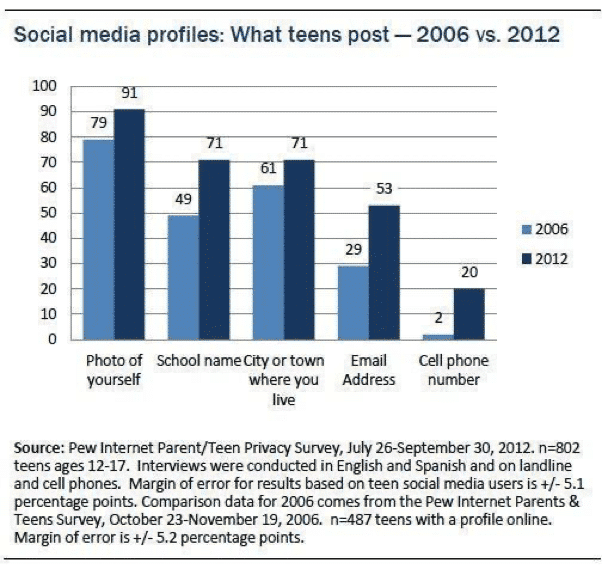
According to Pew Research Center, 71% of teens post their school name, 71% post the name of the city or town they live in, and 20% post their phone number.[1] Further, 36% of older teen’s Facebook friends are people they have never met in person.[2]
Although teens understand that oversharing can be dangerous, few have the life experience to understand exactly how it can be dangerous. When I was a teenager, the more “likes” I got on a photo or the more “friends” or “followers” I had on social media, the better I felt about myself and my online presence. I accepted friend requests from mutual friends who I had never met before, along with accepting requests from strangers. In my teenage mind, there wasn’t any harm in letting strangers see my online profiles. I felt that I would be okay as long as I wasn’t sending them my address. It didn’t occur to me that this data could be used to predict my location or even that anyone could have that kind of predatory intent.
Dr. Bennett shared a story with us where she worked on the production of the Lifetime TV show, I Catfished My Kid. In the show, producers created a poster board map (like detectives do) with yarn connecting the teens’ movements throughout the day for a week. With this data, they were able to predict daily habits like location, activities, and even who they hang out with.
How is Location Data Shared?
Instagram
One way location is shared on social media is through geotagged photos. A geotag is an electronic tag that assigns a geographical location to a photo or video posted on social media or other websites.[3] Geotags are commonly used to share what restaurant or city someone is in and are very popular on Instagram.
If your teen has a public profile and decides to post a photo on Instagram with a geotag, not only will their friends be able to see where they are, but users around the world can too. By simply clicking on that location’s tag, your teen’s photo will pop up as a current or recent visitor.
Another way location is shared on Instagram is by the use of hashtags. If your teen has a public profile and adds hashtags to their posts, their photos will show up as recent users of whatever hashtag they use, similar to the geotag feature. Hashtags are commonly used to have other users find their posts quicker and potentially gain more followers and traffic on their profile. However, that could be a privacy concern for younger users.
Facebook
The check-in feature on Facebook is similar to geotags. Facebook users “check-in” as an announcement to friends that they are visiting a particular location. Once checked-in, it appears on the user’s Facebook profile.
Snapchat
The SnapMap feature on Snapchat can also be a location risk. SnapMap allows your teen to share their location with their Snapchat friends every time they open the app. The SnapMap feature is a default, meaning it is automatically on so your teen might not even know that they are sharing their location. This is another privacy issue and may be a safety concern if your child accepts friend requests from strangers.[4]
Helpful Tips and Tools to Protect Your Child on Social Media
Set up a digital contact like our free Connected Family Screen Agreement and have ongoing, informative conversations with your kids about online safety. Our GKIS blog offers credible, interesting topics that will feed an ongoing agenda. Register for our Connected Family Screen Agreement to get on our weekly email list!
Set up your home to optimize best-use screen practices using our Connected Family Course for school-age kids.
Limit location sharing in Settings. On an iPhone, go to Settings and remove the location by clicking on the social media name > Location > select Never, Ask Next Time, While Using the App, or Always. You also have the option to turn off “Precise Location” meaning apps can only determine your approximate location
Don’t allow your child to have social media accounts until they are ready (we recommend after 13 years old or late middle school).
Require that your child set social media to private and only accept friend requests from family and friends they know in real life
Have your child change to the “Ghost Mode” on Snapchat (their location will no longer be viewable on SnapMap)
Thanks to CSUCI intern, Remi Ali Khan for researching common ways teens overshare on social media for this article.
I’m the mom psychologist who will help you GetKidsInternetSafe.
Onward to More Awesome Parenting,
Tracy S. Bennett, Ph.D.
Mom, Clinical Psychologist, CSUCI Adjunct Faculty
Photo Credits
Photo by Cottonbro from Pexels
Photo by Pixabay from Pexles
Photo by Pew Research Center
Works Cited
Deahl, D. (2017, June 23). Snapchat’s newest feature is also its biggest privacy threat. Retrieved November 04, 2020, from https://www.theverge.com/2017/6/23/15864552/snapchat-snap-map-privacy-threat
Dove, J. (2020, October 07). How to Remove Location Data From Your iPhone Photos in iOS 13. Retrieved November 04, 2020, from https://www.digitaltrends.com/mobile/how-to-remove-location-data-from-iphone-photos-in-ios-13/
Madden, M., Lenhart, A., Cortesi, S., Gasser, U., Duggan, M., Smith, A., & Beaton, M. (2020, August 17). Teens, Social Media, and Privacy. Retrieved November 04, 2020, from https://www.pewresearch.org/internet/2013/05/21/teens-social-media-and-privacy/
Oxford Languages and Google – English. (n.d.). Retrieved November 04, 2020, from https://languages.oup.com/google-dictionary-en/