
Need peaceful screen time negotiations?

Get your FREE GKIS Connected Family Screen Agreement

teens

The Google Effect. Because Memorizing is So Yesterday

child using google

Do you suffer from digital amnesia? How many phone numbers can you recite offhand? Can you name three movies that are out? Does anybody have paper maps in their cars anymore? Most of us, particularly the digital natives, Google to search out random facts and figures rather than relying on memory. Researchers call this the Google effect, meaning that fewer of us bother to memorize things if we believe they are online.

Google was introduced to the Internet in 1998. It is a search engine that calculates and ranks the web pages that receive the most attention. Google not only serves up delicious content, but it also determines what we see first on our search list. Google works to filter out useless, scam-like, or explicit information and images from our search list.

Websites that rank the highest load quickly, do not use flashy animation, and have a coherent list of relevant search terms. Google weeds through the bad web pages to provide us with the best, which makes the scary world of the Internet a lot safer and easier to navigate. Google provides users with convenience, comfort, and trust.

What is the Google effect?

As Albert Einstein said, “Never memorize what you can look up in books.” Did I remember this line? No, I opened my Google Chrome web browser, proceeded to Google.com, and searched “famous quotes about memory.” We are moving to a future of memory decline and an over-reliance on technology that’s always at our fingertips.

Dr. Maria Wimber, Professor at the University of Birmingham’s School of Psychology, said the Google effect “makes us good at remembering where to find a given bit of information but not necessarily what the information was. It is likely to be true that we don’t attempt to store information in our memory to the same degree that we used to because we know the Internet knows everything.”

Betsy Sparrow from Columbia University explained, “Our brains rely on the Internet for memory in much the same way they rely on the memory of a friend, family member, or co-worker. We remember less through knowing information itself than by knowing where the information can be found.” We are more likely to commit keywords to memory than the facts they lead us to.

toddlers using a smartphone

How powerful is the Google effect?

It’s been estimated that 90% of us have undergone digital amnesia. Over 70% of parents have not memorized their children’s phone numbers.[3] We are even less likely to remember an experience if we snapped a photo of it.

In her study, Dr. Maria Wimber assigned one group to go around the museum taking pictures, while the other group was told not to take pictures and just to enjoy the experience. Those who took pictures were found to remember significantly fewer details than those who did not use their smartphone.[3] Dr. Wimber elaborated, “One could speculate that this extends to personal memories, as constantly looking at the world through the lens of our smartphone camera may result in us trusting our smartphones to store our memories for us. This way, we pay less attention to life itself and become worse at remembering events from our own lives.”

As a millennial accustomed to heavy smartphone use, I would go as far as to say we rely on the “likes” from our social media posts to determine the worth of an event. If we get lots of likes, we must have had a great time; fewer likes and it was a bust.

Is the Google effect bettering us for the future?

Anthropologist Genevieve Bell thinks that the Google effect is not as detrimental as others think. She reports that technology “helps us live smarter.” Creating good search words is how knowledge is conforming to the technological future. There is such a thing as a good or bad question. If you type in a random mess of words into Google’s search bar, it’s likely you won’t find an answer that fits your needs. But being able to write a short, competent question that produces a concrete answer is a form of intelligence.

Bell gave an example of new parents worried that their child is not sleeping well. Her theory is that a smart parent would be able to comprise all the symptoms into a great Google search, while others might rely on others’ feedback. Google can find legitimate websites to back up the diagnosis of the child, while feedback from friends is just a matter of opinion.

baby sitting at laptop

What can you do to optimize Google’s benefits and minimize the risks?

  • Decide if you’re pro-integrated technology or if the commitment to technology has a negative impact on our future.

  • Emphasize to your kids that worth is more than skin deep. Provide opportunities for intellectual, spiritual, and character growth. Value substance.

  • Be a good role model. Watch your GTS ratio.

  • Educate your children about the risks and benefits of trusting the Internet.

  • Monitor and limit how often your teens use the Internet when studying with screen time management apps. Encourage them to build the scaffolding for memory with less reliance on Google.

  • Teach how to balance healthy and fun activities like interacting often with family members face-to-face, riding bikes, or reading books.

Wendy Goolsby, CSUCI Intern Thanks, Wendy Goolsby, CSUCI Intern, for this great article about Google’s effect on our learning. It is because of these factors that I have changed my teaching style at CSUCI. No longer do I give in-class exams that cover several factors at once. I found that my students just procrastinated and crammed, which didn’t lead to quality learning. Now I offer an online timed multiple-choice quiz after each lecture.  They are telling me that this forces them to keep current and they’re remembering and applying material better. Even we digital immigrants must adapt. 🙂 For more parenting support on educating about the effects of the Internet, check out the GKIS article Youtube Beauty Gurus Suck Money and Teen Confidence.

Works Cited

[1]Albert Einstein Quote

[2]The Googlization of Everything (And Why We Should Worry)

[3]Google Effect: Is Technology Making Us Stupid?

Photo Credits

Andrew Lines, CC BY 2.0

Courtney Warren, CC BY 2.0

Baby boy using a laptop computer, CC BY 2.0

The GKIS Sensible Parent’s Guide to Venmo

Venmo Logo

You’re having dinner with friends and realize you forgot your wallet. No longer do your friends have to cover wondering if you’re good for the money. With the free money-sharing app, Venmo (send money make purchases), you can send a digital transaction more simple than sending an email. Viola! Your friend has your money in their bank with a digital receipt of payment. Crisis averted. You feel safe, because Venmo promises your personal and financial information is kept private with encryption. But is Venmo safe enough for teens to use? Today’s GKIS Sensible Guide answers parent questions.

What is Venmo?

Venmo is a free money-sharing application. Users can immediately transfer money from either their Venmo account, bank account, or debit card. Users can connect with other Venmo users by using the search function. With Venmo, you can pay for items automatically or transfer money between friends without an additional charge. Instead of cash, teenagers can be found saying, “I’ll Venmo you.”

Venmo was created by two college students in 2009, in the hopes to create a better way of paying each other back. It started as a text message transferring system; which, has revolutionized to a new type of social network. According to Fast Company, it is estimated that there are about 7 million active users every month. The also reported that last year the app transferred almost a total of $18 Million dollars between users.

What are Venmo’s popular features?

Venmo is super popular as a convenient, quick and easy way to wire somebody money. You can request for somebody else to send you money or you can easily pay somebody back. Your account will use the money you have received in Venmo or link to your bank account or debit card quickly. Venmo does have the option to connect to Facebook but it will only take your contact list.

How to use Venmo?

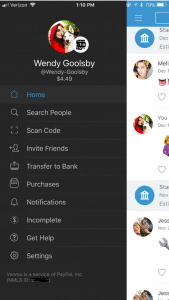
You’re on the Venmo app and you press the three lines on the left hand side. You’re brought to your account options but what do all of these tabs mean?

Screenshot of Venmo

  • Home: This is where you can see your friend’s interactions with the app. When on the home tab there is three buttons at the top.
    • One is an emoji of a world, which will bring you to a list of anyone in the world’s latest interaction with Venmo.
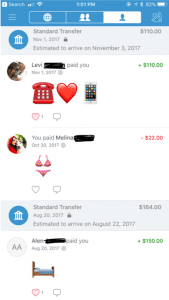
    • The second option shows two heads, this is where you can see the money you’re friends have been transferring between each other. On this section, it used to show how much people were sending but for security reasons it now just shows that you transferred but with no money total.
    • The last button is a picture of single–headed emoji. This shows all of your past transactions and also when you took out money from your bank and when you deposited money back into your bank.
  • Search People: This is where you can search through your friends for the appropriate person you want to send or receive money from. You have the option to connect to your Facebook so it can inherit your contact list.
  • Scan Code: Your coworker brings you coffee and asks you to pay them back. You don’t have cash and you’re not friends on Venmo. Instead of searching their name, this tool gives you the option to scan the user’s unique barcode. Both of you have to have the application open at the same time for this to work.
  • Invite Friends: Your friend isn’t on Venmo? You can input their name, phone number, or email to invite them to join the app.
  • Transfer Balance: This is where you go when someone has sent you the money but now you need to get it into your bank. It has the option to transfer the money to your previously entered account or to enter a new bank account.
    • This is also where you will see Venmo’s new interaction to instantly transfer money to your Bank in seconds. This new feature does cost $.25. The standard option (free) is still available but this option takes one to three business days to transfer to your bank account.
  • Purchases: You can now use Venmo to pay in other apps and on the mobile web with select PayPal merchants.
    • Venmo does put in their FAQ webpage that if a person purchases a good or service on the internet using Venmo, they will not offer protection. The transactions are potentially high risk and you may lose funds.
  • Notifications: This is where it will show if you have any pending requests for money or if anyone is requesting money from you.
  • Incomplete: This will show outstanding requests or payments. There will not disappear until the other user pays your or you pay them.
  • Get Hep: This brings you to three options and those being “Browse Ours FAQs”, “Contact Us”, or “My Support Tickets” (for any IT help).

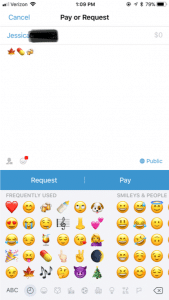
Payment Screen on Venmo

How to make a payment or request a payment?

  1. Click on the button in the top right hand corner to pull up your contact page.
  2. Select the friend you want to send money to or request money from. You can also type in the name.
  3. Type the amount for payment.
  4. Add a comment about what the payment is for using words, emojis, or a combination of both (Venmo will not let you skip this step).
  5. Select pay or request money. If you pay, the money is transferred to their account. If you request, your friend receives an email or text and an app notification saying that you requested money.

What are the privacy options?

When you make a payment or receive money from someone it automatically gets added to a live feed. This feed is where you can see your friends and families latest transactions. It will not show the amount transferred but it will show the reason (you can leave the reason blank). It’s common for people to not use words in their description but instead emoji’s.

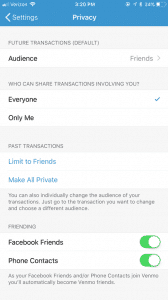
Privacy Options Screen on Venmo In the Settings menu you can change your audience options to include public (everyone on the Internet), friends (sender, recipient, and their friends), and participants only (sender and recipient only). There is the option to change past transactions viewers as well and make everything completely private.

It also asks where you want your contacts to come from. You can get contacts imported from your Facebook contacts or your phone contacts or both. You have the option to turn both options off and only have friends you add by hand.

Venmo Privacy Options

What are the risks for use?

A new trend is for sites like Craigslist, Instagram, or Facebook to ask people to buy goods and services and to pay with their Venmo accounts. The company highly discourages this type of transaction but it happens daily. Buying a pair of leggings off an Instagram promoter seems innocent enough, but the real problem is now it’s even easier to buy illegal substances.

Rachael Ferguson did a research project in which she used an application called Whisper, a messaging app that allows users to send and receive messages anonymously, and she had two drug dealers agree to talk to her about their social media influence on the drug market. They explained how easy it is to find drugs on apps like Instagram or Twitter, just buy searching up relevant hashtags. An example of those would be #Kush4Sale or #OGKUSH. If you comment on these posts it’s more likely you’ll caught, so there in underground etiquette of messaging the hastagger privately (Ferguson.)

Besides using social media to buy drugs, there are plenty of other goods and services that can be bought through these apps and that are requesting a payment using Venmo. One man was selling a car on Craigslist, the purchaser claimed he could only pay if he used Venmo. The car dealer watched the other person transfer money and he saw the money come into his bank account. Happily, he signed the car over to the purchaser. 12 hours later, the dealer of the car received an email from Venmo saying the payment had been stopped (Chatman.)

What to watch out for on Venmo.

Users can remain secretive about the actual reason for money transfer. Unless you set your page to private, the public can see your transactions and reason for sending. In the privacy section of a Venmo account, there is the option to set all past transactions to private.

When I asked my friends why they or their other friends are using Venmo, they majority reported that they used it for paying rent, bills, dinner, coffee, drugs and when they were underage they can transfer money to someone 21+ to buy alcohol. This is where the emoji’s come in handy when putting in a description for your money transfer.

Emoji’s and what they mean on Venmo:

  • Wine/Beer/Cocktail: Alcohol/ booze
  • Dancing/Celebrate: Party/bar
  • House: Rent or bills
  • Car: Uber
  • Leaf: Marijuana
  • Needle: Drugs

And there numerous food emoji’s used to indicate that they are paying the person back for food. Fun fact: the pizza emoji is the most popular emoji in Venmo transaction messages (Wener-Fligner.)

What are the protection features?

Venmo’s security page outlines how it will protect you financial information, your account, storage and how it will keep you safe in the long run.

Venmo is an easy app to use, but when the user is a child or a teen, parents should consider discussing with them the risks and how to stay safe. Some things to think about:

  • Decide if it is the right time for your child to have their own personal bank account or if they are responsible enough to have a Venmo account connected to your bank account.
  • Discuss with the child when it’s appropriate to send money and when it is not. Set limits and don’t let them send or receive money from strangers.
  • Consider monitoring their transactions. One way to do this is by making a contract demonstrating their Venmo rules and regulations. Establish an agreement that you can have access to their account anytime.
  • Create a list of the people they are allowed to transfer money to. If they want to add a new person, they must let you know first. You have the right to remove any person at anytime.

When using a money sharing app, the child should be prepared to be honest and responsible. As parents, instead of banning certain apps all together, make sure your children know what your rules are! Keep a copy of their username and password so you can easily monitor their account.  Also, remember this application is not only for your kids! Venmo is super helpful in limiting your cash interactions and providing a safe way to share money with your friends and family.

GKIS Intern - Wendy Goolsby Thanks GKIS Intern, Wendy Goolsby for keeping us up to date on the latest virtual wallet. Make sure to keep an eye out if your child is attaching credit cards to any sorts of applications. In other teen news, check out the article, Is Your Teen Hooking Up? for ideas about how to support your kids in today’s casual sex environment.

Work Cited

The Digital Underground: Here’s How You Can Buy Drugs on Social Media, Right Now by Rachel Ferguson

Warning: Venmo Payment from Strangers Can Cost You by Samantha Chatman

The Emoji of Venmo by Zach Wener- Fligner

Fast Company

Why Venmo Is So Popular With Millennials by Matthew Cochrane

Photo Credits

Venmo by Tessa Singer

Teens Intimidate and Parents Slack: How to Stop the Guilt

Teen Resisting a Limit on Screentime Parents know that screen use carries risk, whether it’s sleep deprivation, texting while driving, online sexuality and aggression, or addiction. But what can we do about it? Pandora’s box has been opened. Yes, there are powerful parenting strategies that should be happening to limit risk, but who wants to deal with toxic teen fallout? Tweens and teens can put up a fight and workaround most rules anyway. And what if you have been monitoring on the sly and see something alarming, then what? If they find out you’ve been spying, it will damage an already difficult relationship. What can parents do to kick in and do a better job without starting World War III?

I work with teens every day in practice and have two at home. I agree they can be pretty scary. But I also know that without us, they’re capable of getting into real danger. There are sensible techniques you can use to implement real change without damaging your relationship. Believe it or not, teens even welcome limits sometimes, as long as they’re justified and introduced with a sincere offer for respectful negotiation. If that wasn’t the case, I’d be getting fired by session three most of the time by my teen clients. Instead, I often have to push them to graduate from therapy. Like us, they love fun connection and will accept adult influence more than you think.

Here are some parenting hacks for managing screen use even with the most independent teens:

DON’T AMBUSH

Sprinkle in your intent and justification over time rather than in one aggressive attack. Intervention doesn’t have to happen all at once (even though you may be anxious to get it over with). Introduce your ideas over time to give teens a chance to digest the information. Start with a discussion, then a meeting, then the implementation in doable steps. It’s unlikely you’ll ever get their full buy-in, but gradual tweaks will be accepted far better than a hostile takeover. For example, rather than take away Instagram due to a transgression, talk to them with warmth and acceptance acknowledging that ALL teens make mistakes online. No big deal. Just fix this one and maybe pare back to Dunbar’s number on their friends list. This is the number of friends our brains seem to have slots for, 150. By paring back, they reduce risk and still get to keep connecting with friends. All-or-nothing interventions can drive a wedge, but gradual and reasonable tweaks provide learning opportunity and you get cred for being reasonable.

PREPARE FOR PUSH-BACK

When I work with families, I often start with coping skills long before I suggest parenting strategies. Listening, assertiveness, negotiation, and relaxation skills are key. It also helps if you are prepared. These push-back possibilities are offered so you won’t be surprised when they arise and will stay calm and strategic and avoid getting pulled in and manipulated. If it gets too heated, walk away (eyes off the behavior you don’t want) and return to the issue another time (eyes on the behavior you want). Most important, don’t let them see you sweat. Maintain your credibility with calm authority.

Teenager Pushing Back About Screentime Limit Typical teen push-backs:

Act like they don’t care with plans to sneak later

 Justify, lie, or make excuses

“I didn’t do it”

 “Everybody does it”

 “My teacher says I have to”

“You don’t know what it’s like now [I know everything about everything]””

Deflect and distract

By triggering you with real-time bad behavior, you may forget to follow through (“Look squirrel!”). I call this “throwing a fireball into the room.” While the parent is running around putting out fires, the issue at hand gets lost and the kid wins. Fireballs can be:

Eye-rolling

Talking back or cussing

Pulling out a list of grievances with absolutes (“You never let me” “This always happens”)

Tantrum

Name calling (“You suck”)

Self-deprecation (“I’m a terrible kid”)

Emotional extortion: Threaten to hurt you or themselves

Physically aggress (throwing, slamming, hitting)

Defy you and do it anyway

LISTEN AND VALIDATE

Although maddening, it’s healthy for teens to push back and manipulate. You want your kids to test things out on you, their safe person. Don’t take oppositionality personally. Manipulative kids are simply smart, strategic kids. Your job isn’t to squash their spirits, it’s to manage it and coach them to success.

For kids to engage in a discussion, you’ll need to listen as much as you talk. Lectures turn them off immediately. No engagement means you’ve lost any hope of influence. Once your child has responded and you’ve confirmed that you understand their position (whether you disagree with it or not, their position is legitimate), firmly state your intent to establish sensible rules. Remember that screen use is their lifeline to learning and socialization. Compulsive screen use happens, because it has real meaning and benefit. If you tell them to “turn it off,” they get anxious. Anxious kids are the most defiant, because they will endure almost anything to avoid the feelings from anxious rebound. Making a non-negotiable announcement will make for hard-going later and interfere with the opportunity for teens to take accountability for positive change. There’s big payoff for giving in a little rather than demanding full obedience. Modeling, mentorship, and teamwork are keys to success.

NEGOTIATE THE RULES

How does one negotiate without losing authority? Let’s take the example of trying to get your child off their phone during homework time, called multitasking. First, keep in mind this is not a black and white issue. Sometimes multitasking contributes to learning, other times it interferes.

Multitasking is beneficial when generating ideas, acculturating oneself to vocabulary and ideas around a particular topic, identifying experts and networking with community, enriching understanding using multimodal formats (reading, listening, viewing video), and when browsing for entertainment. Multitasking activities that have performance costs include screen activities that interrupt demanding cognitive learning tasks like reading, homework, or studying. Perhaps pulling back on bad habits rather than eradicating them entirely is a good start for now. For best success, outline goals, commit to honest learning objectives, and download time management and tracking apps. Let them try out their ideas, then swing around later to discuss outcome. Tweak, repeat.

There you have it, a plan! Remember to set an expectation for success and prepare for follow-through. If you capitulate to teen freak outs, it will be far harder next time because you’ve taught them you’ll cave in the face of tantrums. If you follow through, they’ll eventually respect your authority. Staying firm, consistent, and emotionally neutral is also important. You’re empowered and so are they. Small consequences (one night when devices are docked early) are usually just as impactful as big ones (taking their phone for a week), and you are less likely to cave because it’s doable. Don’t forget to remind them that you will lighten up as they get close to graduating. High school seniors need more independence to build resilience and prep them for success in college.

Check out my article, You Spied and Caught Your Teen Sexting, Now What? for more parenting advice about screens and teens. If these tips are useful, find more in my book Screen Time in the Mean Time: A Parenting Guide to Get Kids and Teens Internet Safe. If you like what you read, please leave an Amazon review. <3

I’m the mom psychologist who will help you GetYourKidsInternetSafe.

Onward to More Awesome Parenting,

Tracy S. Bennett, Ph.D.
Mom, Clinical Psychologist, CSUCI Adjunct Faculty
GetKidsInternetSafe.com

Photo Credits

Photo by Adrian Sava on Unsplash

Photo by  Timothy Eberly Unsplash

Virtual Kidnapping, A Parent’s Worst Nightmare. How to Protect Yourself and Your Family.

Virtual kidnapping scams are on the rise and, since it is difficult to identify the perpetrator, they are unlikely to go away. Last week a Facebook friend posted about a terrifying telephone scam. She encouraged me to share her story. Be warned, it’s really upsetting, and it’s a true story! It’s worth the read so you won’t fall emotional and financial victim to scammers, phishers, and extortionists.

“Mommy! Mommy! Mommy! He’s got me! He’s got me!”

A mother’s WORST NIGHTMARE, and it happened to me Saturday morning.

I was at home working in my office when my cell phone rang. I picked it up and heard a girl screaming and crying, “Mommy! Mommy! Mommy! He’s got me! He’s got me!” Then a male voice saying, “Shut the f__ up b___!” The girl’s voice sounded like my daughter who is living away for graduate school.

The world beneath me fell away. I can’t tell you the fear I felt. This VILE man spoke to me in a thick accent telling me what he is going to do to her, and after he’s finished with her he will send her home to me in pieces if I don’t give him money right now.

I kept talking to him on speaker while dialing 911. The dispatcher said, “Stay on the phone, police have been dispatched.” Within minutes a special crime unit arrived.

For the next twenty minutes, I spoke to the “kidnapper” while the police coached my questions and traced the call. I demanded he put her on the phone and text me her picture. He continued to threaten terrible things. Meanwhile, our calls to my daughter went to voicemail, so they sent Arizona police her work.

My husband and other daughter could see my texts, CALL HOME NOW!!!! URGENT!!! and were freaking out. Neighbors told them the police were everywhere, and they couldn’t get through.

Finally she texted after the police located her at work. They checked her apartment and verified it was safe. I broke down crying.

I don’t want ANYONE, EVER to go through what we did!  The fear and possible reality were there for me for what seemed like hours! All I have thought about ALL weekend is “These VILE people are putting someone else through this!” Please share this story about the new horrible scam out there.

Source of the Theft

A few days after my friend posted this story, I followed up with her. She informed me that another family from the same university was scammed by the same man minutes after he hung up on her. They were about to wire $7000 before they were able to contact their daughter. This incident made her wonder if the information was gathered from hacked university data. A few weeks later, another Facebook friend posted this one:

Today my parents got a phone call from someone pretending to be my son. He told my dad that he went to the store to get cold medicine with a friend from school who was driving, they got pulled over, and his friend had pot in the car, so he was arrested and now was in jail. He begged my dad not to tell “my mom.”

My dad asked a few questions and was thinking it may be a scam, but he said the person on the phone sounded young, so he wasn’t quite sure. After a few questions, the kid hung up. We’re pretty sure that he would have asked for money to wire or something. My son is safe at school (I checked). But wanted to pass this on to you guys. Maybe this scam has been going around? Obviously, they are targeting older people, and I can see some people falling for it. My dad is pretty sharp, and it still tricked him at first.

Other Scams to Look Out For

Other types of extortion scams involve the perpetrator posing as the IRS or a crime cartel framing you for a false crime that will result in a suspension of your bank accounts, criminal charges, or a threat to you or your family’s safety if you do not send money. For instance, there have been reports of victims on vacation receiving a call in their hotel room stating that they are being targeted by a drug cartel and should turn off their phones to remain safe. While the victim is out of communication, the virtual kidnappers demand money from friends and family.

Another type of scam involves ransomware, which is a virus that infects your computer and encrypts the data. The scammer sends a message threatening to keep your hijacked computer data unless a ransom is received.

To avoid this kind of virus:

  • learn how to identify typical phishing strategies,
  • do not click on unknown email links or websites,
  • install premium security software, and
  • keep your software updated.
  • It is also important to backup computer data on a secure cloud-based backup service with revision history. Even legitimate websites can be hacked to spread malware, so awareness and preparation are key.

Here are GetKidsInternetSafe tips to avoid being a victim of virtual kidnapping:

  • Stay up to date about the scams popular in your area.
  • Set your social media profiles to private and avoid giving out personal information. Teach your kids to do the same with GetKidsInternetSafe techniques.
  • Occasionally cleanse your social media profile of photos. A backlog of photos tells a detailed blueprint of your family’s activities and personalities. When viewed by a perpetrator, those details can be used against you.
  • Keep your telephone landline.
  • Download GPS location-sharing apps to family member phones, such as Find My iPhone, Find Friends, or Life360.
  • Create an emergency plan, which includes a list sharing of names and phone numbers of workplace landlines, friends, and extended family. Create and include family nicknames to use in case of a need for emergency telephone identification.
  • If you get a suspicious call, assess its authenticity. For example, if the call is not from the victim’s telephone and they want you to stay on the phone until the money is delivered, be suspect.
  • If they are on the victim’s phone, recognize that the phone may have been hacked and forwarded to another phone or lost or stolen. Just because the number shows up as your child’s phone doesn’t necessarily mean the scammer has possession of the phone or the phone’s owner.
  • Recognize that scammers often ask for money to be wired through services like Western Union or online currency like Bitcoin, as these methods of payment are untraceable.
  • Stay calm, slow the caller down, and do not share any personal information. Ask them to answer a question only the victim would know. Don’t challenge or argue with the caller. Buy time by saying you are writing down the demand and need time to comply.
  • Use another device to call the police while on the phone.
  • Ask questions and, if feasible, demand a call from the victim’s phone or a picture of the victim.
  • Get to a safe place as soon as possible.

These tips do not constitute legal advice from GetKidsInternetSafe. Although many of these suggestions are offered by the Federal Bureau of Investigation website, recognize that nothing outweighs your instincts. Err on the side of caution and seek expert help from your local police department or the FBI.

Worried about child identity theft? Check out this GKIS article to learn how to protect your child’s financial security. To learn about other scams effecting the elderly, read Scammers Target the Elderly: How to Avoid Being Scammed.

I’m the mom psychologist who will help you GetYourKidsInternetSafe.

Onward to More Awesome Parenting,

Tracy S. Bennett, Ph.D.
Mom, Clinical Psychologist, CSUCI Adjunct Faculty
GetKidsInternetSafe.com

Live Streaming Can Cause PTSD in Adults and Children

We are vulnerable to dangers previous generations couldn’t even imagine. We are on-demand, world connected – available to watch any horror from any place. Graphic (meaning vivid or realistic) live stream videos can be found on social media platforms such as Facebook Live, Instagram, TikTok, Snapchat, and YouTube. Children are especially vulnerable to getting upset when viewing violence. Today’s GKIS article covers if the mental illness Post Traumatic Stress Disorder (PTSD) can result from viewing violence on screen.

How Graphic Live Streams Affect Children

Accidentally clicking on a violent video would frighten anybody. Children are particularly vulnerable to trauma, including the development of serious mental illness. PTSD is a mental health disorder in which a person struggles to recover from experiencing or witnessing a traumatic event such as an assault, war, natural disaster, or serious accident. People with PTSD often have severe anxiety and panic attacks when reminded of the traumatic event. They feel stressed and frightened even when there is no danger present.

PTSD symptoms include intense nightmares, difficulty sleeping, and flashbacks of the traumatic event (intrusive images like you’re re-experiencing it). Children younger than six years old show signs of PTSD differently than adults. Their symptoms include behaviors like wetting the bed, being unable to speak, acting out the traumatic event in playtime, and clinging to their caregiver. PTSD is a very serious, debilitating disorder that can leave the individual in a nearly constant state of fear and stress.

Being able to discuss the witnessed traumatic event is a necessary step in treatment. In a study with Danish high school students, subjects who had witnessed a school shooting were assessed for PTSD. It was found that the prevalence of PTSD seven months after the incident was 9.5%. Being unable to talk about the incident was found a predictor of those who developed PTSD.[1]

Studies on Videos and the Onset of PTSD

Because violent videos are relatively new, there is little research on how they affect us. One of the earliest studies was conducted after Americans viewed the television coverage of the 9/11 tragedy.

The researchers interviewed 560 adults three to five days after 9/11. Approximately 90% reported one or more stress symptoms. In contrast, 35% of children had one or more stress symptoms, and 47% were worried about their safety or the safety of loved ones. Ten percent of the children had trouble falling asleep or staying asleep.

In another study, researchers surveyed 4,675 adults who viewed the 2013 Boston Marathon bombings on video. They found that people who had repeatedly watched the tragic footage sustained more trauma and stress than people who had witnessed the events in real life!

Those who watched six or more hours per day of media coverage were nine times more likely to report high acute stress than those who viewed less than one hour a day. Symptoms of acute stress included intrusive or troubling thoughts, feeling hyperaware, avoiding anything that reminds one of the traumatic events, and feelings of detachment.

If your children witnessed a traumatic live stream or Internet video, how would you know if they had PTSD? 

Elementary School-Aged Children

“PTSD in children and adolescents requires the presence of re-experiencing and avoidance, numbing, and arousal symptoms. However, PTSD may not present itself in children the same way it does in adults.”[2] For example, young children may not experience flashbacks like adults with PTSD. They are more likely to experience “time skew” and “omen formation,” which are symptoms usually not seen in adults.

Time skew is the mis-sequencing of trauma-related events when remembering the experience.

Omen formation is a belief that there were warning signs that foreshadowed the traumatic event.

Children often believe that if they remain alert, they will recognize the warning signs and avoid another trauma resulting in chronic hypervigilance, anxiety, and sleep disorders.

School-aged children with PTSD often engage in posttraumatic play or reenactment of the trauma in play, drawings, or verbalizations. Post-traumatic play is a literal representation of the traumatic event in which the child repetitively acts out some aspect of the trauma. This often does not relieve anxiety.

An example of post-traumatic play would be a child shaking a playhouse after they’ve experienced an earthquake.

Post-traumatic reenactment, on the other hand, is more flexible and involves behaviorally mimicking some aspects of the trauma. An example would be carrying a toy gun after being exposed to violence.

Adolescents and Teens

PTSD in adolescents more closely resembles symptoms seen in adults. However, some features are unique to teenagers.

As discussed above, children may engage in traumatic play after the onset of trauma. Adolescents are more likely to engage in traumatic reenactment, in which they merge some aspects of the trauma into their lives. Reenactments occur due to psychological vulnerabilities and defensive mechanisms which are characteristic of PTSD survivors.  Adolescents tend to engage in impulsive and aggressive behaviors more than younger children and adults do.

What can parents do?

  • Advocate for better safety protocols including monitoring and filtering with platforms like Facebook, Instagram, Snapchat, TikTok, Periscope, and YouTube.
  • Filter video access to children by using a child-safe browser, refusing requests to adopt livestream social media apps, and using appropriate child sites like YouTube Kids.
  • Maintain an ongoing dialogue about content viewed online to optimize the chance your child will go to you if they happen upon inappropriate content.
  • Let your child know they won’t be in trouble for accidental views.
  • Be alert for changes in behavior that may be reflective of PTSD like fears, anxiety, bathroom accidents, mutism, sleep problems, appetite problems, substance abuse, or school failure.
  • Seek the help of a child psychologist if you have concerns.

Thank you to CSUCI Intern, Mara Pober for writing this important series to inform parents and help them keep their kids Internet safe. For more parenting advice on-screen media and trauma in children, pick up your copy of Dr. Bennett’s book, Screen Time in the Mean Time: A Parent Guide to Get Kids and Teens Internet Safe.

I’m the mom psychologist who helps you GetKidsInternetSafe.

Onward to More Awesome Parenting,

Tracy S. Bennett, Ph.D.
Mom, Clinical Psychologist, CSUCI Adjunct Faculty
GetKidsInternetSafe

Works Cited

A National Survey of Stress Reactions after the September 11, 2001, Terrorist Attacks (2001)

[2] National Center for PTSD

Prolonged viewing of Boston Marathon bombings media coverage tied to acute stress (2013)

[1] The psychological reactions after witnessing a killing in public in a Danish high school

Viewing violent news on social media can cause trauma (2015)

Photo Credits

Don´t let it happen again

classroom-laptops-computers-boy.jpg

Little Boy Bluescreen

Graphic Livestream Horrors

Popular livestream video platforms, like Facebook Live, Twitter, Instagram, and Periscope, can put viewers at psychological risk with graphic content that’s impossible to moderate or filter. Last week we learned the history of news coverage, including livestream during the recent Las Vegas shooting. Today’s article covers how quickly and dramatically easily-accessed video content has changed with a constantly increasing viewing audience. Is violent livestream video detrimental to our psychological wellbeing? #Vegasstrong

How is livestreaming different from news coverage?

We are all disheartened by the unprovoked mass murder of country concert attendees in Las Vegas recently. Constant bombardment with graphic news coverage left many of us reeling. No longer do news outlets need a reporter on-scene to get dramatic live coverage. Private citizens stream photos and videos from their smartphones real time on the Internet, while outlets choose and air the most dramatic content available.

Graphic news coverage is a relatively new phenomenon. Prior to smartphones, network executives edited out content that would upset viewers. Community standard determined the selection process, with ethics and consumer preference in mind. Livestreaming does not undergo this filtration process. It’s raw, authentic, and very real. Viewers can hear, see, and observe the terror of victims real-time without actually being there.

Livestream Horrors

Imagine the horror of watching a mass murder unfold real-time, helpless to do anything about it. This is exactly what happened to hundreds of Internet and television viewers of recent Las Vegas livestreams. As people livestreamed themselves enjoying the concert, the scene quickly changed. Viewers watched on in horror as the chilling events unveiled. This is not the only case of a tragic event captured on livestream.

In April 2017, Steven Stephens livestreamed himself shooting a 74 year old man on Facebook Live in Cleveland. In the video, Steven is seen in his car saying, “Found me somebody I’m going to kill — this guy right here, this old dude.”  Steven then exits the car and kills Robert Godwin Sr. on the spot. The video was on Facebook live for three hours with hundreds of viewers before it was finally taken down.

In a similarly disturbing incident, a man in Thailand livestreamed himself murdering his daughter.  The recording showed Wuttisan Wongtalay hanging his 11 month-old daughter by the neck from the rooftop of a building. The footage was on Facebook Live for twenty-four hours before it was taken down. Wongtalay later committed suicide off camera. Facebook called this “an appalling incident.”

In another criminal event, Obdulia Sanchez, 18, livestreamed herself on Instagram driving under the influence with two 14 year-old girls in the back seat.  After losing control of the vehicle, she shakes her sister, dead in a pool of blood, pleading, “Jacqueline, please wake up.”

Another particularly noteworthy livestreaming event occurred in January 2017, when four people broadcasted a 28-minute livestream video as they tortured a mentally disabled man. They taped his mouth shut and threatened him with a knife as they beat him, made him drink from the toilet, and cut off a part of his scalp. The first perpetrator to be tried, nineteen year-old Brittany Covington, pleaded guilty to the hate crime and received four years probation where she was ordered not to use social media.

Tolerance of Violence?

Information reaching us faster alerts us to a more accurate reality. This can be beneficial when considering the authenticity of news. But at the same time, instant access to unfiltered media may be desensitizing us to violent imagery. According to the World Health Organization, “Rules or expectations of behavior … within a cultural or social group can encourage violence.”

Children and adolescents who are curious and thrill-seeking seek out content to be shocked, scared, or more “in-the-know.” Other times viewers come across this content by accident. Each of us have our own complicated profile of risk. Perhaps the normalization of violent livestreams reduces our sense of safety, even sensationalizing issues like assault, murder, and suicide. Copycat behaviors seeking notice can also be a problem.

The fact that there are thousands of disturbing videos circulating the Internet at any time makes one question how it got this bad. As a nation, we are becoming more tolerant of viewing violence on-screen. Many argue that certain types of violent videos must be publicly available for informational and educational purposes. In response to this, most Internet platforms have specific rules for how violent videos are filtered.

For example, Facebook now has guidelines regarding which violent videos are permitted to stay on the website and which are removed. Videos of violent deaths are not always taken off the site, because they can help bring awareness to issues such as mental illness or war crimes. Videos in this category are instead marked as disturbing content and blocked from minors. Facebook also permits users to livestream themselves attempting suicide or committing acts of self-harm. The justification for doing so is because they do not want to censor freedom of expression or punish someone in distress. If a person does livestream a suicide attempt, the video documenting the incident may not be taken down if it is deemed newsworthy.


Youtube also has challenges filtering inappropriate content. Dr. Bennett was invited as a parenting expert on Access Hollywood Live to discuss the poor judgment of celebrity Youtube Logan Paul after he posted video of a suicide victim hanging in Japan’s notorious “suicide forest.” Although Logan took it down after receiving criticism, over six million of his followers, mostly young people, saw the footage and Logan’s poor taste of giggling uncomfortably throughout. People are increasingly willing to post scandalous content in order for it to go viral. After all, that mean’s BIG profits. Dr. Bennett called for parents to talk to their kids and advocate for better safety monitoring on video and livestream social media sites.

Find out how graphic livestreams may affect mental health in Mara Pober’s last article of her three-part series, “Live Streaming Can Cause PTSD in Adults and Children.”

I’m the mom psychologist who helps you GetKidsInternetSafe.

Onward to More Awesome Parenting,
Dr. Tracy Bennett

Works Cited

4 charged with hate crimes in Facebook Live beating of man with ‘mental health challenges’

How Facebook decides what violent and explicit content is allowed

Jailed woman says she livestreamed aftermath of deadly crash to raise funds for sister’s funeral

Las Vegas shooting FRONT ROW at country music concert live stream

Man livestreams murder of baby daughter on Facebook before committing suicide

Nationwide manhunt for suspect in Cleveland Facebook video murder

Post Traumatic stress disorder

Photo Credits

Eye By Richard Broderick

Girl on Computer Notebook

Gun