In today’s day and age, it seems our whole world depends on smartphones, tablets, and the internet. There is no doubt that technology has completely changed our world. It has given us unlimited access to information and communication while removing the need for face-to-face social interaction. Technology is particularly helpful with vulnerable children, like those with autistic spectrum disorder (ASD). Screen technology can play an important role in supporting early language by creating new opportunities for interaction and engagement. Indiana Resource Center for Autism reports that many children with autism are visual learners.[1] Screen media tends to make visual images more available for children with autism and computer graphics grab and keep their attention. Technology also enables kids to find specific interests and build skills, thus increasing play options and independence. To learn more about autism and ways you can help your child, Check out Dr. B’s book Screen Time in the Mean Time. In today’s article, we will discuss the benefits of technology and app recommendations for children with autism.
What is Autistic Spectrum Disorder (ASD)?
Autistic Spectrum Disorder is a developmental disability that affects the way people communicate, behave, or interact with others. Researchers have not identified a single cause, and symptoms can be mild to severe. Autism can be detected at 18 months or younger.
There are also cases where children don’t receive diagnoses until much older. According to the Centers for Disease Control, autism affects an estimated 1 in 54 children in the United States.[2]Autism spectrum disorder affects children of all races and nationalities. It is 4 times more common among boys than girls.[3] It is important that as parents we are aware of certain signs and symptoms of autism. The earlier the treatment, the better and more effective for the child.
Signs of Autism
Social Skills
Impaired social skill is one of the most common signs of autism. Specifically, many children with autism display impairment in the areas of poor eye contact, trouble recognizing expressions of emotions of others, and lack of social awareness. This is different compared to when someone is “shy.” Kids with ASD often have difficulties knowing how to act in social situations, especially with same-age peers. Children with ASD tend to avoid eye -contact, prefer playing alone, and often don’t respond to their name by 12 months old.
Communication
Communication varies when it comes to autistic children. About 40% of children with ASD do not talk at all. About 25%–30% of children with ASD have some words at 12 to 18 months of age and then lose them.[4] ASD issues include delayed speech and using repetitive words and reversed pronouns. Many children with ASD have a hard time understanding and using nonverbal behaviors that facilitate communication like hand movements, body language, and different tones of voice.
Behavior
Children with ASD tend to repeat their actions and behaviors over and over which are called stereotypies. For instance, a child might spend a long period spinning in circles or clapping their hands. This is an example of a self-stimulation activity. Children with autism often thrive with a routine. Changes to their expected rituals can be upsetting to them.
How is technology beneficial?
If your child has ASD, technology can help them become more self-sufficient, work out challenges and improve upon strength. Using helpful apps shouldn’t disrupt your day-to-day routines, but rather enhance them. Apps allow for personalized learning and encourages an inclusive and interactive learning environment.
By observing children and their interaction with apps and listening carefully to the way they respond, you can better understand their thought patterns and plan carefully for their next steps in learning. Wellness apps offer strategies to regulate moods and improve well-being.
Using Technology to Improve Verbal Skills
Many children with autism find it helpful to use resources with a picture communication system, social stories, and visual timetables to improve their verbal skills. Applications for smartphones and tablets now allow parents to create schedules, stories, and activities that can benefit their children. There are many apps designed for those who have trouble communicating by providing a digital voice. Apps can give children the opportunity to enhance vocabulary development while also supporting children’s understanding of early language concepts.
Apps to Improve Verbal Skills
Proloquo2Go
Proloquo2Go is a symbol-based app for children with nonverbal autism. Using a natural-sounding voice, the user creates a sentence using symbols they are familiar with. Then the app will read it aloud. Most individuals report improvement in verbal skills and behavior. The images on the buttons are SymbolStix, although the user can also use real pictures or life-like cartoon drawings. The app is currently available for ios users.[5]
Avaz AAC
Avaz AAC is a speech app that assists children with autism who have a hard time communicating with others. The app can create a picture exchange communication book that can be created into a pdf and printed. That way the child has the option to print it out and store it in a binder. The Avaz app can help your child communicate their thoughts and needs while tracking progress. The app is currently free for a 14-day trial.
Using Technology to Improve Social-Emotional Skills
Often children who are on the autistic spectrum have difficulties with social skills. Children usually cannot understand facial expressions and vocal tones which can affect a child’s ability to communicate. This can lead to failure to understand other emotions and social cues. Technology can help children be understanding and aware of others, which increases their communication skills.
Apps to Improve Social-Emotional Skills
Conversational Builder
Conversion Builder is an app to help children develop social skills and exchange conversations with people. The app supports children to role-play conversation such as turn-taking, topic maintenance, and appropriate questioning in a fun and engaging way. It can be challenging for children with autism to start and maintain a conversation. This app helps children practice, rehearse, and learn from their mistakes which can lead to them having a successful conversation.
Thanks to CSUCI intern, Maira Soto for researching technology and autism for this article. For more information on some beneficial apps, check out this GKIS article, GKIS Recommends Some Favorite Mental Health Apps
I’m the mom psychologist who will help you GetKidsInternetSafe.
Onward to More Awesome Parenting,
Tracy S. Bennett, Ph.D.
Mom, Clinical Psychologist, CSUCI Adjunct Faculty
GetKidsInternetSafe. com
Most of us do not put much thought into reading, but not everybody has this privilege. Dyslexia is a cognitive disability that impacts someone’s abilities to read, write, or spell.[1] Letters that look similar and sound similar—such as n and m, w and m, and p, b, d, and q—are most frequently mixed up. To illustrate this, reading the sentence “Briana went to the park to walk her dog” may be read as “Briana wemt to the dark to malk her bog” for an individual with dyslexia. While some of us may mix these letters up occasionally, individuals with dyslexia chronically mix letters up to the point that it interferes with their daily life.
How common is dyslexia?
The DyslexiaHelp organization at the University of Michigan notes that 7 to 10% of the population have dyslexia. Individuals with dyslexia also represent around 70 to 80% of the population that have reading difficulties.[2] While dyslexia impairs an individual’s ability to read, write, or spell, this impairment does not affect one’s intelligence.
Dyslexia can lead to slow reading, poor language, messy handwriting, and a limited vocabulary. Behavioral issues such as tantrums, crying, and isolation may also manifest due to frustration. With proper treatment, impairment due to dyslexia can be improved. Children are especially adept at responding to treatment due to their remarkable ability to learn and adapt.
Assistive Technology
Assistive technology is a type of device or application designed to ease the symptoms of a disability.[3] In the case of treating symptoms of dyslexia, assistive technology has been refined throughout the years and garnered large satisfaction among users.
Scientists such as Tamik and Latif from the National University of Sciences and Technology are carrying out promising research for the development and accessibility of assistive technology for individuals with dyslexia. Putting the application they developed to the test, they found that their app helps significantly improves the writing for kids with dyslexia.[4] In a study by Draffan and colleagues looking at how assistive technology is used among 455 students with dyslexia, 90% of subjects found it helpful.[5]
Not only can assistive technology make things easier at the moment, but there can also be transfer effects which are benefits generalized to other things. A 2017 study by Lindeblad and colleagues put 35 children with dyslexia in a specialized program utilizing assistive technology applications. A year follow-up indicated that the children’s literacy increased at the same rate as their non-dyslexic peers.[6]
Maximizing Your Child’s Smartphone
Newer smartphones are becoming increasingly sophisticated and accessible for a diverse range of users. With smartphones, assistive technology is at our fingertips!
While a smartphone is easily accessible and can aid with alleviating symptoms of dyslexia, we at GKIS recommend that you consult with a school or private disability program prior to app adoption. Specialized programs will not only help you assess the severity of the learning disability, but they often give you access to specially designed tools that are straightforward and multifunctional.
Here are few steps on optimizing your kid’s smartphone experience:
Text-to-Speech
To have your smartphone read to you, simply highlight a word, sentence, or the entire page. To set this up on your iPhone, go to Settings -> Accessibility -> Spoken Content, then turn on the speech selection. For Android phones, download the Android Accessibility Suite by Google LLC, then go to Settings -> Accessibility -> Installed Services, then turn on Select to Speak.
Speech-to-Text
Simply, dictation is defined as translating spoken word into text. While there are specific disability devices that offer this, the latest smartphones are now equipped for dictation. Click here to learn how to use dictation for iPhone. Click here to learn how to use dictation for Android.
Recording
Recording devices have proven as useful aids for individuals with dyslexia. Not only will they be able to reference the class discussion with full detail, but they can also feel at ease now that they can write notes at their own pace. To access the Voice Memos app quickly on iPhone, go to Settings -> Control Center, then click the green plus button to add the shortcut to the Control Center. On Android, the built-in app “Voice Recorder” is located in the App drawer.
Scanning and Reading
Scanning and reading pens are often distributed through disability services. However, many smartphones are now able to do this. With the application Prizmo, you can scan a typed document which will then translate into text. From here, you can use the text-to-speech functions on your smartphone to have it read out loud to you.
Text Display
With an iPhone, you can go to Settings -> Accessibility -> Display & Text, and from here, you can turn on Bold Text. From this same page, you can also go to “Larger Text” and play around with the sizes to fit one that works best for your child. On Androids, you can go to Settings -> Accessibility -> Font Size, and play with the options from here.
Note: Due to the wide range of Android devices, the provided Android settings may be accessed differently depending on the version.
The Internet is host to an endless stream of potential sources that can help your child, but it is important to be careful of any potential marketing ploys that are from unverified sources or people without credentials. To help provide your child and yourself with a keen-eye on spotting scams, check out our How to Spot Marketing supplement that is the perfect addition to your free Connected Family Agreement.
Thanks to CSUCI intern, Avery Flower for researching assistive technology and dyslexia, and for co-authoring this article.
I’m the mom psychologist who will help you GetKidsInternetSafe.
[1] Azorín, E. I., Martin-Lobo, P., Vergara-Moragues, E., & Calvo, A. (2019). Profile and neuropsychological differences in adolescent students with and without dyslexia. Revista Latinoamericana de Psicología, 51(2), 83–92.
[4] Tariq, R., & Latif, S. (2016). A mobile application to improve learning performance of dyslexic children with writing difficulties. Journal of Educational Technology & Society, 19(4), 151–166.
[5] Draffan, E. A., Evans, D. G., & Blenkhorn, P. (2007). Use of assistive technology by students with dyslexia in post-secondary education. Disability and Rehabilitation: Assistive Technology, 2(2), 105–116. https://doi-org.ezproxy.csuci.edu/10.1080/17483100601178492
[6] Lindeblad, E., Nilsson, S., Gustafson, S., & Svensson, I. (2017). Assistive technology as reading interventions for children with reading impairments with a one-year follow-up. Disability and Rehabilitation: Assistive Technology, 12(7), 713–724. https://doi-org.ezproxy.csuci.edu/10.1080/17483107.2016.1253116
Have you ever witnessed the scene of a car accident and wondered why it was hard to look away? More often than not, you are left with more questions than answers. How did this happen? What events led up to that moment? Somehow learning the facts makes us feel more in control and less vulnerable. In the same way that a car accident catches our attention, true crime stories have become extremely popular. Murder mysteries are increasingly making their way to everyday platforms like YouTube, TikTok, and Apple Podcasts as well as streaming services like Netflix and Amazon Prime. With the push of a button, teens and tweens have unlimited access to gruesome content like crime scene photos, autopsy reports, and case reenactments. Today’s article covers the genre of true crime, the effects of constant exposure, and GKIS tips to keep your family safe from digital injury.
What is true crime?
True crime is a nonfiction genre that covers real-life events of crime and other acts of deviance. Depending on the medium, the delivery of the story can vary. Cable reserves several channels (Investigation Discovery, Oxygen) for true crime stories told through reenactments and interviews with the victim’s family.
Platforms like YouTube and TikTok typically have the user telling the story, sometimes supported with real crime scene photos or dispatch calls. Netflix has released documentaries like Night Stalker: The Hunt for a Serial Killer which recounts the horrifying murders committed by Richard Ramirez, a serial killer who lived in Los Angeles and San Francisco in 1985.[1]
While watching these types of true crime series, one episode may turn into two and before you know it, you can fall down a rabbit hole researching related information. While true crime stories may pique your child’s interest, it is important to note that the details embedded in these true crime cases are not age-appropriate for kids, tweens, or even teens.
It can be hard to pinpoint where to start with internet safety, which is why GetKidsInternetSafe has done the research for you. Our free Connected Family Agreement provides a 10-step plan that organizes screen time while maintaining a healthy alliance with your child(ren). In addition, our GKIS Screen Safety Toolkit is a family-tested, outcome-based resource guide that provides links and how-to information about parental controls, social media filtering, and blocking for safe browsing.
The Psychology Behind Indulging in True Crime
You might be wondering why anyone would spend their leisure time exposing themselves to such explicit content. According to Psychology Today, reasons for indulging in true crime are simple— adrenaline, fear, and mystery (figuring out the who, why, and how).[2]
When you experience fear, your sympathetic nervous system is stimulated with the same arousal that you’d experience during a state of emergency. When this system is at work, your body is releasing a stress hormone known as adrenaline.[3]Adrenaline can arouse feelings of fear or pleasure. Whether you’re watching a true-crime documentary or riding a rollercoaster, that same hormone is secreted throughout your body. Frequent reinforcement of that adrenaline can be just as addicting as taking drugs or alcohol.
Other explanations for indulging in true crime involve catharsis. Catharsis is a process of releasing repressed emotion, as one may do while identifying with the victim of a true crime story. Watching true crime allows you to experience fear and anxiety in a controlled environment, without actually being put into the situation at hand.[4] Catharsis is then remedied by feelings of safety, knowing that the suspect was caught, the case was solved, or that the case has left the viewer feeling more aware of what could happen. It’s the same fear/thrill and relief that drives some people to watch horror movies. Some viewers also join true crime communities where they feel a sense of camaraderie as they sleuth through the issues together, leading to feelings of satisfaction and accomplishment. Empowerment over seemingly hopeless situations is genuinely rewarding.
Effects of Constant Exposure
Desensitization
In psychology, desensitization refers to the decline in emotional response due to repeated exposure.[[5]] It makes sense that, just as research has found that playing violent video games causes desensitization to violence for some players, vulnerable kids and teens consuming gruesome details of true-life death, murder, and violent crime may be desensitized as well.[6] An example of kids already becoming desensitized to true crime is the viral TikTok of a live suicide that became embedded in other seemingly innocent videos.
While it may be interesting to learn about deviant behavior, constant exposure to this kind of content may also dull positive emotional responses like empathy and compassion. Research on desensitization has found that constant exposure to violence (even over a short period of time) may result in declines in empathy for victims.[7] This enables the true crime genre to become a source of entertainment, rather than a tribute to the victim and their families.
Cultivation Theory and Hypervigilance
Cultivation theory is a theory that suggests a relationship between media exposure/consumption and how it may alter one’s perception and behavior.[8] In the context of viewing true crime, constant exposure may lead someone to think that they are more susceptible to becoming a victim of a crime. There is a big connection between this theory and news outlets, as the news strives to cover deviant acts that plague the community like robberies, assaults, and police pursuits.
With laptops and cell phones readily available, this exposure is not limited to what the news is covering that day.
Teens and tweens can seek multiple sources for true crime content, which in turn, may increase susceptibility to hypervigilance in their day-to-day life. Hypervigilance is a state of constant alertness and fear, which causes someone to feel that they need to protect themselves from potential danger. Hypervigilance is commonly connected to generalized anxiety disorder and posttraumatic stress disorder.
To keep our children safe, we must take the steps to be proactive, not reactive. It can be tricky to virtually monitor their screen time without jeopardizing your parent-child relationship, which is why GKIS founder Dr. Tracy Bennett designed a Social Media Readiness Course. Specifically for teens and tweens, this social media training teaches kids and their parents about digital injuries through modules and mastery quizzes. Kids are also equipped with Dr. Bennett’s psychological wellness techniques to protect them from bad outcomes like depression, anxiety, and self-harm (as seen by many adolescents since the rise in screen time in the past year).
Thanks to GKIS volunteer Kaylen Sanchez for contributing to this GKIS article.
I’m the mom psychologist who will help you GetKidsInternetSafe.
[[5]] Fanti, K. A., Vanman, E., Henrich, C. C., & Avraamides, M. N. (2009). Desensitization to media violence over a short period of time. Aggressive Behavior, 35(2), 179–187. https://doi-org.ezproxy.csuci.edu/10.1002/ab.20295
[[6]] Fanti, K. A., Vanman, E., Henrich, C. C., & Avraamides, M. N. (2009). Desensitization to media violence over a short period of time. Aggressive Behavior, 35(2), 179–187. https://doi-org.ezproxy.csuci.edu/10.1002/ab.20295
[[7]] Fanti, K. A., Vanman, E., Henrich, C. C., & Avraamides, M. N. (2009). Desensitization to media violence over a short period of time. Aggressive Behavior, 35(2), 179–187. https://doi-org.ezproxy.csuci.edu/10.1002/ab.20295
“I can’t breathe, and my chest is killing me. My heart is racing. Am I having a heart attack? I am sweating, trembling, and dizzy. I think I’m going to vomit. My thoughts are racing. Have I gone crazy? What is wrong with me?” If this sounds familiar, you are probably one of three adults in the U.S. who has had an anxiety attack. Screens can have a significant effect on our levels of anxiety, but how?
What is anxiety?
In my 25+ years of clinical practice, I have treated many kids, teens, and adults with anxiety disorders. Since the advent of mobile screen technology, we have seen prevalence numbers increase dramatically. Twenty-five percent of 13- to 18-year-olds have mild to moderate anxiety with the median age of onset at 11 years old.[1]
There are five major types of anxiety disorder.
Generalized Anxiety Disorder(GAD) is characterized by chronic worry about things that don’t warrant that level of concern.
Obsessive-Compulsive Disorder (OCD) is characterized by recurrent, intrusive thoughts and repetitive ritualistic behaviors, like counting, tapping, washing, or checking.
Panic Disorder (PD) is a chronic dread of having a panic attack, which feels like intense fear and trouble breathing, heart racing, and dizziness.
Post-Traumatic Stress Disorder(PTSD) is typically triggered by a terrifying ordeal.
Social Phobia (SP) causes people to withdraw due to extreme self-consciousness or embarrassment around others and a fear of being scrutinized or judged.
How Screens Can Trigger Clinical Anxiety Symptoms
Generalized Anxiety Disorder
Screens can be distracting and lead to wasted time and poor work performance. Not only do kids worry about those missed assignments, but too many hours of online learning can put them in a state of irritable exhaustion. In Dr. Bennett’s book, Screen Time in the Mean Time, she details how multitasking, which refers to interrupting one task to attend to another (like social media notifications during homework), burns brain fuel at a rapid rate – leading to mental brownout.[2] Mental brownout can lead one to feel hopeless and helpless, which can lead to chronic worry about … just about everything.
Obsessive-Compulsive Disorder
Keeping up with the Jones’s (or Kardashian’s) on social media can lead to obsessive scrolling and compulsive checking. We’ve all seen the notorious #GymSelfie or #FoodPorn that pops up on our news feed. Then there’s the #OutfitOfTheDay, #MCM (man crush Monday), #WCW (woman crush Wednesday), or your #TBT (throwback Thursday). Keeping up can feel overwhelming.
As Dr. B says in her article “Teaching Kids the Brain Traps of Video Games May Break the Spell,” “likes” are designed to tap into our evolutionarily-reinforced need to please our tribe – also called social capital. She elaborates, “When that notification pops up on our smartphone that somebody liked our post, we get a slight euphoria.”
Getting the likes makes us want more (compulsive use patterns), and not getting the likes can send us into compare and despair. Big tech is aware of this and plays on our psychology to keep our eyes on the screen. Our attention has been commodified (meaning that data about our online behaviors is for sale because it has value to marketers). The more we stay on screen, the more we fall victim to ads and the compulsion to buy.
Panic Disorder
Panic attacks happen when the autonomic nervous system, our survival center, gets triggered too easily. Poor self-care (like not sleeping, eating well, exercising, or socializing) can make us vulnerable having panic attacks. Dr. B says video games are also programmed to jack up your autonomic nervous system, which can lead to panic attacks.
Post-Traumatic Stress Disorder
In our GKIS article, “Live Streaming Can Cause PTSD in Adults and Children,” we detailed how watching live-streamed videos on social media and Youtube can lead to debilitating trauma symptoms. It’s critical to consider that screen content matters as much as, if not more than, screen time.
Social Phobia
It doesn’t take much imagination to consider that social media can lead to fear of excessive social scrutiny. Dr. B writes about the normal adolescent defense called the imaginary audience. She writes, “Teens can become extremely focused on their looks and very self-conscious, convinced that EVERYBODY is looking at them. As a result, they pay meticulous attention to clothing, makeup, hairstyle, body shape, and mannerisms. It’s as if they are carefully cultivating their brand to fit in and stand out among admired peers. Although imaginary audience has been observed among adolescents throughout history, social media may exacerbate anxiety. I believe compulsive urges to take perfect selfies are a healthy expression of the imaginary audience rather than the pathology of narcissism.”
It didn’t happen if you didn’t post it.
There is a popular saying that if you didn’t post about it, it didn’t really happen. Many teens are more invested in their virtual lives than they are in their non-virtual lives. This makes sense considering they spend more waking time on screen than they do off-screen!
Teen life often happens in a snapshot and not much else. Our kids are spending time at events, the beach, and vacation looking for that split moment to capture a picture guaranteeing them likes from their followers. Conversations are “Uh-huh” and “Mm, sure” without eye contact. Screen time is the master, and we’ve grown to accept that that is “just what teens do these days.”
Social media can become a shrine of a person’s life, and if it is subpar, that person’s life seems subpar. Sound extreme? It is, and it is real. The pressure to be perceived in a certain way can consume our minds and impact self-esteem. A Canadian study found that the more time spent on screens, the higher the risk of developing anxiety in children.[3] Screen addiction is proving to be a real concern rather than a minor annoyance.
Driven to Distraction
Anxiety has the potential to impact not only the quality of time spent with family and friends but may also sever the most important relationship of all, the one with ourselves. Self-worth goes down, anxiety shifts to depression, and all because we judge others and ourselves through the safety of a screen, hidden in anonymity, and supported by strangers.
It can happen to anybody.
A child therapist friend of mine shared with me that she recently deleted all social media apps off her phone. She said she felt social media was consuming her and ultimately the cause of a lot of anxieties. Between clients, she browsed Facebook and Instagram instead of doing her mandatory briefings. Her briefings would get stacked up for weeks. Ultimately, this would contribute to her unease. This is a professional in mental health, one whom we would like to think could find a good balance. Now imagine your teenager…
What can we do about it?
Identify the triggers and recognize that you may be powerless against them without cutting down on screen time.
Set reasonable parameters.
Use time management and blocking apps.
Learn cognitive behavioral coping skills like breathing, mindfulness, cognitive restructuring, and meditation
Make your nonvirtual life more enriching
Thank you to Chad Flores for helping us recognize how screens may contribute to anxiety.
[3] Maras, D., Flament, M. F., Murray, M., Buchholz, A., Henderson, K. A., Obeid, N., & Goldfield, G. S. (2015). Screen time is associated with depression and anxiety in Canadian youth. Preventive Medicine: An International Journal Devoted To Practice And Theory, 73133-138. doi:10.1016/j.ypmed.2015.01.029
Is your child sharing their location with hundreds of “friends” online? Are they unwillingly giving away personal information that can put their privacy in danger? Our GKIS tools can help with that. In this article, we cover the ways kids overshare online and provide insightful tips and strategies to keep your child safe.
The GKIS Mission
GKIS helps families achieve screen sanity, prevent digital injury, and form deeper, more meaningful relationships. We don’t have to give up screens to be safe. GKIS offers tools and strategies that keep the joys of childhood discovery alive for all of us in today’s overtasked world.
Oversharing
Teenagers love to share what they are doing online, whether it’s posting what they’re eating, uploading selfies, or posting pictures of their pet. Sharing daily life online is fairly common; we adults are guilty of it too. But sharing location data can be particularly dangerous for teens because it offers a bridge from online contacts meeting them online to meeting them offline.
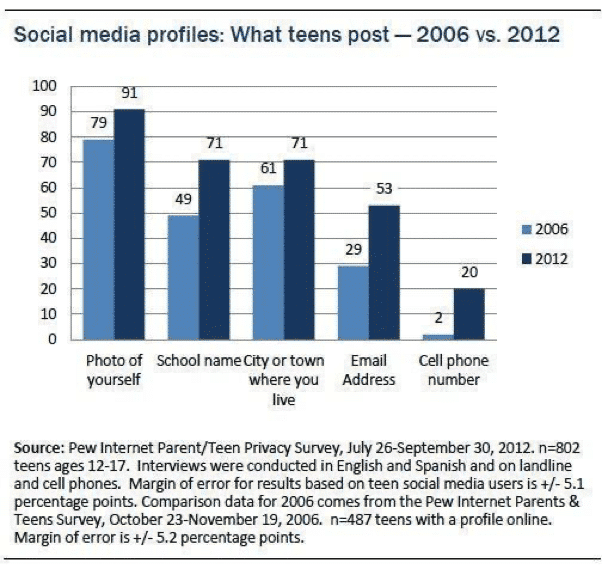
According to Pew Research Center, 71% of teens post their school name, 71% post the name of the city or town they live in, and 20% post their phone number.[1] Further, 36% of older teen’s Facebook friends are people they have never met in person.[2]
Although teens understand that oversharing can be dangerous, few have the life experience to understand exactly how it can be dangerous. When I was a teenager, the more “likes” I got on a photo or the more “friends” or “followers” I had on social media, the better I felt about myself and my online presence. I accepted friend requests from mutual friends who I had never met before, along with accepting requests from strangers. In my teenage mind, there wasn’t any harm in letting strangers see my online profiles. I felt that I would be okay as long as I wasn’t sending them my address. It didn’t occur to me that this data could be used to predict my location or even that anyone could have that kind of predatory intent.
Dr. Bennett shared a story with us where she worked on the production of the Lifetime TV show, I Catfished My Kid. In the show, producers created a poster board map (like detectives do) with yarn connecting the teens’ movements throughout the day for a week. With this data, they were able to predict daily habits like location, activities, and even who they hang out with.
How is Location Data Shared?
Instagram
One way location is shared on social media is through geotagged photos. A geotag is an electronic tag that assigns a geographical location to a photo or video posted on social media or other websites.[3] Geotags are commonly used to share what restaurant or city someone is in and are very popular on Instagram.
If your teen has a public profile and decides to post a photo on Instagram with a geotag, not only will their friends be able to see where they are, but users around the world can too. By simply clicking on that location’s tag, your teen’s photo will pop up as a current or recent visitor.
Another way location is shared on Instagram is by the use of hashtags. If your teen has a public profile and adds hashtags to their posts, their photos will show up as recent users of whatever hashtag they use, similar to the geotag feature. Hashtags are commonly used to have other users find their posts quicker and potentially gain more followers and traffic on their profile. However, that could be a privacy concern for younger users.
Facebook
The check-in feature on Facebook is similar to geotags. Facebook users “check-in” as an announcement to friends that they are visiting a particular location. Once checked-in, it appears on the user’s Facebook profile.
Snapchat
The SnapMap feature on Snapchat can also be a location risk. SnapMap allows your teen to share their location with their Snapchat friends every time they open the app. The SnapMap feature is a default, meaning it is automatically on so your teen might not even know that they are sharing their location. This is another privacy issue and may be a safety concern if your child accepts friend requests from strangers.[4]
Helpful Tips and Tools to Protect Your Child on Social Media
Set up a digital contact like our free Connected Family Screen Agreement and have ongoing, informative conversations with your kids about online safety. Our GKIS blog offers credible, interesting topics that will feed an ongoing agenda. Register for our Connected Family Screen Agreement to get on our weekly email list!
Set up your home to optimize best-use screen practices using our Connected Family Course for school-age kids.
Limit location sharing in Settings. On an iPhone, go to Settings and remove the location by clicking on the social media name > Location > select Never, Ask Next Time, While Using the App, or Always. You also have the option to turn off “Precise Location” meaning apps can only determine your approximate location
Don’t allow your child to have social media accounts until they are ready (we recommend after 13 years old or late middle school).
Require that your child set social media to private and only accept friend requests from family and friends they know in real life
Have your child change to the “Ghost Mode” on Snapchat (their location will no longer be viewable on SnapMap)
Thanks to CSUCI intern, Remi Ali Khan for researching common ways teens overshare on social media for this article.
I’m the mom psychologist who will help you GetKidsInternetSafe.
Onward to More Awesome Parenting,
Tracy S. Bennett, Ph.D.
Mom, Clinical Psychologist, CSUCI Adjunct Faculty
Photo Credits
Photo by Cottonbro from Pexels
Photo by Pixabay from Pexles
Photo by Pew Research Center
Works Cited
Deahl, D. (2017, June 23). Snapchat’s newest feature is also its biggest privacy threat. Retrieved November 04, 2020, from https://www.theverge.com/2017/6/23/15864552/snapchat-snap-map-privacy-threat
Dove, J. (2020, October 07). How to Remove Location Data From Your iPhone Photos in iOS 13. Retrieved November 04, 2020, from https://www.digitaltrends.com/mobile/how-to-remove-location-data-from-iphone-photos-in-ios-13/
Madden, M., Lenhart, A., Cortesi, S., Gasser, U., Duggan, M., Smith, A., & Beaton, M. (2020, August 17). Teens, Social Media, and Privacy. Retrieved November 04, 2020, from https://www.pewresearch.org/internet/2013/05/21/teens-social-media-and-privacy/
Oxford Languages and Google – English. (n.d.). Retrieved November 04, 2020, from https://languages.oup.com/google-dictionary-en/
All parents work hard to keep our kids safe. However, sometimes unexpected things happen. Imagine if your child finds themselves alone at school or at the soccer field waiting for their ride and starts to feel unsafe. Or maybe in an emergency a teen takes an Uber and feels uncomfortable with their Uber driver. Or maybe they are at a new friend’s house and you need to pick them up, but they’re not answering your texts or calls. Today’s GKIS article covers several tech remedies that you may not have been aware of.
Fake Phone Calls on TikTok
Although we’d like to think our child would never feel unsafe enough to need a fake phone call, TikTok users think otherwise. Search “fake phone call safe” on TikTok and you’ll see a video that stages the sounds of a real phone call conversation.
Typically in these fake phone call videos, the person recorded in the conversation is saying that they are expecting you and are aware of what you are doing. They are designed to make the listener appear as though they are real-time connected to their parent.
Possible uses for this video are if your child is in an Uber or somebody they don’t feel comfortable with is giving them a ride home or if they feel unsafe while walking home or waiting for a ride alone. Not only does the fake call take the pressure off of them from talking to the stranger=, but it also appears as though they are being tracked for location and situation.
Emergency SOS
Emergency SOS is a free default feature on your iPhone. By clicking your power button five times, you can trigger an automatic 911 call within three seconds.
How to Check if Your Child has this on Their iPhone
Go to Settings > Emergency SOS > Select On to turn on the call with the side button switch, then enable Auto Call.
To test it, click your power button five times and wait for a loud alarm to sound. Of course, be sure to click it off before the 911 call goes through.
Find My Friends
Another great way to know where your child is at all times is the Find My Friends app on the iPhone. With this app, you can check where your child is at all times.
Find My Friends comes as a default feature of an iPhone. To use it, you simply have to make sure you have clicked the Share My Location feature under Settings > Privacy > Location Services > Share My Location.
Life360 “Feel free, together”
Similar to FindMyFriends, Life360 is a tracking device for Apple phones and Android phones that allows you to sync your family into a private, invite-only circle.
Life360 has three membership levels with different features:
Free:
Location Sharing
Battery Monitoring
Location ETA
Place Alerts – notifications when family members come and go from your most frequent Places
History – a quick view of your family member’s drive a location data for the last 48 hours
Help Alert
In-App Chat
Crash Detection
Plus:
All of the above plus Crime Reports
Driver Protec:
All of the above plus Emergency Dispatch, Roadside Assistance, and Driver Report
Personally, my mom and I have always shared our locations on the FindMyFriends app because of our almost 3-hour drive from one another. Once I discovered this app, I immediately made her download it because of all the unique features. However, not everybody is a fan of this tracking app. Search “Life360” on TikTok and you’ll see teens insisting that their lack of privacy and spying parents have ruined their lives.
Recently Dr. B says her clients have reported that teens are giving it one-star in the Apple store hoping that Apple will respond by removing the app. GKIS suggests you use discretion and offer older teens their privacy if they ask for it.
Emergency Whistle App
This kind of app can be found in the app store by searching up “Emergency Whistle.” Choose your favorite and download it!
In this app, you can access a digital whistle that activates a loud and alarming sound while also causing your phone flashlight to flash off and on. This acts as a physical whistle nicknamed a “rape whistle.”
Growing up I always carried one of these whistles. But now I’ve found this app which allowed me to feel safe for those late nights on campus as I walk back to my car.
Siren GPS
Cell service is not always the best. This app offers a “panic button” service which when you press it you are instantly connected to 911 services.[1] It will give emergency personnel your exact coordinates with or without a good cell connection.
I remember a time in middle school where my mom was running late after I got out of drill team practice. I sat at school alone for a bit wondering when she would show. Worried, I began to walk home on my own on an unfamiliar path that was deserted. Looking back at that memory, I wish I would’ve had an app like this one just in case something happened. Luckily, I made it home safe and sound!
ICE Medical Standard App
With the ICE app, “The World’s #1 Emergency Medical App,” your vital statistics like blood type, allergies, medical conditions, and medications will appear on your Lock Screen Display Overlay.[2] That way emergency personnel has potentially life-saving information for appropriate medical care.
Medical ID App
Similar to the ICE Medical Standard App, you can use the Medical ID app on both Android and Apple smart devices. It displays an emergency medical card on the lock screen of the user’s smartphone while also allowing to navigation through this screen to get to a list of emergency contacts.
Another great feature of this app is that you are capable of sending SMSs of your location. There is also a function where you are able to send GPS tracking to designated contacts. Several profiles can be saved on this device for those who have larger families.[3]
Although every parent does their best to ensure their child’s safety, parents can’t be with their kids 24/7. Thankfully with the help of these apps, you can have the reassurance that your child safe when you are not around.
Special thanks to Danielle Rivera for researching and co-writing this article. If you liked the article, you’re interested in learning more tips on how to get yourself and your child prepared with great safety tools check out the Connected Family Course on the GKIS website where you will be able to create a family understanding of why these apps are important for everyone to have on their phones.