Four out of five GKIS interns this semester admit to visiting dangerous video chat sites as middle schoolers despite parent warnings. Could that mean it’s common these days? After surveying friends, we think so. Parents have no idea what kids are actually seeing and doing during these online chats. Today’s GKIS article is the real story from the mouth of a millennial, where I discuss how we worked around parent supervision and what actually happens in popular chat rooms. Learn what video chat rooms are, the dangers associated with them, red flags to look out for, and just how simple it is for your child to access them. With this information, you can parent smarter and prevent digital injury … our GetKidsInternetSafe mission.
Video Chat Rooms, Sites, and Apps
Video chat is a way to interact face-to-face with anyone around the world through webcams. Video chat rooms are on multiple platforms including online websites and apps on your child’s smartphone, computer, gaming system, or tablet.
To place a video chat call, all your child needs are internet access and a webcam. Video chat sites and apps can also include alternative ways of communication such as instant messaging and chatting through sharing photos. Video chat sites and apps randomly pair your child with another user.
The Most Popular Video Chat Websites and Apps
There are hundreds of video chat websites and apps that are easily accessible. Many video chat sites and apps are free, while others require purchase. The most popular sites include; Omegle.com, DirtyRoulette.com, ChatRandom.com, and Chatroullette.com.
Video chat sites accumulate millions of users a month, with the most popular being Omegle.com with a whopping 34,000,000 monthly visitors.[1] The most popular video chat apps for Android and IOS devices include Badoo, Telegram, and Azar. Similar to video chat websites, these apps are used by millions of people. The most popular video chat app is Badoo, with over 460 million users.
Why We Did It
Kids love discovery and novelty. Just as they would visit random neighborhoods in town if they could drive, they love to browse random neighborhoods on the internet if they have access. Get them with their friends and they’re even more reckless and bold. That is why we offer our GKIS Screen Safety Toolkit. Parents told us they felt overwhelmed by the number of parent-management tech options, so we made it easy for you. The GKIS Screen Safety Toolkit is a family-tested, outcome-based resource guide with our best recommendations, how-to information, and links to our favorite easy-to-onboard parental control systems. With the toolkit, you’ll be set to create the custom screen safety toolkit for your unique child. Managing your child’s access is a first step toward protecting them from dangerous choices.
Our parents didn’t have these resources. That’s why we were video chatting with strangers by middle school. When I was thirteen years old, using Omegle and Chatroulette was the fun thing to do. My friends and I would go on during sleepovers and after school hangouts. Occasionally, I would even access it late at night when I was alone in my bedroom.
We did it because it was funny and exciting. We were kids having face-to-face conversations with complete strangers; it was interesting to us. We felt like we were the ones in control, and we always felt relatively safe. Disgustingly, a majority of the random connections would connect us to older males masturbating in front of the webcam. They would continue touching themselves even when they could clearly see just how young we were.
In my personal experiences, whenever a creepy man would be touching himself, my friends and I would quickly hit the skip button in hopes to be connected with a clothed person we could talk to. But there were also times when we would chat with one of those perverts and let them know how disgusting it was.
Now that I’m in my 20s, I realize just how dangerous and repulsive our online experiences were. Luckily, nothing horrible happened to us. But if I or a friend would have shared enough information or decided to meet up with someone we met from Omegle or Chatroulette, it could have been devastating.
Dangers of Video Chatting with Predators
Psychological injury can result from children viewing sexual behaviors or being groomed by predators online. It’s not uncommon for kids to be coerced to reveal identifying information like where they live, where they go to school, and who their friends are. From there, some predators will persuade their victims to meet up in person, which can lead to a number of dangerous possibilities.
Red Flags That May Signal Risk
Your child interacting with a predator may go unnoticed, but there are a few red flags that you can look out for. For example, your child may be at risk if they
become secretive about what they were doing online or change screens the minute you walk into the room,
regularly deletes their browser history or their browser is typically on private browse,
spend a lot of time on the phone or computer, or
seem nervous when asked if the parent can check their history or search their phone.
For a more comprehensive list of child red flags, check out our Cybersecurity Red Flag Supplement. Three-tools-in-one, this supplement to your free Connected Family Agreement offers:
Our GKIS CYBERSECURITY SUPPLEMENT – Did you know that kids are the #1 targeted population for identity theft? That’s because the cybercriminal can benefit from fraudulent charges for years before the victim discovers it. Protect your family from hacking, scamming, malware, and phishing with our cybersecurity setup guide and best practices checklist (at home and while traveling).
PLUS
Our GKIS ONLINE SAFETY RED FLAGS FOR KIDS & TEENS – Parents in my clinical and coaching practices frequently ask me to teach their kids the red flags that may alert them to the tricks of online predators, hate groups, and cyberbullies. I offer you my clinical teaching list so you can educate your kids. Knowledge and assertiveness coaching are key elements of child resilience and good judgment online.
PLUS
Our GKIS ONLINE SAFETY RED FLAGS FOR PARENTS – Parents need to know the behavioral red flags that may signal their child is suffering a digital injury. This tool teaches parents what child behaviors to look for that may signal they are at risk – a tool I created from 25+ years of clinical practice. Being able to recognize behavioral red flags in your child may be the difference between stopping risk after one exposure versus not recognizing dangerous relationships and exposures until it’s too late.
With parent management tech tools, cybersecurity awareness, child education, and parenting tools to recognize risk, you are far better equipped to block anonymous strangers from predating on your kids.
Thanks to CSUCI intern, Remi Ali Khan for researching video chat websites and apps for this article.
I’m the mom psychologist who will help you GetKidsInternetSafe.
Onward to More Awesome Parenting,
Tracy S. Bennett, Ph.D.
Mom, Clinical Psychologist, CSUCI Adjunct Faculty
GetKidsInternetSafe.com
Photo Credits
Photo by Andrea Piacquido from Pexels
Photo by Julia Cameron from Pexels
Works Cited
[1] ChatHub. (2020, February 13). Top 12 Sites Like Omegle in 2020 (Ordered by popularity). Retrieved September 29, 2020, from https://blog.chathub.cam/top-12-sites-like-omegle/
Too much screen time can be harmful to our health. Findings suggest that, along with unhealthy diet and lack of exercise, increased screen time is a contributor to epidemic obesity among Americans. According to the CDC, 40% of adults and 18.5% of children in the United States are obese. Obesity increases the risk of developing other health conditions like diabetes, cancer, high blood pressure, heart disease, and stroke. But screen time isn’t all bad and can even help us get more active and track important health data. Today’s GKIS article offers recommendations for some awesome exercise apps that can help get you off the couch and on your feet for more healthy and fun fitness.
The Benefits of Exercise
Physical fitness is proven to have many physical health and mental health benefits. Exercise can improve sleep, reduce anxiety, and lift your mood, ultimately reducing the risk of depression. With busy schedules and limited access to gyms, we too often go without exercise. Luckily, there are hundreds of apps on our smart devices that make exercise enjoyable and easier, even on a tight schedule. Also, exercising with your family is a great way to teach kids important life skills and bond and stay connected!
Trending Exercise Apps that you (and we at GKIS) Love
Nike Training Club
A favorite of Dr. B’s, the Nike Training Club is a great free app that you and your family can enjoy at home. This app contains over 185 workouts for all levels including high-intensity training, yoga classes, and bodyweight workouts. Little to no equipment is required for most of the workouts, so you don’t have to stress about spending money on weights.
Here are some of the collections that are great for home:
Big Workouts for Small Spaces
For the Whole Family
Boost Your Mood
Rejuvenate with Yoga
Elevate Your Game
Other Features
In addition to the free workouts, Nike Training Club offers tips for nutrition, sleep, recovery, mindset, and wellness.
I have personally used this app, and I love it. Not only is it great because it is free, but the quality of what is being offered is fantastic. This app would be a perfect addition to your families’ devices and your daily routines!
Workouts and Exercises at Home
This fitness app is perfect for families with busy schedules because the workouts take only seven minutes. The app features a cute “Lazy Monster” character that guides you through up to 30 different exercises that require no equipment. All you have to do is set aside seven minutes of your day to try it out.
Other Features
Workouts and Exercises at Home allows you to create personalized workouts and track your progress. It currently costs $3.99 a week, but it is less than a gym membership and all of the workouts are planned for you. All you have to do is open the app. Workouts and Exercises at Home is an app that will make exercising fun for you and your family.
Gymondo: Fitness and Yoga
Gymondo is a fun fitness app that contains workouts under 30 minutes long. There are a variety of workouts to choose from like yoga, strength training, HIIT, mobility, and body weight. These workouts are available at any fitness level, so this would be perfect for anyone in your family.
Other Features
Gymondo is a free app, but the premium version gives you access to over 200 workouts, healthy recipes, and a nutrition plan. The premium version is only $7 a month, which is a good deal for all that is being offered. Get your family together and try this app out for free!
Seven
Seven is a high-quality fitness app that contains seven-minute workouts. This app is family-friendly and requires no equipment. All you need is seven minutes and some open space for a great, quick workout.
Other Features
Seven features daily challenges to keep you motivated to exercise every day. You can choose between 12 different instructors that will motivate you during your workout. You can also create workouts that are personalized for you and your family.
If you join The 7 Club, you get access to all the workouts and features on the app. One month costs $10, and one year costs $60. Seven is perfect for a quick workout in the morning, afternoon between zoom classes/meetings, or in the evening. All you have to do is set aside seven minutes for you and your family to get a good workout in.
A special thank you to Alisa Araiza for researching and co-writing this article. I hope that trying these apps will bring you closer to your family and make exercising enjoyable. For other ways to stay connected with your family, take a look at Dr. Bennett’s #TogetherAtHome Family-Friendly Activity Ideas on the GKIS website.
I’m the mom psychologist who will help you GetKidsInternetSafe.
Surveys reveal that depression and anxiety have increased for adults, teens, and kids. It’s unclear what is causing these increases, but longer workdays and overtasked lives may be strong contributors. Increased screen time on video games, social media, video and movie streaming, texts, and emails can be super fun and even improve productivity. But too much screen time can also lead to a mental brownout, a type of anxious fatigue that we may not even recognize until it leads to mental illness. Giving up screens to avoid it simply isn’t possible for most of us. But the good news is we don’t have to! Learn how smartphone health and wellness apps can benefit you without having to give up screen time!
Mental Health
Did you know that anxiety, depression, self-harm, and suicide is up 78% among teens?[1] In fact, by some estimates 1 in 6 children between the ages of 2 and 8 have a mental, behavioral, or developmental disorder. Left untreated, child symptoms may lead to more issues in adulthood.
Among children ages 3 to 17:
4% or 6.1 million have been diagnosed with ADHD
4% or 4.5 million have been diagnosed with a behavior problem
1% or 4.4 million have been diagnosed with anxiety and
2% or 1.9 million have diagnosed with depression.
Boys are more likely than girls to experience a mental, behavioral, or developmental disorder.[2]
Social Media Impacts on Children’s Mental Health
Sleep Deprivation
Social media has various effects on mental health, especially in children. Dr. Bennett writes in her book, Screen Time in the Mean Time, says that she feels sleep deprivation is the most common contributor to mental health problems today. The blue light on devices interrupts the sleep pattern and makes it more difficult to fall asleep. Many people also develop a compulsive impulse to check notifications which can also delay sleep.[3] Teens with sleep deprivation demonstrate lower achievement motivation, more teacher-child relationship problems, a poorer academic self-concept, and poorer school performance.
Self-Comparison
Too often, we see the best sides of our friends on social media. After all, nobody wants to read about the doom and gloom of a breakup or the fight someone just had with their mother-in-law. Positive posting can lead to friends feeling left out and generally bad about how their lives don’t compare. The GKIS article The FOMO EFFECT: How Fun Friend Posts Can Lead to Clinical Anxiety provides more information on self-comparison.
Distraction
Social media poses a major risk of distractibility. We tend to go on an endless cycle of content on one social media app or we cycle between multiple social media apps. This causes us to spend a longer amount of time on social media and forget about what we are supposed to do in the “real world”.
Mental Health Apps
Dr. Bennett recommends mental health apps to her clients all of the time. Free and convenient, they can be a great addition to psychotherapy. Even for people who aren’t in treatment, mental health apps can help us get to where we want to be by offering mood-enhancing toolkits, mood monitoring, and breathing and meditation ideas.
Mental health apps are awesome in that they are convenient, inexpensive, and even free, and available. They can be a comfortable first-step to wellness prior to (or even while) seeking out help from a mental health professional.
CAUTION: Keep in mind possible privacy issues due to the risk of data breaching and the release of private information to third parties. Many psychologists also agree that the apps are not as effective as seeing a mental health professional.[4]
Here are some mental health apps that GKIS is happy to share with you:
Sanvello
Sanvello is an app that aims to help you relieve symptoms of depression or anxiety by providing a complex toolkit of strategies and resources. It allows you to record your mood and health activities in order to track patterns.
There is also a Sanvello peer community that allows users to share stories, encouragement, and personal insights on any topic. The Terms of Service state “You must be over 13 years of age to use the Services, and children under the age of 13 cannot use or register for the Services.”[5]
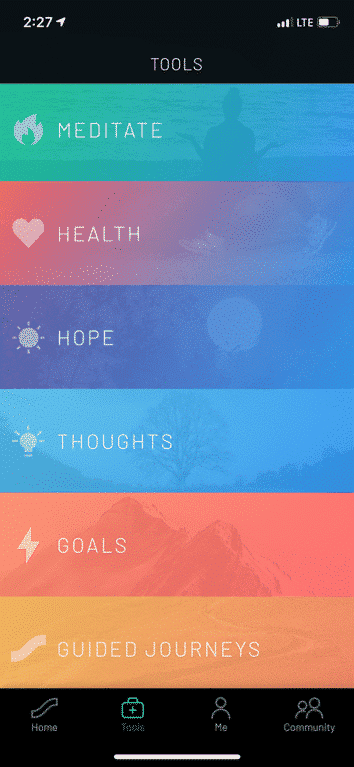
The toolkit provided by Sanvello includes:
Meditation: Lessons focus on specific topics like relaxing, mindfulness, stressful situations, and calm down.
Health: Helps you track health habits that may be affecting your moods such as exercise, drug use, and water or caffeine consumption.
Hope: This tool provides the user with a space to save photos, quotes, activities, and community content.
Thoughts: Provides a place for journaling, analyzing events that have occurred, or discovering characteristics that have contributed to a feeling.
Goals: Allows users to select a challenge such as reconnecting with a friend or saying hello to a stranger.
Guided Journeys: A series of journeys that encourage a user to accomplish something they have never done before.
Porchlight: Being There
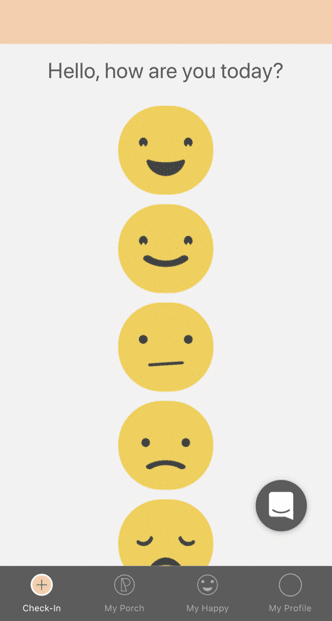
Porchlight is an app that is designed to allow loved ones to easily check in on each other’s mental health. The app prompts you to “check-in” once you enter the app where you can share your emotions using emoji. Users can connect with others which will send daily check-in notifications to the connected users. Porchlight provides prompts to check in with the connected users depending on what emotion they check in as.
Porchlight’s Terms of Service states “you must be 13 or older to register as a user or to use the app. If you are a minor, you must have your parents’ permission to donate through the App.”[6]
Headspace
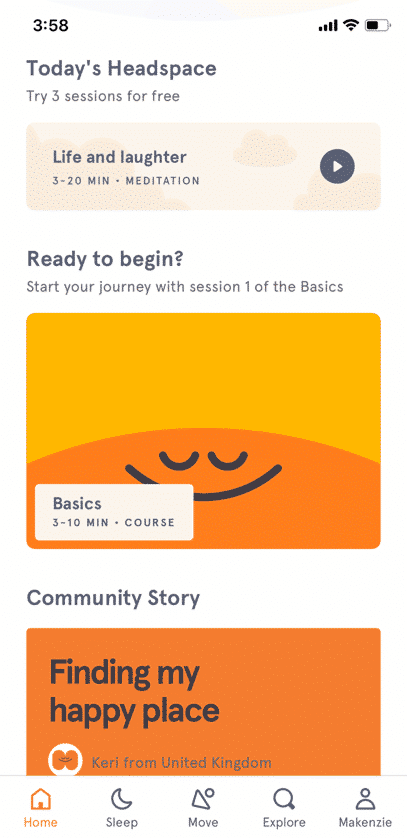
Headspace is an app that provides guided meditation exercises to help the user become healthier and happier. Headspace claims that it can increase happiness by 16% with just 10 days of use. It is also a popular app with over 60 million active users.
There are 4 main guides to mindfulness within the app:
The Wake Up: Daily short stories and small meditations to help you start your morning on a good start
Move Mode: Exercises to help strengthen mental and physical well-being
Sleep: Sleepcasts, music, and audio experiences to aid a restful night of sleep
Meditation: Teaches everyday mindfulness to help at any time of the day[7]
According to the Terms of Service for Headspace, “You must be 18 years of age, or the age of majority in your province, territory or country, to sign up as a registered user of the Products. Individuals under the age of 18, or the applicable age of majority, may utilize the Products only with the involvement and consent of a parent or legal guardian, under such person’s account and otherwise subject to these Terms.”[8]
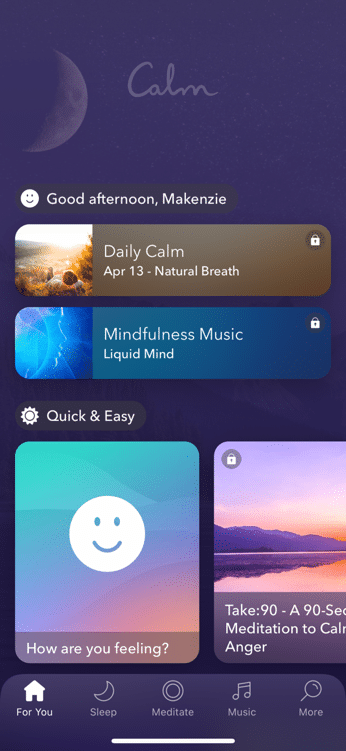
Calm
Calm is an app designed to assist users to develop healthy mental fitness, relax, and good sleep habits. The goal of the app is to introduce people to the benefits of mindfulness through meditation.
There are 6 different items of focus in the app:
Meditate: Teaches the skills of meditation
Sleep: Tools to have a restful sleep
Music: To help you relax, focus, or sleep
Body: Demonstrates mindful movement and stretching
Masterclass: Audio programs taught by experts
Scenes: Nature scenes and sounds to help relax and focus[9]
Calm’s Terms of Service state “you may only use the Services only if you are 13 years or older. To make a purchase via the Services, you must be 18 years or older and capable of forming a binding contract.”[10]
Thank you to CSUCI Intern, Makenzie Stancliff for providing insight on mental health apps. For more information about how electronics can impact our health, check out Dr. Bennett’s GKIS article, Is Wi-Fi Dangerous to Our Health?
I’m the mom psychologist who will help you GetKidsInternetSafe.
[1](n.d.). Retrieved from https://www.ajmc.com/focus-of-the-week/mental-health-issues-on-the-rise-among-adolescents-young-adults
[2]Data and Statistics on Children’s Mental Health. (2019, April 19). Retrieved from https://www.cdc.gov/childrensmentalhealth/data.html
[3] How does social media impact the mental health of young people? (2019, October 28). Retrieved from https://www.internetmatters.org/blog/2017/04/12/social-media-impact-mental-health-young-people/
[4]Technology and the Future of Mental Health Treatment. (n.d.). Retrieved from https://www.nimh.nih.gov/health/topics/technology-and-the-future-of-mental-health-treatment/index.shtml
[5]Home. (n.d.). Retrieved from https://www.sanvello.com/
[6]Being There. (n.d.). Retrieved from https://www.porchlightapp.io/
TikTok is a trendy, popular social media app that is controversial amongst parents. On the one hand, explicit language, attention-seeking trends, and cyberbullying on the app give TikTok the potential to be harmful. But kids and teens love it, anxious to join and follow the latest trends, memes, and creators. Like every app, it is important to consider the potential benefits TikTok can offer, not just the dangers. Many TikTok creators take advantage of the app’s popularity to provide inspiration and education to its adolescent audience. If you’ve decided to allow your teens access to TikTok, GKIS has identified some influencers your family may enjoy.
Who’s on TikTok?
Like YouTube and other social media platforms, TikTok users form communities based on popular trends like cooking, makeup, education, and wildlife. While we don’t think of apps like TikTok as a learning resource, many TikTok creators have dedicated their page to making teen-friendly, educational videos that can help your teen learn new things in a fun, accessible way.
Before You Start
As we mentioned in our GKIS Sensible Parents Guide to Tik Tok, it is recommended that kids be over the age of 13 before using TikTok due to its explicit language and content. Also, we strongly advise that you implement our free GKIS Connected Family Agreement before you allow your child a mobile device. With two versions available for kids and teens, our agreement spells out just what you should cover to help keep you family members safer online. All you have to do to get your free agreement delivered directly to your email by entering your name and email address on the GKIS home page. No purchase necessary and, if it’s not for you, you can unsubscribe at any time.
Meet Our Favorite Creators
For this article, we tried to find creators who have a relatively clean act for a teen audience. Please review these creators and decide for yourself whether they are good fits for your family.
Cooking
In the cooking community, creator @salt_to_taste has amassed over 1 million followers with his cooking videos and recipes. With easy recipes made with everyday ingredients and simple directions, this page is a great place for teens to get inspired to start experimenting in the kitchen. Salt to Taste makes a variety of foods, from snacks to smoothies to simple American and East Asian dishes. This creator has been active for almost a year and has been recently nominated for a Shorty Award in the food category. This creator does not seem to use inappropriate language and does not seem to do sponsorships.
Makeup
In the makeup community, creator @mariasgoldenmakeup is known for her bold eye looks and makeup tutorials. Though fairly new to TikTok, Maria has already gained over 61,000 followers with videos showing how she achieves her beautiful makeup looks as well as the products she uses to achieve them. Maria’s page can offer inspiration for teens who want to try their hand at makeup and achieve specific looks. Her looks can be used for everyday makeup and special occasions. She has done some sponsored posts but is transparent about what products are being advertised, using the hashtag #ad to indicate a sponsorship.
Nutrition
In the educational community, there are a few creators who have gained popularity for their educational TikToks in various subjects. In nutritional education, creator @sarahgracemeck, with over 149,000 followers, creates educational TikToks correcting various health myths and promoting tips on healthy eating. In our culture, we are obsessed with being thin and restricting what we eat, and this message unfortunately gets pushed on teens the most. Sarah does a great job using her background as a dietician to spread the message of healthy eating in a nonjudgmental, positive way. Sarah is passionate about spreading accurate information and debunking various unhealthy dieting trends and myths. It does not seem that Sarah offers sponsored content.
Science
In science education, creator @chemteacherphil is a popular user with a background as a high school chemistry teacher. Phillip has amassed over 1.3 million followers on TikTok with his videos exhibiting different chemical reactions and explaining their processes. The reactions he creates in his videos are fascinating to watch, and the information he gives can be useful to any high school student taking a chemistry class. Phillip does not seem to use explicit language or audios in his videos or do sponsorships.
Language
In language education, creator @fresajapomex is a popular multilingual creator who publishes videos in Spanish. With over 2.5 million followers, this creator does a variety of content from vlogs to comedy skits to food reviews. This creator, who goes by Sony on TikTok, has an energetic and kind personality and has a great sense of humor. Her parents are Mexican and Japanese, and therefore she speaks both languages as well as English. As a former Spanish student, one of the ways I improved my Spanish skills was consuming media in my target language. Sony’s content can be a great tool to help your teens improve their skills in a different language in a fun way. Sony does not seem to do sponsored content.
Wildlife
In the wildlife community, The Urban Rescue Ranch, the organization behind the page @ostrichplug, recently joined TikTok in an effort to show the work they do raising animals in an urban area. Their content shows their workers handling a variety of animals like frogs, possums, ostriches, pigs, and most recently, chickens. The creators often include their animals in fun, comedic skits and do frequent updates on the development of a few of their younger animals. This is a fun page for teens to view the different responsibilities of owning animals, and may even be inspired to go volunteer for an organization like the Urban Rescue Ranch themselves. This page does not seem to use any explicit language or audios and also does not seem to do sponsorships.
Fun with Coffee
Lastly, a popular creator among GKIS interns is @morgandrinkscoffee. Morgan is a college student who works as a barista for her local coffee shop, and she has gained over 2.2 million followers since joining in 2019. Her content mainly consists of the work she does as a barista, showing how she makes certain drinks, her day to day responsibilities, and some funny skits on her experience in the food industries. For teens who may be experiencing their first jobs in food services, Morgan’s content can show that it’s possible to enjoy the work that you do, but it also lets teens have a laugh at some of the shared struggles most of us have faced while working in customer services. Morgan is transparent in her sponsorships, labeling her sponsored content with the hashtag #ad.
Making TikTok Safer
As discussed in our previous TikTok article, it can be difficult to control the content suggested by the TikTok algorithm. But with careful decisions on who you allow your teen to follow, TikTok will suggest better, safer content that teens will love and parents can trust. Though it’s important to be cautious of the dangers of TikTok, with a little research, finding teen-friendly creators can help make the app safer and more fun for everyone.
Thanks to Alexandra Rosas-Ruiz for her research and help with writing this article. Want to learn more about how to manage the risks of the internet for your teen? Check out Dr. Bennett’s latest book, “Screen Time in the Meantime.” With a quick read (or listen because it is also offered in audio), you can learn creative, sensible, and family-tested parenting strategies to help protect your teen both online and offline.
I’m the mom psychologist who will help you GetKidsInternetSafe.
Onward to More Awesome Parenting,
Tracy S. Bennett, Ph.D.
Mom, Clinical Psychologist, CSUCI Adjunct Faculty
Screen technology provides amazing entertainment, convenience, and communication as well as a wide range of problems, particularly for kids and teens. Parents and professionals complain they can’t find the perfect tech toolbox to help. There are a lot of costly third-party solutions out there, but where do parents start? None seem to cover all the bases! Apple may have helped us by launching the Screen Time setting in the new iOS 12 update. Promising more speed, the ability to FaceTime up to 32 people at once, new personal animojis, stickers, and filters, augmented realities, easily sharable photos, searching, and shortcuts, Apple is committing to more “power” overall. Features that promise to help us control our use include auto turn-off Do Not Disturb, Instant Tuning to selectively turn off notifications, advanced shortcut and privacy features, and Screen Time tracking. Find out what you need to know in today’s GKIS article.
Tracking Your Usage
This update offers Screen Time, which will allow you to see which apps you use most often and how much time you spend on each activity with an easy-to-read bar graph and data count. Screen Time also allows parents to see which of your kids is the Twitter addict and which is up past their bedtime watching YouTube videos. You can monitor multiple devices linked to your iCloud account.
The Screen Time feature also tracks how many notifications you receive and from which apps they are coming from. Screen Time even tells you how many times you picked up your phone, a number that may surprise you.
Setting Limits
There are several limits that you will find with this update. If you see that social media is taking up a majority of your child’s day, you can set a timer on that category and for the entire day they will only have a set time to use their phones for that specific purpose. If your concern is about a certain app, like Snapchat, then you can just set a limit on that app alone.
Another useful tool is the Content and Privacy Restrictions, which allows you to monitor your child’s internet usage and their app store purchases. This is a simple way to ensure that your child is not viewing graphic or inappropriate internet content.
The last major setting that can be utilized by this new update is called Downtime. Downtime allows for you to schedule time for yourself or your family to disconnect from the distractions of your apps. This may sound a lot like Airplane mode, however the difference with Downtime is the ability to allow certain apps to continue to be used. Calls and texts come in automatically with Downtime, but if you can’t be without your emails you can allow that to remain active during this scheduled break.
Opportunity to Start Important Screen Time Conversations with Your Family
With the new Screen Time feature, your kids may feel like their privacy is being infringed upon, and you aren’t giving them enough space. However, we at GKIS feel that filtering inappropriate content and monitoring screen use is an important aspect of parenting, especially for younger kids and teens.
Rather than avoid the discussion and lock their screen use down, negotiate what seems reasonable for your family. Have spirited conversations. Share important facts about risk and benefits that you learned from GKIS articles. Team work builds stronger relationships.
There is no more influential tool for screen safety than a healthy parent-child relationship. Trust is earned on both sides. As stated in Dr. Bennett’s book, Screen Time in the Mean Time, your attachment to your child is a relationship built upon communication, negotiation, and fun. It’s important to ensure that your children’s privacy is something that is as important to you as it is to them, and that seeing where their time on their phones is spent is a way to look after their digital health and social well-being.
Recap
You can see which apps are the most used and for how long
You can set limits to specific apps and categories of apps
You can set content restrictions for internet and iTunes usage
You can set a bedtime for yourself and your children
Thanks to GKIS intern Adam Ramos for keeping us up on the latest! We at GKIS are big fans of Apple’s new Screen Time innovation. It is worth carving the time out of your chaotic parenting schedule to check this one out. It’s easy to use, free, and a giant step toward personal screen time accountability. Need support how to start these important family conversations, set your home up for safe screen use with handy tech tools, and get your family behind sensible rules? Check out the GKIS Home Starter Kit. In 10 easy steps and in as little as two hours, you can make several giant steps toward a closer relationship and better screen safety in your home.
I’m the mom psychologist who will help you GetKidsInternetSafe.