Were you the kid with a mohawk in the 70s or pegged pants in the 80s? Maybe you were goth, a skater, or straight-edge. Teens of every era love to experiment with creative expression and explore new philosophical ideas. The internet offers boundless opportunities to follow cool influencers andchat with like-minded others in online forums. Visiting random virtual neighborhoods can be mind-expanding and fun, but it can also be dangerous. Today’s GKIS article explores the world of online counterculture. Being in-the-know is a critical element to great parenting in the digital age.
New Age Counterculture
As adolescents begin to form their unique adult identity, they look to their peer community for ideas for current, creative interests, how they want to come across, and what they want to look like. Especially attractive to teens is anything that their parents ARE NOT. Trends that are new, fresh, and totally different from parents or social norms are aptly named counterculture.[1]
The concept of countercultures isn’t new. From the anarchists in ancient Greece to the punks of the 1970s, countercultures have always influenced trends and fashion. Because kids today form multiple identities in their real world and in various virtual worlds, they love to explore constantly-evolving countercultures.
Fun Curated Online Platforms
These days, online influencers define counterculture for kids and teens. Sometimes that results in harmless fun. Other times, influencers post sexualized and edgy content designed to shock and titillate, engaging their audience in active discussions and
sharing.
To help you become familiar with counterculture online content, we’ve selected some content creators for you to check out and explore. Please keep in mind that because we don’t monitor these sites, we can’t vouch for their choices or the choices of their followers. Only you can best decide what makes sense for your family.
Kathryn Loo, Youtube username@hellobatty, posts videos about crafts, outfits, vlogs, and more. Her gothic Lolita style and love for all things Halloween inspires her viewers to embrace their interests and gives viewers ideas on how to get creative in her own spooky aesthetic.
Alex Weaver, Instagram username@thegothicalice, posts artwork, fashion, and for-sale creations in her goth/punk style. She frequently posts about books she’s interested in, artistic projects she’s working on, and creative outfits she puts together.
Aurel Nelson, Instagram username @phonyghost,is a skilled costume creator who makes amazing images of her cosplays (meaning dressing up and portraying a specific character). Some of her costumes include superheroes. She frequently collaborates with other costume makers to make a spin-off of our favorite Disney princesses as punk rock girls.
Tae-Seon Hall, Tik Tok username@tae.seonrise,posts videos on funny reactions to how her style is perceived by the public, videos of her cat, and quick makeup looks.
Mary Rose, Blog @TheEveryday Goth, creates fun posts relating to counterculture events, fun reads, fashion posts, and references to goth classics such as The Addams Family. She also links goth themed stores and songs she loves.
Pros to Trendy Counterculture Sites
Opportunities to meet and interact with like-minded fans
Exposure to creative ideas and unique ideas that may not be reflected in your community
Encourage your child to develop independent thinking
Help to build self-confidence
Their participation reflects that your child knows your home is a safe place for expression and communication
Cons to Trendy Counterculture Sites
Unregulated, unmonitored messaging boards
Exposure to inappropriate content like sexuality, vulgarity, and cyberbullying
Exposure to hate groups, radicalization, fake news, and conspiracy theories
Conversations of that may encourage serious mental health-related behaviors like depression, anxiety, eating disorders, self-harm, and suicide
Pop up ads and marketing
Tips to Navigating Counterculture Sites
Dr. B offers the following tips to protect your child from inappropriate counterculture sites
Tell your child you’ll be monitoring their online activity and explain why you think that is important.
Have an ongoing, fun, cooperative dialogue to stay current with their interests, challenge their ideas, and teach family values.
Monitor sites your child is interested in by creating a bookmark and following the creators. Be alert for subtle messaging and links to other sites and music.
Insist on having your child’s login credentials to their devices
Review browser searches
Do not save your credit card information on sites you share with your child.
GKIS Parenting & Safety Tools
If you feel overwhelmed when it comes to keeping your kids safe online, we got you covered. Our GKISScreen Safety Toolkit offers tried-and-true tech tools to help with filtering, monitoring, and managing your child’s screen activities. We also share links to apps and social media safety guides for platforms popularly used by influencers. This parenting step is what Dr. B calls protectionism in her bookScreen Time in the Mean Time, an important part of parenting in the digital age.
If you’d love a more comprehensive parenting course to help understand not only how to manage your child’s media, but how to optimize creativity and learning potential, check out our GKIS Connected Family Course. Dr. Tracy Bennett, can even personally guide you through this process during a personalizedworkshop orin-person coaching. Our GKIS CEO is passionate about assisting families with these confusing moments and is available to you at a click of a button. Coaching is an efficient, cost-efficient alternative to in-person psychotherapy. Prevention is always better than treatment.
The Overall Verdict?
The GKIS mission is to help families achieve screen sanity, prevent digital injury, and form deeper, more meaningful relationships. That includes joining them where they’re at in experimenting with identity formation. Just like punk in the 1970s and new wave in the 1980s, online counterculture helps today’s kids discover all that this crazy world has to offer.
Special thanks to Aroni Garcia for researching and co-writing this article. If you want to learn more about the mentioned social media platforms of the GKIS approved counterculture influencers, check out the GKIS parents sensible guides to Instagram and Tik Tok.
[1] CrashCourse. (2017). Cultures, Subcultures, and Countercultures: Crash Course Sociology #11. Retrieved from https://www.youtube.com/watch?v=RV50AV7-Iwc&feature=emb_title
[2]Daschuk, M. (2010). Messageboard Confessional: Online Discourse and the Production of the “Emo Kid”. Berkeley Journal of Sociology,54, 84-107. Retrieved February 6, 2020, from www.jstor.org/stable/40999937
[3] Hawkes, N. (2015). Young goths may be more vulnerable to depression and self-harm, study finds. BMJ: British Medical Journal,351. Retrieved January 31, 2020, from www.jstor.org/stable/26521636
It seems everybody is on their screens all of the time. Whether you’re working on your computer or your kids are texting and walking back from school, screen use can take an unexpected toll on your body. Find out about “text neck” and what you can do to avoid damaging and even dangerous distractions and repetitive use injuries.
What is a repetitive strain injury?
According to the CDC, device use has contributed to a 10% increase in unintentional child injuries.[1] Overuse or repetitive strain injuries (RTI) refers to bodily injuries that result from reduced blood flow to the muscles, bones, and ligaments as a result of poor posture or repeated movement.[2]For kids, repetitive strain injuries can occur from repeated movements typical in sports play, video controller use, or from repeatedly swiping or texting on smartphones and from excessive screen use.
Preventable Repetitive Strain and Misuse Injuries
Tendonitis
Repetitive strain injuries from excessive screen use include tendonitis in the shoulder, elbow, forearm, wrist, and hand and back or neck strain.
Ocular Migraines
Migraine headaches, particularly ocular migraines, are also becoming increasingly common due to excessive screen use. Symptoms of ocular migraines include visual disturbances like temporary vision loss, blind spots, auras, flashing lights or seeing stars, and zigzag lines.
Tinnitus
Tinnitus refers to a hissing, buzzing, whistling, roaring, or ringing in the ears that result from exposure to excessive and loud noises. Not only can the tiny hairs in the inner ear be damaged by loud and excessive noises, but they can also occur due to aging, sudden impact noises, middle ear infections, stress, negative side effects from medications, neck or head injuries, and other untreated medical conditions. Currently, tinnitus is incurable, but symptoms can be relieved with techniques like sound therapy (listening to specially selected distracting sounds).
Postural Injuries
A postural injury refers to injuries that result from accumulated pressure due to poor posture while sitting, using your computer, driving, wearing high heels, or standing. If you’re not using good posture your bones don’t properly align and your muscles, joints, and ligaments can’t work as they are designed to.
The most common postural injuries include
lower back pain
neck pain
shoulder impingement
knee pain
carpal tunnel syndrome (numbness, tingling, and weakness in your hand and arm due to nerve impingement in your wrist)
piriformis syndrome(pain that radiates down the back of the legs when the piriformis muscle compresses the sciatic nerve when sitting or crossing your legs)[3]
Text Neck
Another common type of postural injury among kids and teens is text neck. Text neckrefers to premature degeneration and malformation of the neck and spine caused by looking down at the screen for texting.
In the past, these types of injuries were only seen among aging dentists and welders. Now physicians are seeing these injuries in teens.
Hanging your head at a sixty-degree angle while texting places sixty pounds of force on the neck. This is far beyond the ten pounds of force your neck is designed to support when your head is in the neutral position.
Kyphosis
Poor texting posture can be particularly problematic for young users whose spines are still developing and could lead to arthritic changes in the spine, bone spurs, or muscle deformities. Research findings indicated that kyphosis, which refers to an S-curve of the spine or rounded back, can be caused by the loosening of ligaments in the spine aggravated by screen use.
Prevention
Instead of taking away the screen device or video controller altogether, simply implement healthy screen practices in your family.
Here are some great injury prevention ideas
Balance off-screen and on-screen activities.
Download an app, use parental controls like those we offer in our Screen Safety Toolkit, or provide a simple kitchen timer for time limit compliance and body-healthy rest and stretch breaks. Suggested break times are fifteen-minute for every forty-five minutes of play.
Encourage your kids to refocus their eyes for twenty seconds after every twenty minutes of screen time
Set up kids’ yoga, which helps with strength, stabilization, balance, and range of motion. Plus, kids learn more about their physiology and how to optimize healthy posture and avoid painful injuries. We recommend watching Youtuber AloYoga’s video “Yoga for Kids with Alissa Kepas.”
Implement ergonomics, the study of people, and their efficiency when interacting in different environments. The primary goal of ergonomics is to arrange a workplace so that it fits the individual working there.
Ergonomic computer setups include:
Eyes leveled with the top of the screen
Head and neck balanced and in line with the torso
Shoulders relaxed
Elbows supported and close to the body
Wrists and hands in-line with forearms
Feet flat on the floor
Overhead lighting dim to prevent glare
Curious to learn more helpful tips on RTI prevention? More information can be found in Dr. Bennett’s book, Screen Time in the Mean Time.
Distraction Injuries
We’ve all seen this form of injury in headlines about car accidents due to texting while driving. We’ve even had a laugh at trips and falls while texting in programs such as America’s Homes Funniest Videos where a person may trip and fall while texting. A distraction injury is an injury resulting from one’s attention being taken by screen use (texting, viewing, talking, or video conferencing).
While Walking
On CBS News you can find an article where a woman was texting and so distracted, she fell into a mall fountain.4 Or maybe you saw the viral video of a guy who literally ran into a bear while walking and staring into his phone. The Internet is alive with videos of injuries that have resulted from distracted walking or bicycle riding. The possibility of bringing harm to yourself has become such an issue that New Jersey has proposed a ban on walking and texting.5 Remind your child that there is a time and place to be sure you are being extra cautious towards your surroundings, such as walking in the streets.
While Driving
Distracted driving accounts for 60% of all teen accidents.6 Teens are more reliant on their phones and lack experience behind the wheel. According to CNN Health, texting is the most distracting form of device use and has been proven to limit the number of times an individual will look up and look both ways before crossing.7
TheCDC Youth Behavior Surveillance System (YRBSS) reports that 39.2% of teens will use devices while driving.8 While you may assume that your teen knows better, it’s always a smart choice to play it safe. This can be as easy as putting devices out of sight while driving or adopting helpful tech.
Tech Tools That Can Help
Use the “Do Not Disturb” mode on their smartphone to ensure safety practices when you’re not around.
On iPhones:
Go to settings
At the very top, there will be a search bar, type “driving”
Press “Do Not Disturb While Driving”
Activate the Feature at the bottom
If your phone doesn’t already have the Do Not Disturb feature, the following are GKIS-approved apps that can assist in distracting free driving!9
The AT&T Drive Mode App silences incoming alerts and calls. The application automatically activates once you’ve reached a speed of 15 mph or higher. If you’re concerned about not calling your kid and being left on voicemail with no notice, the app has customizable automatic responses that will let the parent know they are driving and will answer them afterward.
The OMW (On My Way) app works similarly to the AT&T app, but rather than activating at 15 mph it starts at 10 and higher. Aside from this you could earn points and win discounts for being a safe driver.
The Safe 2 Save app also allows you to earn points for being a safe driver by giving discounts to local businesses. The app also encourages users to include pictures of loved ones as a reminder of who they’re driving safely for.
Think you’ll need a helping hand in implementing all these tips? Contact ourscreen safety expert and founder of GKIS Dr. Tracy Bennett for a telehealth coaching session to discuss specific outside-the-box screen safety tips! In a quick, fun, and customized family workshop, you’ll feel more at ease knowing you have the tools to continue to have important safety conversations with your kids.
Special thanks to Aroni Garcia for researching and co-writing this article. If you liked the article, you’re interested in learning more tips on how to manage device time to avoid distracted driving and repetitive tech use, look at What Age Should We Allow Smartphones?
I just finished a webinar I offered for moms to support them during our stay-at-home order. In the audience, we had a mom who was seven-months pregnant with a three-year-old as well as moms with school-age kids and teens. During these challenging times, all have unique situations. Some of us are working full-time and struggling to find a free moment, while others are bored and working to find fun and purpose. Some of our kids are best friends, while others can’t seem to get along ever. Some kids are jetting through easy schoolwork while others can’t seem to get anything done. How are you doing? Are you making amazing memories with your time together or struggling to make things happen? Today’s article is about recognizing that the love is in the daily details, but it may take some special effort to notice.
“Seeing” by Annie Dillard from Pilgrim at Tinker Creek (Harper Perennial 1974)
When I was six or seven years old, growing up in Pittsburgh, I used to take a precious penny of my own and hide it for someone else to find. It was a curious compulsion; sadly, I’ve never been seized by it since. For some reason, I always “hid” the penny along the same stretch of sidewalk up the street. I would cradle it at the roots of a sycamore, say, or in a hole left by a chipped-off piece of sidewalk. Then I would take a piece of chalk, and, starting at either end of the block, draw huge arrows leading up to the penny from both directions. After I learned to write I labeled the arrows: SURPRISE AHEAD or MONEY THIS WAY. I was greatly excited, during all this arrow-drawing, at the thought of the first lucky passer-by who would receive in this way, regardless of merit, a free gift from the universe. But I never lurked about. I would go straight home and not give the matter another thought, until, some months later, I would be gripped again by the impulse to hide another penny.
It is still the first week in January, and I’ve got great plans. I’ve been thinking about seeing. There are lots of things to see, unwrapped gifts and free surprises. The world is fairly studded and
strewn with pennies cast broadside from a generous hand. But—and this is the point—who gets excited by a mere penny? If you follow one arrow if you crouch motionless on a bank to watch a tremulous ripple thrill on the water and are rewarded by the sight of a muskrat kid paddling from its den, will you count that sight a chip of copper only, and go your rueful way? It is dire poverty indeed when a man is so malnourished and fatigued that he won’t stoop to pick up a penny. But if you cultivate a healthy poverty and simplicity so that finding a penny will literally make your day, then, since the world is in fact planted in pennies, you have with your poverty bought a lifetime of days. It is that simple. What you see is what you get.
I love this passage because it captures so much about childhood joy. Like the puppy-dog-tails and sugar-and-spice nursery rhyme, childhood joy is a magic blending of anticipation, preparation, and imagination. Children build their magic worlds by keeping their eyes open for real-world discovery. And when they find something new and delightful, they turn to those around them to share in their excitement. For young children, this is a ladybug on a blade of grass; and for older kids, this is a giggling walk with friends to get ice cream. Parents can be a part of this magical discovery, or they can be washing dishes. It’s really up to us to be present.
But here’s the thing, we don’t have to entertain our kids 24/7. Contrary to popular parenting lore, our job is not to make our prodigy happy all of the time. Our job is to offer a safe and enriching place in love and guidance, helping them build resiliency skills so they can feel their worth and practice their capabilities. Sometimes that means we are by their sides, and sometimes that means we offer a crafted setting of endless possibilities.
To teach them how to recognize those endless possibilities, we first have to create the framework for meaningful magic and create the lens for them to see through. And I’m telling you now, memory-making family events don’t have to take place in a faraway destination or during a $5000 planned vacation. Magical, meaningful moments worthy of memories don’t cost dollars….they cost pennies. They’re like shiny pennies cradled in the roots of a Sycamore or left by a chipped-off piece of sidewalk. They are gathered in tiny moments of discovery and shared joy. To find them, we just have to have our eyes, and our hearts, open.
VIRTUAL SUPPORTIVE ACTIVITY IDEAS
Take a virtual travel vacation.
Create a passport for the virtual trips you will take.
Research the things to do once you get there.
Visit those places on Google Earth.
After the trip your child can draw a picture of something from the trip as a passport stamp.
Create a collage of the virtual places you visit.
Create family businesses and then end with a trade show.
Decide on your idea and write a mission statement.
Design your logo (fun ideas are to look on https://www.fiverr.com/ or https://99designs.com where people hire logo designers online). Pick your brand colors (https://coolors.co is a fun site for that)
Pick free stock images for your site or take them on your own (we love https://unsplash.com)
Create a budget
Source and buy materials for your product
Manufacture your product
Create flyers and business cards
Design and film a TV commercial (don’t forget to hire your celebrities and learn your marketing)
Create a sales convention where you each have a sales table where you hawk your wares (you can take turns as founders and customers or recruit family members and friends as customers)
Find brand partners
Create your store
Have a trade show where you buy each other’s wares and services with a budget and fake money you set up ahead of time.
Set up a restaurant in your home.
Plan the menu
Prepare the food
Dress up like chefs and waiters
Serve your family guests just as they’d be served in a restaurant (menu, orders, bill payment).
For more ideas to create fun family fun, follow our daily #TogetherAtHome idea posts on the GetKidsIternetSafe Instagram page! To help you out during challenging times, here is a list of linked resources to help you make magic family memory moments while you’re #TogetherAtHome.
ARTS AND CRAFTS
Easy Peasy and Fun
From their website: “Ready for a fantastic crafting session with your kids or students? We have a ton of engaging art and craft for kids to make and you’ll find ideas for all ages and for all occasions.”
From their website: “If you’re looking for easy and fun craft ideas for kids – you’ve definitely come to the right place! We’ve included our best and most popular crafts for kids on this page for you. Kids will love making these simple crafts – and the best part is the preparation for you will always be easy too!”
From their website: “Kidspace may be temporarily closed, but curiosity never ceases. Keep the learning going at home with Kidspace curated programming and resources developed to spark connection, creativity, laughter, and inspiration. Join the Kidspace-At-Home journey bringing hands-on joyful learning experiences to families every day. Scroll to the bottom to learn how you can help support our efforts and keep Kidspace strong!”
From their website: “An award-winning audio show for kids and families. Each week, a different kid co-host joins Molly Bloom to find answers to fascinating questions about the world. Our mission is to encourage kids’ natural curiosity and wonder using science and history…but there’s no age limit on curiosity, and episodes of Brains On can be enjoyed by anyone.”
From their website: “But Why is a show led by you, kids! You ask the questions and we find the answers. It’s a big interesting world out there. On But Why, we tackle topics large and small, about nature, words, even the end of the world. Have a question? Send it to us!”
From their website: “Goodnight With Dolly” will feature Dolly Parton reading a series of Imagination Library books all carefully chosen for their appropriate content at this moment in time.”
From their website: “Looking eBooks for your kids? We have the best collection of free animated eBooks will undoubtedly stimulate your child’s mind, studies and learning pattern. Find these very interesting carefully made free eBooks for kids. These online eBooks touch various subjects and promise to make your child’s learning experience richer. Read and download your favorite eBooks for free.”
From their website: “Full online curriculum ages 2-8. 10 levels. More than 850 Lessons Across 10 Levels. The Step-by-Step Learning Path presents the full ABCmouse.com curriculum in a carefully designed program of more than 850 lessons in ten levels. As your child completes each lesson, he or she is guided to the next one and is motivated to continue learning by ABCmouse.com‘s Tickets and Rewards System.”
From their web site: “The Aquarium of the Pacific is currently closed. During this time, we will be offering a variety of live and on-demand programming for our community..”
From their website: “The Exploratorium isn’t just a museum; it’s an ongoing exploration of science, art, and human perception. Explore our vast collection of online experiences to feed your curiosity and education resources supporting online teaching and learning.”
From their website: “Bring the Zoo to You. During our closure, we’ll continue to share cool views of the Zoo, our animal residents, and our dedicated keepers to keep you informed, engaged, and connected while social distancing.”
From their website: “MOCA Education makes education more collaborative, inclusive, and learner-centered, and nurtures intellectual growth through transformative experiences with contemporary art. Join our team of MOCA educators as they lead different family-friendly activities through interactive workshops, virtual Talking Tours, and classroom curriculum discussions. It is fun for all and particularly helpful for homeschooling!”
Live storytime events aimed at providing children with emotional support tools to help them cope with anxiety and stress in an entertaining, engaging way. In the first installment, Leah Bowen reads A Feel Better Book for Little Worriers, co-authored with Holly Brochmann, to help children identify a worry and where it might come from, as well as provide them with helpful tools to reduce and cope with worries.
Full disclosure, when Facebook’s Messenger Kids (MK) first came out in 2017, I was skeptical. As a GKIS screen safety expert, I published an article accusing Facebook of branding our kids and introducing them to the world of social media too young. Soon after, Facebook’s Head of Global Safety contacted me to let me in on some things I hadn’t thought about. She said that they’d done the research and found that kids were already using their parents’ messaging apps whether we liked it or not. To increase safety and offer parent management and kid-friendly features, they decided to trial Messenger Kids. They also offered me a volunteer spot on their Youth Advisory Committee for ongoing input. Since I joined in 2017, I’ve enjoyed a monthly collaborative call with about 25 other child development experts from over the world. Messenger Kids has benefitted from some of the most respected experts in the business, including Sesame Street, The Fred Rogers Institute, and the Yale Center for Emotional Intelligence, among many others. Do you want a safe way for your child to message and video chat with friends and family? This GKIS Sensible Guide offers you the information you need to make a competent decision about whether Messenger Kids makes sense for your family.
What is Messenger Kids?
Messenger Kids is a video conferencing app for kids that was released by Facebook in 2017. It was created as a safe alternative to Facebook’s Instant Message.
How old is old enough for adoption?
Messenger Kids is designed for kids ages 6 to 12 as a safe, parent-managed way for children to video chat and message with friends and family.
After downloading the app, you will be prompted to complete the following:
Log into your Facebook account
Once logged in, you will be prompted to enter your child’s name and their birth date.
After the account is created, you will be shown a list of other Messenger Kids accounts, as well as Facebook accounts to add to your child’s friend list.
Add a second parent or guardian who would be able to manage the account as well.
Set a code that your child can give out to their friends which would request your permission to be a contact.
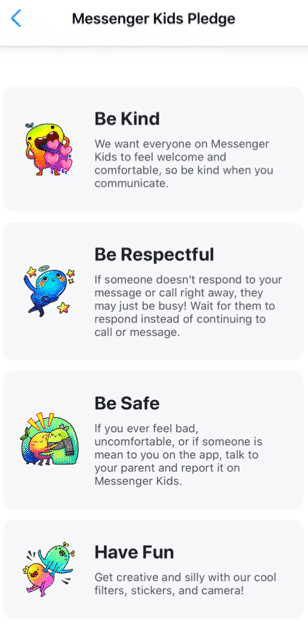
After you have completed all the above steps, your child will be prompted to add a photo of themselves, set a color to decorate the app, and complete “missions” to get to know the functions of the app. Your child will be prompted to read the Messenger Kids Pledge to be kind, be respectful, be safe, and have fun.[i]
What are the main features?
A parent dashboard that displays your child’s activities, contacts, and controls
Provide education to the child about new control features
Blocking a user allows the user to remain in the contact list, but the child will not be able to have individual conversations with that user
The child can use photo filters to send images to their contacts and to video chat
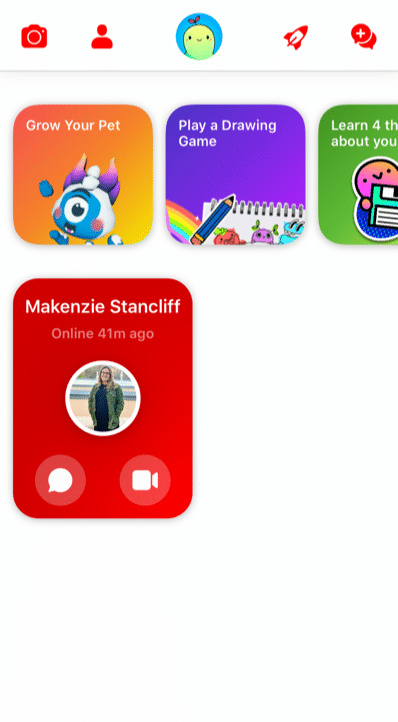
There are several “missions” the child can complete
Grow a pet
Play a drawing game
Learn 4 things about your information
Add a friend
Take a funny photo
Create a group
The Parent Dashboard
Because Facebook gets feedback from kids, parents, and child development experts, Messenger Kids is always changing for the better. For example, the updated parent dashboard is where you can see all of your child’s latest activities, contacts, and controls at a glance in one place. It also shows you
who and what content your child has reported or blocked and why,
a list of recent chats and calls (including how frequently your child is chatting/calling and with whom),
an image gallery of all the images and videos exchanged by your child and their contacts (including whether exchanged in a group).
User Education for Kids
Facebook has also thought through Kids’ digital literacy and privacy needs by notifying child users of the new parental control features in a Data Transparency Flow. Kids are prompted to go through this education with a push notification. It’s also available in the “mission” section of the app for kids. New users engage with this education during the registration process. They’ll get important basic information about how their personal data is used and shared when they use Messenger Kids – a great first step to cyber awareness and privacy issues in general.
Because child friendships need a healthy pause here and there, Facebook has also made blocking easier to use and less permanent. Before, if a child blocked someone, they were automatically removed as a contact. Now when a kid blocks someone, they won’t be able to communicate in a 1:1 chat, but they’ll remain contacts and still be able to be in group chats together. This allows kids to leave or stop individual interactions they no longer want while not having to leave group environments they may share with that contact. The child is always warned when they return to or start a group chat that contains a blocked contact that they have the option to continue to the chat, leave the group, or cancel joining the chat.
What are the privacy and safety options?
There is no minimum age of use outlined in the apps privacy policy. Facebook has a detailed list of what features they collect while using the app on their privacy policy. Here are a few of the features collected while using the app:
Facebook has recently added more controls. In the controls tab, you can see which device your child is logged into on MK, when your child last used MK on those devices and enables you to log your child out of selected devices. Parents also have the ability to remove and report any of these images and videos from the same Dashboard (doing so will remove that content from the child’s thread and notify them that you removed it).
As long as parents stay on top of who’s being friended and the information that is being exchanged, there are few risks associated with using Messenger Kids. The parent has the ability to control what the child can and cannot do as well as who they contact. Parents can also see what has been shared (and deleted).
However, any messaging app has its risks, especially when kids are involved. Here are a few we at GKIS thought you may want to consider
Your child and their friends may post inappropriately or impulsively
Cyberbullying between known contacts, like exclusion.
Too much access to friends and screens (of course, parents can schedule the use and use the sleep feature).
Your child is exposed to the Facebook brand, just as they are other popular American brands like Coca-Cola, Harley Davidson, and Budweiser.
Because parents have so much management opportunity and kids love the socializing, GetKidsInternetSafe rates Messenger Kids as a green-light app. We also love that Messenger Kids offers educational information that helps kids make better decisions with friends onscreen.
Thank you to CSUCI intern Makenzie Stancliff for co-authoring this article. For more information on keeping your child safe on social media, check out the Get Kids Internet Safe Screen Safety Toolkit. Be sure to add Messenger Kids on to the free GKIS Connected Family Agreement as “appropriate.”
I’m the mom psychologist who will help you GetKidsInternetSafe.
[i] Introducing Messenger Kids, a New App For Families to Connect. (2019, November 7). Retrieved from https://about.fb.com/news/2017/12/introducing-messenger-kids-a-new-app-for-families-to-connect/
[ii] (n.d.). Retrieved from https://www.facebook.com/legal/messengerkids/privacypolicy?version=2020
Minecraft is a virtual 3D game that allows users to create unlimited worlds using online building blocks while unlocking resources along the way. From cities to rollercoasters, the possibilities are nearly endless. We at GKIS are big fans of Minecraft because it fosters creativity, problem-solving, new skill development, and socialization opportunities. But like any online tool, there are also associated risks. This GKIS Sensible Guide provides information that parents need to optimize Minecraft’s benefits while keeping your children safe.
How long has Minecraft been around and how popular is it?
Minecraft was created in 2011 by Swedish game developer Markus Persson and purchased by Microsoft in 2014. Nearly 176 million copies were sold by late 2019. In 2019, Minecraft has over 112 million players every month and can be played on various platforms including smartphones, tablets, Xbox, and other gaming stations. It has evolved to include more elements and has a series of spin-off g
ames with different themes. Users also post Let’s Play videos YouTube to show how they build their worlds and different ways to create items.
Getting Started on Minecraft
According to Minecraft’s Terms of Service, “If you are young and you are having trouble understanding these terms and conditions, please ask a responsible adult such as your parent or guardian.” Minecraft also insists that children under age 13 have their parents download and register for an account. However, children can easily change their age before signing up to go around that rule.
Minecraft varies in price depending on the type of platform. Signing up for an account is simple. Just create an account with a unique username and email address. Users are given one profile by default but have the option to make multiple profiles.
Features of Minecraft
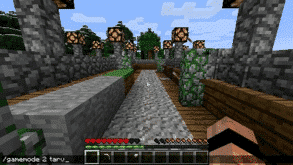
Minecraft allows users to collect resources and build their own worlds. Users can dig, build, and enchant items to transform their world into whatever they want. Users can also select different game modes, each with unique challenges and features.
Survival Mode
One of the main game modes
Players must collect resources, build structures, battle mobs, find food.
The goal is to survive and thrive.
Creative Mode
Players are able to build with an unlimited number of blocks.
Players are given all the items needed to build.
Mobs still exist, but there is no threat to survival.
Players are able to fly around the world.
Adventure Mode
Players use maps to navigate the world.
Depending on the device played on, blocks can either be destroyed or placed.
Hunger and dying is possible.
Spectator Mode
Users have the ability to fly around and observe the worlds without interacting with it
Players are invisible and can move through blocks and buildings.
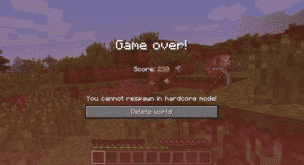
Hardcore Mode
Available only on the online version.
The world is locked to hard difficulty and the player cannot respawn after they die.
Only specific worlds enable hardcore mode and not individual players.
Minecraft has two different play modes, single-player and multiplayer. In single-player mode, a user only interacts with their own character and their own world. In multiplayer, users can join any game with any player, friends or strangers. Parents have the ability to sign their child up for a family-friendly multiplayer mode that is supervised and has restrictions on the chats and interactions.
The Benefits of Minecraft
Minecraft allows players to use their imagination and create what they desire. Users develop problem-solving skills while they are creating their world. Minecraft also helps users develop computer literacy skills, teamwork, and collaboration. For example, while in multiplayer mode, players are able to communicate and work together to build their worlds. Mathematics and spacial skills are also developed while playing the game. For example, it takes six planks to build one door. If players have 60 planks, they can calculate how many doors they are able to build.
Parents have the ability to limit their child to only single-player mode or a family-friendly version of multiplayer. There are several Minecraft servers that have been designed for children in mind. They are designed with a code of conduct and have full moderation. Parents are able to sign their children on to a family-friendly server where they will be safe from interacting with strangers in a negative way.
The Risks of Minecraft
There are relatively few risks for children playing Minecraft. With the exception of playing too often, for too long, or getting frustrated with gameplay, single-player mode is relatively safe because kids can be restricted from interacting with players they don’t know. However, violence can be easily found in the game. For example, there are multiple ways to kill users, mobs, or animals, such as:
setting another player on fire using lava or a torch
hanging an animal or another player
using canons and bombs
using sand to trap and suffocate mobs
using a zombie as a weapon to kill a villager
shooting with a gun or stabbing with a sword
There is also a chance for cyberbullying in multiplayer mode. It is not uncommon to come across a user who is intentionally irritating and harassing other users. They often use parts of the game in unintended ways. For example, they may curse, cheat, and kill without reason. Cyberbullying also includes players who deliberately kick players off the server and anger others for their own enjoyment.
Multiplayer mode carries the risk of children chatting with strangers. For example, in 2017 a Minecraft user was jailed for meeting two children on Minecraft and persuading them to carry out sexual acts. [i]
There is a potential for users to track down your IP address from playing Minecraft. An IP address is n unique number for an internet network. The IP address provides the location of where your network is coming from. If users are able to hack into the server, they can find another player’s IP address. This can lead the user to the location of the player within a couple of miles.
If your child wants to play Minecraft, GKIS recommends that you:
Add it to your free GKIS Connected Family Agreement (If you haven’t downloaded it yet, enter your name and email on our GetKidsInternetSafe home page and it will be emailed immediately)
Discuss the risks of chatting with strangers with your child. For ideas about how to do this, check out our GKIS Connected Family Course.
GetKidsInternetSafe rates Minecraft as a green-light app due to the safety of the game and the benefits it can have on children’s development. Dr. Bennett has found that her kids and the kids in her practice love Minecraft when they are young and even return to it as teens! They tell her they appreciate the simplicity of it and especially love the relatively stress-free atmosphere with no in-game purchase requirements.
Thank you to CSUCI intern Makenzie Stancliff for writing this article. If you love to encourage creativity with your kids, you won’t want to miss the Makerspace ideas in our Connected Family Course.
I’m the mom psychologist who will help you GetKidsInternetSafe.
Tik Tok is a social media app that allows users to create and discover short videos made and posted by users. It’s popular because it combines teen users’ love for social media, music, and creative shorts. They love the authenticity of sharing and creating Tik Tok offers. Dangers are that kids may post and view sexualized or stunt videos and explicit songs, post videos of others without their permission, users are commonly ridiculed and cyberbullied, they may read lewd comments, and there is potential for public direct messaging. Be aware that popular Tik Tok influencers produce highly sexualized content and the “For You” autofeed commonly offers up content that most parents find inappropriate for child viewing. Plus, it’s so fun it’s addictive. Kids can spend hours scrolling endless content. As always, make sure you have familiarity with Tik Tok before you allow your child to use it. And, of course, add it to your free GKIS Connected Family Agreement as an “OK” or a “not yet,” so parameters, rules and regs, and etiquette issues are understood. (If you haven’t downloaded it yet, enter your name and email on our GetKidsInternetSafe home page and it will be emailed immediately). For a comprehensive tween/teen course on how to stay safe on social media, know what to watch out for, and how to apply amazing psychology wellness strategies, check out our GKIS Social Media Readiness Training Course. It gets the conversations started about the truths of Internet risk,. Also, y\ou won’t want to miss the parent setup tips at the end of this article. Our GKIS Sensible Guide provides information that parents need to know to make an informed decision.
What is Tik Tok?
Tik Tok is an app that allows users to create 15-second videos. It’s based on a previously popular app called Musical.ly, which is no longer available. Tik Tok users can post videos they saved on their phones and add sounds, parts of songs, special effects, and filters. Recently, Tik Tok added a new feature that allows users to record their reactions to other Tik Tok videos. The app also includes a feature that notifies users when they’ve spent more than two hours on the app. Users seem to value creativity and authenticity over likes.
How long has it been around and how popular is it?
Tik Tok is developed by ByteDance, a Chinese Internet technology company. It was first released in September 2016 for IOS and Android. Tik Tok’s global offices are located in Los Angeles, London, Dubai, and Tokyo, among other places. As of October 2018, Tik Tok was downloaded 80 million times in the US and 800 million times globally. It is free to use. ByteDance makes its money through advertisements integrated into the app.
How old is old enough for adoption?
Tik Tok’s Term of Service states, “If you are under age 13, you may only use the Services with the consent of your parent or legal guardian. Please be sure your parent or legal guardian has reviewed and discussed these Terms with you.” As you know from other GKIS Sensible Guides, 13 years old allows social media apps to be in compliance with the U.S.’s Children’s Online Privacy Protection Act (COPPA). It has nothing to do with child psychology. Nobody assessed that 13 years old is a healthy age for app adoption. That is up to you.
Before you make your decision, keep in mind that before 13 years old, kids still have limited ability to understand potential consequences and lack impulse control. In Dr. Bennett’s book, Screen Time in the Mean Time, she recommends no social media app adoption until at least the second semester of sixth grade, when kids have more social experience for creative problem solving and are no longer transitioning into middle school. (If the seventh grade is a transition year in your community, she recommends waiting until spring semester for the introduction). Most parents will find that, even at 13 years old, they are uncomfortable with their kids viewing the sexually explicit and sometimes cruel content easily available on Tik Tok. Follow a few popular Tik Tok influencers to sample what I’m talking about. Of course, every family circumstance is unique. We at GKIS believe that parents are the ultimate authority on your children’s unique traits and “fit” with Tik Tok.
Tik Tok In the News
In December 2019, the U.S. Army and U.S. Navy banned soldiers from using the Tik Tok app on government-owned phones due to concerns that content shared with ByteDance could be used to influence and surveil Americans. ByteDance reports that it stores U.S. user data in the U.S. with backups in Singapore, so it is not subject to Chinese law. But as a security expert told me, “It doesn’t matter where they store the data, it’s how they access it that counts. China is well known for having an excellent ability to steal private data from foreign countries.”
In February 2019, ByteDance was fined $5.7m by the U.S. Federal Trade Commission for illegally collecting personal information from children, like names, emails, addresses, and locations. in violation of COPPA. The FTC found that Tik Tok failed to delete content from underage children despite receiving thousands of complaints from parents. As a result of the FTC fine, Tik Tok created an experience for underage users which allows them to only access curated, clean videos and not have the ability to comment, search, or post their own videos. Kids can work around this by simply entering a false birthdate.
What are Tik Tok’s popular features?
After opening the app through your smartphone, you have the option of looking at the videos of those who you follow, what’s featured, and videos under hashtags.
You can follow friends and other Tik Tok users. Those you follow will show up under “following” on the home page of the app. With a simple scroll, you’ll be introduced to the thousands of videos Tik Tok users create. Just because you follow someone doesn’t necessarily mean they follow you back.
To make a Tik Tok video, click the square button with the plus sign. Once there, the app will ask you if you want 15 seconds, 60 seconds, or photo templates. You also have the option to add sounds, upload photos or videos, and add effects. Users can also adjust the speed and add filters. Tik Tok provides sound categories like “Trending,” “Country,” “Furry Friends,” “Sweat It Out,” and even “Munchies.”
There’s a search feature that allows users to browse through various hashtags. They can also search through categories like “top,” “videos,” “sounds,” and “hashtags.”
You can personalize your “For You” feed by ♥︎ing videos you like or choosing “not interested” on those you don’t.
Tik Tok nudges its users to go outside of their groups of friends by immediately introducing them to group challenges, theme hashtags, and videos based on a popular song.
What is included in the personal profile?
Tik Tok makes signing up to the app simple. You can sign up with an email, name, and phone number or through your Facebook, Google, Instagram, or Twitter accounts or through your Apple ID. From there, you can choose to sync your phone or Facebook contacts with Tik Tok to see if your friends also have an account.
Along with a personal profile photo of your choosing, your profile page can also contain your bio, the number of people you follow, who follows you, and how many Tik Tok videos you’ve liked. If you have uploaded Tik Tok videoes, they’re displayed on your profile too.
The top left has a button for searching for friends on the app. The top right is a button for the settings. When you click on “edit your profile,” you have the option of adding your Instagram username or your YouTube channel, which will be public to those who can see your profile.
What are the privacy and safety options?
Many Tik Tok users love interacting with a large, global audience to spark creativity and enjoy fun feedback. As a clinical psychologist who sees how some of these collaborations with strangers can turn dangerous, I recommend a private account so you can approve or deny follower requests, and only users you’ve approved as followers can see your content. Of course, we encourage parents to discuss the pros and cons of use with their kids to reach a cooperative agreement.
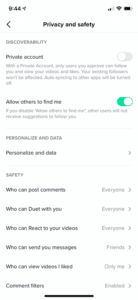
To do this,
Click on the Settings button at the top right corner on your profile page.
Click on Privacy and Safety.
The first option is “Private Account” or “Allow others to find me.”
If you change an already-existing account to private, current followers will not be affected.
You can also remove or block followers at any time. Removing them disables their ability to direct message your teen. Blocking them stops them from interacting with or viewing your teen’s content at all.
Opting for Restricted Mode limits content that may be considered inappropriate. Users can also restrict comments to friends only or block them altogether. The can also disable messaging and disable duets.
Tik Tok offers a Screen Time Management mode with a passcode as one of their Digital Well Being offerings.
If you see inappropriate content while browsing the app, you have the option of reporting it within the app. We noticed that the report button is somewhat difficult to find in that it is hidden among other buttons.
As with most social media apps, the company collects information, including your name, email address, and phone number. They may also collect any messages you send through the app to friends. This is part of their privacy policy.
Tik Tok is rated a 12+ app store rating. This means you can block underage kids from onboarding the app with Gooogle and Apple parental controls. Tik Tok resources for parents include a Top Ten Tips for Parents primer, “You’re in Control,” safety educational videos, a Safety Center, and an ongoing blog series with helpful tips. The videos can be accessed directly in-app @TikTokTips.
What are the risks for use?
Constant Access
When kids are little, parents decide when playdates happen. Once Tik Tok is on board, keep in mind that your kids will have access to their friends whenever they have their device, and other Tik Tok users will have access to your kids. For many, that means 24/7 access. If you’re not OK with that, you’ll have to dock screens consistently or limit their access.
Inappropriate Content
Although the rules state that users younger than age thirteen shouldn’t be on Tik Tok without parental guidance, anyone can simply lie and accept the terms of conditions without informing their parents. Sometimes the content may not be filtered, and any kind of inappropriate content may pop up. Of particular concern is dangerous stunts, hate speech, and sexualized dancing to explicit music lyrics. Imagine watching your 12-year-old dancing sexy to lyrics that include the n-word, the f-word, p&^sy, and worse.
Cyberbullying
A fun video posted today can feel humiliating when viewed tomorrow. Since moderators can’t oversee all comments on the app, there is cyberbullying. Since being creative requires risk, public ridicule now or later is a real concern. Often the ridicule happens when the Tik Tok video is shared on other social media platforms, like Instagram or Twitter. The best way to prevent this would be to keep the account on private and add only people whom you know or are friends with. However, keep in mind that cyberbullies can always screenshot from a private account and share publicly. Users can turn off comments to prevent or stop cyberbullying on their content. Exclusion from posts about friend groups can also be hurtful. Imagine if your child is the one who was left out.
Trends & Attention-Seeking
Users can produce or view inappropriate Tik Tok’s and often try to attract large numbers of followers with poor posting or comment choices. For example, the trend for “Chop Chop Slide” involves kids filming their parents’ reactions to an unexpected string of very explicit lyrics. Many of these videos of their parents are likely shared without permission. To feed the need for likes, affiliative apps offer the purchase of likes for your posts and to buy more followers.
Stunts & Challenges
Most Tik Tok Challenges are incredibly skillful dance moves. You’ll also see kids singing along with their tongues out and clever facial expressions to vulgar lyrics alone and in groups. Like with the other social media platforms, you’ll also see some winners come up with something like the outlet challenge which involves shoving a penny in a charging cube for sparks. To see what I’m talking about, search YouTube for Best Tik Tok Compilations and prepare to be mesmerized for awhile. The talent Tik Tok inspires is amazing.
Online Predators
If your child’s profile is set to public, anybody signed into the app can view your child’s videos, comment, and message your child. The tech website, Motherboard, reported a large community of adults soliciting young Tik Tok users for nude photos and videos and even sent videos to the children. Lewd and hateful comments have been found on children’s videos. News reports say that, while Tik Tok has attempted to remove those comments after being reported, several inappropriate comments were left on videos. The owners of the accounts that left those comments were not suspended from Tik Tok and were allowed to continue commenting.
It’s Addictive!
Once you test the app, you’ll see how fun it is! It’s hard for users to resist the endless on-demand video content on the Discover page (indexed with hashtags) that is interactive, shocking, funny, creative, musical, and titillating. Be aware that popular Tik Tok influencers produce highly sexualized content and the “For You” autofeed offers up content that is similar to what has been viewed before. Kids spend hours scrolling endless content.
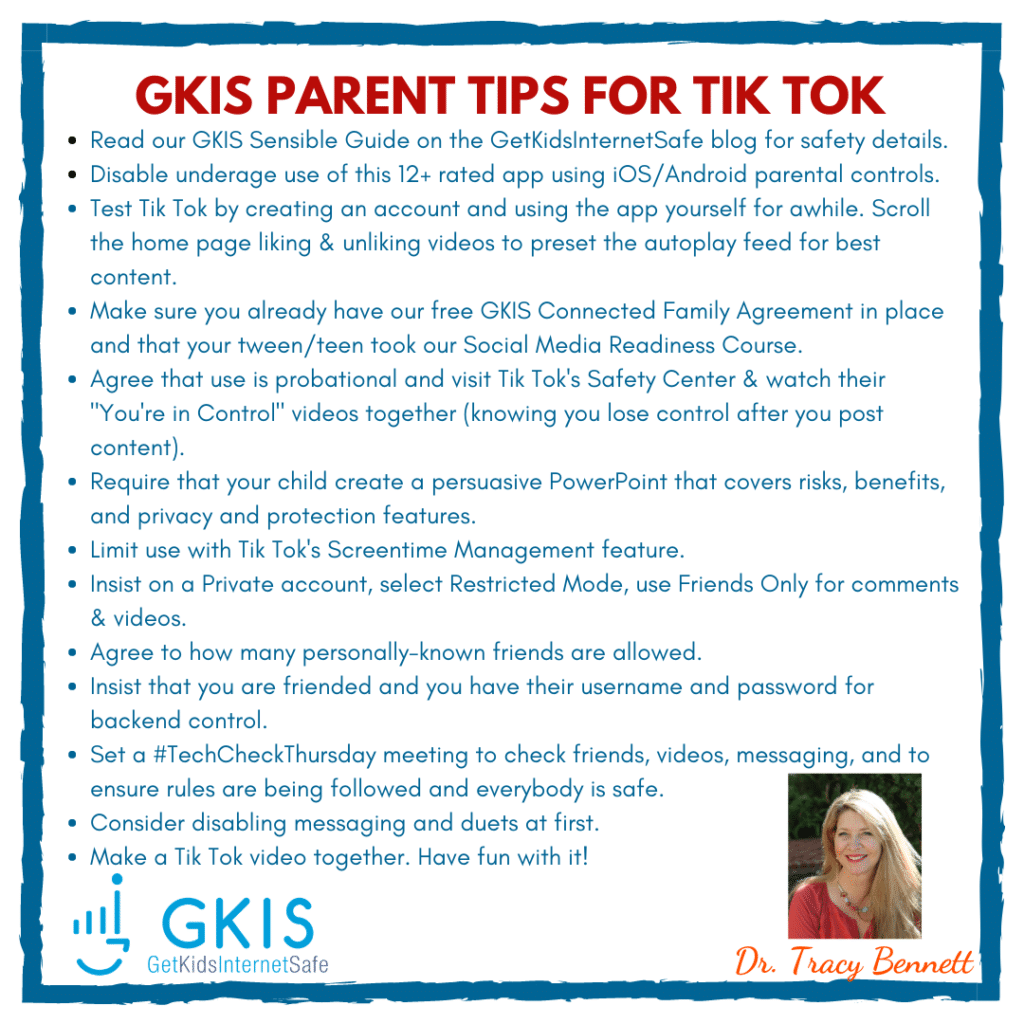
GKIS Parent Checklist for Tik Tok Use:
Disable underage use of this 12+ rated app using IOS & Android parental controls.
Test Tik Tok by creating an account and using the app yourself for awhile. It’s mind-blowing how creative users can be. It’s also helpful to search YouTube for Tik Tok compilations (e.g., “Tik Tok procreate compilations”).
Preset your chid’s account for best content by scrolling the home page liking appropriate videos & selecting “not interested” for inappropriate videos. Although it won’t keep them safe from viewing inappropriate content, it does preset the autoplay to a more positive autoplay pattern.
It’s also helpful to block influencers who commonly produce inappropriate content, while also “hearting” topics and influencers that match your child’s interests (e.g., singing, dancing, drawing, procreate, etc.).
Make sure you already have a digital contract in place (like our free GKIS Connected Family Agreement). Add it to your agreement as an “OK” or a “not yet,” so parameters, rules and regs, and etiquette issues are understood. (If you haven’t downloaded it yet, enter your name and email on our GetKidsInternetSafe home page and it will be emailed immediately.)
Agree that use is probational and visit Tik Tok’s Safety Center and watch their “You’re in Control” videos together (recognizing that once the content is posted, you no longer are in control).
Require your child to create a persuasive PowerPointthat covers risks, benefits, and privacy and protection features so you both know the in’s and out’s of Tik Tok’s features before you agree to it. For more information about how to create and judge a persuasive PowerPoint about a social media app along with other useful screen safety strategies, check out our Connected Family Online Course. The course was created to optimize healthy screen use while protecting kids and teens from digital injury. The best part about the course is it brings parents and kids closer with more cooperative negotiation around family screen rules. Once you agree on a trial, create a digital poster with a bullet list of the rules you agreed upon and tape it up in your home’s homework or computer space.
Limit use with Tik Tok’s Screentime Management feature.
Insist on a PRIVATE account so strangers can’t view your child’s posted videos, Select RESTRICTED MODE. Use FRIENDS ONLY for comments and videos.
Consider DISABLING messaging and duets at first.
Agree to how many personally-known friends are allowed at first to limit exposure while your child is gaining expertise and judgment. Remember, they WILL post, view, and message inappropriately no matter how great you parent. If that’s unacceptable to you, DON’T ALLOW TIK TOK.
Insist that you are friended and you have their username and password for backend control.
Set a #TechCheckThursday meeting to check friends, videos, messaging, and to ensure rules are being followed and everybody is safe. This will also keep the cooperative dialogue going.
Make a Tik Tok video together. Have fun with it!
GetKidsInternetSafe rates Tik Tok as a red-light app due to the easy access to strangers, inappropriate content, bad judgment while posting or live streaming, and potentially harmful comments. Because the app has millions of users, it is difficult for Tik Tok moderators to weed out all of the unacceptable content. But there is also a legitimate argument for creative and fun sharing with a private profile. If you do opt to allow Tik Tok, be sure and get your child’s username and password and monitor posts. Share our GKIS Parent Tips on your social media for friends and family. HERE’S THE LINK TO THE IMAGE
Thank you to CSUCI intern Makenzie Stancliff for co-authoring this article. For more help with social media. judgment and overall psychological health, you won’t want to miss our GKIS Social Media Readiness Training Course for tweens and teens.
I’m the mom psychologist who will help you GetKidsInternetSafe.