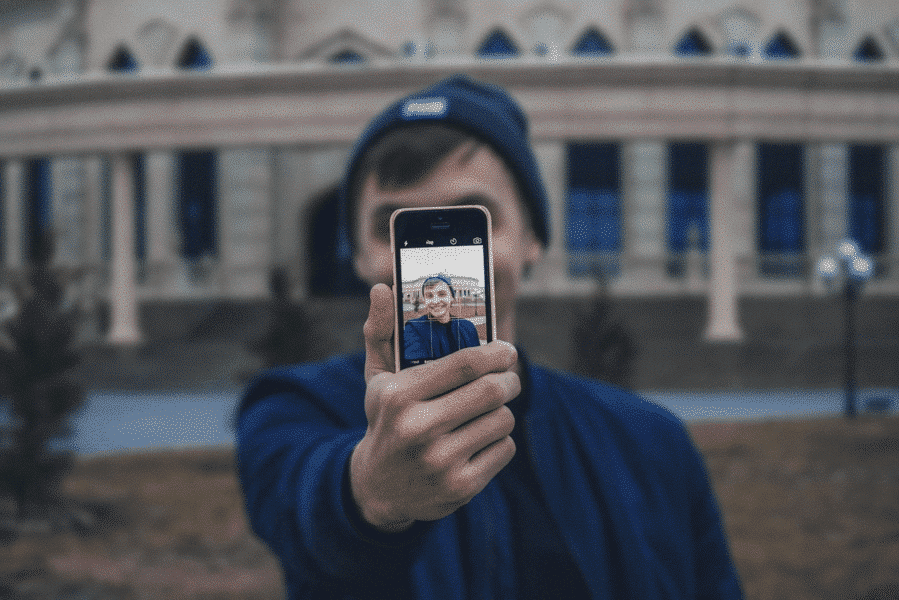
Were you the kid with a mohawk in the 70s or pegged pants in the 80s? Maybe you were goth, a skater, or straight-edge. Teens of every era love to experiment with creative expression and explore new philosophical ideas. The internet offers boundless opportunities to follow cool influencers andchat with like-minded others in online forums. Visiting random virtual neighborhoods can be mind-expanding and fun, but it can also be dangerous. Today’s GKIS article explores the world of online counterculture. Being in-the-know is a critical element to great parenting in the digital age.
New Age Counterculture
As adolescents begin to form their unique adult identity, they look to their peer community for ideas for current, creative interests, how they want to come across, and what they want to look like. Especially attractive to teens is anything that their parents ARE NOT. Trends that are new, fresh, and totally different from parents or social norms are aptly named counterculture.[1]
The concept of countercultures isn’t new. From the anarchists in ancient Greece to the punks of the 1970s, countercultures have always influenced trends and fashion. Because kids today form multiple identities in their real world and in various virtual worlds, they love to explore constantly-evolving countercultures.
Fun Curated Online Platforms
These days, online influencers define counterculture for kids and teens. Sometimes that results in harmless fun. Other times, influencers post sexualized and edgy content designed to shock and titillate, engaging their audience in active discussions and
sharing.
To help you become familiar with counterculture online content, we’ve selected some content creators for you to check out and explore. Please keep in mind that because we don’t monitor these sites, we can’t vouch for their choices or the choices of their followers. Only you can best decide what makes sense for your family.
Kathryn Loo, Youtube username@hellobatty, posts videos about crafts, outfits, vlogs, and more. Her gothic Lolita style and love for all things Halloween inspires her viewers to embrace their interests and gives viewers ideas on how to get creative in her own spooky aesthetic.
Alex Weaver, Instagram username@thegothicalice, posts artwork, fashion, and for-sale creations in her goth/punk style. She frequently posts about books she’s interested in, artistic projects she’s working on, and creative outfits she puts together.
Aurel Nelson, Instagram username @phonyghost,is a skilled costume creator who makes amazing images of her cosplays (meaning dressing up and portraying a specific character). Some of her costumes include superheroes. She frequently collaborates with other costume makers to make a spin-off of our favorite Disney princesses as punk rock girls.
Tae-Seon Hall, Tik Tok username@tae.seonrise,posts videos on funny reactions to how her style is perceived by the public, videos of her cat, and quick makeup looks.
Mary Rose, Blog @TheEveryday Goth, creates fun posts relating to counterculture events, fun reads, fashion posts, and references to goth classics such as The Addams Family. She also links goth themed stores and songs she loves.
Pros to Trendy Counterculture Sites
Opportunities to meet and interact with like-minded fans
Exposure to creative ideas and unique ideas that may not be reflected in your community
Encourage your child to develop independent thinking
Help to build self-confidence
Their participation reflects that your child knows your home is a safe place for expression and communication
Cons to Trendy Counterculture Sites
Unregulated, unmonitored messaging boards
Exposure to inappropriate content like sexuality, vulgarity, and cyberbullying
Exposure to hate groups, radicalization, fake news, and conspiracy theories
Conversations of that may encourage serious mental health-related behaviors like depression, anxiety, eating disorders, self-harm, and suicide
Pop up ads and marketing
Tips to Navigating Counterculture Sites
Dr. B offers the following tips to protect your child from inappropriate counterculture sites
Tell your child you’ll be monitoring their online activity and explain why you think that is important.
Have an ongoing, fun, cooperative dialogue to stay current with their interests, challenge their ideas, and teach family values.
Monitor sites your child is interested in by creating a bookmark and following the creators. Be alert for subtle messaging and links to other sites and music.
Insist on having your child’s login credentials to their devices
Review browser searches
Do not save your credit card information on sites you share with your child.
GKIS Parenting & Safety Tools
If you feel overwhelmed when it comes to keeping your kids safe online, we got you covered. Our GKISScreen Safety Toolkit offers tried-and-true tech tools to help with filtering, monitoring, and managing your child’s screen activities. We also share links to apps and social media safety guides for platforms popularly used by influencers. This parenting step is what Dr. B calls protectionism in her bookScreen Time in the Mean Time, an important part of parenting in the digital age.
If you’d love a more comprehensive parenting course to help understand not only how to manage your child’s media, but how to optimize creativity and learning potential, check out our GKIS Connected Family Course. Dr. Tracy Bennett, can even personally guide you through this process during a personalizedworkshop orin-person coaching. Our GKIS CEO is passionate about assisting families with these confusing moments and is available to you at a click of a button. Coaching is an efficient, cost-efficient alternative to in-person psychotherapy. Prevention is always better than treatment.
The Overall Verdict?
The GKIS mission is to help families achieve screen sanity, prevent digital injury, and form deeper, more meaningful relationships. That includes joining them where they’re at in experimenting with identity formation. Just like punk in the 1970s and new wave in the 1980s, online counterculture helps today’s kids discover all that this crazy world has to offer.
Special thanks to Aroni Garcia for researching and co-writing this article. If you want to learn more about the mentioned social media platforms of the GKIS approved counterculture influencers, check out the GKIS parents sensible guides to Instagram and Tik Tok.
[1] CrashCourse. (2017). Cultures, Subcultures, and Countercultures: Crash Course Sociology #11. Retrieved from https://www.youtube.com/watch?v=RV50AV7-Iwc&feature=emb_title
[2]Daschuk, M. (2010). Messageboard Confessional: Online Discourse and the Production of the “Emo Kid”. Berkeley Journal of Sociology,54, 84-107. Retrieved February 6, 2020, from www.jstor.org/stable/40999937
[3] Hawkes, N. (2015). Young goths may be more vulnerable to depression and self-harm, study finds. BMJ: British Medical Journal,351. Retrieved January 31, 2020, from www.jstor.org/stable/26521636
It seems everybody is on their screens all of the time. Whether you’re working on your computer or your kids are texting and walking back from school, screen use can take an unexpected toll on your body. Find out about “text neck” and what you can do to avoid damaging and even dangerous distractions and repetitive use injuries.
What is a repetitive strain injury?
According to the CDC, device use has contributed to a 10% increase in unintentional child injuries.[1] Overuse or repetitive strain injuries (RTI) refers to bodily injuries that result from reduced blood flow to the muscles, bones, and ligaments as a result of poor posture or repeated movement.[2]For kids, repetitive strain injuries can occur from repeated movements typical in sports play, video controller use, or from repeatedly swiping or texting on smartphones and from excessive screen use.
Preventable Repetitive Strain and Misuse Injuries
Tendonitis
Repetitive strain injuries from excessive screen use include tendonitis in the shoulder, elbow, forearm, wrist, and hand and back or neck strain.
Ocular Migraines
Migraine headaches, particularly ocular migraines, are also becoming increasingly common due to excessive screen use. Symptoms of ocular migraines include visual disturbances like temporary vision loss, blind spots, auras, flashing lights or seeing stars, and zigzag lines.
Tinnitus
Tinnitus refers to a hissing, buzzing, whistling, roaring, or ringing in the ears that result from exposure to excessive and loud noises. Not only can the tiny hairs in the inner ear be damaged by loud and excessive noises, but they can also occur due to aging, sudden impact noises, middle ear infections, stress, negative side effects from medications, neck or head injuries, and other untreated medical conditions. Currently, tinnitus is incurable, but symptoms can be relieved with techniques like sound therapy (listening to specially selected distracting sounds).
Postural Injuries
A postural injury refers to injuries that result from accumulated pressure due to poor posture while sitting, using your computer, driving, wearing high heels, or standing. If you’re not using good posture your bones don’t properly align and your muscles, joints, and ligaments can’t work as they are designed to.
The most common postural injuries include
lower back pain
neck pain
shoulder impingement
knee pain
carpal tunnel syndrome (numbness, tingling, and weakness in your hand and arm due to nerve impingement in your wrist)
piriformis syndrome(pain that radiates down the back of the legs when the piriformis muscle compresses the sciatic nerve when sitting or crossing your legs)[3]
Text Neck
Another common type of postural injury among kids and teens is text neck. Text neckrefers to premature degeneration and malformation of the neck and spine caused by looking down at the screen for texting.
In the past, these types of injuries were only seen among aging dentists and welders. Now physicians are seeing these injuries in teens.
Hanging your head at a sixty-degree angle while texting places sixty pounds of force on the neck. This is far beyond the ten pounds of force your neck is designed to support when your head is in the neutral position.
Kyphosis
Poor texting posture can be particularly problematic for young users whose spines are still developing and could lead to arthritic changes in the spine, bone spurs, or muscle deformities. Research findings indicated that kyphosis, which refers to an S-curve of the spine or rounded back, can be caused by the loosening of ligaments in the spine aggravated by screen use.
Prevention
Instead of taking away the screen device or video controller altogether, simply implement healthy screen practices in your family.
Here are some great injury prevention ideas
Balance off-screen and on-screen activities.
Download an app, use parental controls like those we offer in our Screen Safety Toolkit, or provide a simple kitchen timer for time limit compliance and body-healthy rest and stretch breaks. Suggested break times are fifteen-minute for every forty-five minutes of play.
Encourage your kids to refocus their eyes for twenty seconds after every twenty minutes of screen time
Set up kids’ yoga, which helps with strength, stabilization, balance, and range of motion. Plus, kids learn more about their physiology and how to optimize healthy posture and avoid painful injuries. We recommend watching Youtuber AloYoga’s video “Yoga for Kids with Alissa Kepas.”
Implement ergonomics, the study of people, and their efficiency when interacting in different environments. The primary goal of ergonomics is to arrange a workplace so that it fits the individual working there.
Ergonomic computer setups include:
Eyes leveled with the top of the screen
Head and neck balanced and in line with the torso
Shoulders relaxed
Elbows supported and close to the body
Wrists and hands in-line with forearms
Feet flat on the floor
Overhead lighting dim to prevent glare
Curious to learn more helpful tips on RTI prevention? More information can be found in Dr. Bennett’s book, Screen Time in the Mean Time.
Distraction Injuries
We’ve all seen this form of injury in headlines about car accidents due to texting while driving. We’ve even had a laugh at trips and falls while texting in programs such as America’s Homes Funniest Videos where a person may trip and fall while texting. A distraction injury is an injury resulting from one’s attention being taken by screen use (texting, viewing, talking, or video conferencing).
While Walking
On CBS News you can find an article where a woman was texting and so distracted, she fell into a mall fountain.4 Or maybe you saw the viral video of a guy who literally ran into a bear while walking and staring into his phone. The Internet is alive with videos of injuries that have resulted from distracted walking or bicycle riding. The possibility of bringing harm to yourself has become such an issue that New Jersey has proposed a ban on walking and texting.5 Remind your child that there is a time and place to be sure you are being extra cautious towards your surroundings, such as walking in the streets.
While Driving
Distracted driving accounts for 60% of all teen accidents.6 Teens are more reliant on their phones and lack experience behind the wheel. According to CNN Health, texting is the most distracting form of device use and has been proven to limit the number of times an individual will look up and look both ways before crossing.7
TheCDC Youth Behavior Surveillance System (YRBSS) reports that 39.2% of teens will use devices while driving.8 While you may assume that your teen knows better, it’s always a smart choice to play it safe. This can be as easy as putting devices out of sight while driving or adopting helpful tech.
Tech Tools That Can Help
Use the “Do Not Disturb” mode on their smartphone to ensure safety practices when you’re not around.
On iPhones:
Go to settings
At the very top, there will be a search bar, type “driving”
Press “Do Not Disturb While Driving”
Activate the Feature at the bottom
If your phone doesn’t already have the Do Not Disturb feature, the following are GKIS-approved apps that can assist in distracting free driving!9
The AT&T Drive Mode App silences incoming alerts and calls. The application automatically activates once you’ve reached a speed of 15 mph or higher. If you’re concerned about not calling your kid and being left on voicemail with no notice, the app has customizable automatic responses that will let the parent know they are driving and will answer them afterward.
The OMW (On My Way) app works similarly to the AT&T app, but rather than activating at 15 mph it starts at 10 and higher. Aside from this you could earn points and win discounts for being a safe driver.
The Safe 2 Save app also allows you to earn points for being a safe driver by giving discounts to local businesses. The app also encourages users to include pictures of loved ones as a reminder of who they’re driving safely for.
Think you’ll need a helping hand in implementing all these tips? Contact ourscreen safety expert and founder of GKIS Dr. Tracy Bennett for a telehealth coaching session to discuss specific outside-the-box screen safety tips! In a quick, fun, and customized family workshop, you’ll feel more at ease knowing you have the tools to continue to have important safety conversations with your kids.
Special thanks to Aroni Garcia for researching and co-writing this article. If you liked the article, you’re interested in learning more tips on how to manage device time to avoid distracted driving and repetitive tech use, look at What Age Should We Allow Smartphones?
Full disclosure, when Facebook’s Messenger Kids (MK) first came out in 2017, I was skeptical. As a GKIS screen safety expert, I published an article accusing Facebook of branding our kids and introducing them to the world of social media too young. Soon after, Facebook’s Head of Global Safety contacted me to let me in on some things I hadn’t thought about. She said that they’d done the research and found that kids were already using their parents’ messaging apps whether we liked it or not. To increase safety and offer parent management and kid-friendly features, they decided to trial Messenger Kids. They also offered me a volunteer spot on their Youth Advisory Committee for ongoing input. Since I joined in 2017, I’ve enjoyed a monthly collaborative call with about 25 other child development experts from over the world. Messenger Kids has benefitted from some of the most respected experts in the business, including Sesame Street, The Fred Rogers Institute, and the Yale Center for Emotional Intelligence, among many others. Do you want a safe way for your child to message and video chat with friends and family? This GKIS Sensible Guide offers you the information you need to make a competent decision about whether Messenger Kids makes sense for your family.
What is Messenger Kids?
Messenger Kids is a video conferencing app for kids that was released by Facebook in 2017. It was created as a safe alternative to Facebook’s Instant Message.
How old is old enough for adoption?
Messenger Kids is designed for kids ages 6 to 12 as a safe, parent-managed way for children to video chat and message with friends and family.
After downloading the app, you will be prompted to complete the following:
Log into your Facebook account
Once logged in, you will be prompted to enter your child’s name and their birth date.
After the account is created, you will be shown a list of other Messenger Kids accounts, as well as Facebook accounts to add to your child’s friend list.
Add a second parent or guardian who would be able to manage the account as well.
Set a code that your child can give out to their friends which would request your permission to be a contact.
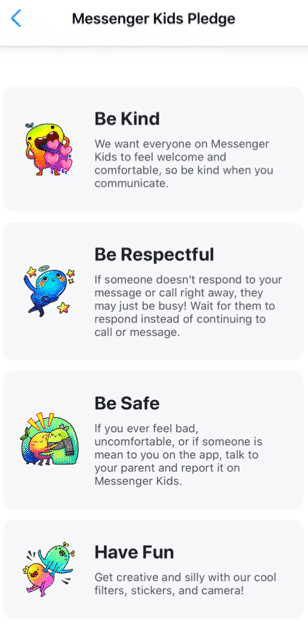
After you have completed all the above steps, your child will be prompted to add a photo of themselves, set a color to decorate the app, and complete “missions” to get to know the functions of the app. Your child will be prompted to read the Messenger Kids Pledge to be kind, be respectful, be safe, and have fun.[i]
What are the main features?
A parent dashboard that displays your child’s activities, contacts, and controls
Provide education to the child about new control features
Blocking a user allows the user to remain in the contact list, but the child will not be able to have individual conversations with that user
The child can use photo filters to send images to their contacts and to video chat
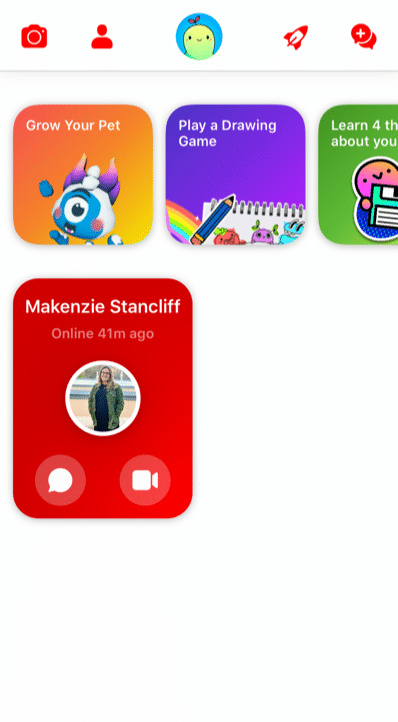
There are several “missions” the child can complete
Grow a pet
Play a drawing game
Learn 4 things about your information
Add a friend
Take a funny photo
Create a group
The Parent Dashboard
Because Facebook gets feedback from kids, parents, and child development experts, Messenger Kids is always changing for the better. For example, the updated parent dashboard is where you can see all of your child’s latest activities, contacts, and controls at a glance in one place. It also shows you
who and what content your child has reported or blocked and why,
a list of recent chats and calls (including how frequently your child is chatting/calling and with whom),
an image gallery of all the images and videos exchanged by your child and their contacts (including whether exchanged in a group).
User Education for Kids
Facebook has also thought through Kids’ digital literacy and privacy needs by notifying child users of the new parental control features in a Data Transparency Flow. Kids are prompted to go through this education with a push notification. It’s also available in the “mission” section of the app for kids. New users engage with this education during the registration process. They’ll get important basic information about how their personal data is used and shared when they use Messenger Kids – a great first step to cyber awareness and privacy issues in general.
Because child friendships need a healthy pause here and there, Facebook has also made blocking easier to use and less permanent. Before, if a child blocked someone, they were automatically removed as a contact. Now when a kid blocks someone, they won’t be able to communicate in a 1:1 chat, but they’ll remain contacts and still be able to be in group chats together. This allows kids to leave or stop individual interactions they no longer want while not having to leave group environments they may share with that contact. The child is always warned when they return to or start a group chat that contains a blocked contact that they have the option to continue to the chat, leave the group, or cancel joining the chat.
What are the privacy and safety options?
There is no minimum age of use outlined in the apps privacy policy. Facebook has a detailed list of what features they collect while using the app on their privacy policy. Here are a few of the features collected while using the app:
Facebook has recently added more controls. In the controls tab, you can see which device your child is logged into on MK, when your child last used MK on those devices and enables you to log your child out of selected devices. Parents also have the ability to remove and report any of these images and videos from the same Dashboard (doing so will remove that content from the child’s thread and notify them that you removed it).
As long as parents stay on top of who’s being friended and the information that is being exchanged, there are few risks associated with using Messenger Kids. The parent has the ability to control what the child can and cannot do as well as who they contact. Parents can also see what has been shared (and deleted).
However, any messaging app has its risks, especially when kids are involved. Here are a few we at GKIS thought you may want to consider
Your child and their friends may post inappropriately or impulsively
Cyberbullying between known contacts, like exclusion.
Too much access to friends and screens (of course, parents can schedule the use and use the sleep feature).
Your child is exposed to the Facebook brand, just as they are other popular American brands like Coca-Cola, Harley Davidson, and Budweiser.
Because parents have so much management opportunity and kids love the socializing, GetKidsInternetSafe rates Messenger Kids as a green-light app. We also love that Messenger Kids offers educational information that helps kids make better decisions with friends onscreen.
Thank you to CSUCI intern Makenzie Stancliff for co-authoring this article. For more information on keeping your child safe on social media, check out the Get Kids Internet Safe Screen Safety Toolkit. Be sure to add Messenger Kids on to the free GKIS Connected Family Agreement as “appropriate.”
I’m the mom psychologist who will help you GetKidsInternetSafe.
[i] Introducing Messenger Kids, a New App For Families to Connect. (2019, November 7). Retrieved from https://about.fb.com/news/2017/12/introducing-messenger-kids-a-new-app-for-families-to-connect/
[ii] (n.d.). Retrieved from https://www.facebook.com/legal/messengerkids/privacypolicy?version=2020
It’s a battle keeping students engaged in education in our screen-soaked world. Kids love learning. But they seem less in love with school and more in love with screen time. How do we reengage our students in school and the love of learning? Have we reached the tipping point where tech in the classroom is necessary for engagement? Or since COVID-19 Stay at Home Orders, have screens isolated kids and made them too fatigued to learn? Screens are great at teaching kids to self-interrupt, leading often report that real-life classrooms turn them off instead of turning them on. Today’s GKIS article highlights the benefit of tech and how gamification is being tested in education.
Traditional Teaching Methods Versus Screen Tech
Traditionally, schools use teacher-led workbook activities, in-class discussions, and textbook-based homework that rely heavily on structured lessons and memorization. Lessons often span longer than 10 minutes. This can be problematic considering the typical adult’s attention span is only 15 minutes.[1]
Screen technology, on the other hand, is fast-moving and interactive and offers the student on-demand selection at the click of a button. The opportunity to self-select content is empowering and gratifying. Teachers can also track the student’s learning process in real time and gradually feed relevant and increasingly challenging content.
The rewarding versatility of technology has led children to immerse themselves in their virtual worlds an average of ten hours a day. With this number of hours on-screen, many kids are creating brain pathways best matched with on-demand screen delivery rather than teacher-facilitated instruction.
Evidence of Disengagement
Even before COVID, a 2014 poll of 825,000 5th-12th grade students found that nearly half of the students surveyed felt disengaged in the learning process. Only 40% of their teachers believed their students were engaged. Reported numbers were even lower (26%) in high-poverty schools.[2] This finding is particularly concerning, considering that a student’s engagement in grade school is correlated with how well they will do in college.[3]
When schoolteacher and gamification enthusiast Scott Hebert asked his students why they didn’t seem to care about the lessons taught in school, they replied, “I don’t get why we need to do this stuff, give us a reason to care.”[4] Without intrinsic interest, meaning the task isn’t naturally motivating, they felt like they had to jump through meaningless hoops to learn.
To be successful, education must speak their language and meet them where they’re at. For most kids, that means reaching them in their virtual worlds. Studies have reported that 90% of students agree using a tablet will change the way they learn in the future, and 56% of high school students would like to use mobile devices in the classroom.[5]
Gamification
Gamification was coined by computer programmer Nick Pelling in 2002. The concept of gamification is to take the natural enjoyments that attract people to technology and inject those into education. In other words, create a more fun humanisticapproach to education, rather than our traditional instruction-led, function-focused approach.[6]
Dr. See is a professor at the University of Hong Kong who teaches human anatomy and medicine. He noticed that video games and education have features that overlap. For example, they both:
require solving mental puzzles,
recalling information,
looking for patterns,
working under pressure,
communicating ideas, and
working within a time limit.
Because his students loved video games, he decided to use gamification within his classroom. He applied puzzles and games to the curriculum, like for the memorization of the names of medications. As a result, his students reported that they were more motivated and learned better.[7] His gamification worked!
Learning through gamification does not mean it is easy. Gamification is engaging because it requires the student to generate the material instead of being instructed to do so. It is not about making school easier. Instead, it allows the student to actively engage in the learning process.[8]
Intrinsic & Extrinsic Motivators
We are psychologically motivated by intrinsic and extrinsic factors.
Intrinsic motivators (things that you enjoy doing that compel you forward) are important for well-being.
The psychological needs that must be met to feel motivated are:
autonomy (working on your own),
competence (being good at it), and
relatedness (feeling connected to what you learn).
Extrinsic motivators are rewards that come from outside. Examples include grades, points, and praise. External rewards may become harmful to our psychological well-being when they’re the only reason for engagement.[9]
For great learning, then, we must avoid rewarding students with points and grades. Instead, we must allow students to have a choice in what they’re learning and a chance to try it on their own and celebrate their efforts. These goals within a classroom can be challenging.
Gamifying Tests
Video games are set up for lots of autonomy, competence, and relatedness. The player gets to pick the game they relate to. then they get to play it on their own, simply restarting after they fail. They may lose points. But so what. They can just start over. Nobody is judging them.
Traditional school testing methods do the opposite. Typically, a failing grade on the test is the student’s final act of the lesson. They don’t get a do-over. That means failure has huge consequences and may leave the learner feeling hopeless and demoralized.
Gamifying testing could reverse that process by offering smaller quizzes that the student can retake over and over as they learn the material. Instead of feeling terrible about their first attempt, they can see their points going up and up – just like in a video game.
Starting a student at 100% with nowhere to go but down can lead the student to feel hopeless. According to prospect theory, people have a difficult time choosing activities when they anticipate a loss.
Alternatively, starting at zero and gaining points from there encourages a growth mindset. That means looking forward to learning instead of feeling defeated by it. The student would begin the semester with zero points and as the year progresses, they could earn points as they complete assignments. This would give students a growth mindset for their education!
AltSchool
Educators have tested technology-assisted education models, especially since the 2020 COVID-19 pandemic. For example, millions of dollars have been invested in AltSchool, a school that promotes a personalized learning platform using technology. In Altschool, students are provided with iPads or laptops and given individualized learning activities. The school encourages students to learn at their own pace, developing the mastery skills needed to learn the subject. The goal is engagement and learning potential.
Outcome studies revealed that students who learned at their own pace felt more competent and autonomous.[10] However, a teacher noticed his students were less connected with each other than before. They were more engaged with the technology than they were with one another. Also, we all remember the Zoom burnout students felt after the COVID epidemic. Losing motivation and connectedness over time may be risks of technologically assisted education.
The need for relatedness and connection is particularly important in learning because others provide feedback and perspective.[11]Authoritative instruction may trigger the reactance theory, which explains how people value autonomy so much they will “react” or do the opposite of what they are told to feel they made their own decision.
Quest to Learn
Another applied experiment for new and creative education is Quest to Learn. This is a gamified high school in Manhattan that was founded in 2009. Many of the classes at the school are not internet-based but instead teach through role-playing. Students act out the responsibilities of a chosen profession, like learning about politics by impersonating a politician.[12] By narrating the character, a student generates the answers needed for complex subjects.[13]
Because screen technology is still new, innovative (new and creative) teaching models and outcome studies are still being developed. Hybrid models (part in-classroom and part on-screen) are also being tested. As tech optimists, we at GKIS look forward to seeing all the cool things coming up in education.
Thanks to Andrew Weissmann for his research for this article. For a glimpse into some of the benefits of video games, check out our GKIS article Is Your Child a “Professional Gamer”?
Works Cited
[1] Usnews.com Kids asked to learn in ways that exceed attention spans by the Hechinger Report
[7] School of Biomedical Sciences sbms.hku.hk Dr. See, Christopher
[8] Christopher See Gamification in Higher Education
[9] Kasser and Ryan (1993) A dark side of the American dream: Correlates of financial success as a central life aspiration. (1996). Further examining the American dream: Differential correlates of intrinsic and extrinsic goals.
[10] Black & Deci, (2000) selfdeterminationtheory.org
[11] The Backlash Against Screen Time at School by Rob Waters
[12] Worldgovernmentsummit.org Gamification and the future of education
Minecraft is a virtual 3D game that allows users to create unlimited worlds using online building blocks while unlocking resources along the way. From cities to rollercoasters, the possibilities are nearly endless. We at GKIS are big fans of Minecraft because it fosters creativity, problem-solving, new skill development, and socialization opportunities. But like any online tool, there are also associated risks. This GKIS Sensible Guide provides information that parents need to optimize Minecraft’s benefits while keeping your children safe.
How long has Minecraft been around and how popular is it?
Minecraft was created in 2011 by Swedish game developer Markus Persson and purchased by Microsoft in 2014. Nearly 176 million copies were sold by late 2019. In 2019, Minecraft has over 112 million players every month and can be played on various platforms including smartphones, tablets, Xbox, and other gaming stations. It has evolved to include more elements and has a series of spin-off g
ames with different themes. Users also post Let’s Play videos YouTube to show how they build their worlds and different ways to create items.
Getting Started on Minecraft
According to Minecraft’s Terms of Service, “If you are young and you are having trouble understanding these terms and conditions, please ask a responsible adult such as your parent or guardian.” Minecraft also insists that children under age 13 have their parents download and register for an account. However, children can easily change their age before signing up to go around that rule.
Minecraft varies in price depending on the type of platform. Signing up for an account is simple. Just create an account with a unique username and email address. Users are given one profile by default but have the option to make multiple profiles.
Features of Minecraft
Minecraft allows users to collect resources and build their own worlds. Users can dig, build, and enchant items to transform their world into whatever they want. Users can also select different game modes, each with unique challenges and features.
Survival Mode
One of the main game modes
Players must collect resources, build structures, battle mobs, find food.
The goal is to survive and thrive.
Creative Mode
Players are able to build with an unlimited number of blocks.
Players are given all the items needed to build.
Mobs still exist, but there is no threat to survival.
Players are able to fly around the world.
Adventure Mode
Players use maps to navigate the world.
Depending on the device played on, blocks can either be destroyed or placed.
Hunger and dying is possible.
Spectator Mode
Users have the ability to fly around and observe the worlds without interacting with it
Players are invisible and can move through blocks and buildings.
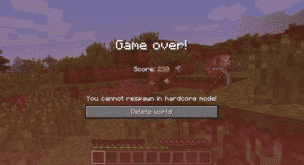
Hardcore Mode
Available only on the online version.
The world is locked to hard difficulty and the player cannot respawn after they die.
Only specific worlds enable hardcore mode and not individual players.
Minecraft has two different play modes, single-player and multiplayer. In single-player mode, a user only interacts with their own character and their own world. In multiplayer, users can join any game with any player, friends or strangers. Parents have the ability to sign their child up for a family-friendly multiplayer mode that is supervised and has restrictions on the chats and interactions.
The Benefits of Minecraft
Minecraft allows players to use their imagination and create what they desire. Users develop problem-solving skills while they are creating their world. Minecraft also helps users develop computer literacy skills, teamwork, and collaboration. For example, while in multiplayer mode, players are able to communicate and work together to build their worlds. Mathematics and spacial skills are also developed while playing the game. For example, it takes six planks to build one door. If players have 60 planks, they can calculate how many doors they are able to build.
Parents have the ability to limit their child to only single-player mode or a family-friendly version of multiplayer. There are several Minecraft servers that have been designed for children in mind. They are designed with a code of conduct and have full moderation. Parents are able to sign their children on to a family-friendly server where they will be safe from interacting with strangers in a negative way.
The Risks of Minecraft
There are relatively few risks for children playing Minecraft. With the exception of playing too often, for too long, or getting frustrated with gameplay, single-player mode is relatively safe because kids can be restricted from interacting with players they don’t know. However, violence can be easily found in the game. For example, there are multiple ways to kill users, mobs, or animals, such as:
setting another player on fire using lava or a torch
hanging an animal or another player
using canons and bombs
using sand to trap and suffocate mobs
using a zombie as a weapon to kill a villager
shooting with a gun or stabbing with a sword
There is also a chance for cyberbullying in multiplayer mode. It is not uncommon to come across a user who is intentionally irritating and harassing other users. They often use parts of the game in unintended ways. For example, they may curse, cheat, and kill without reason. Cyberbullying also includes players who deliberately kick players off the server and anger others for their own enjoyment.
Multiplayer mode carries the risk of children chatting with strangers. For example, in 2017 a Minecraft user was jailed for meeting two children on Minecraft and persuading them to carry out sexual acts. [i]
There is a potential for users to track down your IP address from playing Minecraft. An IP address is n unique number for an internet network. The IP address provides the location of where your network is coming from. If users are able to hack into the server, they can find another player’s IP address. This can lead the user to the location of the player within a couple of miles.
If your child wants to play Minecraft, GKIS recommends that you:
Add it to your free GKIS Connected Family Agreement (If you haven’t downloaded it yet, enter your name and email on our GetKidsInternetSafe home page and it will be emailed immediately)
Discuss the risks of chatting with strangers with your child. For ideas about how to do this, check out our GKIS Connected Family Course.
GetKidsInternetSafe rates Minecraft as a green-light app due to the safety of the game and the benefits it can have on children’s development. Dr. Bennett has found that her kids and the kids in her practice love Minecraft when they are young and even return to it as teens! They tell her they appreciate the simplicity of it and especially love the relatively stress-free atmosphere with no in-game purchase requirements.
Thank you to CSUCI intern Makenzie Stancliff for writing this article. If you love to encourage creativity with your kids, you won’t want to miss the Makerspace ideas in our Connected Family Course.
I’m the mom psychologist who will help you GetKidsInternetSafe.
In a generation that places social media “likes” at a higher importance than registering to vote, it’s no surprise that screen technology has become critical to friendship and entertainment. As my father would say, “We have the world at our fingertips.” Not only can we research smart investments, how to cook a Thanksgiving dinner, or recent celebrity exploits, we can escape into social media. The virtual lives of teens can be particularly consuming as they constantly craft and brand their virtual selves. Self-presentation and self-disclosure are among the major reasons teens use social media.[1]
Studies have found that unmanaged screen time can deteriorate real-life interpersonal relationships and can lead to social isolation. This is not to suggest that we must go screen-free. Instead, we at GKIS encourage parents to support their kids and teens to best navigate a positive screen-using experience. Signing up for the Free GKIS Connected Family Agreement is a valuable first step towards learning how to properly monitor technology usage while developing a trusting and loving environment for families.
Our Connected Family Agreement isn’t just a digital contract. It’s a flexible blueprint that will lead your family into important discussions about what to look out for and what’s expected. After all, if we don’t have an agreement and learn to talk about screen use, even sensible management rules won’t make sense. Parents will get mad, and kids will get in trouble too often. None of us want that.
Topics our agreement covers include
taking inventory of online activities,
how to “love and protect” online as well as offline,
how to maintain honesty and transparency,
screen smarts and digital permanence,
and digital citizenship, online reputation, and netiquette.
When you sign up on our GetKidsInternetSafe home page, you’ll receive the child and teen versions of the Connected Family Agreement in your email. Today’s GKIS article covers issues to keep an eye out for as teens launch their lifetime relationships with tech.
Media Multitasking
Media multitaskingis the use of different media simultaneously, for example, listening to music while playing a video game or texting while watching a movie. Research shows that media multitasking can lead to performance decline due to an overload of cognitive resources. Too much time spent in mental brownout can lead to mental illnesses like depression or anxiety. To learn more about media multitasking, check out our GKIS article Smartphones During Homework?
Social Media’s Effects on Friendship
Psychology research has also explored how smartphones affect friendship quality and face-to-face interactions. Here are the findings:
People rely heavily on social media to develop and maintain relationships with family and friends.[4]
Teens tend to move towards a group that is highly susceptible to negative psychological and behavioral outcomes from social media use.[5]
Teens who obsessively engage in self-presentation on social media may be more susceptible to psychological stress.[6]
Adolescents who appreciate having greater control over message content may prefer smartphone communication rather than face-to-face because they are allowed more time to edit response when behind a screen.[7]
In 2013, college students reported lower feelings of trust and empathetic understanding when there was a smartphone in the room, especially when intimate topics were being discussed.[8]
In 2014, women reported that mobile devices frequently interrupted quality time with romantic partners, and the more frequent interruptions, the lower their relationship satisfaction.[9]
Some teens seek media to help cope with negative emotional states.[10]
Friends who get distracted by their smartphones are more likely to report poor conversations and decreased access to emotional cues, which could reduce their opportunities to build a long-term mature sense of intimacy.[11]
Internet use has been associated with depression and suicidal ideation between the ages of 13 and 18.[12]
The distractions imposed by smartphones are of great concern considering that intimacy development is a critical skill in emerging adulthood.[13]
Internalizing Behaviors to Look Out For
Depression and anxiety are among the leading internalizing behavior diagnoses for teens.[14]
What type of parental monitoring leads to the best results?
Research has shown that parental media monitoring can be effective at reducing the negative effects of media.[16]
Active monitoringrefers to media-based conversations reviewing what content the teen is allowed to view and post.
Restrictive monitoringrefers to parents imposing restrictions around the amount of screen time teens are allowed.
Supportive restrictive media monitoring refers to a parent placing limits on their child’s media use but also taking the time to explain why the rule is important and engaging in mutual feedback in setting rules and limits.
Active monitoring is the most effective type or parental monitoring for promoting autonomy (the child making good independent decisions) because the parent encourages open conversation. This approach promotes critical thinking about the differences between the on-screen world and the real world. When a teen can take charge of their media usage, they are better equipped to engage in critical thinking and learn to make decisions about technology based on internalized values, rather than being instructed by their parents.
Autonomy-supportive approaches are associated with lower levels of depression and anxiety. Whereas controlling parenting styles can encourage teens to spend more time on their smartphones as an escape to express themselves. Teens may not feel comfortable enough to open up to their parents and are more likely to internalize problems instead of reaching out to parents for support.
Overall, teens of all ages can benefit from screen-use rules and limits if they are conducted constructively. We encourage parents to allow enough space for their kids to develop their sense of identity and the free will to make their own decisions. With the help of Screen Time in the Mean Time: A Parenting Guide to Get Kids Internet Safe, you can learn how to properly monitor and protect your teens while still allowing a sense of autonomy. Our goal at GKIS is to prevent issues that may come up related to screen use before treatment is necessary.
Thanks to Isabel Campos for her research and help with writing this article.
Although parenting in the digital world may seem impossible, taking time to understand and learn will allow parents to better connect and relate to their teens. Interested in sharing this information and additional findings with other parents? Be sure to follow GKIS on Facebook, Instagram, and Twitter for more.
I’m the mom psychologist who will help you GetKidsInternetSafe.