Need peaceful screen time negotiations?

Get your FREE GKIS Connected Family Screen Agreement

children and technology

The GKIS Sensible Parent’s Guide to Among Us

Among Us is an app/video game that has seen a rising fan base since its release. It is popular with gamers of all ages. Its cutesy characters and simple gameplay make it appealing to even the youngest children. To get your home set up for cooperation and screen safety, check out Dr. Bennett’s Screen Safety Essentials Course which features weekly parent and family coaching videos in addition to several other valuable resources for promoting family connectedness and preventing digital injury! In today’s GKIS Sensible Guide, you will be learning all the information you need to make an informed decision on if this game is appropriate for your child.

How long has Among Us been around, and how popular is it?

Among Us was released by a small development company called InnerSloth LLC in June 2018. According to Steam, the number of users began to rise when COVID lockdowns started. This peaked around October 2020 with an average number of 170,000 players.[1] It should be noted that this does not include players on Apple or Android devices. The true player count is likely much higher.

Among Us is available for purchase on Steam for under $5. On mobile devices, Among Us is a free download. However, users on mobile devices will be shown ads between games and will have their data collected. To stop this, the user is allowed to purchase an ad-free version of the app. This prevents any ads from playing and their data from being collected by the app.

Getting Started on Among Us

To play Among Us, the player must confirm their age is over 13. This is done with a simple birthdate selection and can be easily bypassed by children younger than 13. Among Us can be downloaded on Steam, along with the Apple app store and the Google Play store.

Before letting your child play Among Us or games like it, we recommend the Connected Family Course to help inform you and your child about the dangers of screen use. It also provides a large number of tips to help your child stay safe online.

Features of Among Us

  • Basic Gameplay
    • During the game, groups of 4 to 10 play together. One to three of those players are selected as the imposters, the rest of the players are crewmates.
      • Crewmates will have a certain number of tasks to complete as a group around the map. These tasks are usually simply mini-games such as connecting wires or swiping a keycard. This group wins when either all of the imposters have been eliminated through voting, or all of the tasks are completed.
      • Imposters have a much simpler task. They want to eliminate the crewmembers until the number of imposters is equal to the number of crewmembers. If this happens the imposters win. Imposters have extra abilities such as using vents to teleport around the map. Imposters always know who the other imposters are.
    • When a dead body is reported or the emergency button is pressed a meeting is called. During this meeting, all players discuss who they think the imposters are. This discussion may be over a text chat or a voice chat. At the end of the meeting, they have the option to vote off a player. They may skip voting if they aren’t confident. Once a player is voted off, it is revealed if they were a crewmember or an imposter.
  • Cosmetics
    • A various number of cosmetics are available for direct purchase for Among Us. They can range in price from one dollar to up to five dollars. While not a loot box, some people do worry that microtransactions like this can lead your child to develop a gambling addiction. For more information on this, please visit our article on gambling in gaming.

Benefits of Among Us

There are numerous benefits of playing Among Us. It is a fun way for friends to interact or to meet new friends online. Its simple gameplay allows for everyone to enjoy it, not just dedicated gamers. Plus, the game is easily accessible because it’s extremely inexpensive or even free. Finally, it teaches players to detect deception from other people. This can be considered a good life skill.

Risks of Among Us

There are a few big risks that come with children playing Among Us. The first is that it does expose the child to violence. While it is cartoon-like, there are some graphic deaths including stabbing, snapping necks, and eating heads off. It also teaches children to lie. To be a successful imposter, one has to lie and plant deception in the crewmates’ heads. This might lead the child to lie in other aspects of their life, particularly younger children. Another risk for anyone playing the game is they may be exposed to cyberbullying by others. Other players may be muted to prevent this, but it is still a risk of playing an online game. Another big risk is talking and interacting with strangers. Though it hasn’t been reported, predators could potentially use Among Us to find victims and groom them into talking outside of the game or offline.

Due to the risk potential for child players, GKIS rates Among Us as a yellow-light app due to the cartoon violence and potential exposure to cyberbullying. This means that children under the age of 13 are not recommended to play this game.

If your child wants to play Among Us, GKIS recommends that you:

  • Add it to your free GKIS Connected Family Agreement (Available if you enter your email on our GKIS home page.)
  • Discuss the risks of chatting with strangers with your child. For tips and advice on how to do this, check out our Connected Family Course.
  • Consider joining our Screen Safety Essentials Course to gain access to weekly parenting and family coaching videos that provide information, extra support, and exclusive tips for helping your child stay internet safe.

Thanks to CSUCI intern Dakota Byrne for researching Among Us and co-authoring this article.

I’m the mom psychologist who will help you GetKidsInternetSafe.

Onward to More Awesome Parenting,
Tracy S. Bennett, Ph.D.
Mom, Clinical Psychologist, CSUCI Adjunct Faculty

GetKidsInternetSafe.com

Works Cited 

[1] https://steamcharts.com/app/945360

Photo Credits

Photo by Kelly Sikkema (https://unsplash.com/photos/PgToaHfQjq0)

Photo by Luis Villasmil (https://unsplash.com/photos/ITFwHdPEED0)

Is Your Child’s Attachment Style Impacting the Way They Use Social Media?


Three billion people use social media globally. We use it to stay in touch with friends and family, share memorable moments in our lives, and entertain ourselves during our leisure time. Although social media has its benefits, it also has its negative effects. Much of the outcome depends on the characteristics of the user. One characteristic that impacts social media use is the user’s attachment style. In today’s GKIS article, you will learn what attachment style is, how a child’s attachment style may impact the way they use social media, and strategies to improve your family relationships and create healthier attachments.

Social Media Readiness

In the article “Do Kids Need Driver’s Training … for the Internet? Dr. Bennett asks, “Does driving city streets have anything in common with browsing the internet?” She argues it does, stating that “ Like driving a car, browsing the internet can cause significant injury. But instead of a concussion, we see kids succumbing to anxiety, depression, and body image problems linked to cyberbullying, radicalization, and compare-and-despair. Also, like driving, kids browsing the internet can wander into any kind of digital neighborhood making friends from faraway places. Most of the places they visit are cool, with fun friends, creativity, and harmless excitement. But there are also digital neighborhoods that would horrify us. Dangerous people like predators and traffickers may be common there and so is intensely violent and explicit sexual content.” With over 25 years of helping kids and families navigate difficult situations resulting from screen use, she created an online course for tweens and teens called the GKIS Social Media Readiness Course.

Dr. B argues that kids need specific knowledge and problem-solving strategies to recognize red flags online, as well as psychological wellness tools to bolster mental health and overall resilience. Not only does our course teach kids what they need to know for online safety, but parents need knowledge too along with an ongoing cooperative dialogue with their kids about online issues. Creating this dialogue has a lot to do with healthy attachment.

 Attachment

The father of attachment theory is John Bowlby, a British psychoanalyst who was interested in studying the intense distress that infants demonstrate when they are separated from their parents. Other attachment researchers went on to create theories and testing measurements, like the Strange Situation paradigm created by Mary Ainsworth.

Strange Situation

To test a child’s “attachment style,” researchers created a child separation situation in the psychology lab. For the Strange Situation method, researchers put a mother and toddler child alone in a room. The room was filled with toys and plenty of eye-catching items for the child. After some time of playing, a stranger enters the room and attempts to interact with the child. The mom is instructed to then leave the room. After a few minutes, she returns and comforts her child. A few minutes later the stranger returns and interacts with the child again. Then the mother comes back and greets her child.[2]

The Strange Situation was designed to present children with an uncommon, but not too overwhelming, experience. The child’s response was then coded and classified to fit in one of four attachment styles.

 Attachment Styles

Attachment styles are academic descriptors of how an individual relates to other people. An attachment style is formed at an early age, and once established it stays with you.

Children with secure attachment styles have healthier relationships overall. Kids with avoidant, anxious, or disorganized attachment styles tend to form poor quality family and peer interactions. They have trouble maintaining healthy, mutually beneficial friendships because they’re often anxious or dependent.

The Four Types of Attachment Styles

Secure Attachment

Secure attachment is characterized by a stable sense of security and comfort to be out and about knowing that their caregiver will be there when needed. Caregivers of securely attached children are typically available, sensitive, and protective of the child. They use authoritative (warm and consistent) parenting strategies rather than being overly strict (authoritarian) or indulgent (permissive).

Avoidant Attachment

Avoidant attachment is characterized by a child who avoids interaction with the caregiver and shows no distress during separation. Caregivers of an avoidant attached child typically don’t acknowledge a distressed child, instead of shaming the child for showing emotions and having unrealistic expectations. These caregivers often don’t validate the child. Emotional validation is the process of encouraging emotional expression and offering warm acceptance and nurturance. Validating a child’s emotion is a critical element to teaching children socio-emotional intelligence and self-soothing.

Anxious Attachment

Anxious attachment is characterized by a child who fears abandonment and doesn’t interact with strangers. Kids with anxious attachment tend to be clingy and insecure. Caregivers of anxiously attached children are often overly protective or insensitive. They can be available at one moment, then unavailable, which can leave the child confused.

Disorganized Attachment

Disorganized attachment is characterized by a child who, when their caregiver unexpectedly leaves the room, will respond with a confused expression, freezing, and demonstrating unorganized behavior. Caregivers in this situation are inconsistent. More specifically, they may demonstrate kindness and care to their child sometimes and other times ignore their needs or get angry. Parents who send these types of mixed signals are often impaired due to mental illness, addiction, or severe overwhelm.

What does social media have to do with attachment?

Social media has become a new form for people to receive validation and support from others, especially for those who are building identities like tweens and teens. In a study by Stöven and Herzberg, researchers reviewed 17 studies on attachment styles and social media use. They found that people with higher levels of abandonment anxiety tend to overuse social media as a way to feel like they belong.[1] The subjects were more likely to seek support and attention from people online to feel good. Social media was a way for them to seek reassurance and feel like people liked them.

 How is an over-reliance on social media for identity a problem?

A constant need for reassurance can cause undesired results, such as

  • trouble making decisions because the subject is too concerned about what others think.
  • anxiety or depressive symptoms when the subject does not get the response they hope for.
  • the subject having an “internal debate” with themselves with questions like, “what if?”

Ways to Improve Your Child’s Attachment and Make Them Healthier Adults

Be sensitive and compassionate. Children need nurturing warmth during their early years to identify the emotion, learn how to express it, and build the confidence to self-soothe on their own.

Respond calmly to your child. Modeling self-soothing is an awesome way to teach socio-emotional skill-building. Plus, it serves to clear the way for logical problem-solving rather than escalating an already stressful situation.

Get involved. Just as you would supervise and monitor your child’s exploration of city neighborhoods, you must do the same with digital neighborhoods. That means setting rules and expectations like those detailed in our Connected Family Course and setting up parental controls using the resources (and discounts) offered in our Screen Safety Toolkit.

If you’d like all GKIS course materials delivered in an inexpensive, convenient, easy-to-follow drip on your smartphone, check out Dr. Bennett’s weekly parent and family coaching videos in the GetKidsInternetSafe App!

Thanks to CSUCI intern, Maira Soto for researching social media and attachment styles for this article.

I’m the mom psychologist who will help you GetKidsInternetSafe.

Onward to More Awesome Parenting,

Tracy S. Bennett, Ph.D.
Mom, Clinical Psychologist, CSUCI Adjunct Faculty
GetKidsInternetSafe.

Photo Credits

Photo by Katerina Holmes from Pexels

Photo by Karolina Grabowska from Pexels

Photo by Cristian Dina from Pexels

Photo by ready-made from Pexels

Photo by Pexabay from Pexels

Works Cited

[1] A systematic review of associations between the use of social network sites and attachment style.

https://journals.sagepub.com/doi/10.1177/0265407520982671

[2] Is your child securely attached?

https://www.parentingscience.com/strange-situation.html

Red-Light Websites and Online Services that Can Be Dangerous to Kids

Our kids are able to find websites that are not recommended for minors. All parents must be aware of these listed websites so that their child will not be a victim of digital injury. Unlike apps, websites make it much easier for underage children to gain quick access to explicit content. GKIS will provide a brief description of the websites, dangers attached to the websites, and methods to prevent digital injury.

Websites to Look Out For

Parler

In our previous blog article, Parler the Free Speech App was covered as a social network platform focusing on the freedom of speech protected under the first Amendment and user’s rights privileges. An increase of conservative users arrived on the platform in the wake of feeling censored on Twitter. In a battle between liberal and conservative views, big tech censorship has become a public outrage sending users to Parler.

As for children, GKIS stands by our previous decided outcome of Parler not being appropriate for minors due to extreme views and lack of censorship. According to Google Trends, the analysis of popularity for search with interest over time (IOT) ranges from 0 to 100. From January 10th to 16th 2021, Parler had a 78 IOT.[8] With a high population usage and the ability to not fact-check user’s posts, children using the app would likely be exposed to false and conspiracy-laden content.

Onlyfans

One of our most-read articles of 2020, Is Your Teen Selling Nudes on Onlyfans?, explained the risks that on Onlyfans kids and teens may easily access pornographic content. Onlyfans is a social media platform meant for users to access a creator’s content that may provide sexual content to subscribers for a monthly payment. From February 21st to 27th 2021, Google Trends reports that Onlyfans had a 99 IOT.[8] According to Onlyfans terms of service, the user must be 18+. Still, there are reports of minors bypassing the age verification without parent knowledge.[1]

GKIS cautions that minors should not have access to Onlyfans due to leaked information, stalking, life-threats, unemployment risks, and family separation. If you worry that your child could become a victim of sexual exploitation, you will get huge benefits from Dr. Bennett’s weekly parent and family coaching videos on the GetKidsInternetSafe App! Your first 30 days are free!

Toomics

In this comic book subscription service, users can receive Japanese and South Korean comics on horror, romance, and action genres. The service does provide a family mode to exclude inappropriate content. However, children can enable or disable the mode without password requirement.

GKIS recommends monitoring this service or, even better, blocking it from your children entirely. There is a vast amount of sexual content and nudity on this service, including comic book sex scenes, incest, and rape. According to the Google Trends report, from February 7th to 13th 2021, Toomics reports an 85 IOT based on search popularity.[8]

Reddit

In 2005, Reddit grew to be the most popular forum website on the internet. But how safe is it for children? The service provides subreddits of vast topics into smaller ones (e.g., from r/books into r/horror stories or r/Stephen King). Subreddits are organized by moderators who are individuals who manage the forum. As of February 27th 2021, Google Trend reports Reddit as an 87 IOT.[8]

Reddit may not look dangerous, but it does have a high volume of not safe for work (NSFW) material that may be easily accessible to children who lie about their age upon entry into the site. Reddit can be used for searching, browsing, and messaging anyone or anything which obviously holds a high risk of digital injury. For more information on the signs and risks of digital injury, be sure to check out Screen Time in the Mean Time A Parenting Guide to Get Kids and Teens Internet Safe.

The Chive

The Chive’s mission statement is “an outlet for attractive ladies from around the world to strut their stuff.” Although intended to be funny, much of the content on this site demonstrates misogynistic views and a strong prejudice against women.

Google trends reports, The Chive has a 95 IOT from February 21st to 27th 2021.[8] GKIS considers this a red light service due to its raunchy and sexist humor. A study by Brown and L’Engle (2009) reported a significant finding that adolescents exposed to sexual content in media are more likely to engage in sexual harassment two years after watching the activity.[3]

DeviantArt

DeviantArt is an online social community where members share their artwork for critique and to build a fanbase. According to their website, DeviantArt has 55 million users and has a score of 92 IOT from February 21st to 27th 2021.[8] DeviantArt earned a red light GKIS rating because reviews report extremely violent and bloody works of art. Parents also report content involving cursing, insulting, stealing art, fetishes, and nudity on community posts.[4]

4Chan

This highly controversial (and GKIS-rated red light) forum had made headlines because of anonymous users posting nude photographs of dozens of celebrities, including Emma Watson. 4Chan users often endorse sexist ideologies against female gamers like the cyberbullying of Jessi Slaughter and discuss neo-Nazi radicalism.[5] Unlike Reddit, users are not required to form an account. Due to its anonymity, kids can easily participate in R-rated posts undetected and unmonitored.[5]

If you haven’t selected a child-safe browser or set parental controls on devices, through your internet service provider, or through third-party apps and services, you’ll want to check out our Screen Safety Toolkit. We did the research for you with this comprehensive how-to safety resource guide.

Tumblr

In our GKIS article “The GKIS Sensible Parent’s Guide to Tumblr,” we rated this social media platform as a yellow-light app due to sexual images and inappropriate content often displayed on member accounts. With over 30 million users and a score of 83 IOT as of February 14th to 20th 2021, this microblogging social platform is still quite popular.[8]

High-risk content includes self-harm, sexual content, eating disorders, and drugs. There are also reports of sex offenders using the website to incite sexual conversations with children. We stand by our previous decision to recommend parents closely monitor their teen’s activities within the website.

Pornographic Websites (NSFW)

A popular website used for viewing pornographic content like photos, videos, and live streams is PornHub. To learn more about how porn impacts our kids and teens, read our GKIS article “Online Pornography’s Impact on Kids and Teens.” We previously reported that 13% of internet searches are found to access pornography. Due to increased access, that percentage has increased to 20% on the computer and mobile internet browsers.[6]

Fight The New Drug is a non-profit organization trying to reduce porn addiction and set regulations for the porn industry. In 2020, they reported that PornHub’s popular searches were “lesbian,” “teen,” “stepmom,” “mom,” “step-sister,” “hardcore,” “gangbang,” and “rough sex.”[7] Further, the average age for first exposure to hardcore pornography has been estimated to be 11 years old.[7]

GKIS highly recommends that parents add pornography websites onto their restricted website list in parental controls. The website Top Porn Sites can help you block them in child-safe browsers.

Hide it Pro

We would all love to believe that we can trust our kids not to search out, post, and collect inappropriate content online. But sadly, we just can’t. Kids and teens often delight in discovering and sharing titillating and forbidden content and hide it from parents. We cover how to check for apps that hide content in our Screen Safety Toolkit and Dr. B covers it in her coaching sessions on the GetKidsInternetSafe App. To get you started with safety, check all devices for Hide it Pro, a particularly popular hiding app.

Set up content restrictions on tablet and phone devices.

On iOS products, Apple has designated a method for parents to limit adult websites for their safety. Follow these steps:

  1. Go to Settings > Screen Time
  2. Tap Content & Privacy Restrictions and enter your Screen Time passcode
  3. Tap Content Restrictions, then tap Web Content
  4. Choose Limit Adult Websites, and Tap Never Allow: Add Website[9]

In this section, you can add each of the listed above websites to protect your child.

Google has designated parents’ methods to limit adult websites for their child’s safety on Android products. Follow these steps:

  1. Open Settings
  2. Tap Digital Wellbeing
  3. Tap Parental controls > tap Get started
  4. Select Parent
  5. Tap Get Family Link and install Google Family Link for parents
  6. Tap Open (review the information) > tap Get started
  7. Tap Add (the plus sign) > tap Yes
  8. Tap NEXT > download Google Family Link for children & teens on the child device
  9. Enter the provided Family Link setup code
  10. Use the on-screen instructions on both phones to finish connecting the two devices. Once it’s all set up, you can use the Family Link app to keep an eye on everything[10]

Thanks to CSUCI intern, Christian Sandoval for locating harmful websites that parents should restrict minors from interacting.

I’m the mom psychologist who will help you GetKidsInternetSafe.

Onward to More Awesome Parenting,

Tracy S. Bennett, Ph. D.
Mom, Clinical Psychologist, CSUCI Adjunct Faculty
GetKidsInternetSafe

Photo Credits

Photo by Ludovic Toinel on Unsplash

Photo by Nataliya Vaitkevich from Pexels

Photo by RODNAE Productions from Pexels

Photo by Joanne Adela Low from Pexels

Photo by Charles Deluvio on Unsplash

Works Cited

[1] Cappetta, K. (2021). What is OnlyFans and should parents be worried about it? Parentology.Com. https://parentology.com/onlyfans-age-limit-is-onlyfans-safe-for-users/

[2] Schiffer, Z. (2020. How The Chive built an empire out of bro-bait. The Verge.https://www.theverge.com/2020/4/28/21238529/the-chive-bro-frat-culture-founders-misogyny

[3] Brown, J. D., & L’Engle, K. L. (2009). X-rated: Sexual attitudes and behaviors associated with U.s. early adolescents’ exposure to sexually explicit media. Communication Research, 36(1), 129–151.

[4] Parent reviews for deviantART. (n.d.). Commonsensemedia.Org. Retrieved March 4, 2021, from https://www.commonsensemedia.org/website-reviews/deviantart/user-reviews/adult

[5] Dewey, C. (2014). Absolutely everything you need to know to understand 4chan, the Internet’s own bogeyman. Washington Post (Washington, D.C.: 1974). https://www.washingtonpost.com/news/the-intersect/wp/2014/09/25/absolutely-everything-you-need-to-know-to-understand-4chan-the-internets-own-bogeyman/

[6] Buchholz, K. (2019). How much of the internet consists of porn? Statista.Com. Retrieved March 4, 2021, from https://www.statista.com/chart/16959/share-of-the-internet-that-is-porn/

[7] How many people are on porn sites right now? (hint: It’s a lot.). Fightthenewdrug.Org. (2020, October 13) https://fightthenewdrug.org/by-the-numbers-see-how-many-people-are-watching-porn-today/

[8] https://trends.google.com/trends/?geo=US

[9] https://support.apple.com/en-us/HT201304

[10] Parental controls available on your Galaxy phone with One UI 3. (n.d.). Retrieved March 4, 2021, from Samsung.com website: https://www.samsung.com/us/support/answer/ANS00086102/

GKIS Sensible Guide to a Social Media Cleanse

Feeling unproductive, unmotivated, and notice that you are wasting countless hours scrolling through social media? A social media cleanse may be a great decision to improve your well-being. In this week’s GKIS article, we will provide a step-by-step guide to putting down your phone and getting that much-needed break your mental health deserves. To help your tween or teen demonstrate they have the knowledge, problem solving ability, and judgment for social media, check out our Social Media Readiness Course. It’s an online course for tweens and teens that offers information about the risks of digital injury due to social media and psychological wellness tools. With a quiz for each module, they work their way through independently so their graduation certification demonstrates mastery of content. Of course, you can take it too if you’d like. It’s like driver’s training but for the internet!

According to pewresearch.org, 70% of Americans use social media.[1] For adults, the most popular social media platforms include YouTube (73%) and Facebook (68%). In contrast, 63% of teens use Instagram, making it the most popular social media platform amongst young users ages 15-25.[2]

According to the American Academy of Child & Adolescent Psychiatry, 90% of teens have used social media and teens spend an average of nine hours a day on social media.[3] Participants of a research study conducted by the Pew Research Center found that 74% of Facebook users visit Facebook daily. People of varying ages spend a lot of time on social media.

We use social media to view funny memes, stay connected to friends and family, meet new people, share opinions and information, show off passions and creative pursuits, advertise businesses, and even get news. Most of us find it extremely rewarding and feel we’ve got it under control. But for others, social media can negatively impact mental health.

Risks of Social Media Use

I’m a millennial who’s been using social media for 10 years. I’ve experienced a wide range of negative effects due to my social media use, including feelings of insecurity and not being good enough, anxiety, and the big one, fear of missing out (FOMO).

For years, I followed my friends’ and Instagram influencers’ profiles and wondered why I wasn’t as happy as them or why I couldn’t travel the world and have a life of fun and excitement. I often compared myself to others on social media and it hurt my mental health. In her book, Screen Time in the Mean Time, Dr. Bennett calls that “compare and despair” and believes it is a common contributor to teen anxiety and depression.

Social media can be a toxic place, especially during these unprecedented times. It’s too easy to spend hours on Google trying to figure out if you have COVID-19 and spend another 45 minutes scrolling through Facebook comments of people arguing over politics. Feelings are high and extreme opinions are rampant. According to helpguide.org, social risks include increased feelings of isolation, depression, anxiety, and insecurity.[4]

The Benefits of a Social Media Cleanse

To get away from negativity, a social media cleanse may be the answer. The benefits of a social media detox include:

  • More free time for other things, like research about a favorite topic
  • Improved self-esteem
  • Improved mood
  • Increased mindfulness and awareness
  • Improved sleep quality
  • Helping you overcome FOMO
  • Reconnecting with others offline[5]

To research this article, I deleted all of my social media apps including my all-time favorite, Instagram, about a month ago. I was concerned that I was averaging too much screen time (6 hours a day), and I wanted to be more productive and connect more with my boyfriend and family.

My first week of being social media free was by far the hardest. But it became much easier after that. I often felt the urge to redownload my Instagram app, but for the most part I have been able to stay away.

The benefits of staying offline have really paid off for me. Almost immediately, I felt it was easier to fall asleep at night (since I was not on Instagram or TikTok late). I’ve also felt a reduction in stress, anxiety, and anger. Now I don’t feel the need to check my friend’s social media just to see what they’re doing all the time. Instead, I reach out directly to friends to reconnect.

I worried that if I deleted my social media accounts, I would feel more disconnected from my friends. But instead, I’ve kept in touch with them more than before my social media cleanse. Relationships and connections are important to me, and I’m glad that I’ve been able to connect in a more meaningful and sincere way. Overall, I’m happy with the results. I feel more mindful and present in my everyday life, my sleep has improved, I’ve experienced less stress and anxiety, and I have more free time to get work done and spend time reconnecting with the people I love.

Do You Need a Social Media Break?

Here are some red flags that may signal that you are ready for a social media cleanse:

  • You spend most of your free time on social media.
  • You feel like you need to share or post often.
  • You find it hard to focus on schoolwork or other life responsibilities.
  • You feel an increase in anxiety and stress after spending time on social media.
  • You feel more lonely, unmotivated, and less creative.
  • You are experiencing feelings of low self-esteem or low self-confidence.
  • You feel anxious without your phone.
  • You feel guilty or ashamed about the amount of time spent on social media.

How to Get Started  

There are many ways to jump-start your social media cleanse. You can stop your phone use cold turkey, or you can delete one or two apps at a time. You can also cut down your friend list to only those you have a close, personal relationship with to cut out the less meaningful posts. Find whatever works best for you.

Here are some tips for getting started:

  • Deactivate or delete your social media accounts.
  • Delete social media apps from your phone.
  • Connect with family and friends in alternative ways.
  • Set a time limit on your phone to cut back on overall phone use.
  • Check your daily Screen Use and make adjustments if needed.
  • Set a specific “phone bedtime” before your actual bedtime (At least 3o minutes before you go to bed is recommended).
  • Make your bedroom a phone-free zone.
  • Turn your phone on “Night Mode” to decrease blue light emissions.[6]

Most importantly, remind yourself why you decided to go on a cleanse in the first place.  And remember, your cleanse doesn’t have to be a permanent decision, you can always go back.

Enriching Activities to Reconnect Offline 

There are endless possibilities for new enriching activities. You can practice meditation, pick up a new skill, or do that thing you’ve been meaning to do. Here are some fun ideas to reconnect with your loved ones:

  • Family game night
  • Family movie night
  • Cook a family dinner. Make it exciting by trying a new recipe or cooking an old family favorite.
  • Have a family yoga or workout session.
  • Practice meditation and deep breathing (alone or with family).

Using this extra time to reconnect and spend valuable time with your family is great, but it’s also important to spend time hanging out with yourself. Start by catching up on your sleep, creating a playlist, or reading a favorite book. Don’t feel pressured to constantly look for something to keep you busy unless that’s what you want to do. This is a well-deserved break. Do whatever you want with it and enjoy!

If you’re interested in learning more helpful tips about parenting in the digital age, check out the GKIS Connected Family Course. The GKIS Connected Family Course is family-tested and outcome-based and helps you close screen risk gaps and improve family cooperation and closeness.

Thanks to CSUCI intern, Remi Ali Khan for researching social media cleanses for this article.

I’m the mom psychologist who will help you GetKidsInternetSafe.

Onward to More Awesome Parenting,

Tracy S. Bennett, Ph.D.
Mom, Clinical Psychologist, CSUCI Adjunct Faculty
GetKidsInternetSafe

Photo Credits

Photo by ijmaki from Pixabay

Photo by ROMAN ODINTSOV from Pexels

Photo by Andrea Piacquadio from Pexels

Works Cited

[1] Demographics of Social Media Users and Adoption in the United States. (2020, June 5). https://www.pewresearch.org/internet/fact-sheet/social-media/.

[2] Clement, J. (2020, September 23). U.S. teens: most popular social media apps 2019. https://www.statista.com/statistics/199242/social-media-and-networking-sites-used-by-us-teenagers/.

[3] Aacap. https://www.aacap.org/AACAP/Families_and_Youth/Facts_for_Families/FFF-Guide/Social-Media-and-Teens-100.aspx.

[4] Robinson, L. Social Media and Mental Health. https://www.helpguide.org/articles/mental-health/social-media-and-mental-health.htm.

[5] Parenta, & *, N. (2017, May 8). 7 amazing benefits of doing a social media detox. Parenta.com. https://www.parenta.com/2017/05/05/7-amazing-benefits-of-doing-a-social-media-detox/.

[6] Pacheo, D. (2020, November 21). Can Electronics Affect Quality Sleep? Sleep Foundation. https://www.sleepfoundation.org/articles/why-electronics-may-stimulate-you-bed


The American Sitting Disease Epidemic


Most of us use our screens hours every day, whether it’s our phones, tablets, mobile gaming devices, televisions, or computers. Usually, when we’re using screens, we’re sitting and being inactive. With the rise of technology and remote work stations, more people are working at desks or home, going to school online, and using screens recreationally. Because of this, adults and children are more inactive than ever, putting them at risk of digital injuries and potentially life-threatening medical conditions. Today’s GKIS article alerts you to the American epidemic of the sitting disease, how it can contribute to medical illness, and how to reduce those risks and become more active as a family.

The Sitting Disease

According to the CDC, 25% of Americans spend eight or more hours sitting per day.[1] As a result, the U.S. is experiencing an epidemic of the potentially deadly sitting disease. The sitting disease refers to the harmful effects of a sedentary or an inactive lifestyle. Research shows that sitting for long periods can be bad for your health. 

Cardiovascular Disease

For example, prolonged sitting is bad for your heart and can lead to cardiovascular disease. A study conducted by Tatiana Warren and colleagues measured the association between hours of sedentary behaviors (riding in a car and watching television) and heart disease. The researchers found that men who reported over 23 hours of sedentary activity had a 60% greater risk of dying from heart disease than men who reported only 11 hours of sedentary activity.[2]

Obesity and Type-Two Diabetes

People who spend more time sitting are also at greater risk of gaining body fat and developing obesity. This is because the number of calories burned while sitting is very low and excessive body fat results from consuming more calories than are burned throughout the day. Prolonged sitting can also put you at risk for type-two diabetes.[3]

Cancer

Those who sit for long periods daily also have an increased risk of developing certain cancers. One study conducted by the REGARDS team asked 8,000 middle-aged Americans to wear a tracking device every day for 5 years. Researchers found that the most inactive people had an 80% higher risk of dying from cancer than those who were more active.[4]

Other Physical Conditions

Migraines, back and neck problems, as well as carpal tunnel syndrome are other physical conditions that can arise from repetitive screen use. To read more about these digital injuries, check out the GKIS article Repetitive Strain, and Distraction Injuries from Screen Use.

 Dr. Bennett’s book Screen Time in the Mean Time offers even more detail about repetitive screen use injuries and offers strategies on how to reduce the risk of digital injury and get closer to your kids.

Reduce the Risks of Medical Illness

Not only are repetitive screen use injuries preventable, so is the sitting disease. Small changes can make a big difference! The goal is to move more throughout the day, offering critical blood flow and stretching to stiffening muscles. It can be as simple as:

  • Taking the stairs instead of the elevator
  • Walking around while taking a phone call
  • Doing chores around the house
  • Stand up and sit down several times a day or do a few quick squat exercises
  • Investing in a mobile laptop desk, or for the inexpensive, flexible option that Dr. B uses, check out the desk height extenders.
  • Drinking lots of water so you have to get up and go to the restroom often

Be More Active with the Family

It’s not just adults that suffer medical risk from too much sitting. Strengthen family relationships while encouraging good habits with some of these fun suggestions:

  • Morning walks are a great way to start the day and get moving.
  • Engage in active hobbies that you and the family enjoy like riding bikes, playing sports, or hiking.
  • Invest in a fitness tracker or a pedometer. Seeing how many steps you take throughout the day can help you determine if you are moving enough. I use an Apple Watch. Some of the many features of the Apple Watch is tracking movement, calories burned, and it even sends reminders to stand up. You can share your data with family or friends, and you can even compete with each other! To read about the pros and cons of fitness trackers check out our GKIS article Is Your Health Declining Due to Wearable Tech?.
  • Home workouts are also a great way to be active with the family. For a list of some great at-home workout apps, check out our article GKIS Recommended Exercise Apps for Families

Limit Screen Time

Cutting downtime spent watching television or playing video games can be beneficial for your health. It’s just too easy to spend hours on the couch binge-watching your favorite show. But if you have no choice but to work online, Dr. Bennett suggests keeping a yoga mat next to your computer and practicing yoga stretches to break up sitting time. 

She recommends subscribing to the SarahBethYoga on Youtube for a variety of high-quality, free yoga classes. Once you learn some stretches, you can practice them during breaks and even try them with your family to encourage them to move with you.

A special thank you to Alisa Araiza for researching and co-writing this article. For tips on how to manage screen time for your children, check out the GKIS Screen Safety Toolkit and grab a copy of Dr. Tracy Bennett’s Screen Time in the Mean Time: A Parenting Guide to Get Kids and Teens Internet Safe. She has done all of the research for you and will provide you with helpful strategies!

I’m the mom psychologist who will help you GetKidsInternetSafe.

Onward to More Awesome Parenting,

Tracy S. Bennett, Ph.D.
Mom, Clinical Psychologist, CSUCI Adjunct Faculty
GetKidsInternetSafe.com

Work Cited

[1] http://ergonomictrends.com/sedentary-lifestyle-sitting-statistics/

[2]https://journals.lww.com/acsm-msse/Fulltext/2010/05000/Sedentary_Behaviors_Increase_Risk_of.6.aspx

[3]https://abcnews.go.com/Health/tv-screen-time-earlier-death/story?id=12585853

[4]https://www.cnn.com/2020/06/18/health/sitting-cancer-study-wellness/index.html

Photo Credit

Photo by Laura Chouette on Unsplash

Photo by madison lavern on Unsplash

Photo by Standsome Worklifestyle on Unsplash

Can Your Child Access the Dark Web?

We know there are dangerous sites on the internet. But most of us have never accessed the dark web, where visitors are anonymous and access to the unthinkable is possible. Recently I visited and discovered that kids and teens easily access it to purchase illegal goods such as fake ids and drugs. Find out what is on the dark web, how easy it is for kids to access it, and what you can do to prevent it in today’s GKIS article. Caution: this article contains graphic descriptions of illegal activities, sex, and violence.

What is the dark web?

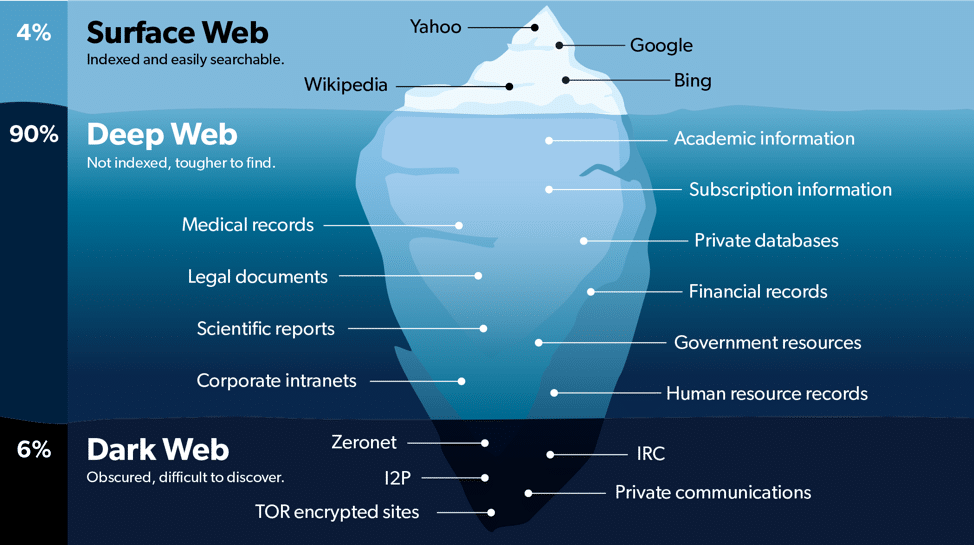
The dark web is the part of the internet that is not visible to regular search engines (like Google or Chrome) and requires the use of a special browser named Tor. Once Tor is downloaded and opened, you have arrived at what many call “Onionland.” Tor uses the onion router hidden service protocol, meaning that the Tor servers derived from the onion router offer users complete anonymity. Also, every website ends with .onion instead of .com, .org, or .gov.

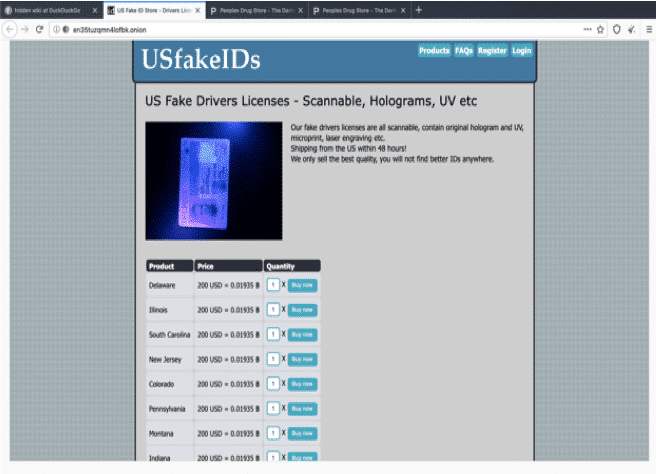
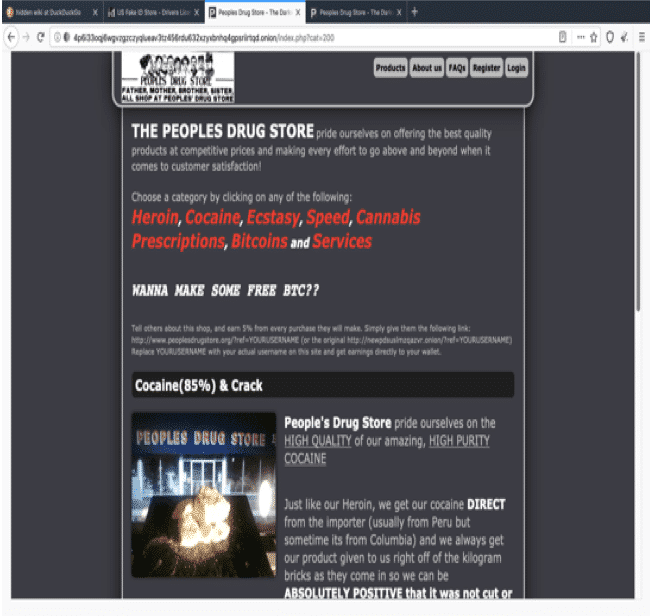
The dark web is a criminal underworld where bad actors online sell and purchase illegal goods like drugs, weapons, counterfeit money, bank accounts, passports and ID’s, and much more. Dark web online shops are set up with customer reviews very much like Amazon which gives users the confidence to purchase from specific vendors. There is even a darker side to the dark web which consists of images and videos of gore, pornography, child sexual abuse, bestiality, and even live murder shows called red rooms where paying customers can tell the person torturing the victim what to inflict on the victim next or how they would like to see the victim killed.

Clear Web Versus Deep Web

The clear web is the part of the internet that can be accessed from any browser. It’s the smallest part of the web, which is astonishing because it seems that the content there is infinite but in actuality, it only accounts for about 4% of the content on the web. Some browsers, like Google, will censor certain websites. The search engine used by Tor, Duck Duck Go, does not censor and will not save your search history.

Then there is the deep web which is not to be confused with the dark web.  The deep web is the largest part of the web. It consists of all the content that is not indexed and will not appear on regular search engines. Many government and private company websites exist there, where you would need an exact address to access them. Accessing without permission is illegal.

Is it easy to access the Dark Web?

It is very easy to access the dark web. I’ve included the steps here so you can recognize them if you ever come across these searches on your child’s browser.

To access the dark web, all you have to do is:

  • Purchase a VPN for extra security and anonymity (optional)
  • Download Tor
  • Access Hidden Wiki Links
  • Use the links on Hidden Wiki to help guide you through the dark web
  • Create an anonymous email
  • Purchase bitcoin (which is an online currency)
  • Find an online store through the hidden wiki that carries the products or services you are looking for

Using the hidden wiki as a guide, you can follow the steps above by merely clicking links and it will guide you through. You can easily find the hidden wiki by typing “hidden wiki” on the search bar in the Tor app.

Dark Web Dangers

Fake IDs and Drugs

So, as a GKIS intern, how do I know that teens are accessing the dark web? I became interested when high school students that I worked with all had fake IDs and were getting into L.A. clubs. I asked how they got them, and they told me from the dark web using bitcoin. They also disclosed that they illegally purchase study drugs like Adderall and Modafinil as well as club drugs like cocaine and molly. I was shocked yet intrigued, so I followed these directions on how to get onto the dark web. I couldn’t believe how easy it was to access.

When I brought up my idea about writing about the dark web at our intern meeting, Dr. B worried we’d be publishing a how-to article. But I argued, and the other interns agreed, that there are plenty of YouTube videos showing the step-by-step process of accessing the dark web. Parents need to know about this!

It is mind-boggling how dangerous access to the dark web can be. As if purchasing illegal drugs from anonymous criminal vendors isn’t enough, consider that purity is not guaranteed. Drugs like cocaine and heroin have been known to be laced with fentanyl, an extremely powerful opiate that kills even the most severe addicts. And consider the risks teens take in 21-and-older clubs. Interaction with adults on the dark web can lead to any type of exploitive situation online and offline.

Violence and Pornography

Consider what watching violence and pornographic material can do to a child’s developing brain. For some kids, watching explicit material can lead to stress symptoms characteristic of clinical disorders such as acute stress disorder and PTSD. For others, they may become desensitized to shocking online content which may lead to craving and seeking increasingly dangerous content to experience that same rush. This type of explicit material can have a similar effect as addictive drugs due to the release of dopamine and endorphins.

Dopamine helps the brain recognize incentive salience. Incentive salience is the desiring attribute that includes a motivational component to a rewarding stimulus. In other words, dopamine is released when a reward is anticipated, and it motivates us to keep seeking that anticipated reward.

When shocking material is viewed, the opiate system in our brains begins to activate by releasing endorphins. Endorphins gives a sense of euphoria and eases pain, which is what heroin does. So, more and more shocking material may be craved due to dopamine released from the anticipation of viewing the shocking stimulus – and endorphins help ease the pain that the shocking stimulus caused. Endorphins are also what causes the “runners high” that people talk about after a good amount of cardiovascular exercise. So when we experience pain, endorphins are released to help ease the pain.

 Hate Groups

An extremist group discussed in the media recently, the “Proud Boys,” is a group that is known for supporting President Trump and for their extremist chauvinist beliefs. If you search for their website on Google, you will likely not be able to find it. But if you use the search engine Duck Duck Go, it shows up right at the top.

Hate groups design their content to radicalize vulnerable adults and youth to their agenda. There have been many incidences where radical Islamic groups have radicalized western youth to fight for their cause. They do this on the clear web too. But when they need to be more discreet, they can use the deep web by creating a .onion site.

Facebook and other social media sites are on the deep web and their web address is www.facebookcorewwwi.onion. It is important to talk about these issues and set rules with your kids. because if they do not learn it from you they will learn from someone else who may not have the best intentions.

Without parent management tools, like those we recommend in our GKIS Screen Safety Toolkit, kids can spend hours over months interacting with extremists. These interactions can be moved offline and can result in child and teen trafficking as well as other crimes.

How You Can Keep Your Kids Safe From the Dark Web

If your kids have open access to the internet, GetKidsInternetSafe has an entire toolkit to get safety dialed in. Check out our GKIS Course Bundle in the plus and deluxe package options, which offers all of our GKIS courses plus bonuses for families with kids of all ages. Our course bundle option offers parent and teen education, communication tools, parenting tools, and tech tool recommendations. Our course summary page with the details can be found HERE.

Thanks to Andres Thunstrom for contributing to this GKIS article. Andres has been advised to never visit the dark web again. J

I’m the mom psychologist who will help you GetKidsInternetSafe.

Onward to More Awesome Parenting,

Tracy S. Bennett, Ph.D.
Mom, Clinical Psychologist, CSUCI Adjunct Faculty
GetKidsInternetSafe.com

Photo Credit

Geralt by Pixabay
Screenshot by Andres