Need peaceful screen time negotiations?

Get your FREE GKIS Connected Family Screen Agreement

sensible guide

The GKIS Sensible Parent’s Guide to Venmo

Venmo Logo

You’re having dinner with friends and realize you forgot your wallet. No longer do your friends have to cover wondering if you’re good for the money. With the free money-sharing app, Venmo (send money make purchases), you can send a digital transaction more simple than sending an email. Viola! Your friend has your money in their bank with a digital receipt of payment. Crisis averted. You feel safe, because Venmo promises your personal and financial information is kept private with encryption. But is Venmo safe enough for teens to use? Today’s GKIS Sensible Guide answers parent questions.

What is Venmo?

Venmo is a free money-sharing application. Users can immediately transfer money from either their Venmo account, bank account, or debit card. Users can connect with other Venmo users by using the search function. With Venmo, you can pay for items automatically or transfer money between friends without an additional charge. Instead of cash, teenagers can be found saying, “I’ll Venmo you.”

Venmo was created by two college students in 2009, in the hopes to create a better way of paying each other back. It started as a text message transferring system; which, has revolutionized to a new type of social network. According to Fast Company, it is estimated that there are about 7 million active users every month. The also reported that last year the app transferred almost a total of $18 Million dollars between users.

What are Venmo’s popular features?

Venmo is super popular as a convenient, quick and easy way to wire somebody money. You can request for somebody else to send you money or you can easily pay somebody back. Your account will use the money you have received in Venmo or link to your bank account or debit card quickly. Venmo does have the option to connect to Facebook but it will only take your contact list.

How to use Venmo?

You’re on the Venmo app and you press the three lines on the left hand side. You’re brought to your account options but what do all of these tabs mean?
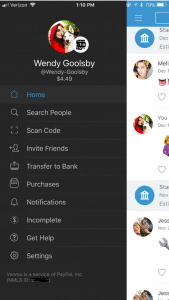
Screenshot of Venmo

  • Home: This is where you can see your friend’s interactions with the app. When on the home tab there is three buttons at the top.
    • One is an emoji of a world, which will bring you to a list of anyone in the world’s latest interaction with Venmo.
    • The second option shows two heads, this is where you can see the money you’re friends have been transferring between each other. On this section, it used to show how much people were sending but for security reasons it now just shows that you transferred but with no money total.
    • The last button is a picture of single–headed emoji. This shows all of your past transactions and also when you took out money from your bank and when you deposited money back into your bank.
  • Search People: This is where you can search through your friends for the appropriate person you want to send or receive money from. You have the option to connect to your Facebook so it can inherit your contact list.
  • Scan Code: Your coworker brings you coffee and asks you to pay them back. You don’t have cash and you’re not friends on Venmo. Instead of searching their name, this tool gives you the option to scan the user’s unique barcode. Both of you have to have the application open at the same time for this to work.
  • Invite Friends: Your friend isn’t on Venmo? You can input their name, phone number, or email to invite them to join the app.
  • Transfer Balance: This is where you go when someone has sent you the money but now you need to get it into your bank. It has the option to transfer the money to your previously entered account or to enter a new bank account.
    • This is also where you will see Venmo’s new interaction to instantly transfer money to your Bank in seconds. This new feature does cost $.25. The standard option (free) is still available but this option takes one to three business days to transfer to your bank account.
  • Purchases: You can now use Venmo to pay in other apps and on the mobile web with select PayPal merchants.
    • Venmo does put in their FAQ webpage that if a person purchases a good or service on the internet using Venmo, they will not offer protection. The transactions are potentially high risk and you may lose funds.
  • Notifications: This is where it will show if you have any pending requests for money or if anyone is requesting money from you.
  • Incomplete: This will show outstanding requests or payments. There will not disappear until the other user pays your or you pay them.
  • Get Hep: This brings you to three options and those being “Browse Ours FAQs”, “Contact Us”, or “My Support Tickets” (for any IT help).
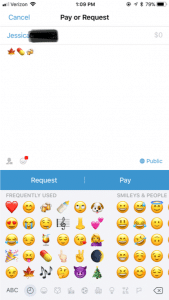
Payment Screen on Venmo

How to make a payment or request a payment?

  1. Click on the button in the top right hand corner to pull up your contact page.
  2. Select the friend you want to send money to or request money from. You can also type in the name.
  3. Type the amount for payment.
  4. Add a comment about what the payment is for using words, emojis, or a combination of both (Venmo will not let you skip this step).
  5. Select pay or request money. If you pay, the money is transferred to their account. If you request, your friend receives an email or text and an app notification saying that you requested money.

What are the privacy options?

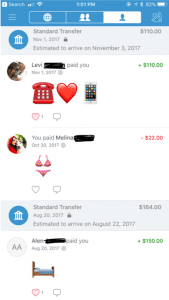
When you make a payment or receive money from someone it automatically gets added to a live feed. This feed is where you can see your friends and families latest transactions. It will not show the amount transferred but it will show the reason (you can leave the reason blank). It’s common for people to not use words in their description but instead emoji’s.
Privacy Options Screen on Venmo In the Settings menu you can change your audience options to include public (everyone on the Internet), friends (sender, recipient, and their friends), and participants only (sender and recipient only). There is the option to change past transactions viewers as well and make everything completely private.

It also asks where you want your contacts to come from. You can get contacts imported from your Facebook contacts or your phone contacts or both. You have the option to turn both options off and only have friends you add by hand.
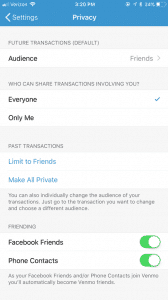
Venmo Privacy Options

What are the risks for use?

A new trend is for sites like Craigslist, Instagram, or Facebook to ask people to buy goods and services and to pay with their Venmo accounts. The company highly discourages this type of transaction but it happens daily. Buying a pair of leggings off an Instagram promoter seems innocent enough, but the real problem is now it’s even easier to buy illegal substances.

Rachael Ferguson did a research project in which she used an application called Whisper, a messaging app that allows users to send and receive messages anonymously, and she had two drug dealers agree to talk to her about their social media influence on the drug market. They explained how easy it is to find drugs on apps like Instagram or Twitter, just buy searching up relevant hashtags. An example of those would be #Kush4Sale or #OGKUSH. If you comment on these posts it’s more likely you’ll caught, so there in underground etiquette of messaging the hastagger privately (Ferguson.)

Besides using social media to buy drugs, there are plenty of other goods and services that can be bought through these apps and that are requesting a payment using Venmo. One man was selling a car on Craigslist, the purchaser claimed he could only pay if he used Venmo. The car dealer watched the other person transfer money and he saw the money come into his bank account. Happily, he signed the car over to the purchaser. 12 hours later, the dealer of the car received an email from Venmo saying the payment had been stopped (Chatman.)

What to watch out for on Venmo.

Users can remain secretive about the actual reason for money transfer. Unless you set your page to private, the public can see your transactions and reason for sending. In the privacy section of a Venmo account, there is the option to set all past transactions to private.

When I asked my friends why they or their other friends are using Venmo, they majority reported that they used it for paying rent, bills, dinner, coffee, drugs and when they were underage they can transfer money to someone 21+ to buy alcohol. This is where the emoji’s come in handy when putting in a description for your money transfer.

Emoji’s and what they mean on Venmo:

  • Wine/Beer/Cocktail: Alcohol/ booze
  • Dancing/Celebrate: Party/bar
  • House: Rent or bills
  • Car: Uber
  • Leaf: Marijuana
  • Needle: Drugs

And there numerous food emoji’s used to indicate that they are paying the person back for food. Fun fact: the pizza emoji is the most popular emoji in Venmo transaction messages (Wener-Fligner.)

What are the protection features?

Venmo’s security page outlines how it will protect you financial information, your account, storage and how it will keep you safe in the long run.

Venmo is an easy app to use, but when the user is a child or a teen, parents should consider discussing with them the risks and how to stay safe. Some things to think about:

  • Decide if it is the right time for your child to have their own personal bank account or if they are responsible enough to have a Venmo account connected to your bank account.
  • Discuss with the child when it’s appropriate to send money and when it is not. Set limits and don’t let them send or receive money from strangers.
  • Consider monitoring their transactions. One way to do this is by making a contract demonstrating their Venmo rules and regulations. Establish an agreement that you can have access to their account anytime.
  • Create a list of the people they are allowed to transfer money to. If they want to add a new person, they must let you know first. You have the right to remove any person at anytime.

When using a money sharing app, the child should be prepared to be honest and responsible. As parents, instead of banning certain apps all together, make sure your children know what your rules are! Keep a copy of their username and password so you can easily monitor their account.  Also, remember this application is not only for your kids! Venmo is super helpful in limiting your cash interactions and providing a safe way to share money with your friends and family.

GKIS Intern - Wendy Goolsby Thanks GKIS Intern, Wendy Goolsby for keeping us up to date on the latest virtual wallet. Make sure to keep an eye out if your child is attaching credit cards to any sorts of applications. In other teen news, check out the article, Is Your Teen Hooking Up? for ideas about how to support your kids in today’s casual sex environment.

Work Cited

The Digital Underground: Here’s How You Can Buy Drugs on Social Media, Right Now by Rachel Ferguson

Warning: Venmo Payment from Strangers Can Cost You by Samantha Chatman

The Emoji of Venmo by Zach Wener- Fligner

Fast Company

Why Venmo Is So Popular With Millennials by Matthew Cochrane

Photo Credits

Venmo by Tessa Singer

Hookup Apps: The GKIS Sensible Parent’s Guide to Tinder

Dr. Bennett recently told me a story about her friend Abby’s first experience using the dating app Tinder. Her first date sounded perfect for a middle-aged woman new to the dating scene. Like her friends told her, she met her “match” for a quick drink. She knew better than to get into his car or reveal where she lived. They had a few drinks and then walked to a nearby restaurant for dinner. He was a gentleman, handsome and professional. She couldn’t wait to get home to tell her friends about him.

When she called my professor that night, Abby was beside herself excited about this guy. Dr. Bennett, quietly wondering if it was too good to be true, suggested that she Google him. A person’s digital footprint can reveal a lot. So, Abby Googled. You will never believe what she found out…

It turns out that the man of her dreams was everything he said he was. He was recently overseas as a military officer and had gotten out of a serious relationship several years before. But she also found out that the relationship ended with stalking, an attempted kidnapping, and years in federal prison. Her night went from fantasy to nightmare in a few keystrokes.

Today’s GKIS article reveals what every parent needs to know about the famous hook-up app recently turned dating app, Tinder.

With the rise of screen technology in full effect, the dating game has changed forever. Instead of going out to meet people, many teens and adults rely on dating apps to potentially meet their future soul mates. Or are they just looking for a casual hook up? This new hook up culture revolves heavily around the dating app, Tinder.

What is Tinder?

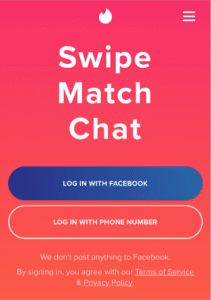
Tinder is a free dating app that you can use either on your mobile device or home computer. After signing up, you can connect with Facebook to merge your mutual friends, interests, and pictures with the Tinder app. There is a new feature to simply log in with a phone number. Tinder uses your location to match with other user’s close in proximity. If interested in one’s profile, users have the option to either “swipe right” which is a “go” or “swipe left” which indicates a “no.” In other words, play or pass. Once users are matched, meaning they both swiped right on each other’s profile, they can begin a conversation – whether it’s gifs (animated or static images) or messages.

What are Tinder’s popular features?

  • When linking Facebook to Tinder, you have access to a network of friends whom can potentially share similar interests.
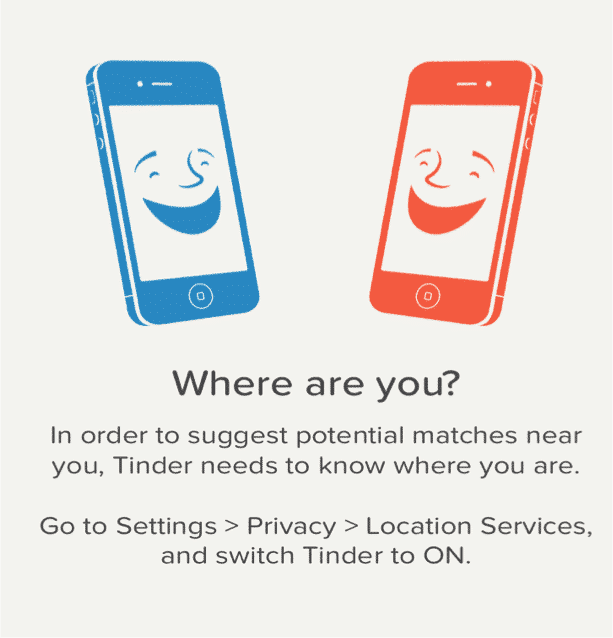
  • The app works off of your geographic location, giving you an option to find matches within a specific radius. The user can match with people as close to 1 mile away and as far as 100 miles away. There is a setting where you can choose the maximum distance you prefer to swipe from.
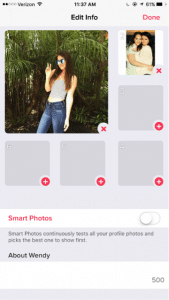
  • Users can edit their profile and select certain photos, create a personal bio, and insert personal demographic information they would like to share.
  • In order to search for matches, users swipe through profiles until they are matched with another user. Once matched, users have the option to message or keep swiping through other profiles.
  • Users can exchange messages, reactions, and gif’s which disappear after 24 hours. Users also have the ability to like a message sent from another user. Sending a reaction to one of your matches is a new feature on snapchat. Reactions look like a bigger emoji that moves and takes up most of the screen. The reactions include sending a shooting heart, a constant laughing face, clapping hands, a jumping cocktail drink, and an eye roll. (They do add new reactions randomly).

What is included in the personal profile?

  • The first thing that appears on one’s personal profile is your photo. It also gives an option to swipe through the other photos posted on the account.
  • Underneath the photo, it shows the user’s name and age. Depending on the user’s privacy preferences, it may also show one’s gender, interests, photos from Instagram, education and job details, a chosen anthem from Spotify, and one’s distance from your location.

What are the privacy options?

  • Although Tinder is connected to Facebook, Tinder does not have authorization to post anything to one’s Facebook page.
  • The information entered to sign up for Tinder can be hidden from other users. This includes e-mail address, home address, phone number, and birthday.
  • When managing privacy options, users can opt to upgrade to Tinder Plus in order to hide their age and location to others.

How long has it been around and how popular is it?

Tinder was launched in 2012 by developer Sean Rad, Jonathan Badeen Justin Mateen, Joe Munoz, Whitney Wolfe and Chris Gylczynski. The app has been growing in numbers ever since. “Research shows there are 50 million active users who check their Tinder accounts up to 11 times per day (Claire, 2017).”

What are the risks for use?

Cyberbully potential:

  • Other Tinder users can send threatening/cruel messages or offensive pictures
  • Fake accounts and impersonation.
  • Users can become desperate for likes and matches, potentially affecting self-perception and self-esteem.

Making poor decisions:

  • There is a temptation to participate in casual hookups that can potentially lead to a unsafe sex and victimization.
  • Since location plays a huge role in this app, it is easy for online predators to target Tinder users.

What are the protection features?

  • If a user is sending inappropriate messages or images, there is an option to un-match with them and this disallows them to contact you.
  • You have the option to upgrade to Tinder Plus, which allows you to hide location and age.
  • There is also an option to turn-off the option to show your profile on Tinder.

Thank you to CSUCI student Nicole Hunnicutt for co-authoring this article. One thing no parent wants to think about is how predators use social media to target victims for sex trafficking. Most of us think this is the kind of thing that only happens to vulnerable youth in poor countries. Unfortunately, children and teens are victimized in most American towns with families in every income level. All it takes is a cunning predator and a kid with a screen. To take safety measures today to Get(your)KidsInternetSafe, check out this article on how sex traffickers use social media to recruit victims.

I’m the mom psychologist who will help you GetKidsInternetSafe.

Onward to More Awesome Parenting,

Tracy S. Bennett, Ph.D.
Mom, Clinical Psychologist, CSUCI Adjunct Faculty
GetKidsInternetSafe.com

Works Cited

Claire, M. (2017, February 21). Tinder: The Online Dating App Everyone’s Talking About. Retrieved March 02, 2017, from http://www.marieclaire.co.uk/life/sex-and-relationships/tinder-the-online-dating-app-that-everyone-s-talking-about-112522

What is Tinder? Parent App Guide (Video) – SafeSmartSocial. (2017, February 15). Retrieved February 22, 2017, from https://safesmartsocial.com/what-is-tinder-parent-guide/?utm_source=Safe%2BSmart%2BSocial%2BMailing%2BList&utm_campaign=57ce4c7f10-S3_Newsletter_3_Stars_2_23_17&utm_medium=email&utm_term=0_40b34a3ccb-57ce4c7f10-195659757

Vedantam, S., Klahr, R., Penman, M., Boyle, T., Schmidt, J., Connelly, C., & Cohen, R. (2017, February 14). Hookup Culture: The Unspoken Rules Of Sex On College Campuses. Retrieved February 26, 2017, from http://www.npr.org/2017/02/14/514578429/hookup-culture-the-unspoken-rules-of-sex-on-college-campuses

The GKIS Sensible Parent’s Guide to Kik

FullSizeRender

It’s every teen’s dream to have unmonitored texting through WiFi, without having to ask parent permission or use expensive data. With instant messaging apps like Kik, all you need is an Internet-connected screen device and, voila, there’s your private Internet portal. Kik is most commonly used among middle schoolers, which translates to online teen hijinks, some innocent and some not-so-innocent. Apps like these are why screen safety agreements among parents and their teens are so vital. My Screen Safety Toolkit is a great instrument for navigating how to monitor your child without hurting your relationship.

What is Kik?

Kik is a free mobile application that is used for instant messaging (IM). It is most commonly used on handheld screen media that connect to WiFi (like smartphones, iPods, and tablets). A Kik account allows the user to send and receive messages with other Kik users. It’s similar to texting, but instead of using “minutes” or a data plan, it sends messages through WiFi. Kik’s Terms of Service state that users must be 13 years or older.

What are Kik’s popular features?

  • Kik looks and acts like a basic SMS text messaging function.
  • You can invite friends or family to use Kik through text, social media, or email.
  • Just like regular text messaging, you will receive notifications when your messages were sent and delivered. Not only can you tell when someone has received your message, but you can also see when they have read it and are typing back.
  • You can send pictures, videos, and texts to peers or even strangers.
  • The main page when you open the app is a list of your Kik conversations.

blog74circletext

What are the privacy options?

  • Kik has limited privacy settings.
  • I recommend that you only tell people you know your personal username. To keep it private, do NOT post it on any other social media sites where strangers may see it.
  • You have the ability to block users (searched by username or name) if you are being cyberbullied. Simply go to “Chat Settings,” then select “Block List.”

blog74kiksecond blog74kikthird How long has it been around and how popular is it?

  • Kik became available to the public in October 2010. In just two weeks it had about one million users.
  • Popular among teenagers, most young adults don’t use this application, due to the fact that most of them already use texting that’s provided with data plans.

What are the risks for use?

Cyberbully potential:

  • Due to the fact that Kik messages do not show up on wireless plans like text messaging, it makes it easier for the kids to send hurtful messages.
  • Cyberbullying commonly occurs with Kik.
    • If an enemy from school gets your username they may message you on Kik and send you insults or threats. For example, there are many reports about Kik users receiving messages telling them they should just die because no one cares about them.
    • Rebecca Sedwick was a twelve year-old girl who was bullied on Kik. Her mother was unaware of the Kik app even though she would sometimes go through her phone. Rebecca had posted photos of herself cutting her arms. Peers responded asking her why she was even alive, calling her names. Before committing suicide she changed her Kik name to, “That Dead Girl.”

blog74fifth

Making poor decisions:

  • It’s possible to have conversations with strangers on Kik, making connection with an online predator dangerously easy.
  • Sexting is a risk with this Kik.

blog74kiksixth

Inappropriate content potential:

  • Due to sexting, Kik users may receive graphic photos from peers or strangers.
  • Drug deals and sex hookups are common on Kik.
  • Parental monitoring is difficult because chats can easily be deleted.

Due to the potential for unmonitorable interaction with peers and strangers and difficulty with monitoring, GetKidsInternetSafe classifies Kik as a red light app. The anonymity and easy delete potential can lead to dangerous conversations. To learn more about the social media applications your child may be using, check out a The GetKidsInternetSafe Sensible Parent’s Guide to Tumblr.

11755355_1062290680448181_4814698546326661932_nThank you to CSUCI intern Adrienne Roy-Gasper for co-authoring this article.

I’m the mom psychologist who will help you GetKidsInternetSafe.

Onward to More Awesome Parenting,

Tracy S. Bennett, Ph.D.
Mom, Clinical Psychologist, CSUCI Adjunct Faculty
GetKidsInternetSafe.com

Photo Credit:

Informal Gluttony by Kat Northern Lights Man, CC BY-NC 2.0

Cyberbullying, would you do it? by kid-josh, CC BY-NC-SA 2.0

Pro Juventute Aufklärungskampagne ‚Sexting’ Themenbild_04, CC BY 2.0

The GKIS Sensible Parent’s Guide to Tumblr

tumblr advertisement

Tumblr is a multimedia microblogging social networking site that many tweens and teens use for streaming a scrapbook of short blogs, images, links, text, and videos and audio clips. Many of my clients love the creative versatility of Tumblr and most choose to have a public profile. Tumblr users commonly form close-knit, highly-involved communities that share common passions. Celebrities like Taylor Swift have benefitted from her 46 million following and reposting fans (#swifties) resulting in consistently viral coverage. Recently a friend of a client detailed her suicide plan on her Tumblr blog, triggering a welfare check from the police. Although this app resulted in a teen getting the help she needed in this instance, often times intimate information is used to get to an unintended victim. Trigger warning with this article due to the graphic and sexual image examples easily found on Tumblr. Sorry folks, but you NEED TO KNOW.

What is Tumblr?

Tumblr is a microblogging, social networking site that you can now use on your phone as an application. It was founded by David Karp and is owned by Yahoo! People use it to post, reblog, or comment on blogs.

What are Tumblr’s popular features?

  • The home screen will contain blogs posted by those you are following.

blog66image1

  • The home screen is where you can see posts made by other people; they can be blogs or reblogs. (Reblogs are when people take a blog and repost it onto their page for more people to see it).
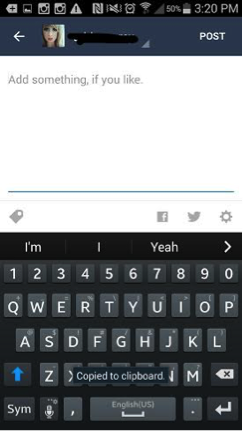
  • To reblog a post you select the two arrows going in a circle; it will take you to a page where you can add something yourself to the post.

blog66image2blog66image3

  • If you want to just like a post you can tap on the heart to the right of the arrows; if you want to leave a comment you can tap the bubble to the left of the arrows. Or you can share a post by tapping the three dots and you can share it via facebook, pintrest, email, etc.
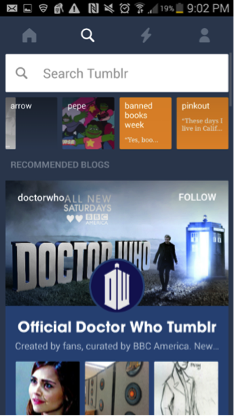
  • The search icon next to the home is where you can look up other users; you can search for friends or you can just search for anyone that may blog about things you enjoy. You can type just about anything into the search bar and find people to follow.

blog66image4.png

  • It will also give you recommendations of what to follow; if you want to follow that page you can just click the follow button.
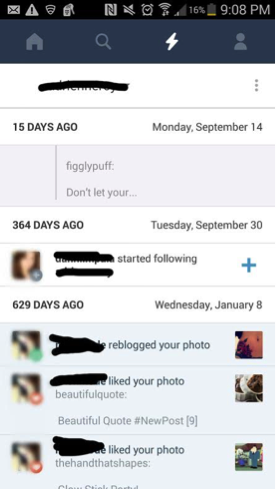
  • The lightning bolt icon is where you can see your notifications. People can tag you, reblog your post, or even comment on something.

blog66image5

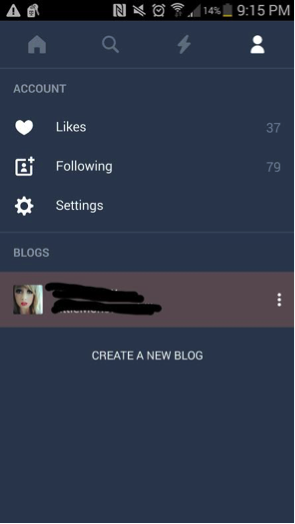
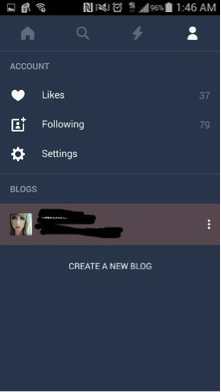
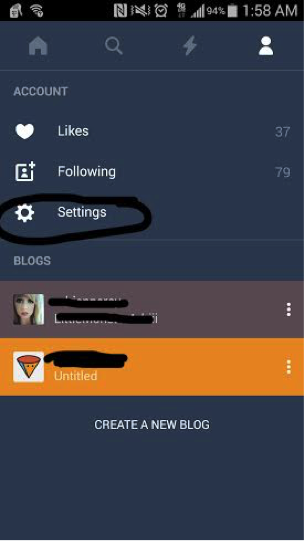
  • The person icon next to the lightning bolt is your account information; here you can see your likes, who you’re following, your settings, and your blog information. There is also a place where you can start a new blog which is like a subaccount.

blog66image7

  • To post a blog you can select the big blue circle with a pencil on the main page.

What is included in the personal profile?

  • To look at your own personal profile you can go to the person icon, click your picture and username. It will bring you to your profile and you can see what everyone else can see.
  • You can edit your user name, background, profile picture, etc. It will also show things that you have posted or shared.

blog66image8

  • The big blue circle with the pencil is where you can post your own personal blog.
  • Top right hand corner is where you can edit your profile.
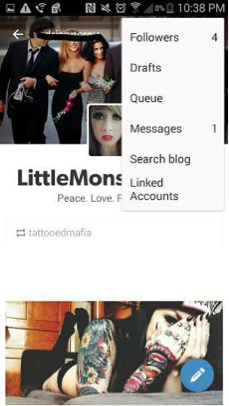
  • The person icon to the left of it is where you can see your followers, messages, search for other blogs, view linked accounts if you have any, etc.

blog66image9

What are the privacy options?

  • There are not many privacy options on Tumblr.
  • You are unable to make your main blog private.
  • In order to post a blog that only you can read; you must make a secondary blog account.
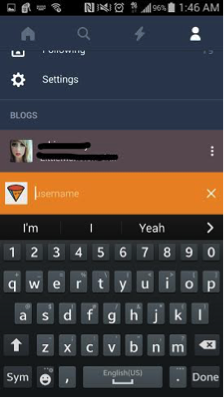
    • To make a secondary blog, you go to the person icon at the top right.
    • Tap the “create new blog link.”

blog66image11blog66image12

  • These secondary blogs are unable to follow other blogs, talk to other users, like or post other blogs.
  • Other privacy information Tumblr offers are under the person icon. Select “Settings,” then select privacy policy.
  • In this section Tumblr just explains why they use your email, username, password, and age (such as using your email to send you updates about the app or site). They note that this information is kept confidential from third parties,

blog66image13

How long has it been around and how popular is it?

  • Tumblr has been around since November, 2007.
  • It is estimated that there are about 30 million users and possibly more.
  • Popular amongst teens and young adults.

What are the risks for use?

Cyberbully potential:

  • Due to the confessional-type nature of many entries, Tumblr users are extremely vulnerable to trollish and cyberbullying comments.

Inappropriate content potential:

  • Social media sometimes provides groups to make teenagers feel like they “belong.” However these groups can be dangerous.
    • Cutting: Those who may have depression and depend on self harm can reach out to others who also cut and share stories/pictures of their experiences, which can lead to more cutting and other “ways” of doing it.blog66image16
      blog66image14
    • Sexualized Content: Due to all ages being on the internet, parents should be aware of the sexualized images that are available through Tumblr.blog66image17 blog66image18
    • Eating Disorders: People tend to use their blogs on social media sites to share their stories and/or pictures of their struggles with eating disorders. This content may give others advice or help on how to become anorexic or bulimic.blog66image20 blog66image19
    • Drug Use: Blogs may be used to “brag” or talk about drug use, making it seem like a cool thing to do.


blog66image22 blog66image21

Making poor decisions:

  • Teens long to form private, creative communities and Tumblr is the perfect place to do that. As with all social media apps, Tumblr can be prosocial or destructive. Therefore if you teen wants Tumblr, I suggest that you continue to nurture a warm, collaborative relationship so they can come to you if they run across anything uncomfortable. And for young teens, definitely monitor content.

Due to the intimate and dangerous content often shared on Tumblr, I recommend this is a GKIS yellow-light app (with monitoring only). Kids are being introduced to topics that they may not be mature enough to handle (is anybody?) and are also vulnerable to cyberbullying. More scary to me is the opportunity that online sex offenders have for learning intimate details about children, such as special interests and personal identifying information. Tumblr is tantamount to confessional YouTube channels and social networking sites like Twitter. Do you have any stories to share about Tumblr? Please share them below!

11755355_1062290680448181_4814698546326661932_nThank you to CSUCI student Adrienne Roy-Gasper for co-authoring this article.


I’m the mom psychologist who will help you GetKidsInternetSafe.

Onward to More Awesome Parenting,

Tracy S. Bennett, Ph.D.
Mom, Clinical Psychologist, CSUCI Adjunct Faculty
GetKidsInternetSafe.com

Photo credit:

Tumblr by Scott Beale, CC BY-NC-ND 2.0

The GKIS Sensible Parent’s Guide to Snapchat

Snapchat Icon

I have mixed feelings about red-lighting the popular self-destructing messaging app, Snapchat, and I’ll tell you why. I Snapchat with my daughter and the other twenty-somethings and its fun! Like all social media apps, Snapchat can be used for good or evil. They say it’s not guns that kill people, it’s people that kill people. The same applies for social media. So here’s the deal; if the individual using Snapchat has a mature frontal lobe and life experience, this app is way cool. But if the user is young and impulsive, Snapchat provides an effective forum for bad behavior in the form of pictures, videos, and texts. Unfortunately, there are no monitoring apps that I know of that work with Snapchat. However, there are many apps that that let recipients sneakily save chats from unsuspecting senders. Keep in mind, social media apps post risks for viewing, posting, and private messaging. Here is your GetKidsInternetSafe Sensible Parent’s Guide to Snapchat so you can make your most informed parenting decision. To help your tween or teen demonstrate they have the knowledge, problem solving ability, and judgment for social media, check out our Social Media Readiness Course. It’s an online course for tweens and teens that offers information about the risks of digital injury due to social media and psychological wellness tools. With a quiz for each module, they work their way through independently so their graduation certification demonstrates mastery of content. Of course, you can take it too if you’d like. It’s like driver’s training but for the internet!

What is Snapchat?

Snapchat is a free mobile messaging app for sharing moments with family or friends. Photos or videos are taken on the application and the user may draw and add a “caption” to their picture and send it to anyone on their “friends” list. Snapchat also contains a “story” (a saved video on static page for 24 hours) where friends can view your photo and/or video series. The photos or videos last up to ten seconds or it can last up to infinite amount of time and then it disappears after the user clicks their screen. The photos can be saved if the other person viewing it takes a screen shot; however it will notify the sender. Also, the sender may save their photos anytime if they are on their “story.” You can also instant message with Snapchat. Snapchat’s Terms of Use states, “Snapchat is intended for people who are at least 13 years old. Persons under the age of 13 are prohibited from creating Snapchat accounts.”

What are Snapchat’s popular features?

Snapchat is highly intriguing to users because the messaging is photo/video based. This is a step-by-step description of how to use it:

  • Take a photo
  • Tap screen to add caption; tap the “T” in the right hand corner to change font size and color. Tap the pencil under the “T” to draw on the picture with color or draw with emoji’s, tap the square under the pencil to add emoji’s or bitmojis.
  • Under the square is a pair of scissors that allows you to clear a blemish, erase a part of the photo, put an entire background, or put hues of color in designated spots.
  • After the scissors, there is a paper click symbol. This allows for the user to attach a URL to any post they make.
  • Apply a filter by swiping right on the photo; includes four different tints for pictures, a “mph” to show friends how “fast” you’re going if in a moving vehicle, the time photo or video was taken, the altitude, and the temperature of where you are. You can only choose one of these filters at a time or you can hold the screen and apply numerous filters to the post.
  • At the bottom of the list of symbols on the left top corner is the clock where, you can choose how long you want your picture to appear when sent to friends from 1-10 seconds or for infinite. You can also click the arrow pointing down (on the bottom of the screen) if you want to download the picture you just took onto your device. Lastly next to the arrow there is the square with a plus sign to “add to your story,” the picture will remain on your story for 24 hours.
  • At the bottom right corner of the screen, you click the arrow pointing to the right to send the photo to your friends. When clicking here you can choose what friends you want to send it to.
  • Check the box of the friends you want it sent to; on the bottom the friends you chose will show up in a blue link with an arrow pointing to the right. You click the arrow once your friends are chosen.
  • The list of friends include, “Your Story,” “Best Friends,” “Recents,” “Groups,” and “Needs Love.” Your story was previously mentioned before; you just have another option to add the photo to your story a different way. Your best friends consist of those you send Snapchats to the most. Recents are those who recently sent you a Snapchat or those you recently sent a Snapchat to. Groups are people who you have grouped together and if you send a snap to them all of the recipients will receive the same snapchat and can respond to the group (like group messaging but with pictures). Lastly those on the needs love list are those who are on your Snapchat list of friends but you don’t Snapchat them often nor sent them a Snapchat recently.
  • Recently added on Snapchat is group chatting. Now, once you are on your main screen (swipe to the right), you’ll see at the top for the option of “Groups”, “Stories”, or “Chats”. Pressing each of these tabs looks fairly similar but it is a new way of organizing your feed. The New Group Video Chat allows groups of up to sixteen people to instantly start video chatting. To create a video call, you simply create a new group of friends (or use a group already created) and tap the video icon to send an automatic notification to those users, as an invitation to join the call.  During your video chat you can use the famous Snapchat filters. You read that right, you can video call your friends and family while you have a dog filter on your face.

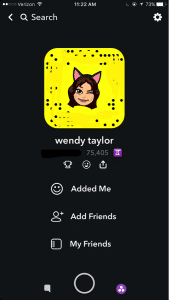
personal profile on Snapchat What is included in the personal profile?

There is not a “personal profile” per se, but there are ways to find your friends who are on Snapchat. From the main snapchat screen, the middle section, you can press the top left corner, which is either a picture of a ghost of your bitmoji you created. From there you can view your name, user name, your astrological sign, and your “score.” There’s a link with a smiley face that says “Added Me” to see those that have recently added you on Snapchat. Then there’s a link that says “Add Friends” and you can search by username, address book, snapcode, or nearby or add from your contacts list. The last link is My Friends, which shows who you have already added.

Those who are not your friends can see the pictures you post on your story, unless you go to settings – view my stor y- and make sure its pressed on “My Friends.” There is an option for Everyone or Custom, which you can block certain people from seeing your story. People can find you using any of the things stated above, but most commonly people will add through “contact” list, snapcode or user name. Your personal snapcode is the unique pattern of dots around your bitmoji. It can be scanned by other users to easily and quickly add you as a friend.

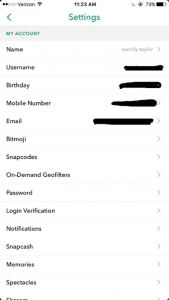
Snapchat settings What are the privacy options?

From the screen with your bimoji, click the settings gear icon on the top right hand corner. When you click it you can see the information you entered when signing up for Snapchat.

privacy options in Snapchat

When you scroll down there is a Manage section with “Who Can…” Contact Me, View My Story, See My Location, and See Me in Quick Add. (Quick add is so you won’t come up on random people’s snapchats saying they might know you and to easily add you as a friend). From there you can select Everyone, My Friends, Only Me, or Custom settings.

How long has it been around and how popular is it?

Snapchat was created by Stanford University students, Evan Spiegel, Bobby Murphy, and Reggie Brow. It was first launched in July, 2011, under the name “Picaboo.” Later it was renamed and relaunched September, 2011.

What are the risks for use?

Cyberbully potential:

  • Friends sending threatening/cruel messages or offensive pictures
  • Fake accounts and impersonation.
  • Mostly used with friends or people the individual knows; so if there is an argument they may say or do hurtful things through the app.

Inappropriate content potential:

  • Sexualized images
  • Instant messaging inappropriately
  • Some consider it the “sexting app;” may receive inappropriate pictures or messages; may send them to others as well.
  • Often times, people feel as if they are safe to use this as a “sexting app” due to the fact that the app will notify you if someone has taken a screenshot. They may think that no one will screenshot their inappropriate photo because it notifies the sender. Or if they get notified that someone took a screenshot they may feel that they can take action.

However, it’s important to note that there are apps that a user can download that allow them to screenshot the sender’s photos without it sending a notification. Some of these apps are called, “SnapKeep,” “SnapBox,” “SnapSpy,” and “KeepSnap.” This is important to know, because people get too comfortable with pictures when they believe that after 10 seconds it’s magically gone; this may not be case.

Making poor decisions:

  • Bragging about substance use to friends by taking photos of alcohol use, drug use, or pictures at a party
  • Using device while driving to use the “mph” filter to brag about the speed of the vehicle you are in. This also can lead to driving over speed limit.

What are the protection features?

  • You can change your privacy settings to where only friends can send you Snapchats or see your story (view privacy settings).
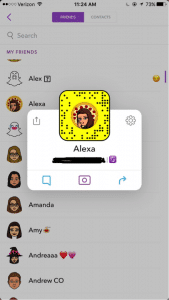
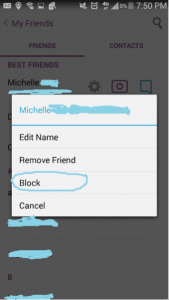
  • If a user is sending inappropriate images you can block them by going to your friend’s list, tap the name of the friend, click the settings link, and click “block.” Or if they recently snapped you, you can just hold their name and press settings and then block. You will no longer be able to receive or send Snapchats to that user; they also will no longer be allowed to see your story.
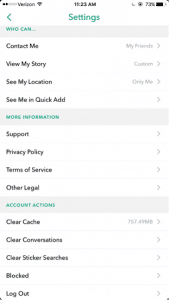
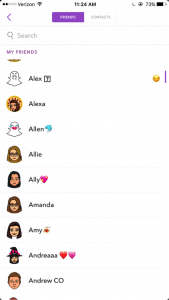
1st screenshot showing protection features in Snapchat

2nd screenshot showing protection features in Snapchat

3rd screenshot showing the SnapChat block feature


Because of the capacity to post images and video unmonitored and instant message, GKIS considers Snapchat a red light app, generally meaning no use prior to age 17. But realistically speaking, most high schoolers actively use and text on Snapchat, so use your best parenting judgment for your child. Also be cautious of similar apps like BurnNote, Slingshot, and Yik Yak. These days, popular social media apps tend to add each other’s most popular features (like Snapchat stories now on Instagram and Facebook). No longer is there a “safer” social media app for middle schoolers.
CSUCI student Adrienne Roy-Gasper

Thank you to CSUCI student Adrienne Roy-Gasper for co-authoring this article. Check out my blog article about how this dad responded to Snapchatters who were cyberbullying his daughter, and how it caused the bully’s dad to lose his job. What are your experiences with Snapchat? Have you run across problems, or do you consider this a reasonable app for your kids? Please let me know what you think in the comments below.

I’m the mom psychologist who will help you GetKidsInternetSafe.

Onward to More Awesome Parenting,

Tracy S. Bennett, Ph.D.
Mom, Clinical Psychologist, CSUCI Adjunct Faculty
GetKidsInternetSafe.com