Need peaceful screen time negotiations?

Get your FREE GKIS Connected Family Screen Agreement

instagram

To Post or Not to Post, That is the Question


blog77socialmedia

For some teens, social media is the primary method of communication with friends and family. Everyday more than half of pre-teens and teens will log on to one or more on social media sites, and 22% of those will log on more than ten times per day. That’s approximately twenty three years of their life on the Internet, with ten of the years specifically spent on social media sites! With that amount of time spent on social media, it is not surprising that more than 1.8 billion photos and personal posts are uploaded to these sites daily. The photos and posts that adolescents upload have become a part of their normal daily life and development. Some of the posts can be beneficial, but some have risks and consequences associated with them (Gary, & Christiansen, 2009).

My eleven year old daughter is a perfect example of these statistics. She communicates with her friends mainly via Instagram. Even though her dad and I are one of her “followers” and we feel like we are in the loop about her online activity, research shows that:

  • 12% of teens admit that their parents do not know about all of their social media accounts,
  • 33% of teens report that their parents know little to nothing about what they do online, and
  • 22% of parents have never spoken to their children about Internet safety and etiquette.

As a busy parent, my days are hectic! It’s too easy to allow my daughter to spend time on the Internet while I get things done. Even though she uses screen media in my presence, I am not always looking directly at the computer screen, her smartphone gives her Internet access outside of home, and I am not up to date with the “lingo” and sites she and her friends use. For example, I just learned of two acronyms that I was unaware of, POS and PA911. They stand for “parents over shoulder” and “parent alert”. These are used by teens to alert someone they are communicating with online or via text to watch what they are saying so parents don’t see. I am now aware that I cannot be 100% sure of everything my daughter is doing online and am part of the statistics.

To help her make healthy online choices, I must be educated about the risks and benefits of online activity so I can share them with her.

Here are some concepts that parents should go over with their children so they are able make good online choices and guide them safely through the Internet:

Negative Feedback

Negative feedback refers to unkind comments on social media. Pre-teens and teens have the tendency to be preoccupied with how they are being perceived by their peers and highly sensitive to their opinions. Most of the time social media elicits healthy feedback within peer groups with responses such as “likes” and positive comments on posts and pictures. But 7% of teens report only receiving negative feedback on their online activity causing lowered self-esteem and feelings of insecurity (Koutamanis, Vossen, & Valkenburg, 2015).

Replicability

Once something has been uploaded to the Internet, it is still searchable even if the person who uploaded later deleted it. Replicability happens if a post or picture is copied and pasted to someone’s personal computer for future or personal use. Copying and pasting is not always done by someone the “poster” knows. Social media sites have the option to “share” a picture or post giving access to thousands of people in a matter of seconds. Once the image or post is someone else’s hands, they are free to do what they want with it, including altering it and reposting it. Anything uploaded can fall into anybody’s possession. Once posted online, no post or photo is safe from copying, altering, or sharing (Moore, 2012).

What gets posted online, stays online

Anyone who has ever used the Internet leaves behind a digital footprint. These footprints are an ongoing collection and recording of EVERYTHING an individual does online. Yes, that even includes websites that have been viewed and searched, accounts created, pictures that have been uploaded, deleted content, and comments left on sites.

Teens need to be aware that there may be future implications from their Internet activity, especially what is on their social media profiles and pages. For example, as many as 75% of employers use social media as part of a background check for potential employment and certain universities also use these platforms when deciding which applicants will be granted admission (McBride, 2011). Would your teen be prepared to turn over their social media accounts and passwords to the college of their choice?

Personal information

Posting too much personal information can lead a predator right up to a teen’s front door. An astonishing 20% of teens feel it is safe to post personal information and public blogs and social media sites. According to the Pew Research Center, 92% use their real name, 71% share the school they go to, 91% show their full face in their profile picture, 71% say what city/town they live in, 20% post their phone number, and 82% share their birthday. When a teen shares too much personal information, it not only makes them an easy target for a predator to find, it also gives identity thieves the information they need to ruin a teens future credit. Once credit is harmed from identity theft, it is hard to turn it back around.

What can parents do to promote positive and safe digital activity for their teen?

Follow age guidelines for specific sites and apps

The Children’s Online Privacy Protection Act (COPPA) was put in place to prohibit websites from collecting personal information of kids under the age of thirteen without parental permission. This is why popular sites such Facebook and Instagram require users to be thirteen or older. Allowing children to join sites by falsifying their age, sends mixed messages about lying and online safety (O’Keefe, & Pearson, 2011).

Teach them healthy digital citizenship

Just as one maintains a positive identity offline, one must also attend to their online reputation. Teach your teen to think about possible future repercussions before they view or post online. Be prepared to have ongoing discussions about what pictures and comments could imply to others (e.g., might be seen as provocative, unkind, or unfavorable to their character) (Moore, S., 2012). Remember that grandma (and UCLA) are watching!

Set up regular GKIS family meetings

Having regular family meetings about issues pertaining to online activity can keep parents informed about what their teen is up to online and offline. Parental involvement and communication is key to promoting healthy internet activity. Family meetings shouldn’t be used as a time for punishing online misuse, but rather a time to mutually teach each other and share issues that may come up due to screen use.

For more specific parenting help on sensible rules and regs, check out the GKIS Connected Family Online Course.

Onward to more awesome parenting

KathleenThank you to Kathleen Gulden, CSUCI intern, for authoring this awesome GKIS article!

Onward to More Awesome Parenting,

Tracy S. Bennett, Ph.D.
Mom, Clinical Psychologist, CSUCI Adjunct Faculty
GetKidsInternetSafe.com

Works Cited

Gray, D. , & Christiansen, L. (2009). Protecting adolescents’ personal information online: Constraints and parameters. Journal of Information Privacy & Security, 5(4), 31.

Koutamanis, M. , Vossen, H. , & Valkenburg, P. (2015). Adolescents’ comments in social media: Why do adolescents receive negative feedback and who is most at risk?. Computers in Human Behavior, 53, 486-494.

McBride, D. (2011). Risks and benefits of social media for children and adolescents. Journal of Pediatric Nursing, 26(5), 498-499.

Moore, S. (2012). Digital footprints on the internet. International Journal of Childbirth Education, 27(3), 86.

O’Keeffe, G. , & Clarke-Pearson, K. (2011). The impact of social media on children, adolescents, and families. Pediatrics, 127(4), 800.


Smartphones During Homework?

blog70jackie1

Are you fighting the homework wars? Wondering if screens during homework are helping or hurting grades? We can’t take screens away during homework time anymore. So much of it is online! Kids insist that tech helps them learn better. But does it? Today’s GKIS article covers who tech can help with learning and how it can interfere.

How We Learn

We have to have a good memory to earn good grades. To learn, we must encode, or anchor, that information into brain memory storage. This type of learning happens as we engage with the material over and over. Memories also encode while we sleep. Changing short-term memories into long-term memories happens through biochemical and electrical processes called consolidation.

Different types of memories store in different parts of the brain. Memorizing factual information (required to perform well on tests) primarily involves the part of the brain called the temporal cortex. Intentionally learning facts is called explicit memory.

Memorizing how to do something, like tie your shoes, is called procedural learning. It is stored in the areas of the brain that involve motor control. This kind of learning is called implicit memory.

Emotional memories (like those that occur in traumatic situations) are stored in multiple brain areas including our emotional center, the amygdala.

Research suggests that kids studying while watching TV may encode that information as procedural rather than factual data. Encoding in the wrong brain region makes fact retrieval at test time more difficult. How and where you study also makes a difference.

How to Facilitate Learningblog70jackie2

To learn well, we must start with great brain health, get motivated, set up a good workstation, and follow best learning practices. Are you practicing these learning techniques?

  • Good self-care, brain health, and cognitive fitness are the foundations of learning engagement (like sleep, nutrition, exercise, and a positive mood)
  • A distraction-free study environment
  • Efforts toward mental engagement: attention and motivation
  • Putting the learning content in a variety of different formats (listening to a lecture, reading notes, writing notes, re-writing notes, watching videos, engaging in discussion, etc.)
  • Memorizing material in a variety of study environments
  • Making unique meaning of the material, such as generalizing and applying the concepts, especially with emotional connections
  • Repetition and practice
  • Avoid doing two tasks at once that require the same cognitive resources (don’t multitask)
  • Uninterrupted brain rest after each study session (mindfulness, meditation, time out in nature)

The Benefits of Screen Time for Learning

Screen devices can be amazing learning aids. Not only do they help us put the material in different formats, but they are fun and convenient to use! Here are some of the ways screen time benefits our learning.

  • With our screen devices, we have immediate, easy access to massive stores of information.
  • The biohacks built into our devices make learning fun. We are captured and motivated.
  • Online quizzes and testing help us immediately assess where we are with our learning.
  • Learning programs dish out progressively challenging content at a pace that matches our performance.
  • Screens give us access to others for group discussions and crowdsourcing problems.
  • Screens offer cool and create learning formats, like project management and brain mapping systems.
  • Gamifying content helps us learn and have fun!


blog70jackie3

Best Learning Strategies

1. Learn from the get-go.

Don’t waste a moment of studying. Be an active learner the minute you come into contact with the material. Actively engage with the content while you read the textbook, take notes in class, and watch the videos. Participating in class also helps deep processing of the material!

2. Learn while you format study materials.

Outline the text and rewrite and highlight your notes. Attend to and connect the main concepts. Leave out illustrative details so you have only essential material (fewer pages) to memorize.

3. Set the stage to study.

Block out sufficient study time over several days using a block-scheduling download from the Internet. Prepare yourself and your study space to optimize learning. Make sure you are comfortable and fit (fed, hydrated, rested) with a positive attitude about studying. Find a comfortable, non-distracting study location. Turn off your phone and other notifications and commit to studying only, no social media or Internet surfing.

4. Engage with content, don’t kill and drill.

For a student to learn effectively, they must engage with the content and integrate it into a meaningful framework. Students often make the mistake of mindlessly rehearsing isolated facts, thinking time spent is evidence of learning. Kill and drill is a waste of time and mind-numbingly punishing. Deeply processing information is the best way to learn.

5. Create learning pathways.

Each time we encode a fact into the hippocampal area (memory center) of our brain, we create a learning pathway to that content that can later be traveled for retrieval at test time. Increasing the number of pathways to that encoded fact is the process of effective learning.

In items 2 and 3 of this list, you already paved the initial pathways! The first pathways include when you listened to the lecture, wrote notes, read the textbook, answered the teacher’s questions, and formatted study materials.

To pave additional pathways to test content, find creative ways to further engage with and elaborate on the material while you study. The more emotionally and cognitively meaningful the material is for you, the easier it will be to learn. For example, use the Internet to view the study material in a variety of vivid formats, such as illustrative maps, diagrams, pictures, speeches, or videos. Link the information to emotionally meaningful memories or associated topics. Study from a variety of locations. Form a study group and talk with others about the content.

6. Rehearse the information and practice retrieving it and applying it just like you would at test time.

If the test is multiple-choice, make up questions that would lead to memorized facts. If the test is an essay, practice outlining and writing essays on that material.

7. Study small chunks of material at a time over several days, eventually linking the chunks together.

Don’t cram at the last minute. Your brain needs time to deeply process newly learned material. It will even process when you’re not actively studying, even in your sleep! That means it’s best to learn and rehearse chunks of material over several days. By test time, the chunks will come together for easy, A+ retrieval.


Fostering the love of learning is the best thing we can do with our kids, that means helping them learn better and achieve a healthy balance on- and off-screen. For more learning tips, view my free video, “How to Study Effectively: Metacognition in Action.” 

I’m the mom psychologist who will help you GetYourKidsInternetSafe.

Onward to More Awesome Parenting,

Tracy S. Bennett, Ph.D.
Mom, Clinical Psychologist, CSUCI Adjunct Faculty
GetKidsInternetSafe.com

3 Tips to Get Back on Track With Screen Safety After the Slips

blog68girlonbooks

Our kids are solidly into midterms and my practice is flooded with concerned parents, bummed out kids, and grade dips. Families start out dialed in with expert organizational and parenting practices, lunch boxes packed and folders color-coded. We set screen blackout times and enforce rules and regs around social media and buddy lists. Everybody is on-board with lofty academic goals, locked in screen media agreements, and calendars ripe with ambition. But then we get busy, really busy. Homework gets shoved to the bottom of backpacks, we cave to the shortcuts of fast food after soccer practice, and screens slowly move from the family docking station to the bedroom. Grades slip, tempers flare, and Dr. Bennett’s schedule gets really busy.

AS A FALL PICK-ME-UP HERE ARE 3 AWESOME PARENTING SHORTCUTS TO GET US BACK ON TRACK

1.    Set a quick agenda for  GKIS tech talks

 and create space to deepen the parent-child connection.

To get ideas about what to talk about, simply go to GetKidsInternetSafe.com, enter your name and email address, and wait for weekly articles to arrive in your inbox. Each weekly article covers hot topics for skill-building and discussion, like cyberbullying, netiquette, digital footprints, and issues spurred by current media events. With this information you are prepped to speak with authority (and a sense of humor) about online issues. With each conversation you’ll see your connection deepening and your collaboration improving. Soon they’ll consider you their #1 GO-TO PERSON for online and offline issues. Taking the time to reboot your parent-child connection is your most powerful tool for safety and the very thing that makes us go to sleep at night without guilt and worry.

2.   Establish the GKIS family docking station as a habit 


Pick up your iPhone right now, push the button, and tell Siri to set a reminder 15 minutes after your child’s bedtime. “Remind me to check the FAMILY DOCKING STATION.” Then set it to repeat. This will ensure screens get docked with you at night before lights out. Remember, screens in the bedroom will eventually lead to inappropriate disclosures, x-rated browser searches, and sexting. Even the “good kids” are doing it so surrender your denial already. And it starts younger than you think. For a great blueprint for home staging, check out my GKIS Connected Family Online Course.

3.   Install tech tools that save you time and hassle 


I don’t know about you, but the last thing I want to do is stalk my thirteen year-olds every move on Instagram. I mean really, how many selfies with Frappuccino’s can a middle-aged mom take? Besides, my daughter is an awesome kid. I want to grant her some privacy with her friends, and I’m not particularly comfortable spying on her 24/7 online. But as an Internet safety expert and clinical psychologist, I’m acutely aware of the risks. Knowing what I know, I’m simply not willing to let her through this dangerous portal alone.

That’s where tech can help. I offer a GKIS Tech Playbook in my 30-Days to Internet Safety Course. With this step-by-step blueprint, I suggest several apps and software programs that help parents fill screen media risk gaps.

One of my favorites is VISR. Their website says, “VISR is a simple, effective and kid-friendly tool notifying parents when relevant safety issues such as bullying, risky geotagging, and unusual times of use are detected across social networks.” When the creator and CEO Robert Reichmann contacted me through GKIS, we had a long discussion about our concerns and parenting perspectives regarding screen safety. And I’m happy to say that we became fast friends.

Robert and I both believe that kids must be monitored with social media use in order to achieve safety. But we also hold the parent-child connection as the highest priority. In order to protect that connection, we think being open and honest with our kids about our parenting choices is critical to maintaining trust. Because I agreed with Robert’s philosophies, I agreed to try out VISR with my family.

Now keep in mind that VISR isn’t the only tech tool we use. But I’m so happy to say it is among my top favorites. VISR only alerts me if their computer algorithm picks up something of concern from my teen’s Instagram use. I’m alerted to issues within 22 categories that include violence, explicit content, drugs, or late night usage. I honestly love it. 

1

I’m pleased to report that VISR’s notifications haven’t uncovered dangerous content for my child. However, it did catch some after-hours usage and has inspired countless conversations including a recent one about a peer who regularly posts inappropriate content. I didn’t step in and make a decision for my daughter about whether to remain that kid’s friend, but I have challenged her to think about some issues in a way that has made our alliance stronger. She accepts my influence while still maintaining her independence. This is the secret to a strong connection and expert skill building. Ultimately I love the idea that I facilitate her in making the safest choices rather than helicoptering her into sneaking and resentment.

I know this sounds like an ad for VISR, but here’s the truth of the matter. Because Robert and I believe in each other’s programs, he offered a deal for GKISsers when they sign up for VISR! Just enter “GKIS” as the coupon code. Although VISR is currently free, GKIS users are guaranteed three months free if and when VISR charges for the service. And because I love VISR so much, I asked Robert if I could write a blog about it to spread the word to informed parents. Currently they cover YouTube, Instagram, Gmail, Facebook, Twitter, and KidsEmail. 

With services like GetKidsInternetSafe and VISR in your corner, you will be informed, confident, and more successful maintaining screen safety in your home.

I’m the mom psychologist who will help you GetYourKidsInternetSafe.

Onward to More Awesome Parenting,

Tracy S. Bennett, Ph.D.
Mom, Clinical Psychologist, CSUCI Adjunct Faculty
GetKidsInternetSafe

Why Our Kids Struggle Not to Overuse Screen Media


Screenshot-2015-05-31-20.30.12

PLEASE SHARE OUR GKIS VIDEO by clicking on the share buttons on the left  🙂

Did you know that the prefrontal region of the brain, the part that involves impulsivity, complex reasoning, and problem solving, doesn’t fully mature until we are 23 years old? This is why kids don’t recognize future consequence and make unwise decisions.

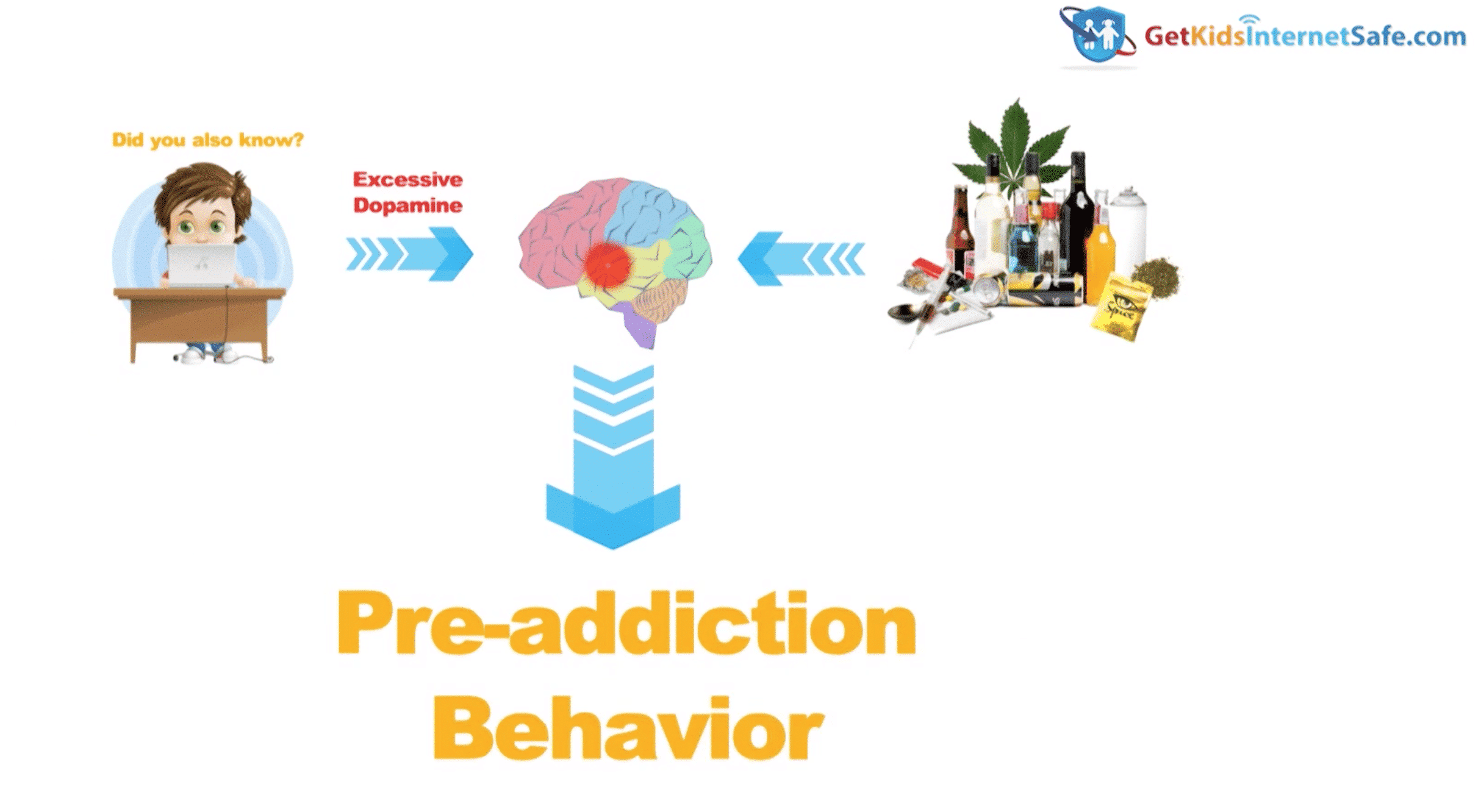
Did you also know that screen media may lead to excessive dopamine in the pleasure center of the brain in a similar way that all drugs of addiction do? That means some kids drift into pre-addiction behavior patterns, like “flow,” when video gaming or using social media.

Although every child’s different, boys tend to prefer gaming and girls tend to prefer social media.

Surging dopamine in the pleasure center quickly overpowers an immature frontal lobe. That means our kids need us to guide them well into what we consider “adulthood.”