Does your teen know how to safeguard their future by cleaning up their social media? I was recently invited to present at a local National Charity League meeting with high school seniors on the topic, “The Cyber Footprint.” Typically, I speak to parents rather than teens about screen safety. But for this group, I went the extra mile. Today’s GetKidsInternetSafe article is a blueprint for how teens can turn a social media footprint from devastating to standout for college and summer or internship employment opportunities.
A digital footprint can make you look good!
Most of us are aware that social media content can have long-lasting negative effects on reputation. That’s why parents monitor child posts. But what many people don’t realize is that having no digital footprint or a dull virtual self can also be a liability (work against you).
In the professional and college worlds, it is widely assumed that having no cyber footprint reflects a lack of productivity and know-how. Not only is it important to have a positive online presence to avoid being screened out of opportunity, but you must also stand out to be selected.
Do employers and colleges care what you post online?
Yes, they do! Not only do employers recruit via social media, but they also screen out potential hires based on your posts and comments.
A 2016 survey conducted by the Society for Human Resource Management revealed:
Recruiting via social media is growing, with 84% of corporations using it currently and 9% planning to use it.
44% of HR professionals agreed that a job candidate’s public social media profile can provide information about work-related performance.
36% of organizations have disqualified a job candidate in the past year because of concerning information (e.g., an illegal activity or a discrepancy with an application) found on a public social media profile or through an online search.
When should you start stylizing your cyber footprint?
…as soon as you’re old enough to care about post-high school education and employment – if not sooner! It’s never too early to consider who you don’t and do want to be online and offline. Using social media to showcase special talents, like art, dancing, modeling, and acting can work for you.
Before using social media for publicity, here are some critical points to consider for safety.
STEP ONE: Cleanse your social media profiles and cyber footprint of content that doesn’t make you look good.
Google yourself and track down and delete unwanted content.
If you’re lucky, you don’t have years of unflattering comments or images to track down, but you won’t know what employers may find until you Google your name first.
Back up your old profile data before you delete your account.
Expect that it may take a few weeks for your chosen social media platform to delete your old profile and allow you to create a new one.
Cleanse all social media profiles, even those set to private.
In some states, it’s legal for employers and college application counselors to ask for social media usernames and passwords. Refusing to do so may cost you. That means it’s necessary to delete inappropriate images, comments, and shares such as those involving drugs, alcohol, sexuality, profanity, cyberbullying, poor spelling/grammar, political affiliations, and off-color jokes.
Social media platforms purposely make it difficult to have more than one personal account or delete your old accounts and start over. Not only does Facebook require you to use a new email address and phone number to create a new profile, but you will lose all of your friends, favorites, photos, messages, comments, and games.
They don’t want you to delete your old profile because they lose ownership over your content. The more metadata they collect about your online activities such as likes and dislikes, the more profit they can make saturating your online time with targeted ads. Since we now select what we want to view rather than being captive television and commercial watchers, advertisers are hungry to capture every opportunity to get our attention. That means we are blitzed with 5,000 ads a day in contrast to 500 ads in the 1970s.
Are you ready to reveal an impressive school or job candidate who is searchable for the right people? Recreating your best virtual self isn’t easy!
STEP TWO: Create an irresistible virtual you!
Choose two or three popular social media platforms.
Quality is more important than quantity. Rather than do a poor job on several platforms, focus on doing a great job with a few.
LinkedIn, Instagram, and Twitter are currently the most popular social media platforms. Get familiar with them to take advantage of useful features. For example, set appropriate privacy settings and avoid default responses in favor of your own words.
Visualize your perfect virtual self and plan before you tackle the project.
Search out those who are doing it right and create a swipe file (think Pinterest). A swipe file is a digital folder where you store your favorite examples of content and style. Keep your eyes open for catchy headlines and titles, image ideas, and potential networking connections. Incorporating multimedia, like colorful and unique images and videos, attracts attention and effectively communicates concepts.
Be strategic, concise, and innovative.
Your online profile is not as formal as a résumé. Be fun and creative while displaying your ideas, research, products, and activities. Proofread. Delete any extra words and avoid big blocks of text by using bullet points and breaking up content into titled sections. Include keywords for search engine optimization.
Blogs can be highly effective, as storytelling is an awesome way to stand out and show rather than tell. Become an author and illustrator. Be the clever, positive, well-rounded person you’d want to work with.
Friend and join influential others.
Every opportunity I’ve ever gotten was the result of good relationships. Not only are your productivity skills critical to success, but so is networking.
Use social media as it’s intended, to connect with like-minded others who fuel and enrich your creativity and protect your confidence. That includes clubs, organizations, special interest groups, and corporations as well as impressive individuals. Don’t friend people you don’t know or haven’t reached out to personally.
Stimulate online engagement and stay active.
Attracting interesting others is one thing but keeping them warmly engaged with valuable content is key to longevity. Just as you do with your friends, be available and share interesting articles you know your online contacts will like. Creating reciprocity will keep others interested in you and generous with potentially valuable invitations and introductions.
6 WAYS TO MAKE YOUR ONLINE PROFILE A COLLEGE/EMPLOYER MAGNET
Switch from teen personal to adult professional with a first-person tone that is warm and welcoming. Make certain any content that a future employer may see as inappropriate or silly has been deleted.
Write a mission statement detailing what opportunities you are looking for. Avoid buzzwords and lingo. Stick to what’s relevant.
Keep your connections education- and employment-focused. Don’t get frivolous and network with everybody. Be selective and seek out those who may lead to mutual opportunity.
Include an attractive headshot.
Include contact information, an email link, and custom URLs for your website or other social media profiles.
Highlight impressive activities/achievements related to education, employment, & community service. Testimonials and endorsements are powerful. Make sure your online profiles are consistent with the content on your résumé.
My best friend’s mother always said, “It’s just as easy to fall in love with a successful man as a loser.” The same can be said about landing your dream job rather than settling for what’s convenient. On the other hand, you’ve got to start somewhere!
As a teen, I worked for a drug store and learned how to be a responsible employee, cashier, organize and stock, and deal with difficult customers. I also learned this position was not for me long-term. From there I landed jobs in accounting, research, and administration, each providing me with business skills that are still paying off today.
Don’t pressure yourself into thinking today’s profile will immediately lead to your dream job. This is scaffolding. One job will lead to another and so on, ultimately building the very best you. Enjoy the creativity of the journey. Take time to daydream about design elements and all of the ways you can blossom.
Have good ideas of your own to improve a digital footprint? Please share with us in the comment section below.
We’ve all been there. Stuck at work, school, or home. We pick up our phones and click on Instagram. There’s BFF Julie on her amazing trip to Japan – 150 likes in 42 minutes. Then check out Twitter. There’s co-worker Andrew’s fun video of an amazing concert at the coolest venue in town. His text post fetched 27 comments. “Wow! That looks so fun!” “I’m so glad I ran into you last night!” “Did you get the pictures I sent you?” You put your phone down and instantly get hit with a wave of sadness. Everybody seems to be having more fun than you. Are you going about life all wrong?
FOMO
FOMO or “fear of missing out” is a form of social anxiety in response to seeing activities streamed on social media. These feelings can blossom into immediate disappointment or long-term feelings of inadequacy. You know you should be happy. You’re ashamed of it. But still … people who experience FOMO the most tend to be extremely active on social media sites like Instagram, Snapchat, and Facebook.[1]
Who suffers from FOMO?
Although FOMO adversely affects all ages, recent studies conclude that FOMO is most common among teens. Nearly 60% of teenagers experience anxiety when they become aware of plans being made without them or can’t get ahold of their friends. Another 63% are upset when they have to cancel plans with friends.[2] Among the other age groups, an overwhelming 61% of subjects aged 18-34 state they have more than one social media account, while 27% state they check their Facebook feeds immediately upon awakening.[3]
FOMO Risks
Compulsive social media checking that gets in the way of everyday activities and leads to texting and driving, like “snap and drive” which is careless driving while Snapchatting.
The inability to prioritize important responsibilities over fun social media posting.
Posting shocking activities like binge drinking and drug use.
Spending lots of money to post expensive designer items.[4]
The constant need to feed is a surefire way to develop feelings of inadequacy and anxiety. FOMO makes us feel lonelier, inferior, and less successful.[5]
Reducing FOMO Anxiety
Get real.
A fun post here and there is not reflective of the “perfect” life. Everybody hurts sometimes, even the pretty ones.
Cop to it.
Once you admit to it, it’s easier to control it and create a plan of action to work through it.[6]
Be in the present.
Practice mindfulness techniques like anchoring – attending to your current surroundings, what you see, feel, hear, smell, and your breathing.[7]
Recommit to your nonvirtual life.
Pet that dog you always see on your way to school or work. Stop and smell the flowers. Read a book in the park. Give yourself ample time to finally finish that term paper or work project. Commit to doing one of those today, right now!
Temporarily detox.
If momentary disconnection is a struggle, delete apps off your phone and use psychological wellness app support. Cool detox apps include Moment, Flipd, and Forest. Detox apps offer fun and clever incentives to get off your phone. For instance, Forest incites you to not open social media by illustrating breaks with forest growth and how large and lush and large you can grow your forest.[8]
Seek counseling.
If all else fails, talk it out. Since FOMO is seen as a cognitive distortion, cognitive behavioral therapy has been shown to be highly effective by offering thought-reconstructing tools. In other words, identifying stinking thinking and replacing it with can-do thinking can greatly improve mood and feelings of well-being.[9] Fewer social media posts may mean a fulfilling life is being lived off-camera rather than no life happening at all.
Thank you to Tammy Castaneda for contributing to this GKIS article. Fomo is becoming an increasing problem for kids and adolescents. If your child is still in elementary school, hold off until middle school before you allow their first social media app. If your teen showing problematic behavior, take action. To prevent clinical symptoms related to screen use, check out our GKIS Connected Family Online Course. In 10 easy steps, you can learn how to encourage healthy screen habits and a happier household.
I’m the mom psychologist who will help you GetKidsInternetSafe.
I’m curled up on a weathered leather couch in a beautiful loft barn we rented for the weekend. A last of summer cozy couples’ retreat in the rolling hills of wine country. We are waking up to soft braying of ponies, early morning foggy walks in vineyards ripe for harvest, and a leisurely breakfast of fresh eggs, hot mint tea, fresh squeezed watermelon and orange juice, and buttery warm banana bread left by our generous hosts. Later we are meeting our friends for a delicious farm to table lunch from local farms and orchards. Best of all…a weekend of fun with old and new friends before a busy school year starts. Crazy grateful for the rejuvenation from the sunshine and laze of summer.
Now that my kids are teens, we are able to sneak away sometimes, guilt-free. If you have little ones and can’t seem to sneak off for weekends yet, don’t despair. It’s coming one day. And when you do, you’ll spend much of it fondly remembering being frazzled and sleep-deprived with your little ones. Each phase of parenting has its challenges and its pleasures. In the spirit of sharing and friendship, I’m taking fifteen minutes out in this sweet little farm kitchen to share the fun content producers of Access Hollywood Live helped me develop for my segment Monday on Online Teen Slang: Should We Worry? I hope you’ve set aside time each week to curl up with steaming hot tea for a moment of solitude to read your GKIS article. They are written to gently pepper you with useful information about tech, parenting, and safety so you can teach during screen-free dinners with you and yours. ❤️ Now on to the basics of teen online slang.
Why is slang always changing? Is it to be ‘cool’ with friends?
Slang is an expression of culture. Youth culture changes rapidly and is based on popular memes, songs, and movies. Part of the excitement is that you have to be an integral part of the culture to keep up. No parents!
Teen Slang: The Bad News
Often reflects and teaches concepts you may not want your child to know.
Can be used to hide from parents and plan secret and even dangerous activities
Can be vulgar, offensive, or cruel.
Teen Slang: The Good News
Young people who use slang are striving to form their own, independent, adult identities.
Sharing slang provides a sense of belonging, and being ‘in-the-know’with friends.
Using slang is a celebration of being young and having fun.
Every generation creates its own slang, but why does it seem so different now? Has it evolved in the age of social media and smartphones?
Slang is not new. But with the web, kids have a bigger, private, more versatile playgroundto live in. They juggle lots of virtual identities, each with its own characteristics, slang, activities, and community on demand with thousands of members of their tribe connected at once. We had our neighborhood buddies and the telephone. Big difference.
Should parents attempt to use their teens’ slang as a way to try to relate to their kids, or is that getting into majorly uncool territory?
If you want them to roll around in agony and openly insult you, you should totally use their slang.
Should parents be worried about the slang their teens are using now, or is it no different than if they think back to when they were younger?
It’s different. It’s more dark and vulgar for sure.But the teens I see in practice and the ones I’m raising are still good people. They’ve just habituated to a more troubling slang culture overall. Parents should be worried if their kids are too “thirsty”to belong, because that would result in being too eager to join in and take risks. They should be worried if they’re too secretive. They should be worried if there’s evidence of sneaking and dangerous defiance. Otherwise, have fun with it. Of course, correct them when they cross over the line, but stay engaged. Allowing them some privacy is also important.
Another topic we want to touch on is the cultural sensitivity issue of using slang — many of the terms originate in African American or LGBTQ communities — how mindful should people of other communities be of this before being quick to just use any term?
In-groups are delicate. If a person intrusively hijacks slang from a group they haven’t earned a place in, it can look aggressive or demeaning. Slang provides information about boundaries and belonging.
How can people make sure it’s appropriate to use a term before they start using it?
Do your research before using slang, like observe and ask others, Google it, err on the side of caution.Teens brutally police each other to follow social morè’s, which may even slip into bullying. Let your teen know you have their back 100%, even when they make stupid mistakes. Even better, teach them that mistakes are part of learning and you expect them often. Rather than shame them when they’re hurting with a lecture, take them for a smoothly, show deep compassion, and share stories about how common and healthy mistakes are. Sometimes providing a fun distraction while it passes is what they need.
How to Spot Red Flags in Teen Slang Use & What to do About it:
Talk to your teen often. Let them DJ in the car and share funny videos to stay connected. Keep up on their friends and interests. Be you but with humor. Encourage their independence but reassure them you are being them 100%.
Keep an eye out for concerning behavioral changes like increased isolation, poor hygiene, reckless behavior, or darkened moods are things that may signal trouble.
Block dangerous websites and monitor screen use.
Bookmark helpful websites, like Urban Dictionary, and set google alerts.
Look out for defensiveness and changing the browser quickly or erasing it.
If you’re worried and they won’t talk to you, consider psychotherapy. It’s shocking the influence I have with teens as they blatantly reject their parents with the same advice. It can really turn the situation around.
Want to know which slang terms to pay attention to and if slang use leads to teens having sex? Check out my earlier article Online Slang That Parents Need to Know.
I’m the mom psychologist who helps you GetKidsInternetSafe.
Do you worry your teen has a Finsta? Based on recent surveys, most parents have a considerable concern that our kids’ digital selves aren’t making kind or safe choices. After all, experimentation, taking social risks, and creative self-expression is healthy for teens. The problem is that social media can blast innocent mistakes to thousands of people at once. Fortunately, teens aren’t stupid. They usually “get” that trust is earned. To protect themselves, they form several virtual social groups from more intimate to the public, much like they do in their nonvirtual lives. Is having a Finstagram dangerous? Or is it simply a smart caution to minimize social fallout from impulsive or questionable judgment? When a parent does uncover concerning content, is it worth the risk to confront the teen? How can a parent spot a Finsta?
Cybersecurity safety starts at home. Feel empowered to talk to your kids about what is appropriate to post online. Dr. Bennett’s Cybersecurity and Red Flags Supplement has easy to implement strategies for how to keep your kid’s information secure without the risk of them oversharing online while keeping your parent-teen relationship intact.
What is a Finstagram?
As of June 2018, Instagram reached over 1 billion active users, the highest number of bloggers in the history of the wildly popular social media app.[1] As Instagram grows and expands, so too does the pressure to create the “perfect profile,” resulting in an unspoken set of rules and expectations dictating what you can post, when you can post, and how you can post. To “keep it real,” young Instagram users often create Finstagramsor Finstas, which are fake private Instagram accounts exempt from the strict posting-rules of real Instagram profiles (Rinstas). Finstagram is a mashing of the words “fake” and “Instagram. Finstas are almost always a secondary account and only close friends are allowed to follow, thus excluding acquaintances, love interests, and the prying eyes of parents.[2]
Posts in a Finsta are usually funny and embarrassing “behind-the-scenes” photos, like awkward candid faces, silly activities, or pictures that are not deemed ‘artsy’ enough for the Rinsta. Teens use their Finsta to express more intimate thoughts and feelings. Posts are often accompanied by long-winded captions explaining daily events or opinionated ranting – like how mean and unfair parents are. In general, Finstas can be considered a form of blogging where people ditch the superficial and fake façade of Rinstagrams and post uncensored photos to only a select few followers.[3]
Because Finstas are “private,” teens can get reckless with their posting choices. Under this false sense of security, kids will post pictures of themselves and friends participating in demeaning, offensive, and sometimes even criminal behavior. Typical posts include party behavior like alcohol, e-cigarettes or vape pen use or revealing or sensual poses. Cruel commentary about fights and cyberbully-like exclusion are also typical Finsta content.
Consequences of Careless Finstagram Posting
One example of the effects of thoughtless Finsta posting is Sophie* and her family. Sophie posted a photo on her Finsta featuring herself and a friend vaping at the beach. The picture was seen by a parent and family friend of Sophie’s family, who spotted it on the Instagram feed of her daughter. The parent shared what she had seen with Sophie’s parents, knowing that if Sophie was familiar with e-cigarettes, it was likely that she was also experimenting with alcohol and other substances. Sophie’s parents were put in the complicated position of debating whether to confront Sophie about her actions or to remain silent to preserve their relationship with their daughter.
A similar story is that of Lindsay*, who posted a revealing photo of herself seductively posing in a bodysuit and holding an unlit cigarette. She posted it on her Finstagram because she knew it was a suggestive photo and did not want her parents or other adults to see it on her primary account. Unfortunately, someone brought the photo to the attention of her swim coach, whose concern for Lindsay’s action prompted her to ask to speak to Lindsay privately. Her coach expressed her disappointment over the photo and told Lindsay that “[she was] better than that.” Lindsay felt an overwhelming sense of shame and humiliation at having let down her coach, a young woman who she respected and whose opinion she valued. Not only was Lindsay devastated by the shame of her swim coach thinking less of her, but she was left wondering who betrayed her. The remainder of her swim season was spent scrutinizing each of her teammates and guessing at who might have ratted her out.
In both of these scenarios, the adults chose to confront the kids out of concern for their safety and potential future consequences, including professional relationships with employers, advisors, and coaches. Also, in each case, the discovery of the Finsta posts compromised the trust between adult and child. The truth is, the consequences could have been far worse.
The Dilemma Parents Face
Parenting teens is tough. It’s too easy to get caught up in emotional swings and crises, resulting in worried and freaked out parents and angry teens. Choosing which hill to die on can be confusing. Here are some issues to think about when deciding whether to confront your teen about unwise Finsta posts.
Humiliating your child. Although teenagers like to act aloof and indifferent, the truth is that they crave the approval of prominent adults in their lives. No parent wants to humiliate their child, but sometimes facing the disappointment of respected mentors is the most effective way to get teens to quit their Finsta-ing ways.
Dealing with punishment.There are times when the hassle of creating a punishment worthy of the crime seems like more work than it is worth. Do you ground them, or let them off with just a warning? Do you take their phone away, or do you also go through it to see what other activities they are keeping secret? And then there’s the fear that you might see something worse than the initial incriminating photo. Consequences are necessary to teach a lesson but don’t compromise your own sanity in the process. A compassionate conversation is probably enough for first-time and understandable slips. Remember, they are supposed to be making mistakes in order to learn.
Inadvertently causing your child to be even more sneaky Kids who have been caught posting risky Finsta photos in the past may take greater measures to make sure they are not caught again. Firm and effective confrontation can help foster a sense of trust between adults and kids, while angry scolding will only push them farther away.
How to Spot a Finsta
Ask your child. In the two stories above, the main cause of the lack of trust after the discovery of a Finsta resulted not from the uncovering of the secret account, but from the seemingly sneaky way the adults came across it. No one likes to feel like they are being spied on, and kids are more likely to try harder to keep secrets if they feel like their parents are constantly sleuthing their social media. By asking your kid face-to-face if they have any other Instagram accounts, you give them the chance to tell the truth, show you trust them, and create the opportunity to better get to know your child.
Check tagged photos. Instagram has a feature where you can look at all the photos someone has been tagged in on their profile. Scroll to see all photos your child was tagged in.
Look for silly Instagram handles. Finstagram account handles are usually nicknames or an inside joke. If you recognize a nickname in the account name as something your child has referred to, it might be their Finsta.
Let’s face it: in a world where we are constantly surrounded and exposed to technology, there is no way to truly prevent kids from being active on social media. All we can do as parents is educate ourselves on the consequences and potential dangers of reckless Finsta posting and steer our kids in the right direction. Thanks to Claire Therriault for teaching us all about Finstagrams. To learn more about safe Instagramming, check out The GKIS Sensible Parent’s Guide to Instagram.
I’m the mom psychologist who will help you GetKidsInternetSafe.
This morning I was invited to participate in the discussion, “How Parents Balance Privacy and Safety for Kids Online” on NPR WBEZ Morning Shift, Chicago. Host, Jen White, chose this topic based on a conversation she had when her best friend intervened with her 13-year-old son who took it upon himself to defend a peer against an Internet predator. Along with the other expert guest, Susan Tran from Depaul University, we discussed important issues that impact parents and families due to child smartphone use. Here are the highlights from the show, as well as a very personal story about my daughter just this weekend that shook me to my core.
Jen first asked about the challenges parents are facing in today’s digital age. Susan started the conversation saying that parents are concerned about risks like cyberbullying, access to unwanted content, and privacy issues like sharing too much personal information. I added that I’m seeing a spike in anxiety and mood disorders resulting from digital injuries. The danger is real, and parents need to do more, sooner, with better efficacy. Of course, if you are a frequent reader of the GetKidsInternetSafe blog, you are also aware of risks like health issues from screens like distraction from healthy relationships and activities (sleep, exercise, mindful eating), repetitive use injuries, and brain impacts (multitasking, mental brownout, addiction); interpersonal exploitation like cyberbullying, online predators, deceptive relationships (catfishing and hate groups and cults), and the encouragement of dangerous behaviors with pranks, online forums, and sexting; and exploitation for profit by selling violent or sexual content, product marketing, and cybersecurity issues. So many to talk about, so little time!
But there are also benefits. One benefit is the ability to monitor our kids for location and communication, real-time. This provides us with safety but also risks overparenting. In other words, parents can become too intrusive. I compared online access to a child wandering an airport. Of course, parents would want to know who kids were talking to and what they were talking about with strangers at the airport. It would dangerous for them to be wandering around alone, unsupervised. They face the same risks online. I believe we need to monitor most certainly, but we also need to let kids make their own mistakes and expand their independence by building resilience over time. We need to be there, slowly offering more opportunities for growth over time.
Jen stated that, according to a Pew Research report from 2016, about 48 percent of parents go through their kids’ text messages and call histories. Is it ever okay for parents to cyber-spy on their kids? My answer is yes to monitoring, no to spying. It’s difficult to know how to monitor, especially when kids push back with “I deserve my privacy” and “You’re the only mom who does that.” We give in to pester power too often. We don’t trust our gut and give them too much credit as digital natives. The truth is, with their immature brains and not a lot of experience yet, they can’t anticipate consequence and don’t realize how dangerous the world can be. They need us. Susan added that the conversation about child privacy changes with every generation. The key is having strong communication between parents and teens to navigate challenges as they arrive.
Jen’s friend called in and told her story about how she implemented strategies with her son, eloquently explaining the same process I experience with kids and teens in session. That is that kids will actually accept and even welcome reasonable limits, as long as the parent takes the time to explain their justifications and calmly negotiates the details. In fact, parent rules and supervision often calm kids down. Teens in particular often get too confident in their abilities to manage difficult online situations and get in over their heads. Having parent limits in place often provides them with an excuse to not get involved and even ask for help when they need it. This is the very dynamic that keeps kids devoted to therapy. Instead of firing me when I suggest limits, they are actually quite grateful. Setting fair limits is the first step to building an honest, open alliance.
Caller Kyle then expressed that he is totally lost and needs help finding software and apps for filtering and monitoring his kids’ phones. I shared some specific ideas, like setting parental controls on devices and through Internet service providers as well as setting privacy settings. Also buying third party services like Teensafe, Disney’s Circle, and OurPact can help. But the bottom line is, once your kids are instant messaging on social media platforms like Instagram and Snapchat, there is no third party software that monitors them. Instead, all you can do is collect usernames and passwords and check their phones regularly. Look out for secret profiles, as many kids have several in one platform (e.g., private and ultraprivate accounts on Instagram). Asking them to dock their screens at night, in your room to avoid sneaking, offers a regular opportunity to spot check. Please be honest about it. You don’t want to violate their trust. Besides, it gets them into the habit of realizing that other adults will see their posts and texts too, like other parents and school administrators. They may think before they post more if they see this as a possibility. If you want to monitor everything on smartphones, don’t allow social media.
As an illustration that it takes lots of tools and teamwork to keep our kids safe. I shared an incident that just happened to our family yesterday. We were at a volleyball tournament in Vegas with my 15-year-old daughter. When she was stretching and warming up with her team, a man snapped her photo without permission. The girls were aware enough (awesome) that my daughter’s teammate told the team mom. The team mom courageously approached the man and required that he delete the photo from his phone and in the deleted photos file as well. She also assured my daughter that she did nothing wrong. She had great concern that she would feel humiliation or blame and took efforts to reassure her. We were very grateful, wondering if he was a clueless grandpa like he said, or one of the 1:100 men out there that was a pedophile. Three hours later this same man was courtside with a telephoto lense during a game. We called security and asked him to stop taking photos of the girls. He apologized with suspicious insincerity and refused to wait for security. Security ultimately came and escorted him out for investigation, assuring us they have handled many cases like this before. Disturbing, yes. I was literally shaking I was so angry. It took awareness and trust for the girls and parents to work together for protection. For that I was proud and grateful. Another caller on the show reminded us to always keep digital evidence (videos, screenshots, and text strings) for law enforcement investigations.
How do we get past teen hesitation to talk to adults? Parents must get empowered and digitally literate by reading articles like those offered on the GetKidsInternetSafe blog. Around the dinner table (with devices in the basket), tell stories and ask their opinions. They will tell you stories in response. Viola! The cooperative dialogue has begun. Bidirectional learning overtime strengthens relationships and creates lots of learning opportunities.
When should kids get a smartphone? Susan said it’s different for every family, but be sure to be gradual. Start with a phone that’s not connected to the Internet. I added that parents are slipping. We need to get tougher. Don’t allow kids smartphones until after they’ve earned good grades the first semester of middle school. This will require gradual evidence of the judgement and initiative they need to manage a very powerful communication tool. For some kids, even middle school is too soon.
We ended with caller, Lucy, reminding us that parents need to model limits and set the example. Show kids that they are the priority, not screens. Set the message young that face-to-face interaction and nonvirtual relationships are the priority.
Thank you to WBEZ Morning Shift for such an important conversation to build closer relationships and safer screen use! To listen to the whole radio segment, CLICK HERE
I’m the mom psychologist who will help you GetKidsInternetSafe.
You’re having dinner with friends and realize you forgot your wallet. No longer do your friends have to cover wondering if you’re good for the money. With the free money-sharing app, Venmo (send money make purchases), you can send a digital transaction more simple than sending an email. Viola! Your friend has your money in their bank with a digital receipt of payment. Crisis averted. You feel safe, because Venmo promises your personal and financial information is kept private with encryption. But is Venmo safe enough for teens to use? Today’s GKIS Sensible Guide answers parent questions.
What is Venmo?
Venmo is a free money-sharing application. Users can immediately transfer money from either their Venmo account, bank account, or debit card. Users can connect with other Venmo users by using the search function. With Venmo, you can pay for items automatically or transfer money between friends without an additional charge. Instead of cash, teenagers can be found saying, “I’ll Venmo you.”
Venmo was created by two college students in 2009, in the hopes to create a better way of paying each other back. It started as a text message transferring system; which, has revolutionized to a new type of social network. According to Fast Company, it is estimated that there are about 7 million active users every month. The also reported that last year the app transferred almost a total of $18 Million dollars between users.
What are Venmo’s popular features?
Venmo is super popular as a convenient, quick and easy way to wire somebody money. You can request for somebody else to send you money or you can easily pay somebody back. Your account will use the money you have received in Venmo or link to your bank account or debit card quickly. Venmo does have the option to connect to Facebook but it will only take your contact list.
How to use Venmo?
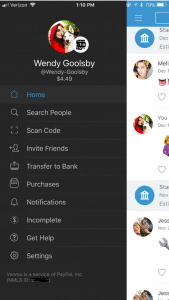
You’re on the Venmo app and you press the three lines on the left hand side. You’re brought to your account options but what do all of these tabs mean?
Home: This is where you can see your friend’s interactions with the app. When on the home tab there is three buttons at the top.
One is an emoji of a world, which will bring you to a list of anyone in the world’s latest interaction with Venmo.
The second option shows two heads, this is where you can see the money you’re friends have been transferring between each other. On this section, it used to show how much people were sending but for security reasons it now just shows that you transferred but with no money total.
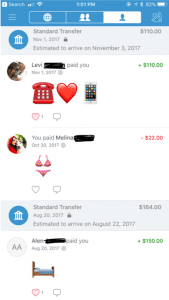
The last button is a picture of single–headed emoji. This shows all of your past transactions and also when you took out money from your bank and when you deposited money back into your bank.
Search People: This is where you can search through your friends for the appropriate person you want to send or receive money from. You have the option to connect to your Facebook so it can inherit your contact list.
Scan Code: Your coworker brings you coffee and asks you to pay them back. You don’t have cash and you’re not friends on Venmo. Instead of searching their name, this tool gives you the option to scan the user’s unique barcode. Both of you have to have the application open at the same time for this to work.
Invite Friends: Your friend isn’t on Venmo? You can input their name, phone number, or email to invite them to join the app.
Transfer Balance: This is where you go when someone has sent you the money but now you need to get it into your bank. It has the option to transfer the money to your previously entered account or to enter a new bank account.
This is also where you will see Venmo’s new interaction to instantly transfer money to your Bank in seconds. This new feature does cost $.25. The standard option (free) is still available but this option takes one to three business days to transfer to your bank account.
Purchases: You can now use Venmo to pay in other apps and on the mobile web with select PayPal merchants.
Venmo does put in their FAQ webpage that if a person purchases a good or service on the internet using Venmo, they will not offer protection. The transactions are potentially high risk and you may lose funds.
Notifications: This is where it will show if you have any pending requests for money or if anyone is requesting money from you.
Incomplete: This will show outstanding requests or payments. There will not disappear until the other user pays your or you pay them.
Get Hep: This brings you to three options and those being “Browse Ours FAQs”, “Contact Us”, or “My Support Tickets” (for any IT help).
How to make a payment or request a payment?
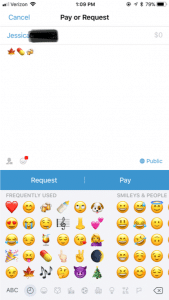
Click on the button in the top right hand corner to pull up your contact page.
Select the friend you want to send money to or request money from. You can also type in the name.
Type the amount for payment.
Add a comment about what the payment is for using words, emojis, or a combination of both (Venmo will not let you skip this step).
Select pay or request money. If you pay, the money is transferred to their account. If you request, your friend receives an email or text and an app notification saying that you requested money.
What are the privacy options?
When you make a payment or receive money from someone it automatically gets added to a live feed. This feed is where you can see your friends and families latest transactions. It will not show the amount transferred but it will show the reason (you can leave the reason blank). It’s common for people to not use words in their description but instead emoji’s.
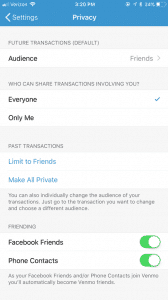
In the Settings menu you can change your audience options to include public (everyone on the Internet), friends (sender, recipient, and their friends), and participants only (sender and recipient only). There is the option to change past transactions viewers as well and make everything completely private.
It also asks where you want your contacts to come from. You can get contacts imported from your Facebook contacts or your phone contacts or both. You have the option to turn both options off and only have friends you add by hand.
What are the risks for use?
A new trend is for sites like Craigslist, Instagram, or Facebook to ask people to buy goods and services and to pay with their Venmo accounts. The company highly discourages this type of transaction but it happens daily. Buying a pair of leggings off an Instagram promoter seems innocent enough, but the real problem is now it’s even easier to buy illegal substances.
Rachael Ferguson did a research project in which she used an application called Whisper, a messaging app that allows users to send and receive messages anonymously, and she had two drug dealers agree to talk to her about their social media influence on the drug market. They explained how easy it is to find drugs on apps like Instagram or Twitter, just buy searching up relevant hashtags. An example of those would be #Kush4Sale or #OGKUSH. If you comment on these posts it’s more likely you’ll caught, so there in underground etiquette of messaging the hastagger privately (Ferguson.)
Besides using social media to buy drugs, there are plenty of other goods and services that can be bought through these apps and that are requesting a payment using Venmo. One man was selling a car on Craigslist, the purchaser claimed he could only pay if he used Venmo. The car dealer watched the other person transfer money and he saw the money come into his bank account. Happily, he signed the car over to the purchaser. 12 hours later, the dealer of the car received an email from Venmo saying the payment had been stopped (Chatman.)
What to watch out for on Venmo.
Users can remain secretive about the actual reason for money transfer. Unless you set your page to private, the public can see your transactions and reason for sending. In the privacy section of a Venmo account, there is the option to set all past transactions to private.
When I asked my friends why they or their other friends are using Venmo, they majority reported that they used it for paying rent, bills, dinner, coffee, drugs and when they were underage they can transfer money to someone 21+ to buy alcohol. This is where the emoji’s come in handy when putting in a description for your money transfer.
Emoji’s and what they mean on Venmo:
Wine/Beer/Cocktail: Alcohol/ booze
Dancing/Celebrate: Party/bar
House: Rent or bills
Car: Uber
Leaf: Marijuana
Needle: Drugs
And there numerous food emoji’s used to indicate that they are paying the person back for food. Fun fact: the pizza emoji is the most popular emoji in Venmo transaction messages (Wener-Fligner.)
What are the protection features?
Venmo’s security page outlines how it will protect you financial information, your account, storage and how it will keep you safe in the long run.
Venmo is an easy app to use, but when the user is a child or a teen, parents should consider discussing with them the risks and how to stay safe. Some things to think about:
Decide if it is the right time for your child to have their own personal bank account or if they are responsible enough to have a Venmo account connected to your bank account.
Discuss with the child when it’s appropriate to send money and when it is not. Set limits and don’t let them send or receive money from strangers.
Consider monitoring their transactions. One way to do this is by making a contract demonstrating their Venmo rules and regulations. Establish an agreement that you can have access to their account anytime.
Create a list of the people they are allowed to transfer money to. If they want to add a new person, they must let you know first. You have the right to remove any person at anytime.
When using a money sharing app, the child should be prepared to be honest and responsible. As parents, instead of banning certain apps all together, make sure your children know what your rules are! Keep a copy of their username and password so you can easily monitor their account. Also, remember this application is not only for your kids! Venmo is super helpful in limiting your cash interactions and providing a safe way to share money with your friends and family.
Thanks GKIS Intern, Wendy Goolsby for keeping us up to date on the latest virtual wallet. Make sure to keep an eye out if your child is attaching credit cards to any sorts of applications. In other teen news, check out the article, Is Your Teen Hooking Up? for ideas about how to support your kids in today’s casual sex environment.