Need peaceful screen time negotiations?

Get your FREE GKIS Connected Family Screen Agreement

social media

The GKIS Sensible Parent’s Guide to Venmo

Venmo Logo

You’re having dinner with friends and realize you forgot your wallet. No longer do your friends have to cover wondering if you’re good for the money. With the free money-sharing app, Venmo (send money make purchases), you can send a digital transaction more simple than sending an email. Viola! Your friend has your money in their bank with a digital receipt of payment. Crisis averted. You feel safe, because Venmo promises your personal and financial information is kept private with encryption. But is Venmo safe enough for teens to use? Today’s GKIS Sensible Guide answers parent questions.

What is Venmo?

Venmo is a free money-sharing application. Users can immediately transfer money from either their Venmo account, bank account, or debit card. Users can connect with other Venmo users by using the search function. With Venmo, you can pay for items automatically or transfer money between friends without an additional charge. Instead of cash, teenagers can be found saying, “I’ll Venmo you.”

Venmo was created by two college students in 2009, in the hopes to create a better way of paying each other back. It started as a text message transferring system; which, has revolutionized to a new type of social network. According to Fast Company, it is estimated that there are about 7 million active users every month. The also reported that last year the app transferred almost a total of $18 Million dollars between users.

What are Venmo’s popular features?

Venmo is super popular as a convenient, quick and easy way to wire somebody money. You can request for somebody else to send you money or you can easily pay somebody back. Your account will use the money you have received in Venmo or link to your bank account or debit card quickly. Venmo does have the option to connect to Facebook but it will only take your contact list.

How to use Venmo?

You’re on the Venmo app and you press the three lines on the left hand side. You’re brought to your account options but what do all of these tabs mean?
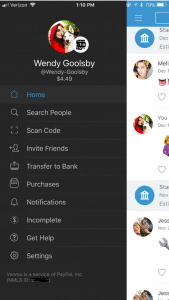
Screenshot of Venmo

  • Home: This is where you can see your friend’s interactions with the app. When on the home tab there is three buttons at the top.
    • One is an emoji of a world, which will bring you to a list of anyone in the world’s latest interaction with Venmo.
    • The second option shows two heads, this is where you can see the money you’re friends have been transferring between each other. On this section, it used to show how much people were sending but for security reasons it now just shows that you transferred but with no money total.
    • The last button is a picture of single–headed emoji. This shows all of your past transactions and also when you took out money from your bank and when you deposited money back into your bank.
  • Search People: This is where you can search through your friends for the appropriate person you want to send or receive money from. You have the option to connect to your Facebook so it can inherit your contact list.
  • Scan Code: Your coworker brings you coffee and asks you to pay them back. You don’t have cash and you’re not friends on Venmo. Instead of searching their name, this tool gives you the option to scan the user’s unique barcode. Both of you have to have the application open at the same time for this to work.
  • Invite Friends: Your friend isn’t on Venmo? You can input their name, phone number, or email to invite them to join the app.
  • Transfer Balance: This is where you go when someone has sent you the money but now you need to get it into your bank. It has the option to transfer the money to your previously entered account or to enter a new bank account.
    • This is also where you will see Venmo’s new interaction to instantly transfer money to your Bank in seconds. This new feature does cost $.25. The standard option (free) is still available but this option takes one to three business days to transfer to your bank account.
  • Purchases: You can now use Venmo to pay in other apps and on the mobile web with select PayPal merchants.
    • Venmo does put in their FAQ webpage that if a person purchases a good or service on the internet using Venmo, they will not offer protection. The transactions are potentially high risk and you may lose funds.
  • Notifications: This is where it will show if you have any pending requests for money or if anyone is requesting money from you.
  • Incomplete: This will show outstanding requests or payments. There will not disappear until the other user pays your or you pay them.
  • Get Hep: This brings you to three options and those being “Browse Ours FAQs”, “Contact Us”, or “My Support Tickets” (for any IT help).
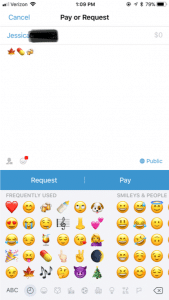
Payment Screen on Venmo

How to make a payment or request a payment?

  1. Click on the button in the top right hand corner to pull up your contact page.
  2. Select the friend you want to send money to or request money from. You can also type in the name.
  3. Type the amount for payment.
  4. Add a comment about what the payment is for using words, emojis, or a combination of both (Venmo will not let you skip this step).
  5. Select pay or request money. If you pay, the money is transferred to their account. If you request, your friend receives an email or text and an app notification saying that you requested money.

What are the privacy options?

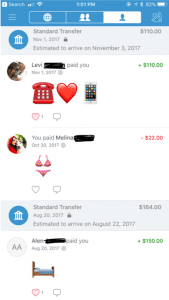
When you make a payment or receive money from someone it automatically gets added to a live feed. This feed is where you can see your friends and families latest transactions. It will not show the amount transferred but it will show the reason (you can leave the reason blank). It’s common for people to not use words in their description but instead emoji’s.
Privacy Options Screen on Venmo In the Settings menu you can change your audience options to include public (everyone on the Internet), friends (sender, recipient, and their friends), and participants only (sender and recipient only). There is the option to change past transactions viewers as well and make everything completely private.

It also asks where you want your contacts to come from. You can get contacts imported from your Facebook contacts or your phone contacts or both. You have the option to turn both options off and only have friends you add by hand.
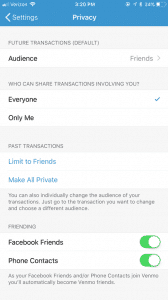
Venmo Privacy Options

What are the risks for use?

A new trend is for sites like Craigslist, Instagram, or Facebook to ask people to buy goods and services and to pay with their Venmo accounts. The company highly discourages this type of transaction but it happens daily. Buying a pair of leggings off an Instagram promoter seems innocent enough, but the real problem is now it’s even easier to buy illegal substances.

Rachael Ferguson did a research project in which she used an application called Whisper, a messaging app that allows users to send and receive messages anonymously, and she had two drug dealers agree to talk to her about their social media influence on the drug market. They explained how easy it is to find drugs on apps like Instagram or Twitter, just buy searching up relevant hashtags. An example of those would be #Kush4Sale or #OGKUSH. If you comment on these posts it’s more likely you’ll caught, so there in underground etiquette of messaging the hastagger privately (Ferguson.)

Besides using social media to buy drugs, there are plenty of other goods and services that can be bought through these apps and that are requesting a payment using Venmo. One man was selling a car on Craigslist, the purchaser claimed he could only pay if he used Venmo. The car dealer watched the other person transfer money and he saw the money come into his bank account. Happily, he signed the car over to the purchaser. 12 hours later, the dealer of the car received an email from Venmo saying the payment had been stopped (Chatman.)

What to watch out for on Venmo.

Users can remain secretive about the actual reason for money transfer. Unless you set your page to private, the public can see your transactions and reason for sending. In the privacy section of a Venmo account, there is the option to set all past transactions to private.

When I asked my friends why they or their other friends are using Venmo, they majority reported that they used it for paying rent, bills, dinner, coffee, drugs and when they were underage they can transfer money to someone 21+ to buy alcohol. This is where the emoji’s come in handy when putting in a description for your money transfer.

Emoji’s and what they mean on Venmo:

  • Wine/Beer/Cocktail: Alcohol/ booze
  • Dancing/Celebrate: Party/bar
  • House: Rent or bills
  • Car: Uber
  • Leaf: Marijuana
  • Needle: Drugs

And there numerous food emoji’s used to indicate that they are paying the person back for food. Fun fact: the pizza emoji is the most popular emoji in Venmo transaction messages (Wener-Fligner.)

What are the protection features?

Venmo’s security page outlines how it will protect you financial information, your account, storage and how it will keep you safe in the long run.

Venmo is an easy app to use, but when the user is a child or a teen, parents should consider discussing with them the risks and how to stay safe. Some things to think about:

  • Decide if it is the right time for your child to have their own personal bank account or if they are responsible enough to have a Venmo account connected to your bank account.
  • Discuss with the child when it’s appropriate to send money and when it is not. Set limits and don’t let them send or receive money from strangers.
  • Consider monitoring their transactions. One way to do this is by making a contract demonstrating their Venmo rules and regulations. Establish an agreement that you can have access to their account anytime.
  • Create a list of the people they are allowed to transfer money to. If they want to add a new person, they must let you know first. You have the right to remove any person at anytime.

When using a money sharing app, the child should be prepared to be honest and responsible. As parents, instead of banning certain apps all together, make sure your children know what your rules are! Keep a copy of their username and password so you can easily monitor their account.  Also, remember this application is not only for your kids! Venmo is super helpful in limiting your cash interactions and providing a safe way to share money with your friends and family.

GKIS Intern - Wendy Goolsby Thanks GKIS Intern, Wendy Goolsby for keeping us up to date on the latest virtual wallet. Make sure to keep an eye out if your child is attaching credit cards to any sorts of applications. In other teen news, check out the article, Is Your Teen Hooking Up? for ideas about how to support your kids in today’s casual sex environment.

Work Cited

The Digital Underground: Here’s How You Can Buy Drugs on Social Media, Right Now by Rachel Ferguson

Warning: Venmo Payment from Strangers Can Cost You by Samantha Chatman

The Emoji of Venmo by Zach Wener- Fligner

Fast Company

Why Venmo Is So Popular With Millennials by Matthew Cochrane

Photo Credits

Venmo by Tessa Singer

You Spied and Caught Your Teen Sexting, Now What?

  teen couple

Parents often sneak onto their teen’s phone and see something explicit, upsetting, or dangerous. Then they’re in the hard spot of telling their teen they were spying without permission and intervening appropriately. I believe screen monitoring is necessary with young, impulsive teens, but I also believe parents should tell their kids they are monitoring and filtering. It provides practice for thinking before posting, demonstrates that other parents and adults are also viewing, and reveals a willingness to work together about online choices. Security and parenting experts have disagreed with me, saying that if a parent reveals intent they will miss out on secret plans and sneaky behaviors. The controversy is real.

A GKIS subscriber asked what do when she saw inappropriate content on her teen’s phone after secretly monitoring. Here’s my response:

Parent honesty is important, because we lose credibility if we punish for sneaking and lying while we are sneaking and lying. The trust was breached when you saw that content without discussing the rules ahead of time. If not handled delicately, this could damage your relationship. For that reason, I suggest you put your ego at the door and get out a knife and fork, because you are going to have to eat crow and apologize. Where is it written that parents can’t make mistakes? Let’s face it. We are new at parenting teens just as kids are new at being teens. This adds up to a rocky road of successes, failures, stops, and starts.

First, schedule a time to have a private discussion with your teen when you will not be interrupted. Tell him the truth. Admit that you were concerned, and you screwed up. In hindsight you realized you should have had more safety parameters in place before you got to this point, and you should have told him that his screen use would be monitored. Express your concerns while validating that his loving and sexual feelings towards his girlfriend are normal and natural (assuming there were no safety or legal violations here). Explain your philosophy about what you think is appropriate regarding intimacy and relationships at his age. Assure him that you will keep his confidence. Don’t go telling grandma and Aunt Linda about the intimate details you uncovered. Let him know that these are his facts to share if he chooses to, not yours.

Second, ask him what suggestions he has to resolve the very real conflict of privacy versus safety. Actively negotiate screen safety parameters. Some of my GKIS Staging Tips apply, such as no screens in bedrooms, bathrooms, or behind closed doors and GKIS blackout times to optimize judgment and supervision. Also, consider if monitoring and filtering programs and apps apply in this situation. Keep in mind it is best not to tell him which specific programs you will be implementing. If your son is a young teen, then monitor more closely. If he is older, you may just want to set a lighter monitoring option. Most importantly, let him know what you plan and why. And absolutely consider his input. By the time he’s an adult, he should be mostly on his own off-screen and on.

Finally, plan relationship-building opportunities with your son to repair the damage done. Perhaps this means getting to know his girlfriend better so they understand that he has a family to take into consideration when it comes to friendship and love. Of course, they deserve privacy, but you may choose to set stricter limits for now. Keep in mind that not every mistake requires traditional discipline, like taking screens away. The humiliation of you reading his texts and the face-to-face conversation about it is probably consequence enough. The truth is, his best resource for keeping intimate relationships healthy is the support and competition for his time from his friends. He needs his friends right now.

Cheers to you for reaching out for help. Teen-parent negotiations can be difficult. To learn more answers to parent questions, get my book Screen Time in the Mean Time: A Parenting Guide to Get Kids and Teens Internet Safe. If you like what you read, please leave an Amazon review. <3

I’m the mom psychologist who will help you GetYourKidsInternetSafe.

Onward to More Awesome Parenting,

Tracy S. Bennett, Ph.D.
Mom, Clinical Psychologist, CSUCI Adjunct Faculty
GetKidsInternetSafe.com

Photo Credits

Photo by Morgan Sessions on Unsplash

Virtual Kidnapping, A Parent’s Worst Nightmare. How to Protect Yourself and Your Family.

Virtual kidnapping scams are on the rise and, since it is difficult to identify the perpetrator, they are unlikely to go away. Last week a Facebook friend posted about a terrifying telephone scam. She encouraged me to share her story. Be warned, it’s really upsetting, and it’s a true story! It’s worth the read so you won’t fall emotional and financial victim to scammers, phishers, and extortionists.

“Mommy! Mommy! Mommy! He’s got me! He’s got me!”

A mother’s WORST NIGHTMARE, and it happened to me Saturday morning.

I was at home working in my office when my cell phone rang. I picked it up and heard a girl screaming and crying, “Mommy! Mommy! Mommy! He’s got me! He’s got me!” Then a male voice saying, “Shut the f__ up b___!” The girl’s voice sounded like my daughter who is living away for graduate school.

The world beneath me fell away. I can’t tell you the fear I felt. This VILE man spoke to me in a thick accent telling me what he is going to do to her, and after he’s finished with her he will send her home to me in pieces if I don’t give him money right now.

I kept talking to him on speaker while dialing 911. The dispatcher said, “Stay on the phone, police have been dispatched.” Within minutes a special crime unit arrived.

For the next twenty minutes, I spoke to the “kidnapper” while the police coached my questions and traced the call. I demanded he put her on the phone and text me her picture. He continued to threaten terrible things. Meanwhile, our calls to my daughter went to voicemail, so they sent Arizona police her work.

My husband and other daughter could see my texts, CALL HOME NOW!!!! URGENT!!! and were freaking out. Neighbors told them the police were everywhere, and they couldn’t get through.

Finally she texted after the police located her at work. They checked her apartment and verified it was safe. I broke down crying.

I don’t want ANYONE, EVER to go through what we did!  The fear and possible reality were there for me for what seemed like hours! All I have thought about ALL weekend is “These VILE people are putting someone else through this!” Please share this story about the new horrible scam out there.

Source of the Theft

A few days after my friend posted this story, I followed up with her. She informed me that another family from the same university was scammed by the same man minutes after he hung up on her. They were about to wire $7000 before they were able to contact their daughter. This incident made her wonder if the information was gathered from hacked university data. A few weeks later, another Facebook friend posted this one:

Today my parents got a phone call from someone pretending to be my son. He told my dad that he went to the store to get cold medicine with a friend from school who was driving, they got pulled over, and his friend had pot in the car, so he was arrested and now was in jail. He begged my dad not to tell “my mom.”

My dad asked a few questions and was thinking it may be a scam, but he said the person on the phone sounded young, so he wasn’t quite sure. After a few questions, the kid hung up. We’re pretty sure that he would have asked for money to wire or something. My son is safe at school (I checked). But wanted to pass this on to you guys. Maybe this scam has been going around? Obviously, they are targeting older people, and I can see some people falling for it. My dad is pretty sharp, and it still tricked him at first.

Other Scams to Look Out For

Other types of extortion scams involve the perpetrator posing as the IRS or a crime cartel framing you for a false crime that will result in a suspension of your bank accounts, criminal charges, or a threat to you or your family’s safety if you do not send money. For instance, there have been reports of victims on vacation receiving a call in their hotel room stating that they are being targeted by a drug cartel and should turn off their phones to remain safe. While the victim is out of communication, the virtual kidnappers demand money from friends and family.

Another type of scam involves ransomware, which is a virus that infects your computer and encrypts the data. The scammer sends a message threatening to keep your hijacked computer data unless a ransom is received.

To avoid this kind of virus:

  • learn how to identify typical phishing strategies,
  • do not click on unknown email links or websites,
  • install premium security software, and
  • keep your software updated.
  • It is also important to backup computer data on a secure cloud-based backup service with revision history. Even legitimate websites can be hacked to spread malware, so awareness and preparation are key.

Here are GetKidsInternetSafe tips to avoid being a victim of virtual kidnapping:

  • Stay up to date about the scams popular in your area.
  • Set your social media profiles to private and avoid giving out personal information. Teach your kids to do the same with GetKidsInternetSafe techniques.
  • Occasionally cleanse your social media profile of photos. A backlog of photos tells a detailed blueprint of your family’s activities and personalities. When viewed by a perpetrator, those details can be used against you.
  • Keep your telephone landline.
  • Download GPS location-sharing apps to family member phones, such as Find My iPhone, Find Friends, or Life360.
  • Create an emergency plan, which includes a list sharing of names and phone numbers of workplace landlines, friends, and extended family. Create and include family nicknames to use in case of a need for emergency telephone identification.
  • If you get a suspicious call, assess its authenticity. For example, if the call is not from the victim’s telephone and they want you to stay on the phone until the money is delivered, be suspect.
  • If they are on the victim’s phone, recognize that the phone may have been hacked and forwarded to another phone or lost or stolen. Just because the number shows up as your child’s phone doesn’t necessarily mean the scammer has possession of the phone or the phone’s owner.
  • Recognize that scammers often ask for money to be wired through services like Western Union or online currency like Bitcoin, as these methods of payment are untraceable.
  • Stay calm, slow the caller down, and do not share any personal information. Ask them to answer a question only the victim would know. Don’t challenge or argue with the caller. Buy time by saying you are writing down the demand and need time to comply.
  • Use another device to call the police while on the phone.
  • Ask questions and, if feasible, demand a call from the victim’s phone or a picture of the victim.
  • Get to a safe place as soon as possible.

These tips do not constitute legal advice from GetKidsInternetSafe. Although many of these suggestions are offered by the Federal Bureau of Investigation website, recognize that nothing outweighs your instincts. Err on the side of caution and seek expert help from your local police department or the FBI.

Worried about child identity theft? Check out this GKIS article to learn how to protect your child’s financial security. To learn about other scams effecting the elderly, read Scammers Target the Elderly: How to Avoid Being Scammed.

I’m the mom psychologist who will help you GetYourKidsInternetSafe.

Onward to More Awesome Parenting,

Tracy S. Bennett, Ph.D.
Mom, Clinical Psychologist, CSUCI Adjunct Faculty
GetKidsInternetSafe.com

Is Facebook Messenger Kids Harmless Fun or a Gateway Drug for Compulsive Social Media Use?

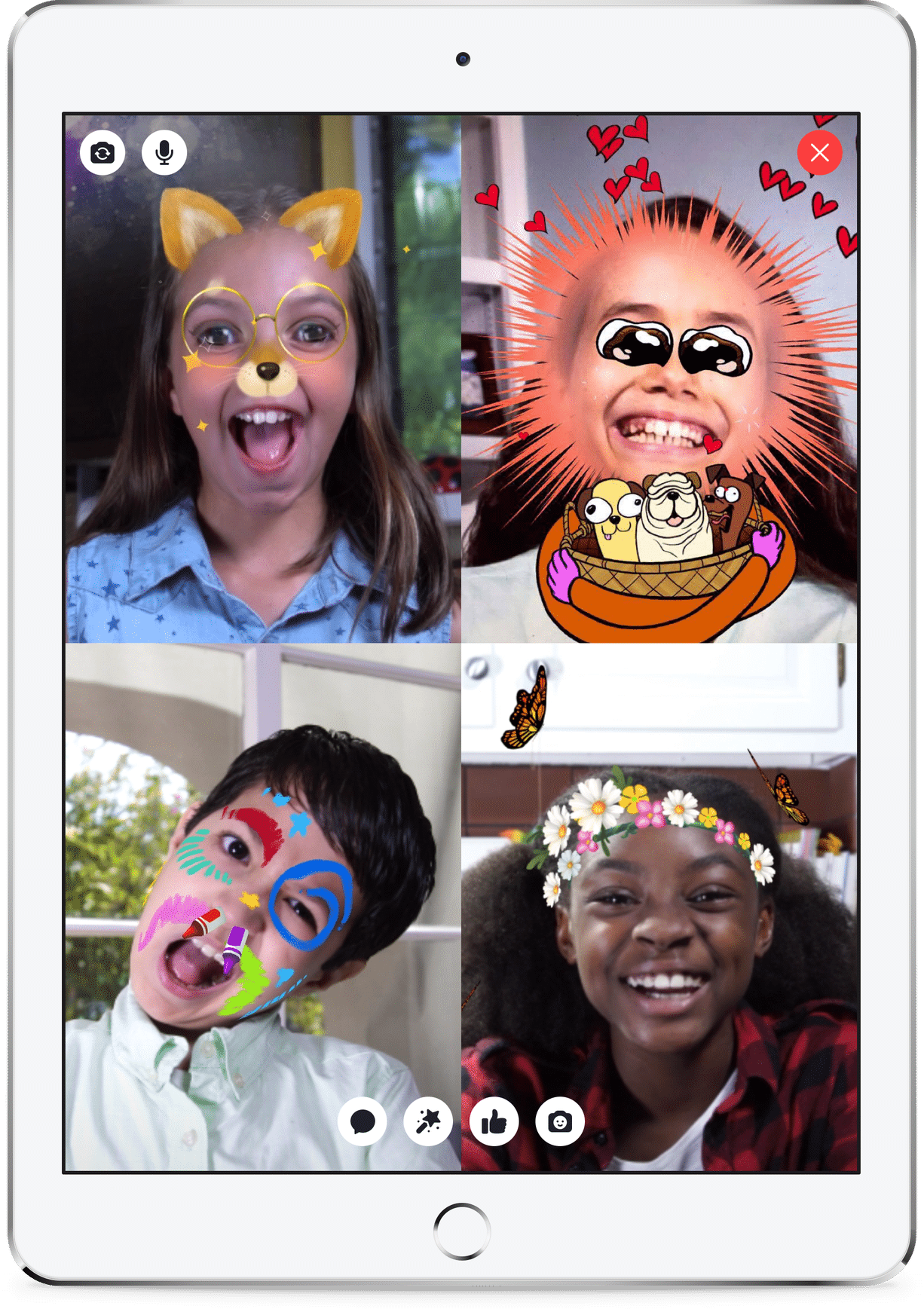
Facebook recently launched Messenger Kids, a free, stand-alone video chat and messaging app for children ages 6 to 12 to “connect with people they love but also has the level of control parents want.” Designed with kid preferences in mind, this app aims to please with one-to-one and group video chat or text thread, fun filters, masks, stickers and GIFs. Facebook says they have integrated features with the consult of a 100-member team with child safety and privacy in mind. Although I welcome the integration of kid-friendly features (finally!) that doesn’t sell to kids or collect information for marketing, introducing young children to a screen activity may be distracting at the least and addictive at the worst. Having participated with a team of experts talking about Messenger Kids, I believe Facebook has developed a much-needed product that can be very positive when used optimally with parent guidance.

Why now?

Historically, kids have been restricted from social media app membership without parental consent because of The Children’s Online Privacy Act (COPPA, 1998). This federal law imposes certain requirements on operators of websites or online services, like not collecting data from or advertising to children under thirteen years of age. Facebook is compliant with COPPA in that Messenger Kids won’t show ads, offer in-app purchases, or collect data for marketing. Also, in order to adopt the app, kids must have parent permission as an extension of the parent’s Facebook profile. Other safety features include parent control over their child’s contact list, child inability to delete messages, and an option to block users and report inappropriate content with parent notification. Kids can be found through Facebook search and parents must ask permission to see kid content to avoid spying. Facebook also says they won’t automatically upgrade users to an adult account when the child reaches 13 years old.

What are the privacy risks?

In response to privacy and security concerns, Democratic Sens. Ed Markey and Richard Blumenthal asked Facebook to specify what data is collected and what they’re planning to do with it, if information about child device location is being collected and stored, and whether Messenger Kids will be walled off from the Internet. Facebook has said collected information will only be used for infrastructure purposes to improve the app.

What are the behavioral risks?

As a clinical psychologist and screen safety expert, I am pleased that Facebook has delivered a product with child safety in mind. After all, surveys reveal that most kids are using apps before age thirteen that don’t have safety features. Messenger Kids offers families an option without the same risk profile as Instagram, Snapchat, Twitter, or KIK. However, there are still some risks to consider before allowing your child to adopt Messenger Kids.

First, we are all well aware of the compulsive nature of social media use. According to Apple, we check our iPhones an average of 80 times a day, 30,000 times a year.[i] Nearly 60% of parents think their teens are addicted to their mobile devices.[ii] With features specifically designed to keep people using, social media can lead to addictive use patterns that distract us from healthier activities and nonvirtual relationships. The younger the brain, the higher the vulnerability to habit formation and brain wiring changes. I’m not entirely satisfied with the argument that without this, kids are going to use less safe social media anyway. It’s kind of like letting your teen drink at your house since they’re going to do it anyway…Maybe the answer is don’t let them drink in the first place.

Do we really want children as young as six years old to have that kind of opportunity?

After all, child screen use is so new we have no idea what kind of long-term impact these kind of use patterns will have. Behavioral conditioning is an intentionally embedded component of  Silicon Valley tech products to increase profits. I believe the old adage, “If you can’t see the product, you are the product” may apply here. Furthermore, just because parents can monitor child behavior doesn’t mean kids won’t impulsively offer or view inappropriate or embarrassing information that can lead to shame and cyberbullying. The younger the child, the higher the risk. As a parent, are you ready for your child to adopt the “training wheels” for social media independence?

On the other hand, we must keep in mind that Messenger Kids is a messaging app, not a social media app. Parents have full monitoring control and must approve the contact list. This app is a fun way for kids to connect to other kids and family members, with playful adjunct features like masks and stickers. Facebook has said that this is not a product designed to profit off of children. Instead, Facebook believes it is good business to build products that people love to use.

Things I learned when Facebook asked me to participate in a working session with child and technology experts:

I believe that the best outcomes are reached through collaboration from people of all different viewpoints. As a result, I was very pleased to accept the invitation of Facebook to participate in a discussion with a panel of experts. I believe that being a part of the solution means getting in there and working with industry, academia, and with front-line teachers and practitioners. Obviously, I am under the restrictions that are typical of nondisclosure agreements when one works with a company about a product. However, it is appropriate to share my impressions having interacted with Antigone Davis, Head of Global Safety for Facebook, and the Facebook employees who have developed and continue to work on Messenger Kids.

I am somewhat unique in that I have lots of day jobs, all relating to psychology and families. I have had a private practice for over 23 years working with kids, teens, and adults. I teach addiction studies, parenting, and clinical psychology at CSUCI and supervise interns writing from a screen-media research perspective, and I’m founder of GetKidsInternetSafe, my love project. I’m fond of saying that I’m the MacGyver of psychology in that I take the theories and research findings from academia and apply them to real people in my practice, adjusting and tweaking as I go. From this perspective, I have a lot of opinions about the benefits and risks of screen activities to the American family.

Having interacted with the impressive panel of experts Facebook invited to the Facebook Global Safety Summit, I came away with the feeling that Facebook is being thoughtful and open about their child products. They are conducting their own research, generously open to feedback, and clearly dedicated to an ongoing dialogue about what families want and need. Let’s face it, they are experts with what they do and have enormous reach. I believe they have the potential to provide positive child and family service, and they’re taking that role seriously. As the company has matured, they seem to realize that they have a precious social responsibility to their customers and were very enthusiastic to hear from those of us who have dedicated our careers to child and family advocacy. I’m feeling pretty good about Messenger Kids, yet believe that kids and parents still need more education and support to best implement this fun communication tool while optimizing learning and connection on screen and off screen.

What should you keep in mind if you want to try out Messenger Kids for interactive digital play?

  • Stay engaged during the on-boarding process and visit the Messenger Kids FAQ page.

  • Recognize that this app was not designed for education, but rather as an alternative to adult social media apps that kids were already using. Not only must parents create a Facebook profile for Messenger Kids setup (another customer?), but Facebook branding has just been launched in your child’s tender consciousness. Ready, set, go!

  • Start a teaching dialogue about privacy, marketing, and balance. Familiarize your kids with the rules at a developmentally optimal level for their age and understanding.

  • Adopt the GKIS Living Agreement digital contract found in my book, Screen Time in the Mean Time: A Parent Guide to Get Kids and Teens Internet Safe.

  • Once on-boarded, your child has launched a dynamic digital footprint within the walled garden of their contact list. This may be their first introduction to digital messaging. Exciting yes, but supervision and building teaching opportunities are important for positive outcome.

  • Set up a creativity kit next to the computer with play props, dress up clothes, art materials, and toys. When you are having a conversation on Messenger Kids, encourage your child to act out a fun, creative activity like pretending to prepare and serve you lunch, writing a poem and presenting it, or choreographing a dance. Augmenting virtual reality with fun nonvirtual reality keep kids engaged with a balanced life of two-dimensional and three-dimensional play. Building relationships and play are still critical learning opportunities for the developing brain.

  • Watch to make sure your child doesn’t exhibits behaviors suggestive of compulsive use or addictive patterns.

  • Encourage your child to attend to the other person’s words, facial expressions, and feelings while chatting. Recognize that fun animations may be distracting, so they need your prompts and teaching narrative to learn social skills and digital citizenship.

  • Most importantly, offer an enriching balance of virtual with nonvirtual activities, a key to healthy development.

For additional information about another popular child app, check out The GKIS Sensible Parent’s Guide to Musical.ly.

I’m the mom psychologist who will help you GetKidsInternetSafe.

Onward to More Awesome Parenting,
Tracy S. Bennett, Ph.D.
Mom, Clinical Psychologist, CSUCI Adjunct Faculty
GetKidsInternetSafe.com

Works Cited

[i] Bajarin, B. (2016). “Apple’s Penchant for Consumer Security.” Tech.pinions, 18 Apr. 2016, techpinions.com/apples-penchant-for-consumer-security/45122.

[ii] Common Sense (2015). The Common Sense Census: Media Use by Teens & Tweens. www.commonsensemedia.org/sites/default/files/uploads/research/census_executivesummary.pdf

Photo Credits

Facebook

Silicon Valley Giants Suspend Alt-Right Social Media Profiles and Funding Campaigns. About Time or Overstepping?

After the Charlottesville violence, Silicon Valley giants, like Facebook, Google, Twitter, Paypal, and GoDaddy, are choking off tech avenues that hate groups use for crowdsourcing, organizing, and funding. This is a reversal of tech companies’ overall “hands off” approach to censorship and raises free speech concerns. In response to the censorship, alt-right organizations are revolting by creating parallel digital services, essentially birthing an alt-right Internet resembling the dark net. Some believe it is the tech companies’ right to cancel accounts that violate their values and membership agreements. Others think a private company using unregulated editorial judgment, with a profound impact on the ability for American citizens to communicate, is overstepping. What do you think?

What does this censorship look like?

Facebook and Twitter have actively suspended the accounts of white supremacists attached to the violence in Charlottesville, like white nationalist Christopher Cantwell and @Millenial_Matt, a social media personality who showcases the Neo-Nazi agenda. Considering that a third of the world’s population has a Facebook account and Twitter boasts 1.6 billion users per month, the power these social media giants wield is substantial.

The 71 million-website host, GoDaddy, has also chosen to censor users who demonstrate hate speech. For example, on Monday GoDaddy delisted the popular Neo-Nazi website The Daily Stormer, after its founder celebrated the murder of Charlottesville counter-protester Heather Heyer. When the Daily Stormer transferred its website registration to Google, Google also cut off the site.

In regard to funding, Paypal stated intent to remove 34 organizations from its customer base who espouse white nationalism. Apple also dropped funding sources for hate groups. GoFundMe, one of the largest crowdsource sites, deleted campaigns for the driver who murdered protesters in Charlottesville (Jan, 2017).

Promoting violent genocide is flat wrong, why are we even having this discussion?

I’m writing this article partly to impart news in case you didn’t hear it, but mostly to challenge you to think through the implications of Silicon Valley giants making decisions about the sharing of information. In this instance, I happen to agree with the policy that threatening violence should not be tolerated by any of us, government, private companies, or American citizens. The Internet spreads ideas like a virus, with hate groups recruiting people with untrue, manipulative, and inflammatory rhetoric. Vulnerable individuals, particularly the mentally ill and children, are at risk for being duped by sophisticated online grooming techniques. Perhaps Silicon Valley CEO’s have a moral obligation to limit their products’ availability as a tool to spread evil. But then there’s this concern…

What if the information they shut down is a cause you believe in? What if some of the censored activists were promoting unpopular ideas rather than threats or violence? What if the man behind the curtain decides to censor the democratic principles key to American freedom? Where does the slope start to get slippery? Should private corporations be making decisions about blocking pedophiles, terrorists, hate groups, and cults or should that be left to the government? Do we still trust a government that secretly surveilles its citizens, like what was revealed by Edward Snowden? Do we still have confidence in elected government leaders who use Twitter to cyberbully those who disagree with them?

“I’m happy to forfeit informational freedom for security”

Have you heard of the Total Information Awareness (TIA) policy? This program was developed in 2003 by the Pentagon under the direction of retired Adm. John Poindexter as a counter-terrorism measure. Under this policy, later renamed to Terrorism Information Awareness, the United States government aimed to integrate private and government intelligence and surveillance programs to be used as a powerful tool for the use of intelligence, counter-intelligence, and law enforcement. Simply put, that means secretly surveilling American citizens to better “detect, classify, and identify potential foreign terrorists” (The Associated Press, 2003).

On its surface, one may think, “Go ahead and track my online activities. It’s worth giving up some freedom for security. I’m not up to anything anyway.” But consider the fact that your personal online information is vast. The scope of the data collected by TIA included, but was not limited to, your browsing history (what you subscribe to, what your read, who you’re friends with, what you “like,” what you don’t like), financial data like purchases, transfers, and deposits, phone, email, and texting content, geolocation data, travel itineraries and passport data, licenses, judicial (driving and divorce) records, medical records, and biological data like fingerprints, DNA, and gait, face, and iris data. With your private information gathered and stored by the US government, your very identity is available to be hacked by any other entity as well. In the wrong hands, your private information could be used toward your personal devastation, whether you’re up to “no good” or not.

Fortunately in the case of TIA, Congress defunded the program after media reports recognized the alarming potential of “the biggest surveillance program in the history of the United States.” Elements of the program were then absorbed by three-letter governmental agencies and are said to be “quietly thriving” at the National Security Agency (NSA) operating with “little accountability or restraint” (Harris, 2012).

Current law requires that suveilling an American citizen or permanent resident is illegal without a court order. The loophole though, is that surveillance is legal if that citizen is communicating with somebody outside of the United States. Don’t worry though, if you were accidentally caught up in the NSA’s surveillance web, your private data is locked securely in a one million square foot facility in the Utah desert. What could possibly go wrong with that?

From Snopes: The film is authentic. “Don’t Be a Sucker” was produced by the U.S. Signal Corps and distributed by Paramount Pictures for viewing in civilian movie theaters in 1943 and again in 1947. This two-minute clip making the Twitter rounds captures the essence of its anti-fascist message:Where do you stand?

Most of us are frogs in the pot, slowly getting used to giving up our digital freedoms to entities like Facebook in order to gluttonously dine on delicious free Internet content. At what point is enough, enough? Will we get concerned when the government oversteps or when private corporations overstep? Or is privacy something that we are willing to give up for safety and security? Maybe we are OK with adult privacy being violated, but what about our kids? If this stirred you up, please comment in the comments below. Or better yet, “like” the GetKidsInternetSafe Facebook page and start up a conversation.

For specific information to discuss with your kids to protect them from hate group and cult recruitment, read this GKIS article.

I’m the mom psychologist who helps you GetKidsInternetSafe.

Onward to More Awesome Parenting,

Dr. Tracy Bennett

Photo Credit

Lock by Andrea Kirkby CC by-NC 2.0

Works Cited

Harris, Shane. “Giving In to the Surveillance State.” The New York Times, 22 Aug. 2012.

Jan, Tracy, and Elizabeth Dwoskin. “ Silicon Valley Escalates Its War on White Supremacy despite Free Speech Concerns.” The Washington Post, 16 Aug. 2017.

The Associated Press. “Pentagon’s ‘Terror Information Awareness’ Program Will End.” USA Today, 25 Sept. 2003.

Online Slang That Parents Need to Know

Two weeks ago Access Hollywood Live asked me to appear on a parenting segment to discuss slang kids and teens use online. I accepted the request planning to discuss the reasons teens use slang and offer suggestions to parents about how to respond when they see social media slanguage. Very quickly I realized I don’t have “expertise” about current slang terms. My teens and those I interact with in my office don’t talk or text slang with me, leaving me in the dark like every other parent. So I reached out to the teens themselves. Not only did my informal survey generate a list of popular slanguage that parents should be familiar with, but I also learned that teens are having less sex despite our fears.

Why teens use slang

During the adolescent developmental period, teens are creating their own identities independent from their parents. Developing peer relationship skills prepares them to better select a mate later on. At this point in their development, they’ve mastered attachment to mom and dad; now it’s time to learn how to select quality friends, maintain healthy friendships, and form a community with peers. In order to form community, one must create a culture of shared identity and ideals. That means creating similar passions, fashions, music, and language among one’s chosen peer group. Hashing out leadership and alliances are centeral issues behind teen drama. What better way to investigate the complexities of peer interaction than through observation?

Celebrity culture and its impact on slang

Ever wondered why kids are so enamored with the reality show format of Keeping Up With the Kardassians? It’s because they’re trying to keep up with the Kardassians! The sisters in this family are hip, rich, and glamorous. Unlike the typically uptight parents, television celebrities (and their producers) know how to offer up issues kids are most concerned about like beauty, parties, and sex appeal.

Watch the reality shows your kids watch, and you’ll recognize that they are an entertaining forum to learn about forming friendships, negotiating conflict, making yourself appealing to others, and getting rich. Each scuffle between beautiful sisters is a lesson in getting one’s needs met while maintaining connection with those you love. Whether we like it or not, our teens are driven to learn how to “be” from those they admire. Learning from television is particularly prominent as our families get smaller, our houses get larger, and we spend more hours watching screens and less time with each other. No longer do kids listen in on the conversations of their extended family members as they cook in the kitchen or sit on the porch. Now they watch unscripted (but certainly produced) reality television shows to learn how to behave in a group. We protect them by keeping teens home, which can create loneliness and, arguably, less resilience overall.

How is slang different today than when we were young?

Teens from every generation have their own slang, but what today’s kids have that we didn’t is online interaction and less face-to-face interaction.

3 Ways Online Slang Differs From Offline Slang

IMMERSION: No longer is teen social time limited by face-to-face opportunity. Now kids bond with texting and social media most of their waking hours. This means their online relationships are often more intimate and all-consuming than their offline relationships.

IMPACT: When kids post, their content may reach hundreds, thousands, or millions. The more “likes” for their image or post, the more reinforcement. That means kids customize content for shareability and impact. The language used while attaching to teen peers is more intense, shocking, and emotive, reflective of romance and hormone-driven drama.

INHIBITION: Without seeing your words register on somebody’s face, teens are bolder with their sexuality and aggression. Cyberbullying is rampant and edgy commentary is commonplace.

What do parents need to know about teen slanguage online?

When I asked teens what parents need to know, they resoundingly responded, “nothing!” Their intent is to create a culture distinct from moms and dads. As soon as parents understand and, God forbid, use teen slang, it is immediately retired (just like social media apps when parents take over).

There are different types of slang. Spoken slang is designed for humor and impact, emoji slang is designed for simplicity of concept, and abbreviation slang is created for efficiency and sometimes secrecy. Abbreviation slang is likely the most dangerous in that it may be a way for an online predator to extend challenges and invitations to naïve targets. The teens I spoke to insisted those terms are not commonplace.

Has the vulgar online culture resulted in teens having more sex?

When Hollywood Access Live host Natalie Morales asked me, “Now our kids are using code language. Often times it’s harmless and other times it’s not, right?” I responded, “I don’t think teens are any scarier today than we were.” Amidst good-natured laughter, Natalie protested saying, “I think they’re a little more promiscuous than we were.” Guest host Garcelle Beauvais added, “We feared our parents, I don’t think our kids fear us.” Then we went on to agree that online teen online language is far more explicit and vulgar than the slang of yesteryear.

But here is what you may be surprised to learn: even though today’s teens demonstrate more acceptance of casual and what we used to consider deviant sexual practices (like oral sex, anal sex, same gender sex, and polyamory), teens are more sexually responsible than previous generations. In fact, despite popular misconceptions that teens are hooking up casually, the truth is they are “talking” more than dating and having sex later and with fewer partners than previous generations. They are also more likely to use contraception, resulting in teen pregnancy rates being at an all-time low. Shocking right?

A 2016 survey, conducted by the Centers for Disease Control and Prevention of 16,000 9 – 12th grade students from 125 public and private schools, found marked declines in the percentage of kids having sex, a later age for first intercourse, and fewer partners than the teens of previous generations. The drop is sharpest for ninth-graders, showing a dramatic 40% drop in the number of sexually active teens since 1991 (Twenge, 2017). The today’s average teen has their first sexual intercourse during spring of 11th grade, a full year later than the generation before them. This led researchers to conjecture that fewer teen pregnancies and abortion wasn’t just because of better use of birth control, but because of less sexual intercourse.

Why? Nobody can be sure, but it makes sense that kids have less opportunity than ever before. Look in your own home. Are your teens running around the neighborhood with other teens until the streetlights come on? Not so much, right? Instead they are home watching videos, texting, and using social media on average of 10 hours a day. Screen use has so dramatically changed adolescence that 12th-graders in 2015 go out less often than eighth-graders did in 2009 (Twenge, 2017). Kids staying home on screens rather than interacting in the community without parents has resulted in benefits and risks.

Author Dr. Jean Twenge reports that teens are physically safer than they’ve ever been. Kids today are less likely to drink alcohol, smoke cigarettes, or get in a car accidents than teens from previous generations. In fact, one in four teens will not have gotten their driver’s license upon graduating high school, a dramatic change from previous generations who were at the DMV the day they turned 16. Teens are also not employed like previous generations (from 77% among high school seniors in the 1970s to 55% today). With academic and athletic pressures, parents are more accepting of teen leisure time. But does more leisure mean better mental health?

No, rates of teen depression and suicide have skyrocketed since 2011. With increased screen time, teens get less sleep and report more unhappiness and loneliness. Social media doesn’t make them feel more connected, it makes teens feel more left out (Twenge, 2017). Microaggressions online are constant and cyberbullying has chronic impact. Viewing thousands of altered beauty images daily gives rise to body image distortion and anxiety. Online activities fill time and can be fun, but at the end of the day a chronic sense of loneliness and dissatisfaction has its cost. Some have even called it a mental health crisis. The dramatic changes in childhood within the last ten years due to screen use among kids and teens in my practice are the reason I founded GetKidsInternetSafe.

What can we do?

We can limit screen time and enrich their lives by encouraging healthy relationships. We can optimize the benefit of education through digital literacy, recognizing that there are screen activities that provide important health information. Then follow up this information by talking to them about our values and belief systems. Protecting them too much can reduce resilience. But supporting healthy independence and staying present for them increases resilience. Monitor their slang and invite discussion, but don’t bury your head or get intrusive.

Below is a quick list of the most common slang offered up by the teens in my community. My best tip for decoding your teen’s most recent linguistic masterpiece is to look it up on the site Urban Dictionary. If you do use this source, be prepared to be shocked. It is user created, and contributors hold nothing back. Profanity and sexuality is blatant. Be brave. The more you know, the more credibility you’ll have during important family discussions. What do you think? Are kids scarier now than we were? Let me know what you think in the comments below.

Do you wonder if teen slang is contributing to the hookup culture? Check out the article, Is Your Teen Hooking Up? for ideas about how to support your kids in today’s casual sex environment.

I’m the mom psychologist who helps you GetKidsInternetSafe.

Onward to More Awesome Parenting,

Dr. Tracy Bennett

The GKIS Quicklist of Current Teen Slanguage

FOR TEXT:

53X: Sex
8: Oral sex
9: Parent watching
CD9: Parents around/Code 9
99: Parent gone
1174: Party meeting place
420: Marijuana
GNOC: get naked on camera
CU46: see you for sex
LMIRL: let’s meet in real life
IWSN: I want sex now
IKR: I know right
TLDR: too long didn’t read
IMO: in my opinion
FFS: for f*&k sake
NIFOC: Naked in front of computer
PIR: Parent in room
POS: Parent over shoulder
KOTL: Kiss on the lips
PRON: Porn
TDTM: Talk dirty to me
IPN: I’m posting naked
LH6: Let’s have sex
WTTP: Want to trade pictures?
DOC: Drug of choice
TWD: Texting while driving
GYPO: Get your pants off
KPC: Keeping parents clueless
AMA: Ask Me Anything
THOT: That hoe over there
CID: Acid (the drug)
DAE: Does Anyone Else?
Dafuq: (What) the f***?
DM: Direct Message
ELI5: Explain Like I’m 5 (my Fav!)
FML: F*** My Life
FTFY: Fixed That For You

CONVERSATIONAL SLANG:

Broken: Hungover from alcohol
SugarPic: Suggestive or erotic photo
Thirsty: craving attention, desperate
Turnt: to be wasted or crazy
Bae/boo: my girl/boyfriend (before all else)
Smash: do have sex with somebody
F boy: male slut
Tweekin: worried
Skrt: to get out of talking to someone “I need to skrt”
Lit: really cool or wasted
Af: as f&^k
Goat: greatest of all times
Shook: can’t believe it
Thick: someone who is very curvy
Salty: upset or bitter
Extra: over the top dramatic
Savage: cruel
Woke: with it or knowledgable
Shade: untrustworthy
Gucci: cool or I agree
Cash me outside: let’s fight
That’s fire: that’s really good
Dope: that’s cool or good
Yee: hyped up about something fun
Dank: that’s cool or good
Savage: cruel
Choice: fly, desirable, the best
Idek: I don’t even know
Boosted: a league of legends term for a bad player who paid to get a higher rank (a poser)
Fleek: cool

Sources Cited

https://www.cdc.gov/mmwr/volumes/65/ss/pdfs/ss6509.pdf

https://www.theatlantic.com/amp/article/534198/