Is your child sharing their location with hundreds of “friends” online? Are they unwillingly giving away personal information that can put their privacy in danger? Our GKIS tools can help with that. In this article, we cover the ways kids overshare online and provide insightful tips and strategies to keep your child safe.
The GKIS Mission
GKIS helps families achieve screen sanity, prevent digital injury, and form deeper, more meaningful relationships. We don’t have to give up screens to be safe. GKIS offers tools and strategies that keep the joys of childhood discovery alive for all of us in today’s overtasked world.
Oversharing
Teenagers love to share what they are doing online, whether it’s posting what they’re eating, uploading selfies, or posting pictures of their pet. Sharing daily life online is fairly common; we adults are guilty of it too. But sharing location data can be particularly dangerous for teens because it offers a bridge from online contacts meeting them online to meeting them offline.
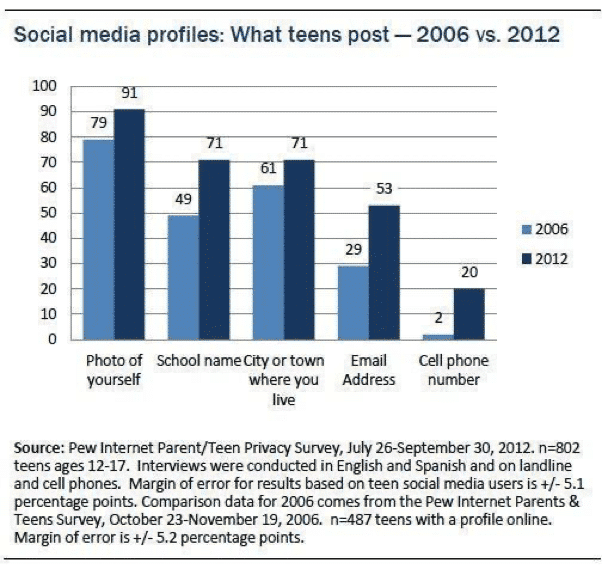
According to Pew Research Center, 71% of teens post their school name, 71% post the name of the city or town they live in, and 20% post their phone number.[1] Further, 36% of older teen’s Facebook friends are people they have never met in person.[2]
Although teens understand that oversharing can be dangerous, few have the life experience to understand exactly how it can be dangerous. When I was a teenager, the more “likes” I got on a photo or the more “friends” or “followers” I had on social media, the better I felt about myself and my online presence. I accepted friend requests from mutual friends who I had never met before, along with accepting requests from strangers. In my teenage mind, there wasn’t any harm in letting strangers see my online profiles. I felt that I would be okay as long as I wasn’t sending them my address. It didn’t occur to me that this data could be used to predict my location or even that anyone could have that kind of predatory intent.
Dr. Bennett shared a story with us where she worked on the production of the Lifetime TV show, I Catfished My Kid. In the show, producers created a poster board map (like detectives do) with yarn connecting the teens’ movements throughout the day for a week. With this data, they were able to predict daily habits like location, activities, and even who they hang out with.
How is Location Data Shared?
Instagram
One way location is shared on social media is through geotagged photos. A geotag is an electronic tag that assigns a geographical location to a photo or video posted on social media or other websites.[3] Geotags are commonly used to share what restaurant or city someone is in and are very popular on Instagram.
If your teen has a public profile and decides to post a photo on Instagram with a geotag, not only will their friends be able to see where they are, but users around the world can too. By simply clicking on that location’s tag, your teen’s photo will pop up as a current or recent visitor.
Another way location is shared on Instagram is by the use of hashtags. If your teen has a public profile and adds hashtags to their posts, their photos will show up as recent users of whatever hashtag they use, similar to the geotag feature. Hashtags are commonly used to have other users find their posts quicker and potentially gain more followers and traffic on their profile. However, that could be a privacy concern for younger users.
Facebook
The check-in feature on Facebook is similar to geotags. Facebook users “check-in” as an announcement to friends that they are visiting a particular location. Once checked-in, it appears on the user’s Facebook profile.
Snapchat
The SnapMap feature on Snapchat can also be a location risk. SnapMap allows your teen to share their location with their Snapchat friends every time they open the app. The SnapMap feature is a default, meaning it is automatically on so your teen might not even know that they are sharing their location. This is another privacy issue and may be a safety concern if your child accepts friend requests from strangers.[4]
Helpful Tips and Tools to Protect Your Child on Social Media
Set up a digital contact like our free Connected Family Screen Agreement and have ongoing, informative conversations with your kids about online safety. Our GKIS blog offers credible, interesting topics that will feed an ongoing agenda. Register for our Connected Family Screen Agreement to get on our weekly email list!
Set up your home to optimize best-use screen practices using our Connected Family Course for school-age kids.
Limit location sharing in Settings. On an iPhone, go to Settings and remove the location by clicking on the social media name > Location > select Never, Ask Next Time, While Using the App, or Always. You also have the option to turn off “Precise Location” meaning apps can only determine your approximate location
Don’t allow your child to have social media accounts until they are ready (we recommend after 13 years old or late middle school).
Require that your child set social media to private and only accept friend requests from family and friends they know in real life
Have your child change to the “Ghost Mode” on Snapchat (their location will no longer be viewable on SnapMap)
Thanks to CSUCI intern, Remi Ali Khan for researching common ways teens overshare on social media for this article.
I’m the mom psychologist who will help you GetKidsInternetSafe.
Onward to More Awesome Parenting,
Tracy S. Bennett, Ph.D.
Mom, Clinical Psychologist, CSUCI Adjunct Faculty
Photo Credits
Photo by Cottonbro from Pexels
Photo by Pixabay from Pexles
Photo by Pew Research Center
Works Cited
Deahl, D. (2017, June 23). Snapchat’s newest feature is also its biggest privacy threat. Retrieved November 04, 2020, from https://www.theverge.com/2017/6/23/15864552/snapchat-snap-map-privacy-threat
Dove, J. (2020, October 07). How to Remove Location Data From Your iPhone Photos in iOS 13. Retrieved November 04, 2020, from https://www.digitaltrends.com/mobile/how-to-remove-location-data-from-iphone-photos-in-ios-13/
Madden, M., Lenhart, A., Cortesi, S., Gasser, U., Duggan, M., Smith, A., & Beaton, M. (2020, August 17). Teens, Social Media, and Privacy. Retrieved November 04, 2020, from https://www.pewresearch.org/internet/2013/05/21/teens-social-media-and-privacy/
Oxford Languages and Google – English. (n.d.). Retrieved November 04, 2020, from https://languages.oup.com/google-dictionary-en/
Since the 2010 launching of the mobile app, Instagram, users share pictures and videos with their peers like never before. While this social media app provides a fun and convenient way to show off family photos and adorable pets, it can also be a source of worry for parents. Do you worry about who is viewing their child’s photos and what they are posting? If so, you’ll be happy to learn about the possible dangers of hashtags.
What are hashtags?
Hashtags are “#” symbols in front of words or short phrases that drop them into a posting page with the same tag. Sorting content this way allows others to see your picture and any other pictures that use the same hashtag if your social media profile is not set on private. Click on a hashtag phrase like “#Monday”, you would be directed to a page of #Monday photo collections from all Instagram photos tagged with #Monday from various user profiles.
Hashtags seem harmless, should I worry?
Most hashtags are used for fun and harmless sharing (#MomGoals, #GKIS). However, as with any social media trend, teens often use this tool to find and contribute to pages with explicit material. One way to hide this activity from parents is to use vague or shortcut terms.
An unfortunate example of this secret language is for pictures depicting images of self-harm (#cutting) and eating disorders (#mia, #ana). While some profiles provide helpful information to help empower those in distress, others overtly encourage self-destructive behaviors. These online communities are commonly known to share detailed techniques and strategies, provide emotional support, and serve as a launch pad for online friendships. In my clinical practice, these relationships often spiral into emotionally dependent and frequently abusively manipulative pairings that remain hidden and are resistant to protective parent intervention.
Hashtags are used on most social media sites, including Instagram, Twitter, and Tumbler (Whitlock, 2009 & Nock, 2010, as cited in Moreno, 2015). Although many kids go looking for these forums after they’ve already experimented with concerning behaviors, others get started this way (Seko, 2011, as cited in Moreno, 2015).
Until social media sites improve the strength of their content advisory, parents must keep their children safe from viewing explicit content.
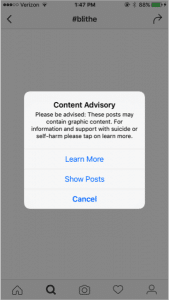
Instagram now has a content advisory that pops up and warns users of content that might be graphic and even provides resources for help with eating disorders and links to helplines. However, just as kids are great at creating sharable online resources, they are also great at staying hidden from parental interference. For example, in a 2015 study that identified similar hashtag meanings on multiple social media sites, vague and hard to identify hashtags including “#mysecretfamily”, “#blithe”, “#Bella” or “#Ben” (a term used for Borderline Personality Disorder), “#Ana” or “#Rex” (used to reference Anorexia), and “#Sue” or “#Dallas” (terms for suicide) (Moreno, 2015). Only a portion of these hashtag terms generated a content advisory warning.
GKIS TIPS for protecting your children from viewing destructive online content:
Check out social media site help centers for information. For example, Instagram’shelp center provides downloadable privacy and safety guides for parents, teens, and gives information and resources for addressing abuse and eating disorders.
Make sure that your child’s social media profiles are set on private.
Have open conversations about what your children view and post online. Remind them that they can talk to you if they do accidently view images, post, or receive something that makes them uncomfortable. No blame, no shame.
By opening up nonjudgmental conversations about what your child may view on social media and mental health issues, you model healthy communication skills, promote stigma free views on mental health, and most importantly, develop a positive and loving relationship between you and your child. If you feel they are too young for these discussions, then they’re too young for social media.
Parenting can be incredibly difficult at times. Parenting a teen struggling with painful psychological issues is particularly scary. In situations like these, many aren’t sure where to turn or what to do. As a psychologist and a mom, I want to remind you that you are not alone. Whether your concerns are about Internet safety or getting a better understanding of where your psychological issues your child may be dealing with, GetYourKidsInternetSafe is here as your resource.
Moreno, A.M., Ton, A., Selkie, E., & Evans, Y. (2015). Secret Society 123: Understanding the Language of Self-Harm on Instagram. Journal of Adolescent Health, 58, 78-84