Need peaceful screen time negotiations?

Get your FREE GKIS Connected Family Screen Agreement

cyberbullying

The GKIS Sensible Parent’s Guide to Kik

FullSizeRender

It’s every teen’s dream to have unmonitored texting through WiFi, without having to ask parent permission or use expensive data. With instant messaging apps like Kik, all you need is an Internet-connected screen device and, voila, there’s your private Internet portal. Kik is most commonly used among middle schoolers, which translates to online teen hijinks, some innocent and some not-so-innocent. Apps like these are why screen safety agreements among parents and their teens are so vital. My Screen Safety Toolkit is a great instrument for navigating how to monitor your child without hurting your relationship.

What is Kik?

Kik is a free mobile application that is used for instant messaging (IM). It is most commonly used on handheld screen media that connect to WiFi (like smartphones, iPods, and tablets). A Kik account allows the user to send and receive messages with other Kik users. It’s similar to texting, but instead of using “minutes” or a data plan, it sends messages through WiFi. Kik’s Terms of Service state that users must be 13 years or older.

What are Kik’s popular features?

  • Kik looks and acts like a basic SMS text messaging function.
  • You can invite friends or family to use Kik through text, social media, or email.
  • Just like regular text messaging, you will receive notifications when your messages were sent and delivered. Not only can you tell when someone has received your message, but you can also see when they have read it and are typing back.
  • You can send pictures, videos, and texts to peers or even strangers.
  • The main page when you open the app is a list of your Kik conversations.

blog74circletext

What are the privacy options?

  • Kik has limited privacy settings.
  • I recommend that you only tell people you know your personal username. To keep it private, do NOT post it on any other social media sites where strangers may see it.
  • You have the ability to block users (searched by username or name) if you are being cyberbullied. Simply go to “Chat Settings,” then select “Block List.”

blog74kiksecond blog74kikthird How long has it been around and how popular is it?

  • Kik became available to the public in October 2010. In just two weeks it had about one million users.
  • Popular among teenagers, most young adults don’t use this application, due to the fact that most of them already use texting that’s provided with data plans.

What are the risks for use?

Cyberbully potential:

  • Due to the fact that Kik messages do not show up on wireless plans like text messaging, it makes it easier for the kids to send hurtful messages.
  • Cyberbullying commonly occurs with Kik.
    • If an enemy from school gets your username they may message you on Kik and send you insults or threats. For example, there are many reports about Kik users receiving messages telling them they should just die because no one cares about them.
    • Rebecca Sedwick was a twelve year-old girl who was bullied on Kik. Her mother was unaware of the Kik app even though she would sometimes go through her phone. Rebecca had posted photos of herself cutting her arms. Peers responded asking her why she was even alive, calling her names. Before committing suicide she changed her Kik name to, “That Dead Girl.”

blog74fifth

Making poor decisions:

  • It’s possible to have conversations with strangers on Kik, making connection with an online predator dangerously easy.
  • Sexting is a risk with this Kik.

blog74kiksixth

Inappropriate content potential:

  • Due to sexting, Kik users may receive graphic photos from peers or strangers.
  • Drug deals and sex hookups are common on Kik.
  • Parental monitoring is difficult because chats can easily be deleted.

Due to the potential for unmonitorable interaction with peers and strangers and difficulty with monitoring, GetKidsInternetSafe classifies Kik as a red light app. The anonymity and easy delete potential can lead to dangerous conversations. To learn more about the social media applications your child may be using, check out a The GetKidsInternetSafe Sensible Parent’s Guide to Tumblr.

11755355_1062290680448181_4814698546326661932_nThank you to CSUCI intern Adrienne Roy-Gasper for co-authoring this article.

I’m the mom psychologist who will help you GetKidsInternetSafe.

Onward to More Awesome Parenting,

Tracy S. Bennett, Ph.D.
Mom, Clinical Psychologist, CSUCI Adjunct Faculty
GetKidsInternetSafe.com

Photo Credit:

Informal Gluttony by Kat Northern Lights Man, CC BY-NC 2.0

Cyberbullying, would you do it? by kid-josh, CC BY-NC-SA 2.0

Pro Juventute Aufklärungskampagne ‚Sexting’ Themenbild_04, CC BY 2.0

Cyberbully: The New Monster in My Room

blog73cyberbully

Remember when your kids were little and scared of the monsters in their closet? You did everything you could to make them feel safe and ease their fear. Just when you thought your kids were old enough for the monsters to be gone, a new one may be lurking. This new monster is known as a cyberbully and may show up on their computer, tablet, or smartphone.

Did you know that 22% of kids between the ages of twelve and eighteen report either being a target or a perpetrator of cyberbullying (National Center for Education Statistics, 2013)? With most homes having access to the Internet and smartphones, this monster can enter without permission and disrupt teen lives 24 hours a day, 7 days a week. The effects of being harassed by one can be psychologically damaging and even deadly.

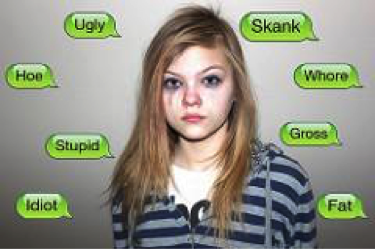
A cyberbully is a new threat for anybody who is online, even little guys who play educational games or use a search browser. A cyberbully is a person who intentionally and repeatedly harasses a person via text messages, instant messaging, social media sites, or through any form of screen contact. These types of bullies are worse than traditional schoolyard bullies, because their attacks follow someone home, making the attacks inescapable in a place that should be safe. Cyber-attacks tend to be more frequent and emotionally vicious, because the attacker is unable to see the victim’s reactions, making empathy for the victim far more difficult. The perpetrator can also remain anonymous and often communicates in packs on public social media posts to humiliate and frighten the victim.

Cyberbully attack methods:

Social networking site shaming

This type of harassment may include posting mean and untrue things or starting rumors about someone in order to humiliate or get a response. Social media posts can reach thousands of people at once and may generate large audiences that join in on the shaming or harassment.

Threatening violence or stalking

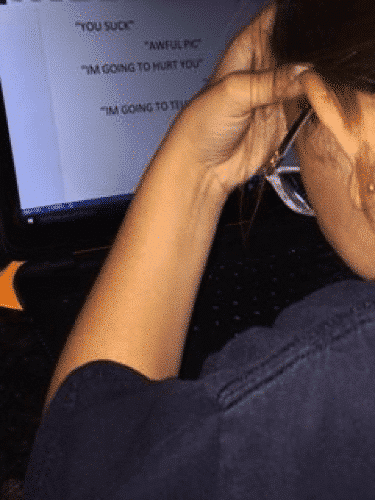
Threatening violence is used to make a person fearful wherever they go. It makes the perpetrator feel powerful. Threatening messages can be threats of bodily harm or threats of telling a secret or starting a rumor. Stalking can include sending repeated unwanted messages that can include the threats, explicit language, or inappropriate content.

Altered or explicit photo sharing

With many photo editing apps available, a cyberbully can take an innocent photo and turn it into something else to shame or embarrass their target. The photos can be used to make fun of someone or point out flaws for others to comment on (this can relate back to shaming). Once this type photo is posted and shared, it can become difficult to take down (Chisholm, 2014).

Consequences from cyberbullying:

Emotional distress

Shame, embarrassment, fear, sadness, and chronic stress resulting from cyberbullying can lead to psychological disorders such as depression and anxiety.

Isolation and loneliness

When children are being harassed online, they may withdraw from social activities and alienate themselves to avoid the harassment, causing them to miss out and feel alone.

Feeling powerless

After being harassed over and over again in their home on the computer and everywhere they go with their tablet or smartphone, children may feel like there is nothing they can do to stop it. Feeling powerless over the harassment can lead to lack of confidence and lowered self-esteem.

What can parents do?

Seek help from schools and law enforcement

With increasing awareness, schools are commonly required to add digital citizenship and etiquette to their curriculum. As a result, cyberbully rates continue to drop (National Center for Education Statistics, 2013). Although every situation is different, in more instances where cyberbullying interferes with a student’s ability to feel safe at school, administrators and/or law enforcement will take action. Even if the incident is outside of the school’s jurisdiction, academic staff may offer referrals to helpful resources.

Maintain a trusting and nurturing relationship with your child that includes filtering and monitoring

Most victims and attackers are heavy Internet users. Parents can reduce risk by setting parental controls and privacy settings on computers and Internet sites.

Avoid habitually taking away screen use when your child runs into online challenges

Impulsively taking away your child’s screens when trouble arises will seem like a punishment and may result in their withdrawal instead of coming to you for help. Instead provide supportive guidance and maintain sensible rules and regulations about online activities. Be nurturing and let them know you are there for them. The more trust they have in you, the more willing they will be to open up and talk.

Make sure they know the difference between a “target” and a “victim”

If your child has been targeted, help him/her feel empowered rather than a helpless victim. Using the word target is more likely to result in him actively seeking help and support rather than suffering in shameful silence (Nixon, C., 2014). Educate your child and teach etiquette and digital citizenship skills so your child knows what is appropriate to view and post.

Encourage social activities that are not screen related

The less time children spend online, the less likely they will become targets. Support their participation in sports, music, art, or afterschool activities. This can help with reasonable screen time limits, build confidence and self-esteem, and offer positive social support.

Make home a safe place to relax and forget about outside stress

Just like you did when they were a small child, keep the monsters out of your house and make your children feel safe at home. For more at home help keeping your family safe and connected check out the GKIS Connected Family Course. To see what programs schools are implementing to keeps our children cyberbully free, read the GKIS article, “How Schools Keep our Kids Internet Safe.”

KathleenThank you to Kathleen Gulden, CSUCI intern, for authoring this awesome GKIS article!

Onward to More Awesome Parenting,

Tracy S. Bennett, Ph.D.
Mom, Clinical Psychologist, CSUCI Adjunct Faculty
GetKidsInternetSafe.com

Works cited:

Adolescent cyberbullies and their victims may have physical, mental health problems. (2010). Mental Health Weekly Digest, 798.

Chisholm, J. (2014). Review of the status of cyberbullying and cyberbullying prevention.

Cyberpsychology: Journal of Psychosocial Research on Cyberspace, 8(4), article 6. doi: 10.5817/CP2014-4-6

Journal of Information Systems Education, 25(1), 77.

Nixon, Charisse L.“Current perspectives: the impact of cyberbullying on adolescent health.” Adolescent Health, Medicine & Therapeutics,5.default (2014): 143-58

Sabella, R. , Patchin, J. , & Hinduja, S. (2013). Cyberbullying myths and realities. Computers in Human Behavior, 29(6), 2703.

National Center for Education Statistics, 2013. https://nces.ed.gov/fastfacts/display.asp?id=719

Seiler, S. J., & Navarro, J. N. (2014). Bullying on the pixel playground: Investigating risk factors of cyberbullying at the intersection of children’s online-offline social lives. Cyberpsychology: Journal of Psychosocial Research on Cyberspace, 8(4), article 6. doi: 10.5817/CP2014-4-6

The GKIS Sensible Parent’s Guide to Snapchat

Snapchat Icon

I have mixed feelings about red-lighting the popular self-destructing messaging app, Snapchat, and I’ll tell you why. I Snapchat with my daughter and the other twenty-somethings and its fun! Like all social media apps, Snapchat can be used for good or evil. They say it’s not guns that kill people, it’s people that kill people. The same applies for social media. So here’s the deal; if the individual using Snapchat has a mature frontal lobe and life experience, this app is way cool. But if the user is young and impulsive, Snapchat provides an effective forum for bad behavior in the form of pictures, videos, and texts. Unfortunately, there are no monitoring apps that I know of that work with Snapchat. However, there are many apps that that let recipients sneakily save chats from unsuspecting senders. Keep in mind, social media apps post risks for viewing, posting, and private messaging. Here is your GetKidsInternetSafe Sensible Parent’s Guide to Snapchat so you can make your most informed parenting decision. To help your tween or teen demonstrate they have the knowledge, problem solving ability, and judgment for social media, check out our Social Media Readiness Course. It’s an online course for tweens and teens that offers information about the risks of digital injury due to social media and psychological wellness tools. With a quiz for each module, they work their way through independently so their graduation certification demonstrates mastery of content. Of course, you can take it too if you’d like. It’s like driver’s training but for the internet!

What is Snapchat?

Snapchat is a free mobile messaging app for sharing moments with family or friends. Photos or videos are taken on the application and the user may draw and add a “caption” to their picture and send it to anyone on their “friends” list. Snapchat also contains a “story” (a saved video on static page for 24 hours) where friends can view your photo and/or video series. The photos or videos last up to ten seconds or it can last up to infinite amount of time and then it disappears after the user clicks their screen. The photos can be saved if the other person viewing it takes a screen shot; however it will notify the sender. Also, the sender may save their photos anytime if they are on their “story.” You can also instant message with Snapchat. Snapchat’s Terms of Use states, “Snapchat is intended for people who are at least 13 years old. Persons under the age of 13 are prohibited from creating Snapchat accounts.”

What are Snapchat’s popular features?

Snapchat is highly intriguing to users because the messaging is photo/video based. This is a step-by-step description of how to use it:

  • Take a photo
  • Tap screen to add caption; tap the “T” in the right hand corner to change font size and color. Tap the pencil under the “T” to draw on the picture with color or draw with emoji’s, tap the square under the pencil to add emoji’s or bitmojis.
  • Under the square is a pair of scissors that allows you to clear a blemish, erase a part of the photo, put an entire background, or put hues of color in designated spots.
  • After the scissors, there is a paper click symbol. This allows for the user to attach a URL to any post they make.
  • Apply a filter by swiping right on the photo; includes four different tints for pictures, a “mph” to show friends how “fast” you’re going if in a moving vehicle, the time photo or video was taken, the altitude, and the temperature of where you are. You can only choose one of these filters at a time or you can hold the screen and apply numerous filters to the post.
  • At the bottom of the list of symbols on the left top corner is the clock where, you can choose how long you want your picture to appear when sent to friends from 1-10 seconds or for infinite. You can also click the arrow pointing down (on the bottom of the screen) if you want to download the picture you just took onto your device. Lastly next to the arrow there is the square with a plus sign to “add to your story,” the picture will remain on your story for 24 hours.
  • At the bottom right corner of the screen, you click the arrow pointing to the right to send the photo to your friends. When clicking here you can choose what friends you want to send it to.
  • Check the box of the friends you want it sent to; on the bottom the friends you chose will show up in a blue link with an arrow pointing to the right. You click the arrow once your friends are chosen.
  • The list of friends include, “Your Story,” “Best Friends,” “Recents,” “Groups,” and “Needs Love.” Your story was previously mentioned before; you just have another option to add the photo to your story a different way. Your best friends consist of those you send Snapchats to the most. Recents are those who recently sent you a Snapchat or those you recently sent a Snapchat to. Groups are people who you have grouped together and if you send a snap to them all of the recipients will receive the same snapchat and can respond to the group (like group messaging but with pictures). Lastly those on the needs love list are those who are on your Snapchat list of friends but you don’t Snapchat them often nor sent them a Snapchat recently.
  • Recently added on Snapchat is group chatting. Now, once you are on your main screen (swipe to the right), you’ll see at the top for the option of “Groups”, “Stories”, or “Chats”. Pressing each of these tabs looks fairly similar but it is a new way of organizing your feed. The New Group Video Chat allows groups of up to sixteen people to instantly start video chatting. To create a video call, you simply create a new group of friends (or use a group already created) and tap the video icon to send an automatic notification to those users, as an invitation to join the call.  During your video chat you can use the famous Snapchat filters. You read that right, you can video call your friends and family while you have a dog filter on your face.

personal profile on Snapchat What is included in the personal profile?

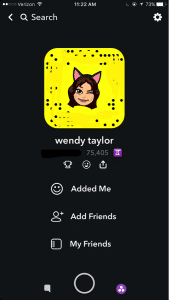
There is not a “personal profile” per se, but there are ways to find your friends who are on Snapchat. From the main snapchat screen, the middle section, you can press the top left corner, which is either a picture of a ghost of your bitmoji you created. From there you can view your name, user name, your astrological sign, and your “score.” There’s a link with a smiley face that says “Added Me” to see those that have recently added you on Snapchat. Then there’s a link that says “Add Friends” and you can search by username, address book, snapcode, or nearby or add from your contacts list. The last link is My Friends, which shows who you have already added.

Those who are not your friends can see the pictures you post on your story, unless you go to settings – view my stor y- and make sure its pressed on “My Friends.” There is an option for Everyone or Custom, which you can block certain people from seeing your story. People can find you using any of the things stated above, but most commonly people will add through “contact” list, snapcode or user name. Your personal snapcode is the unique pattern of dots around your bitmoji. It can be scanned by other users to easily and quickly add you as a friend.

Snapchat settings What are the privacy options?

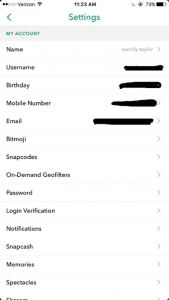
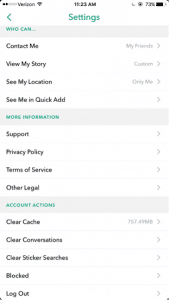
From the screen with your bimoji, click the settings gear icon on the top right hand corner. When you click it you can see the information you entered when signing up for Snapchat.

privacy options in Snapchat

When you scroll down there is a Manage section with “Who Can…” Contact Me, View My Story, See My Location, and See Me in Quick Add. (Quick add is so you won’t come up on random people’s snapchats saying they might know you and to easily add you as a friend). From there you can select Everyone, My Friends, Only Me, or Custom settings.

How long has it been around and how popular is it?

Snapchat was created by Stanford University students, Evan Spiegel, Bobby Murphy, and Reggie Brow. It was first launched in July, 2011, under the name “Picaboo.” Later it was renamed and relaunched September, 2011.

What are the risks for use?

Cyberbully potential:

  • Friends sending threatening/cruel messages or offensive pictures
  • Fake accounts and impersonation.
  • Mostly used with friends or people the individual knows; so if there is an argument they may say or do hurtful things through the app.

Inappropriate content potential:

  • Sexualized images
  • Instant messaging inappropriately
  • Some consider it the “sexting app;” may receive inappropriate pictures or messages; may send them to others as well.
  • Often times, people feel as if they are safe to use this as a “sexting app” due to the fact that the app will notify you if someone has taken a screenshot. They may think that no one will screenshot their inappropriate photo because it notifies the sender. Or if they get notified that someone took a screenshot they may feel that they can take action.

However, it’s important to note that there are apps that a user can download that allow them to screenshot the sender’s photos without it sending a notification. Some of these apps are called, “SnapKeep,” “SnapBox,” “SnapSpy,” and “KeepSnap.” This is important to know, because people get too comfortable with pictures when they believe that after 10 seconds it’s magically gone; this may not be case.

Making poor decisions:

  • Bragging about substance use to friends by taking photos of alcohol use, drug use, or pictures at a party
  • Using device while driving to use the “mph” filter to brag about the speed of the vehicle you are in. This also can lead to driving over speed limit.

What are the protection features?

  • You can change your privacy settings to where only friends can send you Snapchats or see your story (view privacy settings).
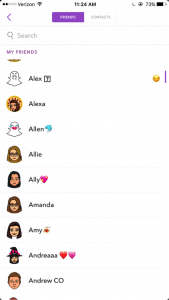
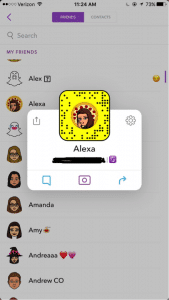
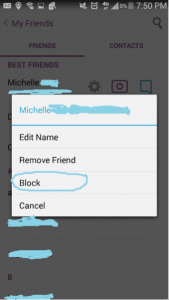
  • If a user is sending inappropriate images you can block them by going to your friend’s list, tap the name of the friend, click the settings link, and click “block.” Or if they recently snapped you, you can just hold their name and press settings and then block. You will no longer be able to receive or send Snapchats to that user; they also will no longer be allowed to see your story.

1st screenshot showing protection features in Snapchat

2nd screenshot showing protection features in Snapchat

3rd screenshot showing the SnapChat block feature


Because of the capacity to post images and video unmonitored and instant message, GKIS considers Snapchat a red light app, generally meaning no use prior to age 17. But realistically speaking, most high schoolers actively use and text on Snapchat, so use your best parenting judgment for your child. Also be cautious of similar apps like BurnNote, Slingshot, and Yik Yak. These days, popular social media apps tend to add each other’s most popular features (like Snapchat stories now on Instagram and Facebook). No longer is there a “safer” social media app for middle schoolers.

CSUCI student Adrienne Roy-Gasper

Thank you to CSUCI student Adrienne Roy-Gasper for co-authoring this article. Check out my blog article about how this dad responded to Snapchatters who were cyberbullying his daughter, and how it caused the bully’s dad to lose his job. What are your experiences with Snapchat? Have you run across problems, or do you consider this a reasonable app for your kids? Please let me know what you think in the comments below.

I’m the mom psychologist who will help you GetKidsInternetSafe.

Onward to More Awesome Parenting,

Tracy S. Bennett, Ph.D.
Mom, Clinical Psychologist, CSUCI Adjunct Faculty
GetKidsInternetSafe.com

Cyberbullies, RATs, and Online Predators. Two Things You Can Do To Protect Your Kids From Online Dirtbaggery


blog60family

Originally published by Kids in the House

The C.S. Mott Children’s Hospital National Poll on Children’s Health found that parents rank INTERNET SAFETY as number 4 (up from 8th in 2014) for biggest child health concern and SEXTING as number 6 (up from 13th). You know why parents are getting so concerned? Because they need to be!

Let’s be honest here. Kids want Internet access like a crack addict wants a hit. And so do we! Screen media is our favorite past time. Those elegant screens clutched in our greedy hands feed us delicious content that we gobble up too many minutes of our day. Kids love it too. And parents are conflicted about what to do about that.

If we disallow it, our kids are dependent on us for entertainment. Keeping them happy and busy without screens is exhausting! Our parents chased us outside to run with the neighborhood kids. When we reminisce about being latch key kids, we tell stories of the eight shades of happy peril we were regularly in. We don’t want our kids in any shade of peril. We want them tucked in the safety of our homes. As a result, we have agreed to be in their constant servitude. Poor us. Poor them.

We do the best we can to keep them busy. Then we worry they’re too busy! What do we rely on when we’ve run out of ideas? Screen media! My daughter’s first love, besides her parents and her poodle Buster, was her purple stuffed Barney. I guiltily admit she was so sold on that annoying talking dinosaur she was a successfully branded consumer by toddlerhood. Every morning while I made breakfast she sat in front of the TV in her expertly branded Disney princess feety jammies and Mickey Mouse toddler chair. I allowed Disney to have that kind of influence on my kid, because I didn’t consider it that harmful and television gave me a moment’s peace. Parents today have even a bigger dilemma with so many screen devices.

Consumer branding is the least of our worries these days. The Internet offers amazing vistas for education, but parents have a tough time managing it effectively. In response to the sad outcomes to poor screen management I was seeing in private practice, I created parenting programs like the GetKidsInternetSafe Screen Safety Toolkit to help families avoid online dangers. I’m aware that parents want to dismiss the GetKidsInternetSafe (GKIS) message as sanctimonious hysteria. If I could forget what I know, believe me I would too. You know what we moms want to read? We want snarky articles about the pleasures of red wine and celebrity bashing and to avoid scary information that makes us feel guilty and scare the crap out of us.

So, admittedly, here I am delivering today’s informational kale salad with a bit of fun snark. And the good news? I’m not going to leave it at the scary stuff. Here are some parenting maneuvers you can do today to prevent tragedy and build your child’s resilience, hopefully avoiding a trip to the psychologist’s office down the line.

  1. If your child is allowed Internet access, ongoing dialogue for education and skill-building is a must.

I know this kind of sucks for us. It takes time to research what to talk about so we don’t blow our credibility stringing together sensational media headlines like our parents did about pot. We also risk annihilating their sense of safety telling them about online predators and risk.

But it doesn’t have to be an awkward or terrifying one-time lecture. Skill building is important for little kids to teens. It just takes targeted conversation and lots of listening. With an eye on the news and an occasional follow of a free online safety blog like GetKidsInternetSafe, you have the information you need to introduce topics into family conversation that are cooperative and positive rather than threatening and exaggerated. The best part is that every conversation builds that important parent-child connection.

How can you get a conversation started? It can go something like this, “Did you hear about the dad that cyberbullied the cyberbully yesterday? He got fed up with a kid harassing his daughter on Snapchat so he posted a video talking about the kid’s dad. Do you think he did the right thing?” You can even show the video. By avoiding shaming lectures and staying curious and positive, it will become evident that you are their go-to person and have their backs online as well as offline.

What topics should you cover? The same kind of social skills you talk to them about in their offline world. How about start with digital citizenship. Introduce how to respond to cyberbullying and, if they’re older, the risks of sextortion. Dialogue provides opportunity for education and skill building. It’s not enough to just introduce the issues, tell your kids details, like how to recognize the manipulative techniques online predators use to groom their victims. With this information your kids will be that much more resilient should a predator get through your controls.

Even easy cybersecurity strategies, like a post-it note over your computer’s camera lense, may cripple a Remote Access Trojan’s (RAT) ability to take over your computer’s camera. Beyond educating and skill building, there’s another thing parents need to do to get their kids Internet safe.

2. Install filtering and monitoring apps and software.

One day of installation can prevent months of online risk. If your kids are little, that means installing filtering tools like child-safe browsers and setting parental controls. If your kids are older, manage their use of social media apps and add monitoring software. Let them know you’re supervising their screen use, because lying and sneaking may harm the very connection that your dialogue has nurtured.

Although kids will initially complain about monitoring strategies, it’s not a mystery to anybody why parents need to parent online as well as offline. You may not be the über mom servant of their dreams, but we are all just doing the best we can, aren’t we?

I’d love to hear how your screen media strategies are faring on the GetKidsInternetSafe Facebook page. If you’d like more suggestions on staging your home for screen safety success, check out the GKIS Connected Family Online Course.

I’m the mom psychologist who will help you GetYourKidsInternetSafe.

Onward to More Awesome Parenting,

Tracy S. Bennett, Ph.D.
Mom, Clinical Psychologist, CSUCI Adjunct Faculty

GetKidsInternetSafe

The GKIS Sensible Parent’s Guide to ask.fm

blog64askfmleadimage

It was a no-brainer for me to include the confessional question-and-answer app, ask.fm, on the GKIS social media red light list. But then … I was contacted by Catherine Teitelbaum, Chief Trust and Safety Officer for ask.fm. Her generous efforts to inform us about their recent investment of “millions of dollars” and impressive safety updates to bring ask.fm up to industry best practice standards gave me pause. I’ll explain more about recent developments at the end of my article. But despite updated safety implementations, I still have real safety concerns because, in my community, ask.fm remains very popular among middle schoolers and few seem to get out of this cyberbully battleground without long-lasting emotional scars. It’s the perceived anonymity and seductive invitation to ask and answer personal questions on a public forum that make this app risky for impulsive teens. Check out this week’s article so you know what to look out for on your child’s smartphone.

Recently a client shared with me how an ask.fm cyberbully incident triggered her first major depressive episode. She said that she initially really liked answering people’s questions on the app, sharing her opinions and private information. Until one day she woke up to a string of insults about her on the public bulletin board, leaving her hurt and demoralized, questioning constantly who was her friend and who was her enemy. Like other teens, instead of closing her account to escape the misery, she started to compulsively check comments in a futile attempt to feel in control of the situation.

As if that wasn’t difficult enough, shortly after the cyberbully posts a peer posed as her on the app and asked scandalous questions. Again she retreated into confused and frightened silence, too ashamed to tell anybody. She didn’t realize that she was placing herself in harms way by adding the ask.fm app to her Instagram. She eventually deleted it, but the damage was already done. She’s such a beautiful and kind girl it’s mindboggling how somebody would attack her this way and that it would hit her so hard. But then again, the sweet kids who have it all are often targeted and social acceptance is very important to young adolescents. It doesn’t take long to move from optimistic naiveté to defensive fear once cyberbullied. Here is GKIS Sensible Parent’s Guide to ask.fm.

What is ask.fm?

Ask.fm started as a social website and app where people can post questions anonymously (or with their screen name). Responses come in the form of text, images, or video. A user can opt not to receive anonymous questions. It’s commonly used by young people and is open for anyone to post comments and ask questions to the public profile. Users often cyberbully and post sexualized content on the site, and it is a convenient forum to start rumors and be cruel to others. Ask.fm’s Terms of Use states that the individual using the app or website must be thirteen years or older. However that does not stop younger children from using it.

What are ask.fm’s popular features?

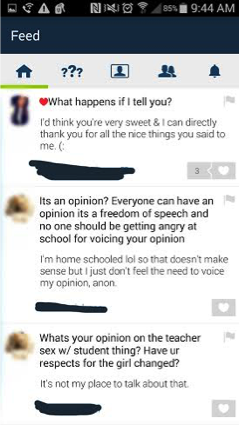
  • The “home” icon is where you can view those you are following on ask.fm. You can see the questions and comments that they received and answers and responses to the comments and questions.

blog64image2

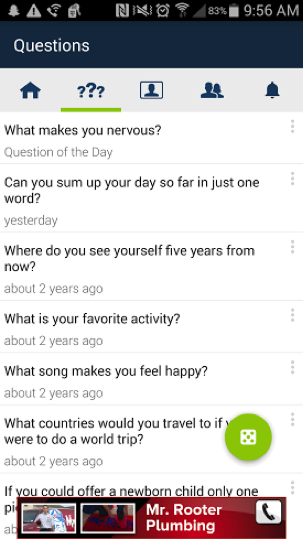
  • Next to the home icon are question marks. Under this icon you can view the questions people have asked you. Some of these questions are also random from ask.fm. These are questions that are generated through the site and you can answer them and post them to your page. So if you are not getting questions from your friends then this can help build your profile. To get these questions you can tap the green circle and more randomized questions from the app itself will pop up.

blog64image3

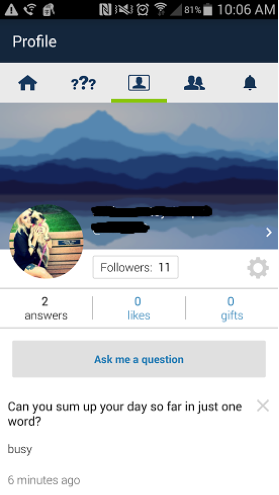
  • Next to the question mark icon is the profile icon where you can see your personal profile. Here you can view your own profile which contains your name, user name, photo, amount of followers, how many questions you’ve answered, amount of likes, and gifts you’ve received.

blog64image4

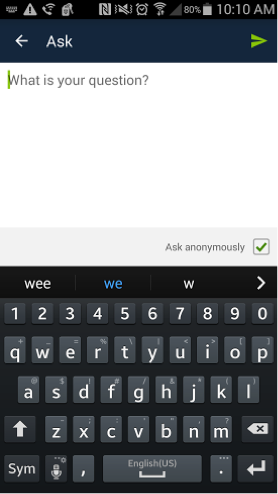
  • There is also the “Ask me a question,” button on every profile. If you click it, it will take you to a page where you can type your comment or question. At the bottom right hand corner there is a check box that when checked allows you post anonymously. Uncheck the box and it will show who asked or commented.

blog64image5


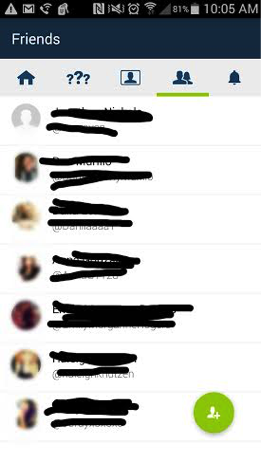
  • Next to the profile link, there is a link with shadowed heads. This is where you can see whom you are following.


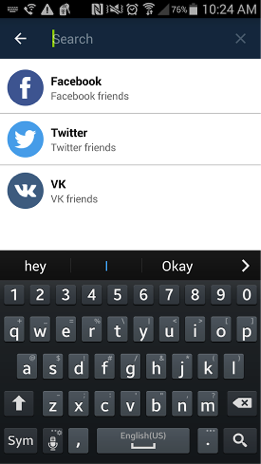
  • blog64image6The big green circle on this page is to help you add friends by either searching, adding them through other social media apps like Facebook, Twitter, or VK Friends.

blog64image7

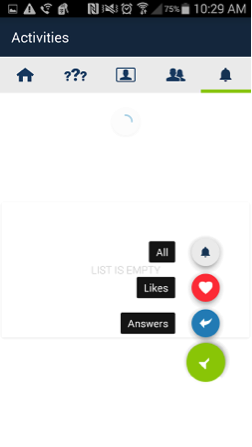
  • The bell next to the friend’s link is where you can see your notifications, such as answers to questions you asked and likes on your page. The green circle on this page lets you choose what notifications you want to receive whether it is just answers, likes, or all.

blog64image9

What are the privacy options?

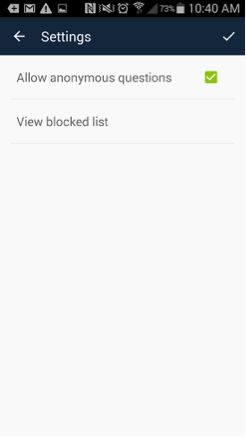
  • You can set your ask.fm account to not allow any anonymous questions and only receive comments or questions from people you know are asking. To do this you go to settings (this is on your public profile, there’s a settings button that looks like a tool), then you click on privacy, and uncheck the box that says “anonymous questions.”

blog64image10blog64image12

What are the risks for use?

  • Cyberbully potential:

The fact that people can post anonymously makes it easy for people to post mean comments and/or threats to a person’s page people cannot post anonymously.

  • Inappropriate content potential:

Just like any other application or social networking site, posts about sex are highly common on ask.fm. People have the tendency to ask other people sex questions- like what they like, who they have been with, etc. Often times, the person being asked questions may end up sharing information that then may be used for cyberbullying. Teens may also inadvertently share personal information about themselves and friends and family members without recognizing long-term consequence.

How long has it been around and how popular is it?

  • Ask.fm was developed by two brothers from Latvia in 2010. It grew in popularity starting in Eastern Europe with a policy that seemed to value free speech over safety concerns. As with so many other social media apps, it became popular quickly and the creators may have been caught off guard and slow to understand the dangerous issues presenting and the important safety changes that needed to be made. Fortunately, the it was acquired by Ask.com (a public company that also owns Match.com, About.com, and numerous other online brands) and they have recently implemented significant safety changes. It is especially popular among teens (40% of users are reported to be under 18 years old). Eighteen billion questions and answers were posted in just one year! That, GKISsers, is A LOT of content. Fortunately, most interactions are inane or neutral to positive and sweet. Catherine Teitelbaum elaborated that users love the opportunity to ask questions and express themselves among peers.

What are the protection features?

  • Users are safest if they block anonymous answers and avoid the public stream. Using WiFi may save you on data charges.
  • Users are now required to be registered with ask.fm before they can log in and ask a question. That means they may be anonymous to other ask.fm users, but they are not anonymous on the backend from ask.fm security. If users violate terms of use, they can be held accountable by receiving a warning and even being banned from the site.
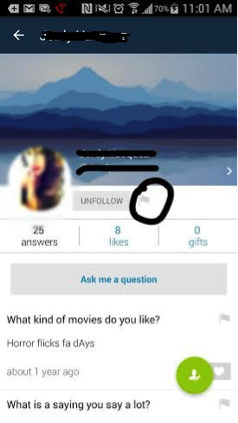
  • Responders can also report content or block another user if they feel threatened or bothered. All you have to do is go to their profile, click the flag button next to the follow button, and then click “block.” Ms. Teitelbaum told me that all reports will be responded to within 24 hours. However, flags are prioritized due to severity and action may be taken within 15 minutes.
    blog64image13
  • Ask.fm has computer algorithms that search for inappropriate content on all questions (like self harm). If content is flagged, ask.fm staff will review the content and determine action. Answers can be in the form text, photo, or video. As of August, 2015, ask.fm policies have resulted in them taking 40% more action on content than before. Of course, as with all social media apps, teens become increasingly sophisticated working around controls using slang and nuance.
  • A gap I’ve identified continues to be that you can be anonymous or not when asking a question. This leaves a lot of opportunity for teens with poor judgement to post unflattering content about themselves and others. Posts are public and not exclusive to a buddy list. In theory, if a predator new a child’s profile name he/she could get into your child’s inbox. That portal to potentially gaining intimate information and/or interacting with you teen pushes ask.fm from yellow to red light in my opinion.
  • The GetKidsInternetSafe overwhelming message is that parents must monitor teen social media posts. This is easy with ask.fm in that EVERYTHING a user answers becomes automatically public and searchable.
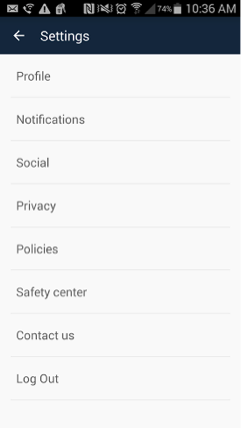
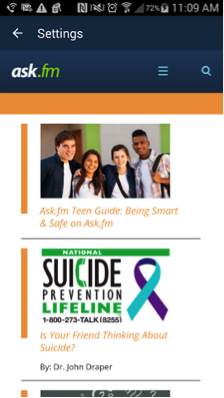
  • Due to their high risk for cyberbullying, if you go to the settings again and click on safety center, it takes you to a page where you can get information on how to be safe on the site. There is also information on a suicide prevention lifeline. I also encourage your to check out the Terms of Use, which includes an impressive list of Rules of Conduct. For more information check out A Parent’s Guide to ask.fm. (Yay ask.fm! We are seeing significant progress in safety here. Cheers to concerned and noisy parents like us!)

blog64image14

Even with the recently instituted safety features, public and anonymous posting makes this a GKIS red light app, meaning no use prior to age 18 years. For good reasons, ask.fm has been compared to a virtual bathroom stall, demoralizing and vulgar. Because teens tend to be open and idealistic, parents are encouraged to use GKIS recommendations about monitoring, ongoing dialogue, and teaching important skills to kids about netiquette and judgement. Keep in mind that their immature problem solving region in their brain will often lead them to make mistakes. It’s critical that we make ourselves available for compassionate and informed consult. I totally “get” how compelling this app is to teens as a way to share with others. But from my perspective as a clinical psychologist, I worry a public format is simply too risky for young teens. Of course, it is important for families to make their own decisions based on their opinions and values and the individual traits of their kids. Similar apps to avoid include Whisper and  Snapchat. What are your experiences with ask.fm? Have you run across problems, or do you consider this a reasonable app for your kids? Please scroll down and let me know what you think! And if you haven’t yet implemented the GKIS staging tools in your home that immediately result in improved safety, check out the GKIS Screen Safety Toolkit today!

11755355_1062290680448181_4814698546326661932_nThank you to CSUCI student Adrienne Roy-Gasper for co-authoring this article.


I’m the mom psychologist who will help you GetKidsInternetSafe.

Onward to More Awesome Parenting,

Tracy S. Bennett, Ph.D.
Mom, Clinical Psychologist, CSUCI Adjunct Faculty
GetKidsInternetSafe.com

The Sting of the Loveless Troll. What It Teaches Us About Kindness.

blog-60-snoopyautograph

Originally published by Sammiches and Psych Meds

When I was in fifth grade I got a Snoopy autograph book to commemorate my move to the fifth school since starting kindergarten. Although nervous, it would mark another opportunity for resilience in my life of many shifting directions. I loved that autograph book with its padded glossy cover and subtle rainbow of pastel pages. I took it to school and asked my friends to autograph it for me. Here are some classic quotes (misspellings intentional):

  • UR2 good + 2be=4gotten. Wendy ‘79

  • Remember M, Remember E, but most of all remember ME. From, Marcie

  • You have bean a greet freind, stay that way good luck in 6th good dancing remember your old freind Steve

  • And from my very best friend: Dear Tracy, I think your very nice and you are fun to play with. Sincerely Yours, Theresa

How sweet is it that a kid’s first instinct is to be complimentary and polite. Especially at 11 years old, it seems to be a bit of a miracle my vulnerable request for a wish-you-well wasn’t ruined with a trollish comment. Perhaps they were more innocent days then. Or maybe it’s because those kids had to see my eager face when they handed me back my treasured autograph book and would not have risked seeing me hurt. For today’s kids, the sting of the loveless troll happens soon after they start using social media. Check out Ask.fm if you’d like to see the brutal forced-choice game of kiss, f*&k, or marry, or worse than that, anonymous questions inviting insults and harassment.

However today’s article is less about how online verbal assault hurts its victims, because it just does. Instead I’d like to focus on how much love and validation helps. Because all these years later, what I really learned from my Snoopy autograph book is to cherish those who truly know and champion me. Here’s the message from lavender page 3 from my number one fan:

Tuffy,

You have a real neat personality and a sensitivity that will always bring you close friendships but it will also cause you to have hurt feelings because others are not always as thoughtful as you. Always keep that cute little smile.

Love, Dad

PS You almost won the bike race.

I think my dad called me Tuffy in the ironic sense, although he’d never admit it. The family legend is that a neighborhood boy was picking on my 5 year-old sister, and at 2 years old I walked up and bit him on the nose – earning the nickname Tuffy. Being that I’m a bit of a chicken, I can’t imagine this is true. But then again, I’ll take a bullet protecting the underdog still…so there it is.

As a psychologist in my twentieth year of private practice, I’ve channeled that sensitivity both personally and professionally and adopted my dad’s validation and championing skills. It nourishes my soul to be of service. To see somebody blossom from the meekness fed by the shaming judgment of others into the courage to step forward and speak their truth is a privilege to witness.

blog60troll

It’s a tough balance to care for those we love while simultaneously nurturing ourselves. Whether it’s the desire to please others or the necessity of sacrificing as a caregiver, it’s just too easy to put yourself last. And so often, people will criticize to make sure you stay last. One of my most memorable AH-HA moments is when I realized that it’s a compliment when certain people hate you. Relationships based on feelings that form an inverse relationship (they get jealous when you do well) are a total waste of time. If comments are hurtful or not constructive, then it’s none of my business what others think of me.

But tell that to the Internet. Social psychologists can attest to the bold cloak of anonymity and how otherwise meek people will self-righteously hop on a hostile bandwagon. The famous Stanford experiment demonstrated how college students will morph into brutal prison guards when given a role to play. And remember how the Milgram and Asch experiments demonstrated how easy it is to influence people into brutality or false eyewitness with an authoritative instruction or through peer influence?

Anonymity and the immediacy of sharing momentary feelings with thousands turns the Internet into Lord of the Flies. Subtweets, flaming, social media shaming, and trollish online comments reflect a shameful display of the worst of what it is to be human. Not that haters are new. After all, even Mother Theresa, Ghandi, and Jesus Christ had haters. But let me tell you a story about how, just because there’s a time-honored tradition, doesn’t mean being an a-hole is acceptable, even if you think it’s in the self-righteous name of kindness.

***

In our community lives a proud, elderly rancher who owns a feed store. We will call him Ben. He’s the kind of man who serves customers sunrise to sunset without complaint and still has time leftover to volunteer for kids. If you need to know how to care for your first bunny, just stop by and he’ll give you all the free guidance you need. Hold a chick? He’s your guy. Every single time we’ve visited over the years, and that’s often, he encourages my kids to give their mom and hug and say, “I love you,” which he promptly rewards with a grin and handful of chocolate. He even lets you return your chick weeks later if it turns out you nurtured a rooster. All in all, from my view as his frequent customer, Ben is an amazing man.

One day I got messaged from a friend that said Ben got an unpleasant Yelp review about his business. His only review at that, go figure. Why do only the complainers leave online reviews? It turns out that an animal lover came by his store and saw a calf out in the rain. After insisting that the worker at the desk craft a shelter for the calf (keep in mind it was 65 degrees), the customer returned to build it himself. He then posted a scathing review about how the store owner, Ben, is cruel to animals.

Now, if you frequent the store as often as we do, you’d realize that that calf is named Princess and is perhaps the most spoiled animal alive. She was orphaned young so the store owner brought her to work to hang out at the neighboring veterinary hospital’s back yard. She comes when called to get her treats and is visited by the little ones of the town often. It’s arguable if calves need a roof on a sprinkling Southern California day, but honestly she usually has one. It turned out that that was one of those rare moments Ben wasn’t even manning the store. What was seemingly an attempt to champion a soggy calf ended up hurting a hard-working store owner with decades of generous service under his belt. Rumor had it that Ben teared up when he read the Yelp review (although he’d deny it).

So in defense of Ben, I and some other customers posted what this feed store really means to our kids and the community. We quickly watered down that one star with love and loyalty. The next time my kids went in to pet the chicks and shyly accept their chocolate, he looked at me with a twinkle and reminded me what’s really important in this life, that we must be careful how we champion those who are wronged and sing even louder for those who love. It was a beautiful lesson for my kids to return Ben’s kindness.

Next time you want to rant about your bad day online, remember that there’s a real person with years of invested sweat and tears on the other side. Maybe your time would be better spent being a champion to those who did go the extra mile for you rather than tearing those down who didn’t. And if you’re stinging from a cyberbullying comment by a loveless troll, remember what Winston Churchill once said, “You have enemies? Good. That means you’ve stood up for something, sometime in your life.”

This article is dedicated to those who nurture themselves as well as others and for the courage to follow your dreams. Drown out the trolls by posting some well-earned 5 star reviews today. It matters. I know the emails I get from my awesome GKIS subscribers and Facebook followers mean the world to me! And if you’re a parent, keep your eye out for social media apps that allow anonymity or a false alias. They are a cyberbully’s paradise, and your child won’t recognize the sting of the loveless troll unless they’re already hurting from it.

I’m the mom psychologist who will help you GetYourKidsInternetSafe.

Onward to More Awesome Parenting,

Tracy S. Bennett, Ph.D.
Mom, Clinical Psychologist, CSUCI Adjunct Faculty
GetKidsInternetSafe.com


If—

BY RUDYARD KIPLING

(‘Brother Square-Toes’—Rewards and Fairies)

If you can keep your head when all about you

Are losing theirs and blaming it on you,

If you can trust yourself when all men doubt you,

But make allowance for their doubting too;

If you can wait and not be tired by waiting,

Or being lied about, don’t deal in lies,

Or being hated, don’t give way to hating,

And yet don’t look too good, nor talk too wise:

If you can dream—and not make dreams your master;

If you can think—and not make thoughts your aim;

If you can meet with Triumph and Disaster

And treat those two impostors just the same;

If you can bear to hear the truth you’ve spoken

Twisted by knaves to make a trap for fools,

Or watch the things you gave your life to, broken,

And stoop and build ’em up with worn-out tools:

If you can make one heap of all your winnings

And risk it on one turn of pitch-and-toss,

And lose, and start again at your beginnings

And never breathe a word about your loss;

If you can force your heart and nerve and sinew

To serve your turn long after they are gone,

And so hold on when there is nothing in you

Except the Will which says to them: ‘Hold on!’

If you can talk with crowds and keep your virtue,

Or walk with Kings—nor lose the common touch,

If neither foes nor loving friends can hurt you,

If all men count with you, but none too much;

If you can fill the unforgiving minute

With sixty seconds’ worth of distance run,

Yours is the Earth and everything that’s in it,

And—which is more—you’ll be a Man, my son!

Photo credits:

fin dac-jade by dug_da_bug, CC by-NC-ND 2.0

http://www.newyorker.com/culture/cultural-comment/its-comments-all-the-way-down?mbid=social_facebook