Imagine discovering that the “innocent” cartoon emoji pinging on your teen’s phone is not harmless fun, but instead a secret drug deal? To help you recognize dangerous dealings, I interviewed a recovering addict whose parents had no idea what he was up to until it was too late. With our Screen Safety Toolkit, you can get a head start with screen safety and prevention. The Screen Safety Toolkit is a resource guide that includes our best recommendations, how-to information, and easy links to our favorite easy-to-onboard parental control systems. Today’s GKIS article shares the true story of a young addict’s emoji workarounds, how to spot dangerous online dealings, and offers great tips to maintain your children’s safety when interacting online.
What are emojis?
Emojis are small digital icons that are readily available on screen devices. Emojis range from facial expressions to common objects, places, animals, and more. According to a report from the emotional marketing platform Emogi, about 92% of online users use emojis.[1,2]
The Pros and Cons of Emoji use
Pros
Emojis add fun and excitement to conversations and social media posts- help convey emotions in online chats. They are particularly helpful because of the lack of nonverbal cues online, such as body language or facial expressions. For example, testing “sure.” suggests annoyance, while “sure 😊” suggests happy agreement.[3]
Cons
Although emojis were originally intended to represent simple concepts, teenagers also use these symbols for encrypted messages about drugs and other illicit activities. Encrypted emoji messages enable life-threatening drugs to reach communities faster, easier, and cheaper.
At a glance, a conversation on your child’s phone may appear to be about being at the gas station but instead is about buying marijuana laced with fentanyl, a synthetic opioid that is 80-100 times stronger than morphine.[4,5,7,8]
How to Tell if Emojis are Indicative of Illicit Drug Use
According to the Drug Enforcement Agency (DEA), the use of emojis alone should not be indicative of illegal activity. Concerns should be raised if the use of emojis is simultaneously accompanied by changes in behavior or appearance or a significant loss or increase in income. The DEA has even published drug decoding sheets for the public’s awareness.[4,6]
A Young Addicts Story
To better understand the workarounds of encrypted messaging, I interviewed a recovering addict. He reported that when he first started his drug use, he would use specific social media platforms to help keep his drug addiction a secret from family and friends.
Here are the tips he revealed:
Snapchat
The DEA reports that Snapchat is the number one social media platform for online drug activity, and my contact confirms that he and his dealers used it too. He explained that Snapchat is an application where people can keep conversations hidden. Snapchat has specific settings that allow users to quickly view pictures, videos, or messages that will disappear after viewing.
Privacy settings on Snapchat also allow users to ensure that only specific people can view what they refer to as “stories.” The young addict remembers his drug dealers adding him as a friend on Snapchat. From there he would track emoji-coded advertisements on their “stories” that revealed which drugs were available for sale.[6]
Venmo
Venmo was another platform that was used by the young addict. Venmo is an application that allows money transfers between users. LendEDU revealed that nearly 1/3 of their survey participants admitted to using this app to pay for drugs.
My interviewee admitted that this was not initially the way he paid for his drug transactions. Instead, before gaining the trust of his drug dealers, they’d come to his home to drop off the drugs and receive payment in only cash after sending an emoji encrypted text that they were outside. His mother reports being very scared to find out that her son’s drug dealers knew where their family lived, which made her reluctant to report the drug dealer to law enforcement officials despite figuring out his identity.[9]
Encoded Texts
The mother I interviewed confirmed that encrypted text messages are a useful way to suppress adult suspicion. She explained that, if it were not for other indicative factors like his drastic weight loss, mood swings, and incomes loss she would have never expected phrases such as, “Do you have kitty cat?” to be an encrypted message referring to the drug ketamine. She remembers seeing other emoji codes and “cute names” for drugs, but not giving them much attention initially. She said she was overwhelmed trying to research on how to stop dangerous online conversations and seek the help he needed.
If you worry things are getting by you, let go of the guilt and let us do the research for you! Researching digital safety tools is overwhelming! But lucky for you, we’ve made it easy. Our GKIS Screen Safety Toolkit is a resource guide perfect for those that need smart tech tools for filtering, monitoring, and management plus some time to find workarounds.
Dr. Bennett recognizes that it’s no longer possible to live a screen-free lifestyle or monitor 100% of the time. And it can be terrifying to know that kids can become victims of online predators and drug dealers. Our family-tested and outcome-based course helps you close screen risk gaps and improve family cooperation and closeness. Check it out to minimize risks and have easier dialogues for better parent-child relationships.
Teen curiosity online can be dangerous and teens don’t always make sound decisions due to lack of experience and poor impulse control. Our GKIS Social Media Readiness Course allows teens an opportunity to start taking accountability for their actions online and become proactive instead of reactive.
The story of the young addict demonstrates how parents can easily miss indications of digital injury and serious problems. Teenagers are becoming more innovative on how to keep their parents in the dark, such as emoji encrypted messages. With our GKIS Online Safety Red Flags For Parents, parents will learn what behavioral red flags they should be on the lookout for that may signal that a child is suffering from a digital injury.
Thanks to CSUCI intern Ashley Salazar for researching and co-authoring this article. If you suspect your loved one is struggling with substance abuse, please reach out for help. Contact your health insurance carrier or call SAMHSA’s National helpline for more resources and advice.
I’m the mom psychologist who will help you GetKidsInternetSafe.
The summer is coming to a close, which means students and parents are preparing for the back to school mayhem. I don’t know about you, but the first day of school always manages to sneak up too suddenly at our house. We at GKIS are all about making family life easier so there’s more time for joyful rejuvenation. Here are a few helpful screen-help parenting hacks that can get you prepared for the madness.
Virtual Shopping for Back to School
I’m already after my kids to make their linked wish list for school clothes to avoid crowded school shopping that leaves us all haggard. The Giftster app is what I was looking for! The app allows for family members to share a wish list for the next upcoming event such as birthday, holiday, and back-to-school.
Super Deals
It’s not just the time shopping that can leave us depleted, so can the spending! To get the best coupon discounts, download RetailMeNot.
Not only can you browse for sales, coupons, cash back, and gift card savings, but I often search store names once I’ve collected my purchases. The online coupon can then be scanned at the register. I’m also in the habit of asking for AAA, education, or military discounts in the counter. Our local retail mall often offers up to 20% off every purchase if you qualify.
Staying Within the Budget
Beyond discounts, many of us need to stay within a budget. Intuit’s Mint app links to your bank card for close budget tracking. Spending is laid out on an easy-to-read graph to help you tracking spending in real time.It also gives spending suggestions, allows you to track and pay bills, and gives tips on how to improve your credit score.
Quick and Easy Money Transfers
Another money app that can alleviate stress is the Venmo app. This app allows users to send money to each other with a click of a button.
If your teen is eager to earn independence, a quick money transfer can be the difference between a fun trip with their friends and a stressful tug of war with a parent. Handy notations help parents track how much and when money was offered. This is far easier than handing over money or your credit card.
Location Sharing
Location sharing is a where one person can locate the other via their phone signal. For teens this may be a fun way to see where your friends are; however for parents, this is the perfect way to see what your kids are up to.
Wondering if your youngest made it home safely on the bus? Look up his location, and you’ll be put to ease knowing they’re safe. Wondering why your oldest isn’t picking up your calls? Look them up and see that they’re at the movies, so there’s no need to worry.
As a parent, keeping track of your kids may sound easy, but life can get crazy and sharing your location with your family is a great tool to put little worries to rest and reduce stress.
For android users with a Google account, simply add their Gmail address to your Google Contacts, open the Google Maps app and sign in, tap Menu> Location sharing> Add people.
For iPhones, simply go to the contact that you wish to share your location with, then select Share Location, and select the amount of time you wish to share your location. I often track my kids from messages simply by tapping the little i in the circle in the upper right-hand corner on your texting screen.
Life360 is a free location app that is amazing! You can set up alerts for when family members make it to a specific location (like kids home from school), view route information for distracted driving details, give at-a-glance information and easy access to check in messaging requests, and offers private and group chats as well as group circles and flexible location sharing. Now that my 16 year-old is driving, this is a MUST HAVE at our house.
Thank you to GKIS intern, Adam Ramos, for helping us get the most useful time-and money-saving apps. Also, because teens can be sneaky, make sure and read The GKIS Sensible Parent’s Guide to Venmo so you know every work-around. Have time-saving apps you love? Share them with us in the comments.
I’m the mom psychologist who will help you GetKidsInternetSafe.
You’re having dinner with friends and realize you forgot your wallet. No longer do your friends have to cover wondering if you’re good for the money. With the free money-sharing app, Venmo (send money make purchases), you can send a digital transaction more simple than sending an email. Viola! Your friend has your money in their bank with a digital receipt of payment. Crisis averted. You feel safe, because Venmo promises your personal and financial information is kept private with encryption. But is Venmo safe enough for teens to use? Today’s GKIS Sensible Guide answers parent questions.
What is Venmo?
Venmo is a free money-sharing application. Users can immediately transfer money from either their Venmo account, bank account, or debit card. Users can connect with other Venmo users by using the search function. With Venmo, you can pay for items automatically or transfer money between friends without an additional charge. Instead of cash, teenagers can be found saying, “I’ll Venmo you.”
Venmo was created by two college students in 2009, in the hopes to create a better way of paying each other back. It started as a text message transferring system; which, has revolutionized to a new type of social network. According to Fast Company, it is estimated that there are about 7 million active users every month. The also reported that last year the app transferred almost a total of $18 Million dollars between users.
What are Venmo’s popular features?
Venmo is super popular as a convenient, quick and easy way to wire somebody money. You can request for somebody else to send you money or you can easily pay somebody back. Your account will use the money you have received in Venmo or link to your bank account or debit card quickly. Venmo does have the option to connect to Facebook but it will only take your contact list.
How to use Venmo?
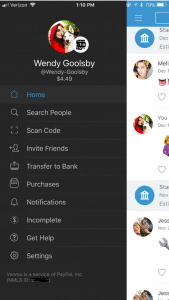
You’re on the Venmo app and you press the three lines on the left hand side. You’re brought to your account options but what do all of these tabs mean?
Home: This is where you can see your friend’s interactions with the app. When on the home tab there is three buttons at the top.
One is an emoji of a world, which will bring you to a list of anyone in the world’s latest interaction with Venmo.
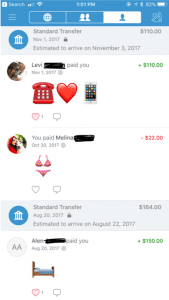
The second option shows two heads, this is where you can see the money you’re friends have been transferring between each other. On this section, it used to show how much people were sending but for security reasons it now just shows that you transferred but with no money total.
The last button is a picture of single–headed emoji. This shows all of your past transactions and also when you took out money from your bank and when you deposited money back into your bank.
Search People: This is where you can search through your friends for the appropriate person you want to send or receive money from. You have the option to connect to your Facebook so it can inherit your contact list.
Scan Code: Your coworker brings you coffee and asks you to pay them back. You don’t have cash and you’re not friends on Venmo. Instead of searching their name, this tool gives you the option to scan the user’s unique barcode. Both of you have to have the application open at the same time for this to work.
Invite Friends: Your friend isn’t on Venmo? You can input their name, phone number, or email to invite them to join the app.
Transfer Balance: This is where you go when someone has sent you the money but now you need to get it into your bank. It has the option to transfer the money to your previously entered account or to enter a new bank account.
This is also where you will see Venmo’s new interaction to instantly transfer money to your Bank in seconds. This new feature does cost $.25. The standard option (free) is still available but this option takes one to three business days to transfer to your bank account.
Purchases: You can now use Venmo to pay in other apps and on the mobile web with select PayPal merchants.
Venmo does put in their FAQ webpage that if a person purchases a good or service on the internet using Venmo, they will not offer protection. The transactions are potentially high risk and you may lose funds.
Notifications: This is where it will show if you have any pending requests for money or if anyone is requesting money from you.
Incomplete: This will show outstanding requests or payments. There will not disappear until the other user pays your or you pay them.
Get Hep: This brings you to three options and those being “Browse Ours FAQs”, “Contact Us”, or “My Support Tickets” (for any IT help).
How to make a payment or request a payment?
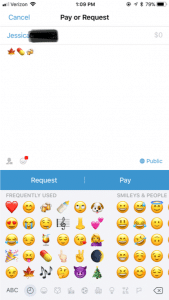
Click on the button in the top right hand corner to pull up your contact page.
Select the friend you want to send money to or request money from. You can also type in the name.
Type the amount for payment.
Add a comment about what the payment is for using words, emojis, or a combination of both (Venmo will not let you skip this step).
Select pay or request money. If you pay, the money is transferred to their account. If you request, your friend receives an email or text and an app notification saying that you requested money.
What are the privacy options?
When you make a payment or receive money from someone it automatically gets added to a live feed. This feed is where you can see your friends and families latest transactions. It will not show the amount transferred but it will show the reason (you can leave the reason blank). It’s common for people to not use words in their description but instead emoji’s.
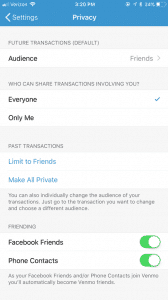
In the Settings menu you can change your audience options to include public (everyone on the Internet), friends (sender, recipient, and their friends), and participants only (sender and recipient only). There is the option to change past transactions viewers as well and make everything completely private.
It also asks where you want your contacts to come from. You can get contacts imported from your Facebook contacts or your phone contacts or both. You have the option to turn both options off and only have friends you add by hand.
What are the risks for use?
A new trend is for sites like Craigslist, Instagram, or Facebook to ask people to buy goods and services and to pay with their Venmo accounts. The company highly discourages this type of transaction but it happens daily. Buying a pair of leggings off an Instagram promoter seems innocent enough, but the real problem is now it’s even easier to buy illegal substances.
Rachael Ferguson did a research project in which she used an application called Whisper, a messaging app that allows users to send and receive messages anonymously, and she had two drug dealers agree to talk to her about their social media influence on the drug market. They explained how easy it is to find drugs on apps like Instagram or Twitter, just buy searching up relevant hashtags. An example of those would be #Kush4Sale or #OGKUSH. If you comment on these posts it’s more likely you’ll caught, so there in underground etiquette of messaging the hastagger privately (Ferguson.)
Besides using social media to buy drugs, there are plenty of other goods and services that can be bought through these apps and that are requesting a payment using Venmo. One man was selling a car on Craigslist, the purchaser claimed he could only pay if he used Venmo. The car dealer watched the other person transfer money and he saw the money come into his bank account. Happily, he signed the car over to the purchaser. 12 hours later, the dealer of the car received an email from Venmo saying the payment had been stopped (Chatman.)
What to watch out for on Venmo.
Users can remain secretive about the actual reason for money transfer. Unless you set your page to private, the public can see your transactions and reason for sending. In the privacy section of a Venmo account, there is the option to set all past transactions to private.
When I asked my friends why they or their other friends are using Venmo, they majority reported that they used it for paying rent, bills, dinner, coffee, drugs and when they were underage they can transfer money to someone 21+ to buy alcohol. This is where the emoji’s come in handy when putting in a description for your money transfer.
Emoji’s and what they mean on Venmo:
Wine/Beer/Cocktail: Alcohol/ booze
Dancing/Celebrate: Party/bar
House: Rent or bills
Car: Uber
Leaf: Marijuana
Needle: Drugs
And there numerous food emoji’s used to indicate that they are paying the person back for food. Fun fact: the pizza emoji is the most popular emoji in Venmo transaction messages (Wener-Fligner.)
What are the protection features?
Venmo’s security page outlines how it will protect you financial information, your account, storage and how it will keep you safe in the long run.
Venmo is an easy app to use, but when the user is a child or a teen, parents should consider discussing with them the risks and how to stay safe. Some things to think about:
Decide if it is the right time for your child to have their own personal bank account or if they are responsible enough to have a Venmo account connected to your bank account.
Discuss with the child when it’s appropriate to send money and when it is not. Set limits and don’t let them send or receive money from strangers.
Consider monitoring their transactions. One way to do this is by making a contract demonstrating their Venmo rules and regulations. Establish an agreement that you can have access to their account anytime.
Create a list of the people they are allowed to transfer money to. If they want to add a new person, they must let you know first. You have the right to remove any person at anytime.
When using a money sharing app, the child should be prepared to be honest and responsible. As parents, instead of banning certain apps all together, make sure your children know what your rules are! Keep a copy of their username and password so you can easily monitor their account. Also, remember this application is not only for your kids! Venmo is super helpful in limiting your cash interactions and providing a safe way to share money with your friends and family.
Thanks GKIS Intern, Wendy Goolsby for keeping us up to date on the latest virtual wallet. Make sure to keep an eye out if your child is attaching credit cards to any sorts of applications. In other teen news, check out the article, Is Your Teen Hooking Up? for ideas about how to support your kids in today’s casual sex environment.